
Should You Try New Outlook for Microsoft Rewards Points? A Windows 11 Switch Checklist | MyTechDailyNews
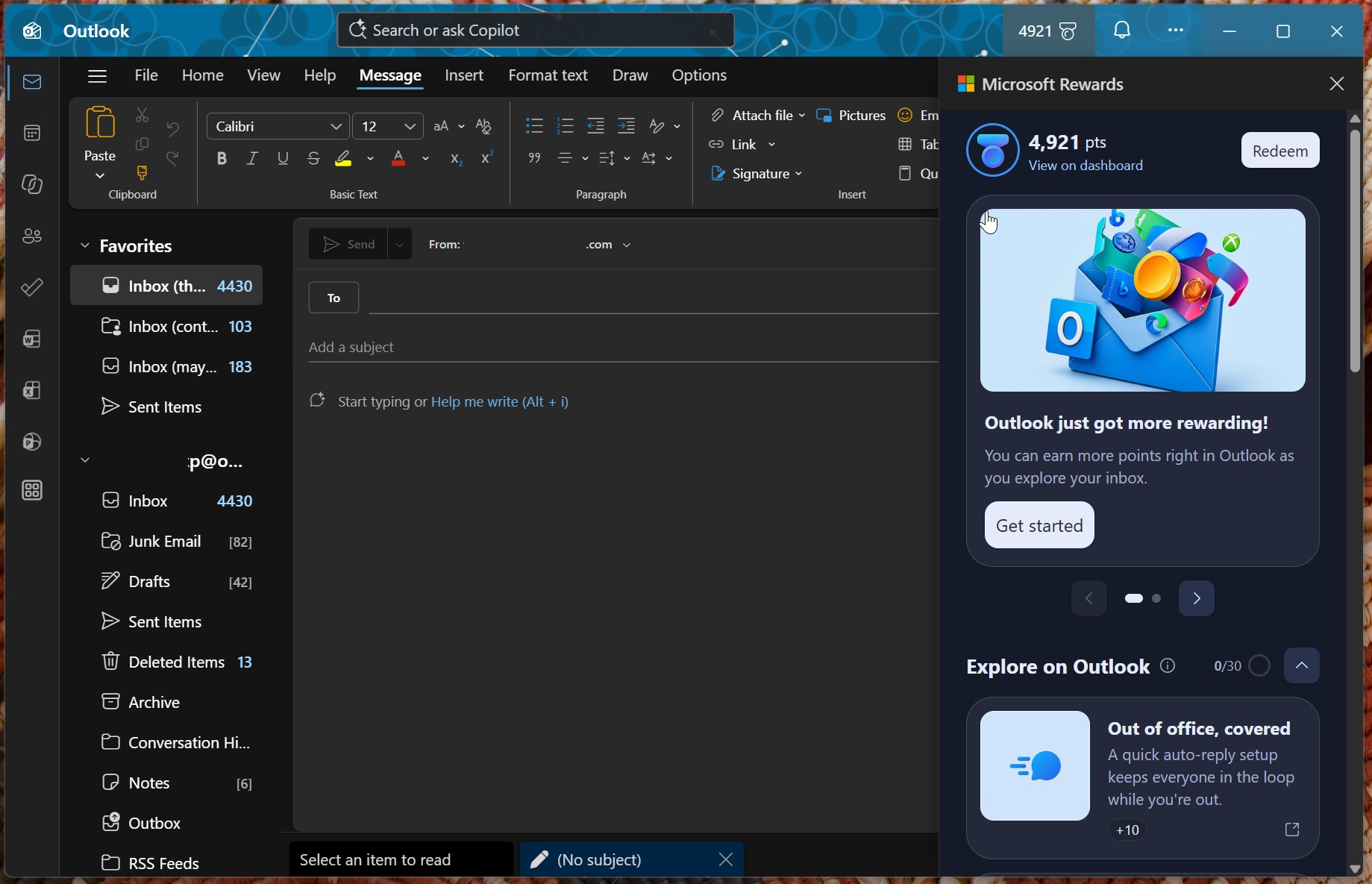
Short answer: recently Microsoft started offering Microsoft Rewards points to Windows 11 users who simply launch the new Outlook, and the first batch of tasks paid out up to 30 points. That is worth only a few cents, so read the promotion as a free, reversible trial window instead of a reason to migrate. Open it, audit what your day depends on — add-ins, local archives, offline search — and switch back to classic Outlook whenever you want.
What exactly is Microsoft handing out in the new Outlook?
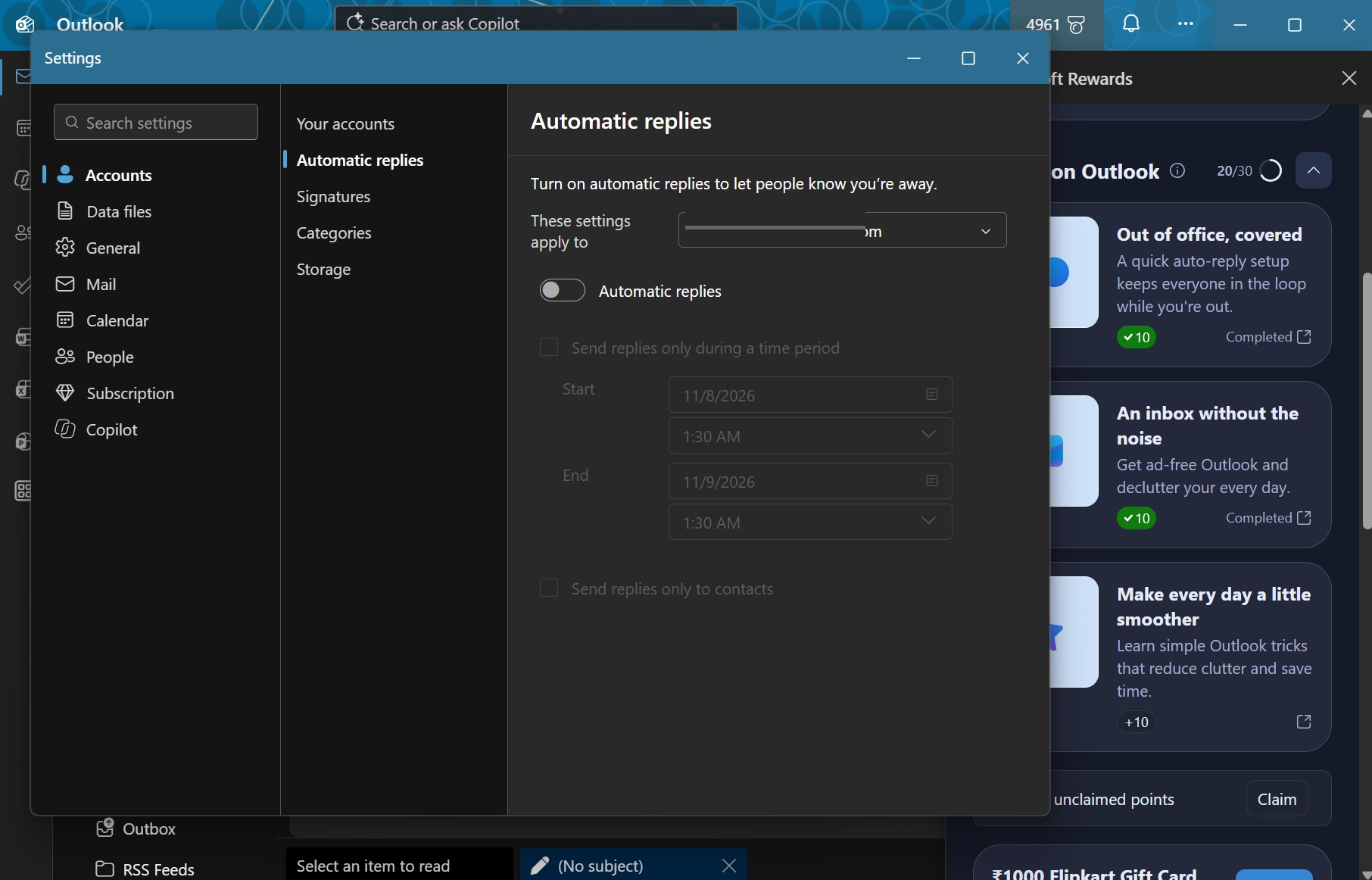
The mechanics are lighter than most loyalty programs. A Rewards icon now sits in the title bar of the updated Outlook pages, and clicking it lists any pending activities. Some Windows 11 users have also run into an in-app notice saying that starting and trying the new Outlook can earn a Microsoft Rewards bonus. Windows Latest, which reported the shift on November 8, 2026, counted three activities worth a combined 30 points at most, each completable in a couple of clicks.
- Auto-reply task: one activity opens the automatic replies settings page, and the system marks it done even if you change nothing.
- Subscription task: another lands on the Microsoft 365 pricing page rather than on a feature, nudging people to keep or start a paid plan.
- Search task: the last one only asks for a Bing query about improving Outlook efficiency — opening the results page counts.
Read the destinations, not the labels: settings, store, search engine. The tasks are a guided tour of the wider ecosystem wrapped in a loyalty currency, which tells you the goal is an account habit, not a genuine product evaluation.
How much are 30 Microsoft Rewards points actually worth?
Conclusion: they will not buy lunch, and that is precisely the design. Microsoft's own Rewards overview lists entry tiers starting at 200 points for a sweepstakes, 1,000 points for a cash donation to a nonprofit, 1,600 points for Microsoft Store or Xbox gift cards, and 5,000 points for gift cards to major retailers, with earning limits and country-by-country availability. Run against those published tiers, 30 points a day needs roughly 53 straight days to reach the cheapest gift-card level — my calculation from the official tier list, not a figure Microsoft has stated.
Set that against the prize Microsoft is actually pointing at: a Microsoft 365 subscription, sold as the cleaner, ad-free mailbox. The incentive is priced to buy one click, not to compensate anyone for changing a daily tool.
Why is Microsoft paying people to open an email client?
Because the migration has not moved at the pace the roadmap assumes. In recent years Microsoft has been steering the platform toward one consumer mail client: the new Outlook is built on web technology and shares core code with Outlook on the web, so features can ship faster and look the same across devices, while Microsoft also gets room to reward traditional Outlook users for stepping onto the newer platform. Earlier levers included an eye-catching toggle inside Windows, automatic installation of the new app and repeated upgrade prompts. Points are the newest lever in the same campaign, aimed at the people who ignored the previous ones.
Industry observers read the move as a measure of how stubborn the remaining holdouts are. Real usage is worth more to Microsoft than a download: more people running the new client produces more feedback data, which shortens the distance between the two products and helps the older one retire. Expect the push to broaden — in the coming period Microsoft is likely to keep adding functions to the new Outlook and to wrap more incentives around them.
The rebuilt-on-web trade-off is not a Microsoft exclusive. Our walkthrough of a ground-up web rebuild of X.com documents the same pattern: a cloud-first client wins dramatically on one metric and still has to chase what the native app gave people for free.
How do you try the new Outlook without wrecking your workflow?
- Leave everything installed. The new Outlook and classic Outlook are separate applications; Microsoft's support documentation says both remain on the machine regardless of how the toggle is set, so you can run them side by side while comparing.
- Add a throwaway account first. Connect a secondary mailbox so the trial never touches data you cannot afford to disturb.
- Open the Rewards panel once, then ignore it. If you want the points, take them in a single sitting; judging an email client while chasing a daily streak biases the test.
- Audit your add-ins. Microsoft's developer documentation states plainly that COM and VSTO add-ins are not supported in the new Outlook on Windows, while classic Outlook still loads them.
- Check your archives. If years of mail live in a local PST file, keep the older client in service for that mailbox; Microsoft's getting-started guidance also flags limited public folder support and recommends classic Outlook for anyone who depends on them.
- Test on the road. Search with the connection switched off, open an attachment cold, time the launch. This is where the two clients diverge most.
- Confirm the exit ramp. Flip back to classic Outlook before the trial quietly becomes your default, and turn off automatic switching if your account or IT policy allows it.
Which Outlook fits which user?
| Your situation | Reasonable choice | Why |
|---|---|---|
| COM or VSTO add-ins, CRM bridges, finance plug-ins | classic Outlook | Those add-in types are not supported in the new client. |
| Mail archived in local files, POP or IMAP accounts | classic Outlook | Local data handling and offline lookups still sit on the older side. |
| Public folders and shared team mailboxes | classic Outlook | Microsoft itself notes limited public folder support in the new app. |
| Everyday mail plus calendar, Teams, OneNote and AI-drafted replies | new Outlook | Frequent updates and tighter Microsoft 365 integration are where it leads. |
| A free consumer mailbox, and you dislike ads | either — budget for a subscription | Microsoft ties the ad-free Outlook experience to a paid plan. |
| Curious but cautious | both, side by side | The toggle reverses and the two apps coexist. |
Five misconceptions that make this promotion more confusing than it is
- "Taking the points commits me to the switch." It does not: the toggle goes back, and both clients stay installed.
- "A reward program means a paid product." One task points at the Microsoft 365 pricing page, but the points themselves cost nothing and require no fee.
- "The tasks teach me the new app." They deep-link to a settings page, a store page and a search result — not to sending, filing or searching real mail.
- "Microsoft has stopped engineering on the older client." It has not; the search overhaul described below is evidence of the opposite.
- "Refusers are just nostalgic." Launch speed, native integration and an ad-free mailbox without a subscription are the objections the legacy Outlook crowd raises most often.
Is classic Outlook being abandoned?
Not on this evidence. Alongside the incentive campaign, Microsoft has recently said it is building a faster search experience for classic Outlook that lets the older client call on Windows Search and pull results from the local machine when the network is unreliable. Windows Latest reported on November 5, 2026 that the same update lifts "top results" to as many as seven relevance-ranked items, handles filler words better, runs a small distilled language model as the ranker, and comes out around 5% faster overall.
Microsoft's stated reasoning, as relayed in that reporting, is that local search remains necessary for offline work and for anything that never fully lives in the cloud — PST files, POP and IMAP accounts. That is an unusually candid admission that a large population cannot move yet, and a useful signal for anyone weighing the points offer: the company is still engineering for both camps while marketing only one.
FAQ: what Windows 11 users ask before tapping the toggle
Do I have to pay to join Microsoft Rewards?
No. The program comes with a Microsoft account and asks for no fees, though available rewards and earning limits differ by market.
Will I lose mail if I switch back to classic Outlook?
Messages held on the server — Exchange, Outlook.com, Gmail, IMAP — are untouched by the toggle. What you can lose is access, inside the new client, to things the older app keeps locally, which is exactly why the add-in and archive checks come first.
Why does the new Outlook feel heavier than the app it replaces?
Because it is a web-based client: interface and search round-trip to online services instead of working from an index on your machine. Users who prize launch speed and native Windows integration keep naming this as their reason to stay put.
What if this is a work or school account?
Do not decide alone; licensing and policy sit above the toggle, and education tenants face their own timetable, covered in our guide to migrating off the free Office 365 A1 plan. Talk to IT before moving a shared mailbox.
How long should the test run?
Two weeks at minimum, including one travel day with poor connectivity and one heavy reporting day. Anything shorter measures novelty rather than fitness.
Action plan: three moves this week
- Fix your verdict in advance. Write down the three tasks you do daily and the tools that must survive; if the new client cannot run them, 30 points are beside the point.
- Run the 15-minute audit. Open the add-in list in classic Outlook, note the COM entries, search a PST-only folder, then repeat the same actions in the new client and compare.
- Treat the promotion as information, not obligation. Claim the points if you want them, keep both apps installed, and revisit later — the roadmap makes clear where Microsoft intends to spend its effort.
Sources referenced
- Windows Latest, "Microsoft is begging you to ditch Outlook Classic, and now it's handing out Rewards points to try new Outlook on Windows 11" (November 8, 2026): https://www.windowslatest.com/2026-11-08/microsoft-is-begging-you-to-ditch-outlook-classic-and-now-its-handing-out-rewards-points-to-try-new-outlook-on-windows-11/
- Windows Latest on the classic Outlook search update (November 5, 2026): https://www.windowslatest.com/2026-11-05/microsoft-just-gave-you-another-reason-to-stick-with-outlook-classic-faster-search-that-falls-back-to-your-pc-even-as-it-pushes-you-to-new-outlook/
- Microsoft Rewards redemption tiers: https://www.microsoft.com/en-us/rewards/about
- Microsoft Support, Getting started with the new Outlook for Windows: https://support.microsoft.com/en-us/outlook/getstarted/getting-started-with-the-new-outlook-for-windows
- Microsoft Support, Run new Outlook and classic Outlook side by side: https://support.microsoft.com/en-us/outlook/getstarted/run-new-outlook-and-classic-outlook-side-by-side
- Microsoft Support, Toggle out of the new Outlook for Windows: https://support.microsoft.com/en-us/outlook/toggle-out-of-the-new-outlook-for-windows
- Microsoft Support, About ads in Outlook: https://support.microsoft.com/en-us/outlook/about-ads-in-outlook
- Microsoft developer documentation on the Office add-ins platform (COM and VSTO unsupported in the new Outlook on Windows): https://msdn.microsoft.com/en-us/library/jj220082.aspx