
MyTechDailyNews Guide: Can a 130°C, 35-Minute Oven Run Really Save a Dying GTX 1080?
Not dead, just tired — sometimes. Recently, PCGH forum user FoxX11 brought a GeForce GTX 1080 back from a hard fault by wrapping the bare board in aluminium foil and running a household oven at 130°C for 35 minutes. The card had been locking up 10 to 15 minutes after boot; afterwards it survived the donut stress test in FurMark. The honest catch: PCGH official survey data puts success at 80% — about 8 in 10 tries — with roughly two-thirds of those cards relapsing within a year.
That is the whole story in one paragraph, and it is also the reason this piece is not an endorsement. Below is a practical breakdown: what the forum case actually did, why heat fixes a card in the first place, where the kitchen-oven method quietly breaks the rules that factories follow, and a decision checklist you can run before you unplug anything.
What did the FoxX11 repair actually involve?
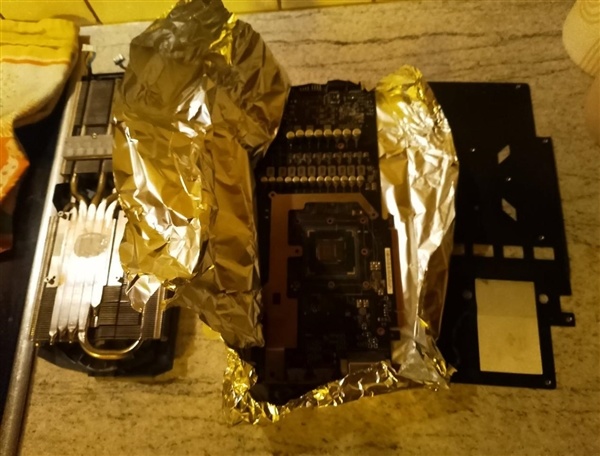
Conclusion first: it was a deliberate, instrumented thermal cycle, not a card thrown in next to a pizza. The card crashed on a timer, so the user reasoned that the fault sat under the GPU core or the memory chips, in solder joints that had failed — the condition commonly called a cold solder joint, or a cracked joint.
- Remove the main cooler, but keep the passive heatsinks over the memory.
- Wrap the whole circuit board tightly in aluminium foil.
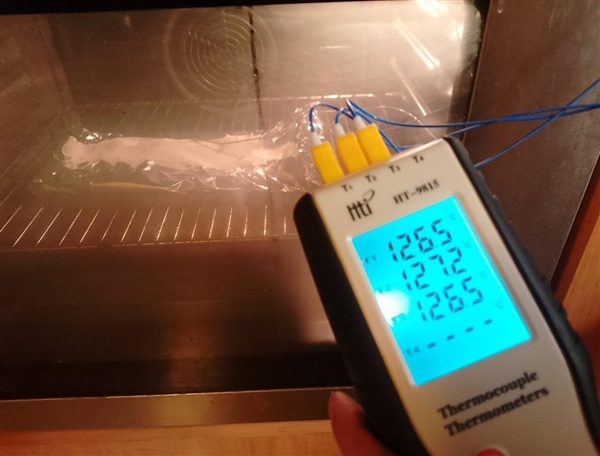
- Set the oven to convection (fan-circulated) mode.
- Hold the temperature band between 120°C and 130°C for 35 minutes.
- Place several independent temperature sensors inside the oven, because a kitchen thermostat cannot be trusted to tell the truth about the air around the board.
- Cool down, refit, then load-test.
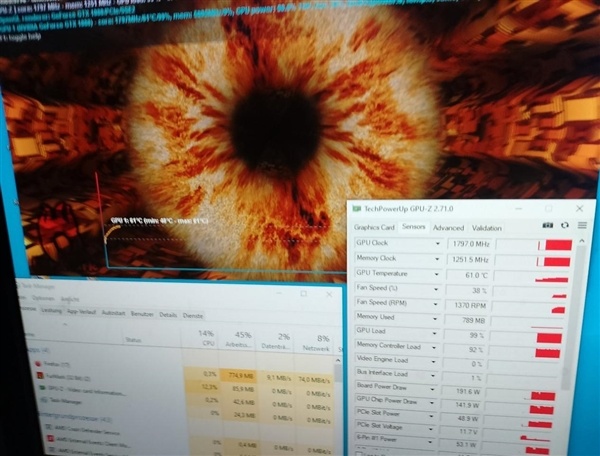
By the user's own report the gamble paid off: the GTX 1080 ran the FurMark test without the crash that had made it unusable, which is a meaningful result because that donut benchmark draws sustained power and pushes temperatures far above everyday gaming loads.
Why does heat fix a failing graphics card at all?
Because the failure is usually mechanical, and heat temporarily makes it mechanical again. A graphics die is attached to the board by hundreds of tiny solder balls underneath the package, a layout known as a ball-grid-array. Years of heating up and cooling down flex the board and the die by different amounts, and the joints fatigue: microscopic cracks open and close. Contact works when cold, intermittently fails when the board expands, which is exactly the symptom this card showed — fine for the first minutes, locked up after 10 to 15 minutes.
Re-heating lets the solder relax and, if it actually reaches melting, lets surface tension re-wet the joint. That is the same principle behind a factory reflow oven or a professional BGA rework station. The catch sits in the phrase 'if it actually reaches melting'.
Why 130°C is not a real reflow — and why so many cards come back broken
Here is the number that changes how you should read this story: lead-free SAC305 solder, the alloy used across modern electronics assembly, has a melting range of 217–220°C, and industrial profiles peak even higher — the technical data sheet for a common SAC305 paste quotes a peak range of 230–245°C. A 120°C to 130°C hold lasting 35 minutes therefore sits well below the point where the joints turn liquid.
Reading the forum result against that datasheet, our analysis is that the oven run most plausibly relieved mechanical stress, drove off absorbed moisture and shifted contact resistance, rather than re-melting the array. That explains the reported outcome without contradicting it: the card worked again, and the improvement was real but shallow. It also explains the durability numbers. PCGH official data says about 80% of people who try the oven method see the card come back, yet roughly two-thirds of them are dealing with the same fault again within a year. A treatment that never melts the joint is a respite, not a repair.
There is a second failure mode that household heat makes worse. Board-level assembly is governed by the IPC/JEDEC moisture-sensitive-device standard J-STD-033, whose purpose is to stop water absorbed into a package from flashing to steam when the part is heated; that steam pressure is what causes internal delamination and the bulbous 'popcorning' damage seen in badly baked boards. A card that has lived in a humid room for years and then goes straight into a hot oven is doing exactly what the standard warns factories against. A home oven also gives you no ramp-up, no soak stage, no controlled cool-down and no calibration — the four things that make a reflow profile a process instead of a coin toss.
Before the oven: a free checklist that solves most 'dying GPU' cases
Run these six checks first. None of them costs money, and all of them are reversible.
- Prove it is the card. Test the display output on a second machine or with a known-good GPU before blaming the board.
- Clean-install the driver, do not layer it. Artifacts that survive a fresh install and a different port are hardware-side.
- Read the temperatures, not the vibes. Logging tools show whether the core hits protection limits in the same minute the crash appears; if you also want to know how detection lists for unreleased cards are assembled, our piece on what a beta hardware-detection entry actually reveals covers the other side of that same tooling.
- Check the boring stuff. Power cables fully seated, PSU rails healthy, dust cleared, fan curve sane, and a card that is not sagging against the PCIe slot.
- Time the crash. A repeatable 10 to 15 minute failure window points at heat-related contact problems; a random one points elsewhere.
- Set your ceiling. Decide the most you would pay to keep the card before you start spending evenings on it.
Repair, bake, or replace: how the three paths compare
| Path | Up-front effort | Expected outcome | Main risk | Best fit |
|---|---|---|---|---|
| Kitchen oven, the 130°C, 35-minute recipe | Low, plus a card you can afford to lose | Revival in about 80% of attempts; roughly two-thirds relapse within a year | Total loss of the board, warped PCB, delamination, contaminated appliance | Out-of-warranty card, spare machine, a weekend experiment |
| Professional BGA rework or reball | Money and shipping time | A joint-level fix under a controlled profile | Bill can approach the card's value | Cards worth more than the repair |
| Replace | A budget decision | Predictable | Component prices are not falling: the 16GB Raspberry Pi 5 now sells for $385 in the UK after an $80 rise blamed on memory supply, one signal that the cost floor stays high — see our breakdown of that price jump | The machine you depend on daily |
Common misconceptions
- Baking is a proper reflow. Only if you exceed 217–220°C, and a kitchen oven cannot hold that profile safely.
- An 80% success rate means my card is fine. That figure counts the card coming back, not staying back — the same data shows relapse within a year for about two-thirds.
- My card is still under warranty anyway. Removing the cooler counts as disassembly and voids coverage under many board partners' terms, including the published Sapphire consumer conditions.
- It is old, so drivers are the least of my worries. Pascal still gets patched: NVIDIA shipped GeForce Security Update Driver 582.78 for Maxwell, Pascal and Volta GPUs on September 30, 2026, with security-only support scheduled through October 2028.
- Any stress test proves the fix. A five-minute loop proves very little; the forum case is persuasive precisely because the donut test held.
If you still try it: a risk list worth printing
- Never use the appliance you cook in; coatings and flux residue outgas and stay put.
- Strip everything that is not soldered on: plastic shroud, fans, thermal pads, backplate.
- Independent thermometers, not the dial — the forum user did exactly this.
- Ventilation on, nobody else in the kitchen, and never leave it unattended.
- Let the board cool slowly in the switched-off oven instead of shocking it in outside air.
- Assume the fix is temporary: back up your work the day it boots again and shop for a replacement while it still outputs a picture.
FAQ
How long did the revived GTX 1080 last?
The forum report covers the immediate result: the card passed the donut stress test in FurMark after a 130°C, 35-minute cycle. Long-run durability comes from PCGH official data rather than one user, which shows about 80% success and roughly two-thirds of those cards failing again within a year.
Why does my card crash only after 10 to 15 minutes of use?
That delay is the signature of a contact problem that temperature reveals. As the board warms up, components expand at different rates and a cracked joint opens; cooling closes the contact again.
Does a home oven actually reach solder melting temperature?
Setting one to 130°C does not. Lead-free SAC305 melts around 217–220°C, so the popular low-temperature recipes are stress-relief cycles, not reflow. Push toward real reflow temperatures and you enter delamination and scorched-PCB territory.
Is a GTX 1080 still worth keeping alive?
For security patching, yes for now — NVIDIA's 582.78 driver for Maxwell, Pascal and Volta was released on September 30, 2026 and security updates are planned through October 2028. For new game features and modern rendering technologies, no: that architecture left regular Game Ready support in October 2025.
What is the cheapest useful test after any repair?
Free is the right price. FurMark from Geeks3D is a standard donut-style load tool and is still maintained, with a Windows build dated November 2, 2026; it is the same class of test that made the FoxX11 result credible.
Bottom line
Treat the FoxX11 story as a data point about how graphics cards age, not as a tutorial. The useful lessons are that a timed crash points at solder and heat, that a 35-minute oven run can buy months rather than years, and that the free diagnostics — drivers, temperatures, seating, power — should be exhausted long before you reach for the foil. If you do bake, do it on a card you can afford to lose, with independent sensors, and with a replacement already open in another browser tab.
Questions about your own case? Reach the MyTechDailyNews hardware desk at hello@techdaily.com. Written by Sarah Chen for Tech Daily.
Sources
- PCGH official forum survey data on oven repairs, as reported in the PCGH forum thread by user FoxX11 and summarised by MyTechDailyNews.
- AIM Solder, WS483 SAC305 solder paste technical data sheet (melting point 217°C; peak range 230–245°C): https://www.aimsolder.com/wp-content/uploads/legacy-files/ws483_sac305_solder_paste_tds.pdf
- IPC/JEDEC J-STD-033, handling, packing, shipping and use of moisture/reflow sensitive surface mount devices: https://www.navsea.navy.mil/Portals/103/Documents/NSWC_Crane/SD-18/Test%20Methods/jstd033.pdf
- NVIDIA GeForce Security Update Driver 582.78, driver details page: https://www.nvidia.com/en-us/drivers/details/280034/
- Geeks3D FurMark homepage and download list: https://geeks3d.com/furmark/
- Sapphire consumer warranty terms covering disassembly: https://www.sapphiretech.com/en/cs_consumer
- Overclockers.com on the oven trick as a repair practice: https://www.overclockers.com/the-oven-trick-repairing-your-broken-video-card-with-an-oven/