
Salvaged MSI Laptop Board vs. Hub, Single-Board Computer or Mini PC: Which Smart Home Server Should You Build? | MyTechDailyNews General
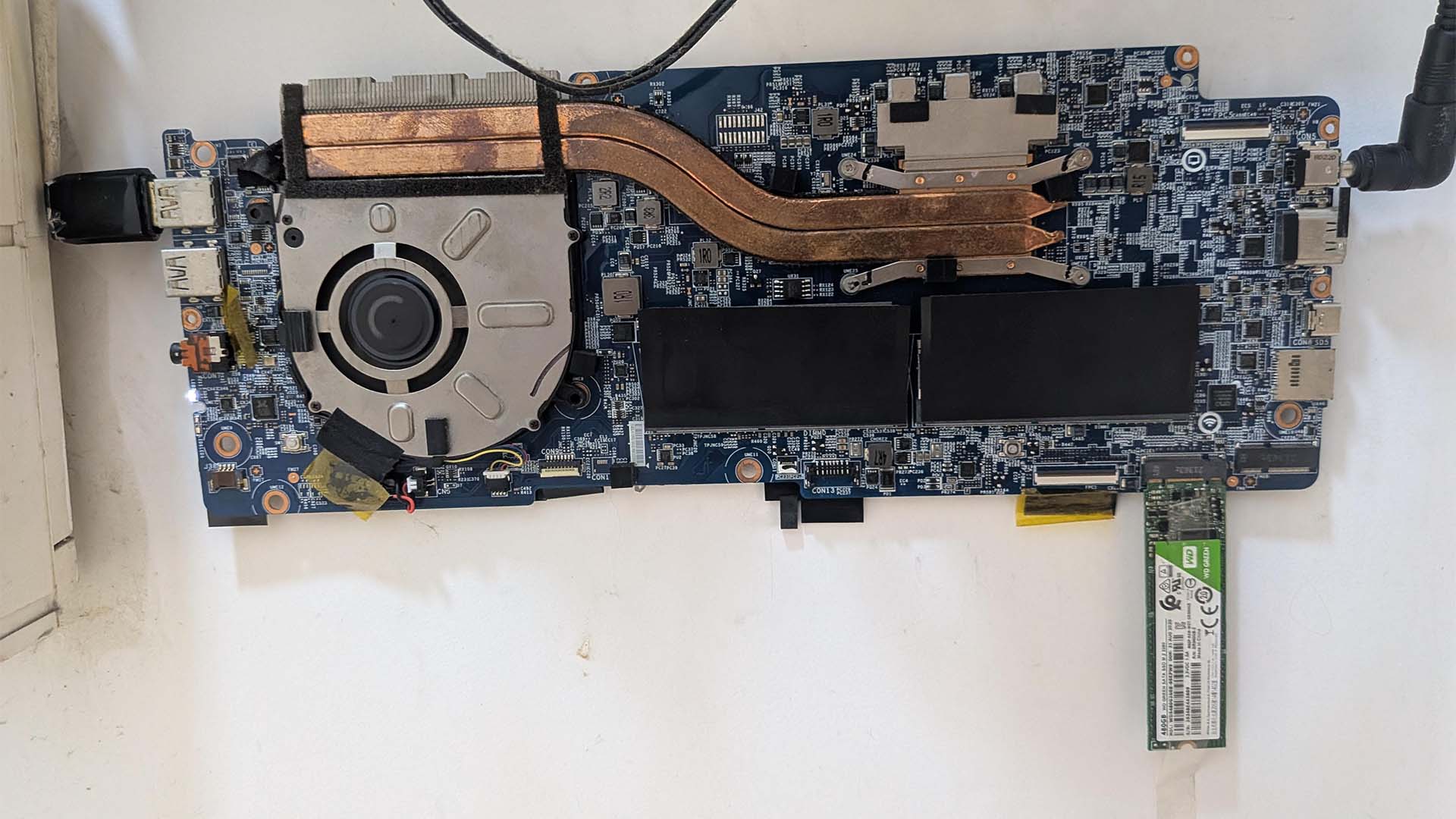
Short answer: if a laptop has already lost its screen but still boots, stripping it down to the bare motherboard gives you a complete x86 home-automation server for almost no cash; if you want a supported, warranty-backed box, a purpose-built hub or a fanless mini PC is the safer purchase. One Reddit user's wall-mounted MSI board proves the first route works. The right choice depends on your budget, your tolerance for dust, and how much time you want to spend inside a BIOS menu.
What did one dead-screen MSI laptop turn into?
The project was posted to the Reddit community r/homelab by user u/noobakw. The notebook's display had failed so badly that the panel was nearly detached from the chassis. Repairing the whole machine would have meant a new screen plus structural parts, so the owner stopped trying to save the laptop as a laptop and kept only what still worked.
Everything else went out of the build: top and bottom shells, keyboard, trackpad and the entire screen assembly were removed, leaving the motherboard with its memory and storage. That board is now bolted directly to a wall, positioned underneath the household network gear. Photographs of the setup show a Jio broadband gateway, an Artis universal power adapter and a TP-Link Wi-Fi range extender mounted alongside it. The copper heat pipes, the blower-style cooling fan and the chipset sit in open room air, and one WD Green M.2 SATA solid-state drive is plugged into its slot with the far end not even screwed down.
Two problems had to be solved before the wall board could act as a real server. First, with the original chassis gone there was no physical power button, so the owner enabled Wake on Power in the BIOS: the moment the adapter is fed electricity, the board starts by itself. Second, the software stack was assembled with help from Claude, the AI assistant from Anthropic, which guided the deployment of a home assistant system. The resulting dashboard opens on a floor-plan view for navigation, handles temperature by zone, and switches smart lighting, motorised curtains and ceiling fans room by room — in practice, one household intelligence hub built from scrap.
As Wccftech noted when covering the teardown, the deeper point is hardware reuse: with memory and other computer components being squeezed by tight DRAM supply, buying fresh server-grade kit is no longer a rounding error, so a still-healthy laptop board can become the core of a low-cost home server.
Why does a junk laptop board look more attractive in 2026 than it did two years ago?
Two verifiable shifts explain the timing.
Entry-level compute has stopped being cheap. Raspberry Pi, the default first server for hobbyists, has repeatedly repriced its own boards during 2026 because of memory costs. The company's news post "More memory-driven price rises", published in February 2026, attributed the changes to LPDDR memory pricing, and Tom's Hardware reported in October 2026 that shortages had pushed prices up by as much as 23% in what was described as the third increase of the year. The Raspberry Pi 5 arrived in October 2024 with launch pricing of US$60 for the 4 GB model and US$80 for the 8 GB model — a reference point that no longer holds on any shelf today, which is exactly why buyers should quote current prices before comparing. For anyone with a working laptop board in a drawer, the opportunity cost of using it has dropped to roughly zero.
The waste it avoids is measured in tens of millions of tonnes. The Global E-waste Monitor 2024, produced with the United Nations University and the International Telecommunication Union, records 62 million tonnes of e-waste generated in 2022 — up 82% from 2010 — with only 22.3% formally collected and recycled, and projects 82 million tonnes by 2030. A dead screen does not make the processor, memory and board inside it worthless; it just moves them into the wrong statistics.
This is not a one-off stunt, either. The YouTube channel DIY Perks published "Recycling Destroyed Tech into Beautiful PCs" on July 17, 2026, turning scrapped laptop motherboards and orphaned monitor panels into polished all-in-one machines, and showing how to probe power-on pins with a multimeter so a board can start without its original keyboard. That technique is the sibling of the Wake on Power trick used on the wall-mounted MSI board: both answers to the same question — how do you switch on hardware that has lost its switch?
Bare board, official hub, single-board computer or mini PC: how do the four routes compare?
| Route | Realistic cash outlay | Power draw | Strongest for | Weakest at |
|---|---|---|---|---|
| Salvaged MSI laptop board on the wall (this build) | About zero if you already own a dead-screen laptop; an Artis-style universal adapter is the only likely purchase | Not published in the post; laptop-class x86 boards typically idle well above an ARM hub, with the exposed blower fan still carrying the load (our estimate — measure it with a plug-in meter) | Free 64-bit x86 performance, SATA and M.2 storage options, second life for otherwise wasted parts | Dust, moisture, knocks, vibration and any leftover warranty claim |
| Home Assistant Green, the official plug-and-play hub | Launched on September 17, 2023 at US$99 | Under 3 W at heavy load and about 1.7 W idle, according to Nabu Casa's own support documentation | First-time users who want automation working the same evening without disassembly | Fixed 4 GB RAM and 32 GB eMMC — no headroom for heavier workloads |
| Raspberry Pi 5 build | US$60 (4 GB) and US$80 (8 GB) at October 2024 launch; 2026 memory-driven increases have changed that | Roughly comparable to a hub, though cases, cooling and SD cards add up | People who like GPIO, add-on boards and a huge tutorial ecosystem | MicroSD storage longevity, plus a moving price target right now |
| Fanless Intel N100 mini PC | Board, memory and SSD in one box; typically a mid-range hub's price | Community measurements commonly report 6-8 W headless at idle, which hobby blogs translate into roughly US$8-12 a year in electricity at US rates | Heavier stacks: databases, dashboards, several containers, transcoding | You still own a closed box from a no-name vendor and its firmware updates |
Read the middle column carefully. The hub figures come from the project's own documentation, and the mini PC figures are community measurements rather than lab results, so they are comparable only as orders of magnitude. The wall-mounted MSI board is the one number nobody published — which is itself an argument for buying a meter before you judge a salvaged build.
Which setup suits which household?
- You rent, or you cannot drill into walls: a hub or a mini PC on a shelf. A board pinned to a wall needs anchor points near your network gear and needs to stay out of reach.
- You own a dead-screen laptop and a weekend: the salvage route. One MSI notebook can host lighting, climate, curtain and fan control for an entire home, as u/noobakw's build demonstrates.
- Many rooms, many device types: prefer x86 — salvaged board or mini PC — because you will run more add-ons, more logs and more databases than an ARM hub comfortably handles.
- Grandparents or roommates who must not lose the lights: buy supported hardware. A salvaged board has no spare-parts path and no vendor to call.
- You care mainly about privacy: any of the four works, because the deciding factor is software and remote-access design, not the metal inside the box.
Where does an exposed, wall-mounted board genuinely fail?
The build is functional, not indestructible. Each risk has a cheap countermeasure.
- Dust on live copper. Heat pipes, fan blades and the chipset are in direct contact with room air. Dust is abrasive and, when it absorbs moisture, mildly conductive — it chokes fans first and corrodes traces later. Blow the board down on a schedule and keep it out of carpets and curtains.
- Humidity and condensation. Environmental guidance for computer rooms flags high humidity as a condensation path to short circuits and corrosion; a bathroom-adjacent or external wall mount is the worst location in the house.
- Static discharge. Without a chassis, your hand, a pet or a clothing brush is the discharge path. Ground yourself before touching the board and consider a low-cost enclosure with ventilation instead of nothing.
- Physical contact. Exposed heatsink fins at head height are a hazard for children. The loose end of the WD Green drive is the same story in miniature.
- Storage that is only half-mounted. An M.2 drive held in place by its connector alone will walk loose under vibration. A screw costs nothing; a corrupted database does.
- Thermal assumptions. A blower fan designed to work inside a chassis now cools free air, which is usually fine — until the wall it hangs on blocks intake. Leave clearance and confirm airflow with a meter and a thermometer.
- Software sunset. Reuse has an expiry date. In May 2025 the Home Assistant project announced it was deprecating two installation methods and three legacy CPU architectures, warning affected systems from release 2025.6 and ending support with release 2025.12. Its team put the trade-off plainly: "We always strive to have Home Assistant run on almost anything, but sometimes we must make difficult decisions to keep the project moving forward." Check that your salvaged machine is 64-bit before committing to it.
- Network exposure. A smart home hub controls locks, cameras and thermostats, so the remote-access decision matters more than the hardware. The project's documentation is blunt: "The easiest and safest option is Home Assistant Cloud. It needs no port forwarding or certificate setup." A VPN such as Tailscale or ZeroTier is the alternative; opening port 8123 or 443 on your router is not a shortcut.
- Backups nobody takes. Automations that run for three years and then die with a drive are the most common self-inflicted outage. If you plan to add long-term archives to a home server, our breakdown of how tape, hard drives and cloud compare on storage cost is worth reading before you buy capacity, because the cheap tier is not the one most households assume.
Five misconceptions that wreck DIY smart home builds
- "The hardware was free, so the project cost nothing." The bill arrives as a power meter, a proper adapter, a case, backup media and your own evenings. Treat the salvage as a discount, not a gift.
- "Wake on Power is a replacement power button." It is an auto-boot rule, not a switch. Power cuts now restart your server unattended, and unplugging the adapter is your only shutdown — plan automations for that.
- "An AI set it up, so it is maintainable." Claude can walk you through deployment, and the same class of assistant is now being pointed at other domestic jobs, including account analysis. But an AI-generated configuration still needs version backups and a changelog you can read after the chat history is gone.
- "Any old laptop will do." Soldered memory, 32-bit CPUs, missing UEFI boot support and failed power stages all disqualify real candidates. Test the board on a bench for a full day before it goes on a wall.
- "Opening the laptop kills any residual value." Screen assemblies are the expensive part; boards, memory and drives hold value precisely because component prices keep climbing. Keep the parts you remove — they are the next project.
Before you drill: a decision checklist
- Confirm the board boots and holds a stress test outside the chassis for 24 hours.
- Verify the CPU and operating system path are 64-bit and supported by your chosen automation platform.
- Measure idle and peak draw with a plug-in power meter, then calculate a year of electricity.
- Secure every M.2 drive with its screw; add standoffs so nothing touches the wall surface.
- Pick a mounting point away from moisture, direct sunlight, carpets and reach heights.
- Keep the removed screen, keyboard and battery — they are resale or spare-parts inventory.
- Decide remote access before the first integration: cloud relay or VPN, never a raw forwarded port.
- Automate an off-site configuration backup on the day one, not the day it breaks.
- Label the adapter and set a physical kill switch on the socket so you can cut power safely.
- Write a one-page recovery note for whoever else lives in the house.
FAQ: readers' questions about salvaged laptop hardware
Can I copy this exact build with my own old laptop?
Yes, if the motherboard, memory and storage are healthy. Remove shells, keyboard, trackpad and display assembly, mount the board with standoffs, enable an auto-boot behaviour such as Wake on Power in the BIOS, and install a supported 64-bit automation image. The three failure points to test first are the power stage, the storage slot and the cooling fan.
How much electricity does a repurposed laptop server use?
Nobody published a figure for u/noobakw's board, so treat any number you read elsewhere as an estimate. For calibration: the official hub documentation cites about 1.7 W idle and under 3 W at heavy load, while community measurements of fanless Intel N100 mini PCs report 6-8 W headless idle. Measure your own board for a week.
Is an exposed board safe in a home with children or pets?
Not at reach height. Exposed fins, an unsupported drive and open circuitry combine three hazards — cuts, knocks and static discharge. Mount above reach, or put the board in a ventilated enclosure.
Do I need Linux skills to run the automation stack?
Less than you think, and AI assistants have flattened the learning curve further — the r/homelab build was deployed with Claude's guidance. What still cannot be delegated is backups, remote-access design and reading error logs after an update.
Should I just buy something instead?
If you want the smart home to be a utility rather than a hobby, yes. A supported hub removes disassembly, power and durability questions in one purchase, and memory-driven price increases on entry-level boards make "just wait, it will get cheaper" a weak plan right now.
Action plan: your first 30 minutes, first week, first month
- First 30 minutes: power on the dead laptop's board on a desk, note the CPU generation, RAM size and free drive slots, and photograph the labels before disassembly.
- First 30 minutes, continued: strip it down, mount it with standoffs, and secure the drive screw. Do not put it on the wall yet.
- First day: install a supported 64-bit automation image, join one light and one sensor, and confirm automations survive a simulated power cut.
- First week: log power draw, choose remote access, schedule a weekly configuration backup, and set a compressed-air cleaning date.
- First month: review which parts genuinely need automation, and only then decide whether the salvaged board still earns its wall space or whether a supported hub or mini PC should replace it.
References
- Home Assistant — official product page for the Green hub: https://www.home-assistant.io/green/
- Nabu Casa support documentation — Home Assistant Green power consumption figures: https://support.nabucasa.com/hc/en-us/articles/25212448491165-About-Home-Assistant-Green
- Home Assistant documentation — remote access and securing an instance: https://www.home-assistant.io/docs/configuration/remote/ and https://www.home-assistant.io/docs/configuration/securing/
- Home Assistant project announcement — deprecating installation methods and legacy CPU architectures (May 2025): https://community.home-assistant.io/t/deprecating-core-and-supervised-installation-methods-and-32-bit-systems/893617
- Raspberry Pi news — "More memory-driven price rises" (February 2026): https://www.raspberrypi.com/news/more-memory-driven-price-rises/
- Tom's Hardware — memory shortages drive Raspberry Pi prices up by up to 23% (October 2026): https://www.tomshardware.com/raspberry-pi/component-shortages-drive-raspberry-pi-prices-up-by-up-to-23-percent-escalating-lpddr4-lpddr5-costs-trigger-the-third-price-hike-of-the-year
- Global E-waste Monitor 2024 (UNITAR / ITU): https://unitar.org/about/news-stories/press/global-e-waste-monitor-2024-electronic-waste-rising-five-times-faster-documented-e-waste-recycling
- DIY Perks — "Recycling Destroyed Tech into Beautiful PCs" (published July 17, 2026): https://www.youtube.com/watch?v=7FStfdGjAwc
- Community measurements of N100 mini PC idle draw: https://bishalkshah.com.np/blog/low-power-homelab-n100-mini-pc