
Testing Microsoft's WinUI 3 Registry Editor on Windows 11: Build Steps, Feature Gaps and Safe-Test Checklists | MyTechDailyNews Software
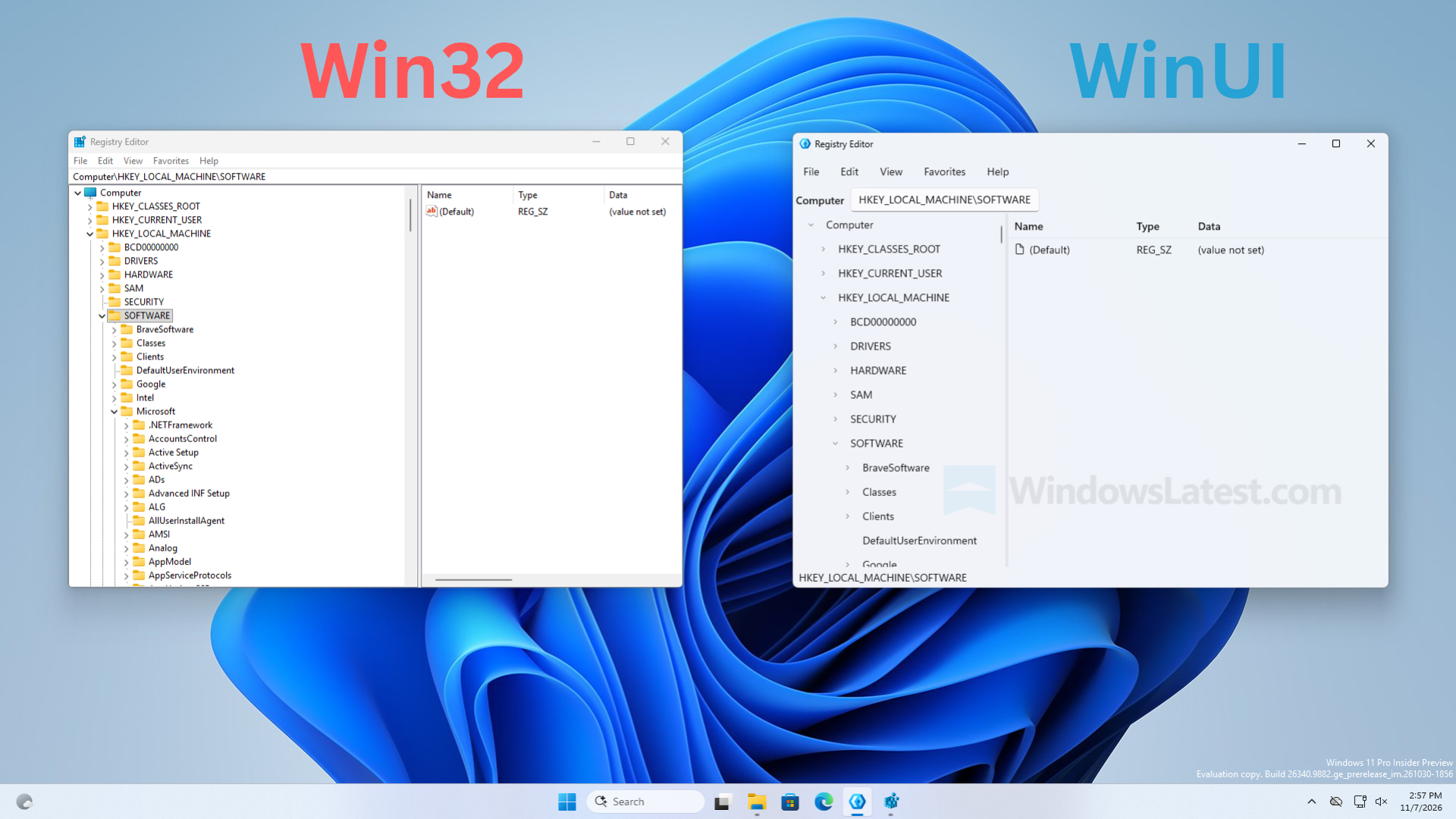
Microsoft's open-source Microsoft.UI.Reactor code base now contains a Registry Editor written in WinUI 3, and a hands-on run on Windows 11 Build 26340.9882 shows it is no visual mock-up: the app really reads and writes the live registry through .NET. The practical answer for anyone deciding what to do with it today — use it to evaluate the new interface and to browse keys, but keep regedit.exe for every change that matters, because .reg file import and export, persistent favorites, working permission controls and a full-registry export are all still missing.
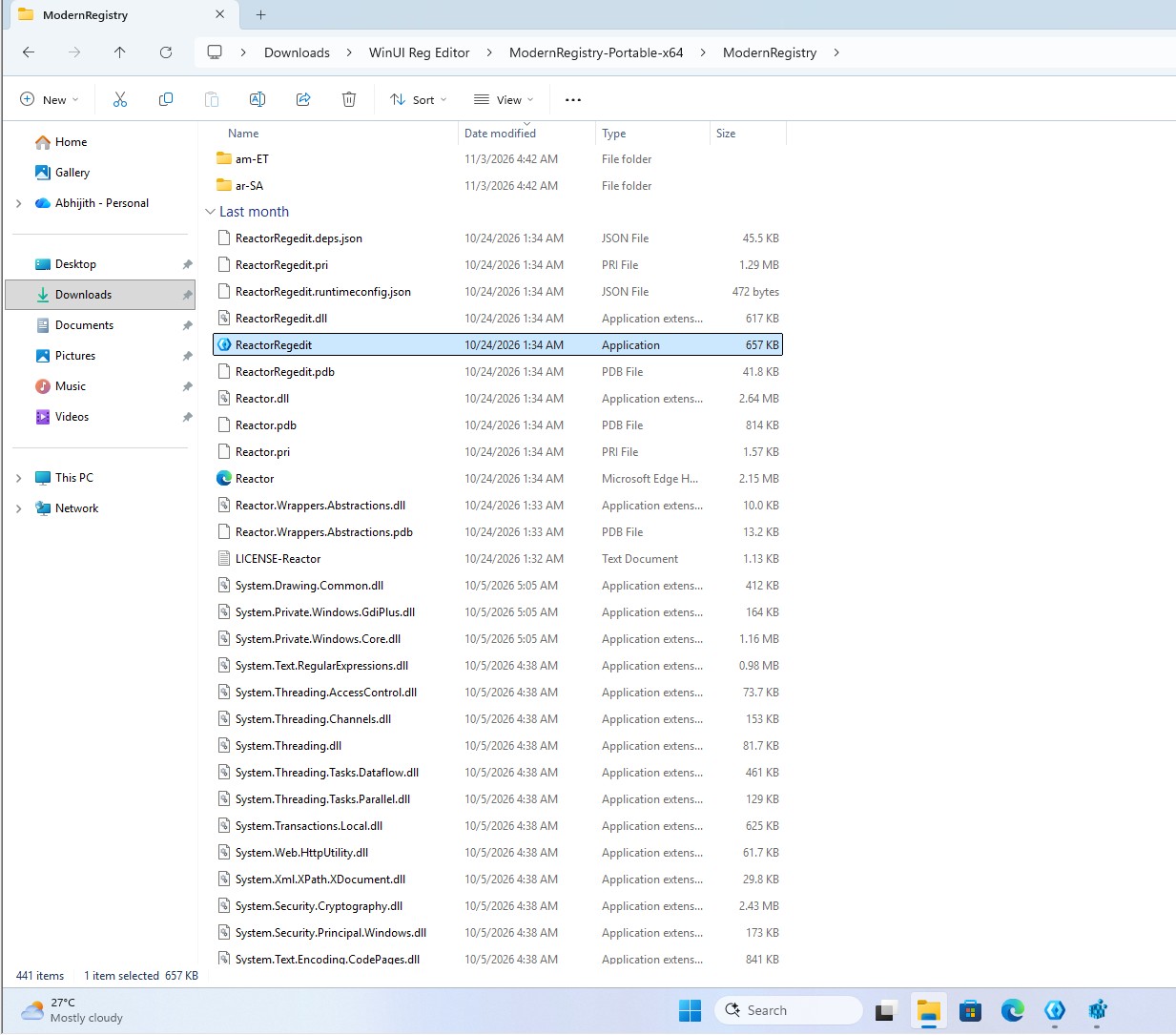
Nothing exotic was needed to get that result. The tool was reached the way any developer can reach it: download the source, compile it locally, launch it on a Windows 11 PC. That detail already shapes how the software should be read — what appears on screen is a build made from sample code, not a shipped Windows component.
What exactly did Microsoft publish, and what is the timeline?
Conclusion first: this is a sample application inside an experimental framework, not a component on a Windows 11 release schedule, and Microsoft has not announced any plan to retire regedit.exe.
What the sample changes is appearance and engineering, not navigation logic. Since Windows 95, the Registry Editor layout has barely moved: key tree on the left, values on the right. Windows 10 Creator's Update added an address bar, yet the yellow folder icons, tight menus and small type survived. The new build keeps the familiar two-pane behavior — a deliberate choice that spares IT staff and power users from relearning where keys live — while opening up menu spacing, swapping the address bar for a native WinUI text box, adopting Windows 11 design elements and adding a status bar at the bottom of the window that prints the current registry path.
Timeline anchors worth pinning down:
- The project page for Microsoft.UI.Reactor labels the framework "Experimental", and preview packages such as 0.1.0-preview.16 are published on NuGet with official documentation.
- Microsoft introduced the framework in a Windows developer blog post dated October 21, 2026, and the same post makes clear the experiment sits on top of WinUI rather than beside it.
- The first hands-on article showing the compiled Registry Editor sample appeared on November 8, 2026.
- Microsoft mentioned the Registry Editor sample in its developer blog in October and said the related sample applications would be covered the next month — a cadence that points at continued experimentation rather than imminent shipping.
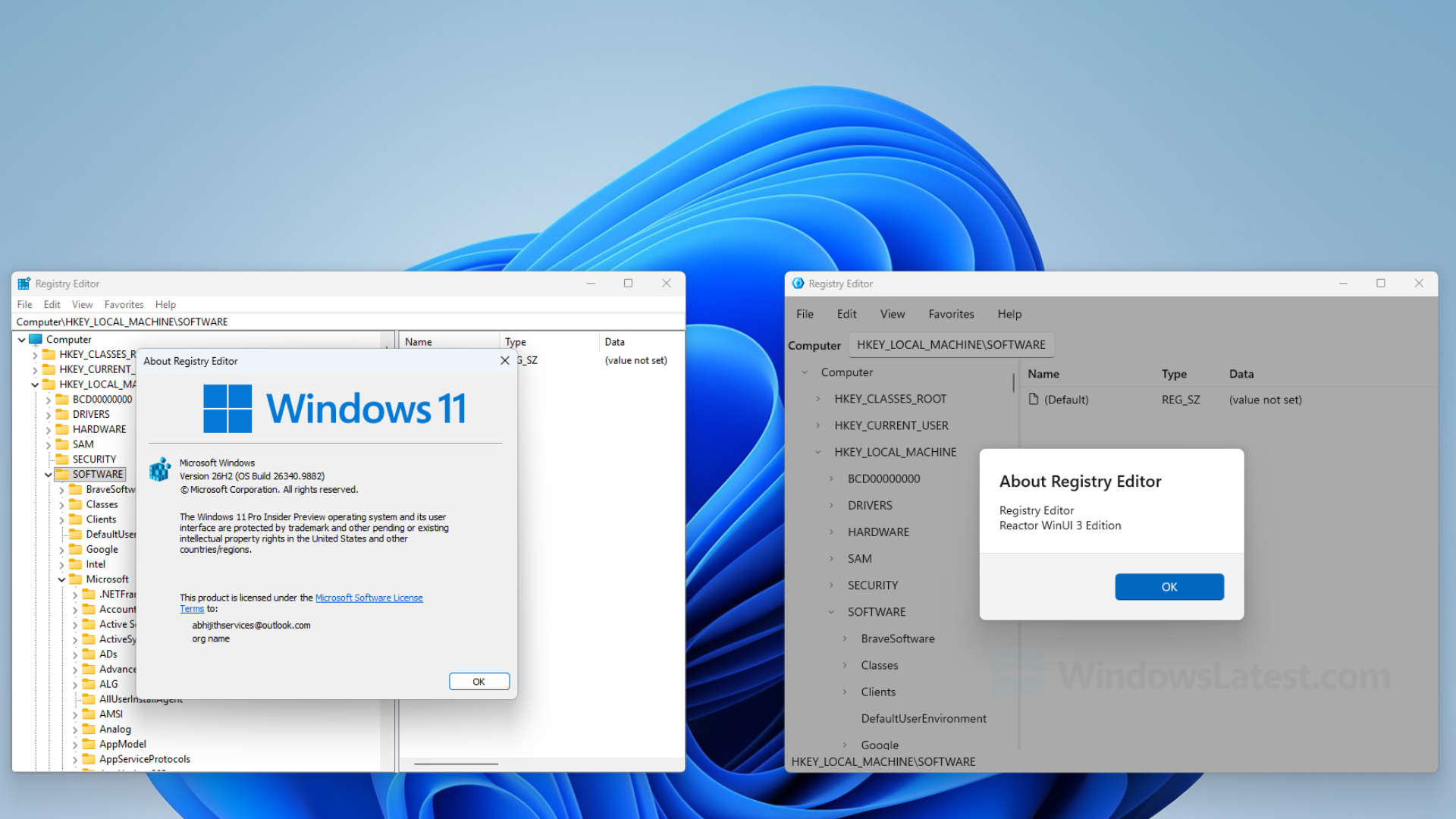
- The About page inside the app reads "Registry Editor Reactor WinUI 3 Edition", the quickest way to confirm you are looking at a genuine WinUI application instead of a skin wrapped around regedit.exe.
What does it feel like on a real Windows 11 machine?
Conclusion first: fast and honest, with visible seams that mark it as unfinished software.
Testing on Windows 11 Build 26340.9882, launch was quick and overall responsiveness sat close to the classic regedit. Expanding HKEY_CLASSES_ROOT produced a brief "Loading..." indicator before the tree filled with entries including .386, .3gp and .7z. Drilling into HKEY_LOCAL_MACHINE\SOFTWARE returned exactly the values the traditional Registry Editor shows, which is the single most important verification for anyone considering a migration: the sample is talking to the real registry, not a demo data set.
The polish is where the WinUI part pays off — menus open with fluid animation, resizing the window stays smooth, and the backdrop uses Windows 11's Mica material. Those are not cosmetic indulgences for this class of tool: administrators spend long stretches inside the Registry Editor, and readable spacing plus a persistent path readout directly reduce wrong-hive edits.
How does Reactor change the job for developers?
Conclusion first: Reactor is a syntax change for native Windows development, not a new platform, and its practical value right now is learning and prototyping.
Microsoft describes Reactor as an experimental C# framework for WinUI desktop applications that brings the MVU (Model-View-Update) architecture into native Windows development. In day-to-day terms, that means component-style coding with mechanisms such as UseState and UseEffect to manage interface state. It is deliberately not JavaScript React: everything is written in C#, and developers skip traditional XAML pages, code-behind files and ViewModel layers, describing the interface as components so that only affected controls update when state changes. A virtual element tree plus a reconciler diff is what makes that selective update possible.
Microsoft has been explicit that Reactor is not a new UI platform. In the GitHub project documentation the line reads that Reactor is "not a new interface platform, it is only a new way of describing WinUI interface content", and the October 21 developer blog frames WinUI as the underlying foundation of the experiment. Every menu, tree view and dialog in the Registry Editor sample is a true WinUI control — no HTML, no Electron, no WebView2 wrapper — which is how the app avoids the runtime overhead that cross-platform shells drag onto Windows.
Under the hood, the source shows a dedicated RegistryService class that reads and writes the system registry through the Microsoft.Win32 API provided by .NET. When it meets a permission error or a protected registry key, it catches the failure instead of letting the whole application crash. The window itself renders over a Mica material background.
Two build traps from the project's own guidance are worth knowing before you clone anything, and they explain most first-attempt failures:
- Clone into a short path. The XAML and resource compilers are 32-bit tools that do not handle long paths, so deep directory nesting or a OneDrive-synced folder can hit the 260-character limit and throw MSB3073 or PRI210 errors.
- Specify the platform explicitly, for example dotnet build -p:Platform=x64 (or ARM64). Omitting it is the other common reason a sample refuses to build.
If you would rather scaffold a small Reactor test app than compile the repository, Microsoft's winapp command-line tool gained Reactor templates in its v0.7.0 release on September 25, 2026; Microsoft Learn's guide to the tool states that the experimental Reactor templates require the .NET 10 SDK and Windows Developer Mode so that the built package can be registered on the machine. Our own note on how open source teams should use GitHub ACCESSIBILITY.md applies here too: Reactor's accessibility, theming, command and data-stack work is planned for the trip back into WinUI, so the documentation you write now outlives the demo.
Which registry tasks work today, and which are still broken?
Conclusion first: browsing, key editing and search are usable; file-based and administrative workflows are not.
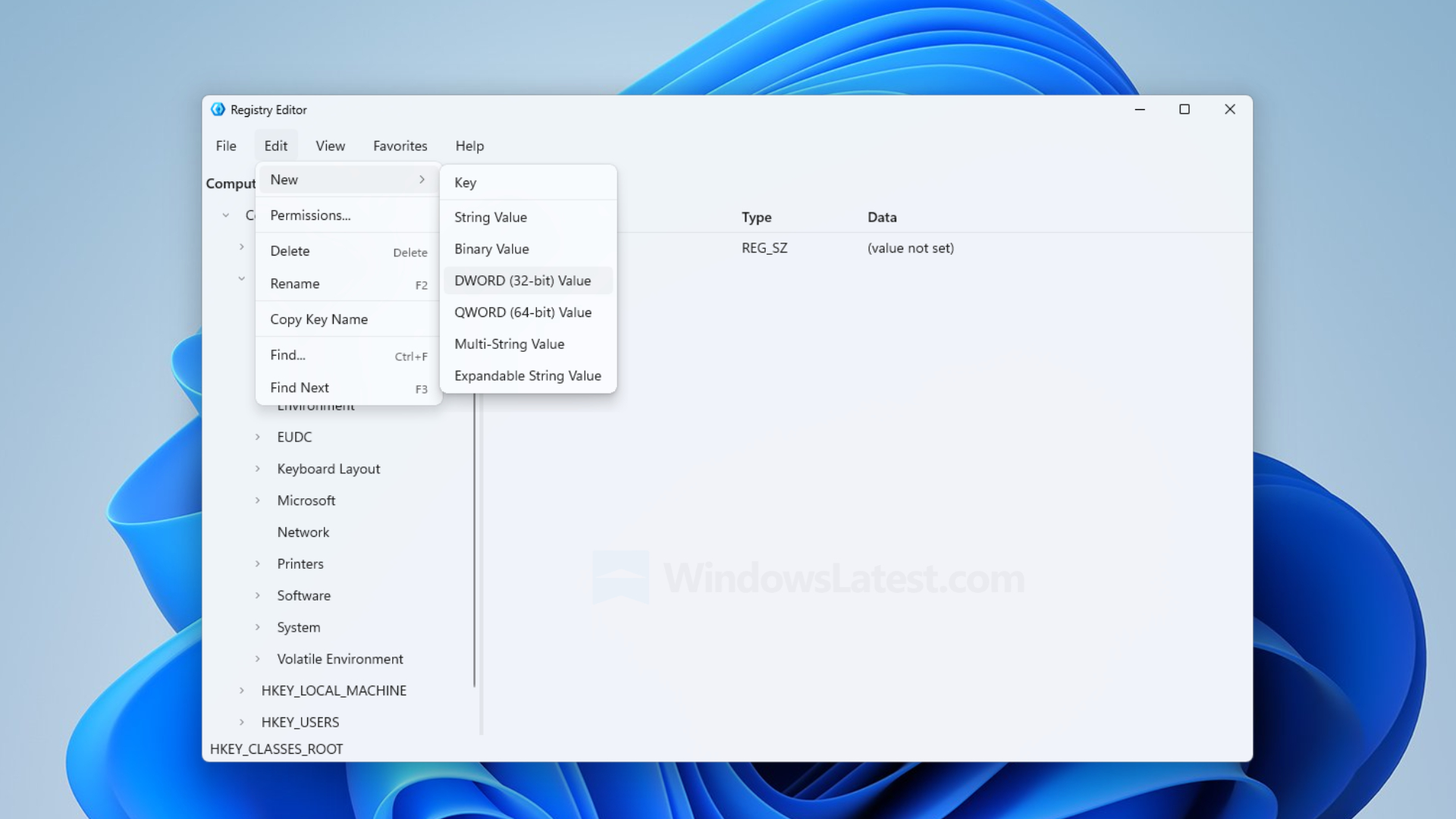
Supported operations already include creating, renaming and deleting registry keys, adding values of the common types — string, binary, DWORD, QWORD, multi-string and expandable string — and searching registry content with the Ctrl+F shortcut.
| Capability | Classic regedit.exe | Registry Editor Reactor WinUI 3 Edition | What it means for daily support work |
|---|---|---|---|
| Two-pane key/value navigation | Yes | Yes | No relearning required for staff |
| Create, rename, delete keys | Yes | Yes | Safe for supervised test edits |
| Edit value types (string, binary, DWORD, QWORD, multi-string, expandable string) | Yes | Yes | Covers most ticket-level tweaks |
| Search | Yes | Yes, Ctrl+F | Usable for locating keys |
| Favorites | Saved between sessions | Not saved after the app closes | Keep your own path list outside the app |
| Import / export | .reg files | Clipboard only, no .reg file picker | Cannot deploy or archive registry changes |
| Export the entire registry | Yes | HKEY_LOCAL_MACHINE only | No full backup path inside the tool |
| Permissions menu | Functional | Present but does nothing | Use regedit.exe or PowerShell for ACL review |
| Load / unload hive | Yes | Placeholder entry only | Offline image and forensic analysis not possible |
| Network registry, printing | Legacy support | Not implemented | Skip in shared or documentation-heavy workflows |
Crucially, Microsoft has not said it will replace the regedit.exe shipped with Windows 11 with this tool. The sample remains a developer example rather than a system component inside a release plan.
How do you test it without putting a working PC at risk?
Conclusion first: treat it as read-only until you have a backup, and never on the machine you depend on.
- Move the trial off the primary machine. Use a spare PC or a virtual machine with a snapshot; the app edits the real registry, so there is no sandbox to fall back on.
- Back up before the first write. Microsoft's own guidance for advanced users states that before editing the registry you should export the keys you plan to change, or back up the whole registry — see the Microsoft Learn registry documentation for the procedure, including the reg export command.
- Create a restore point or a system image so a bad value can be rolled back without reinstalling.
- Build from the official source only. The repository is public; do not run binaries repackaged by third parties, because a Registry Editor that writes to the live hive is an attractive disguise for malware.
- Open the sample and an instance of regedit.exe side by side, and confirm the same path returns the same values before trusting anything you see.
- Verify what you are running via Help → About, which should read "Registry Editor Reactor WinUI 3 Edition".
- Start with navigation and search only; make your first write in a harmless location such as a test key you created yourself.
- Log the paths you visit outside the app, since favorites disappear when the program closes.
- Stop and switch tools the moment an action requires permissions management, hive mounting or a .reg file.
Before touching any value, tick each of these:
- Key exported to a file, or snapshot taken.
- Exact path recorded, including hive name.
- Expected value type and data written down before editing.
- Classic regedit.exe available for cross-checking the result.
- App closed and reopened to confirm the change persisted the way you intended.
What are the permission and privacy points to watch?
Conclusion first: the error handling that keeps the app alive is also the thing that can hide a failed change.
Because RegistryService catches permission errors on protected keys rather than crashing, an unelevated run will look like it succeeded while nothing was written. Treat a silently unchanged value as the default failure mode: re-open the key and confirm the data, rather than trusting the interface. Our analysis, not a Microsoft statement, is that this design is right for a sample and wrong for a daily-driver administrative tool until the app surfaces a clear "access denied, nothing changed" state.
Privacy and data-handling notes follow from the clipboard-only import and export path. Registry paths and value data often contain account identifiers, install locations and tenant-specific strings; moving them through the clipboard on a shared desktop, a remote session or a machine with clipboard history enabled is a needless exposure route. Until file-based export exists, copy only the narrow key you need, paste it into a controlled document, and clear clipboard history afterwards. For now, permission review still belongs to regedit.exe or PowerShell.
Is this part of a bigger cleanup of Windows' legacy tools?
Conclusion first: yes, and the pattern is the best predictor of what happens next.
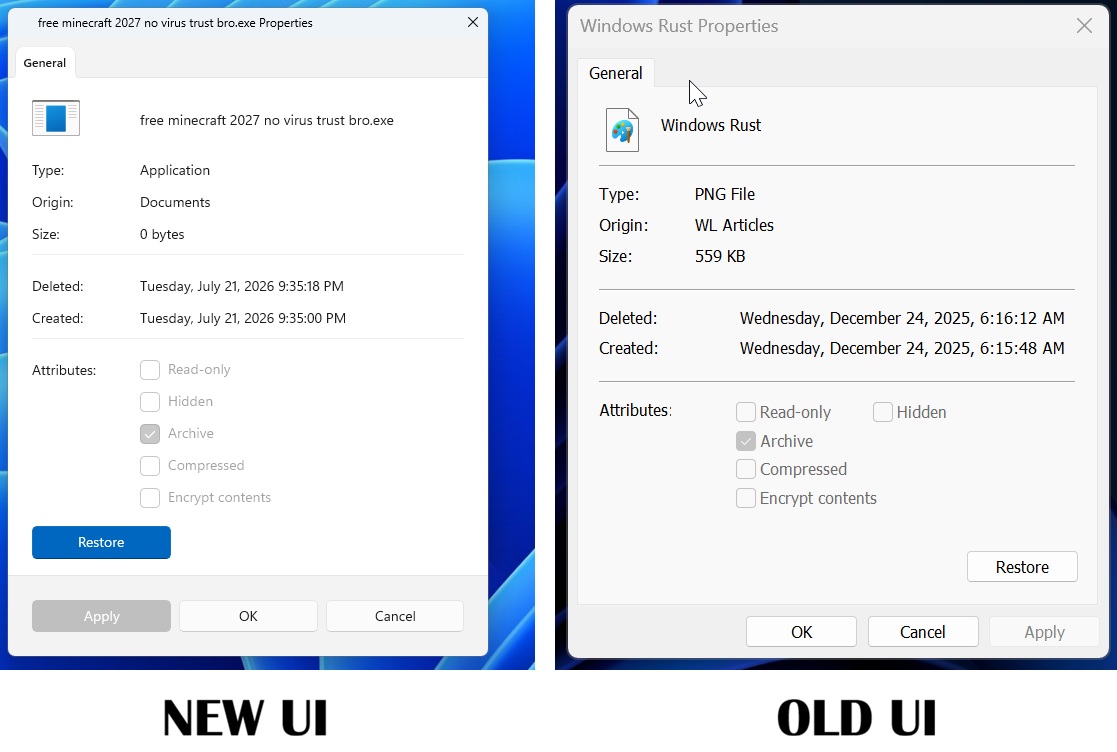
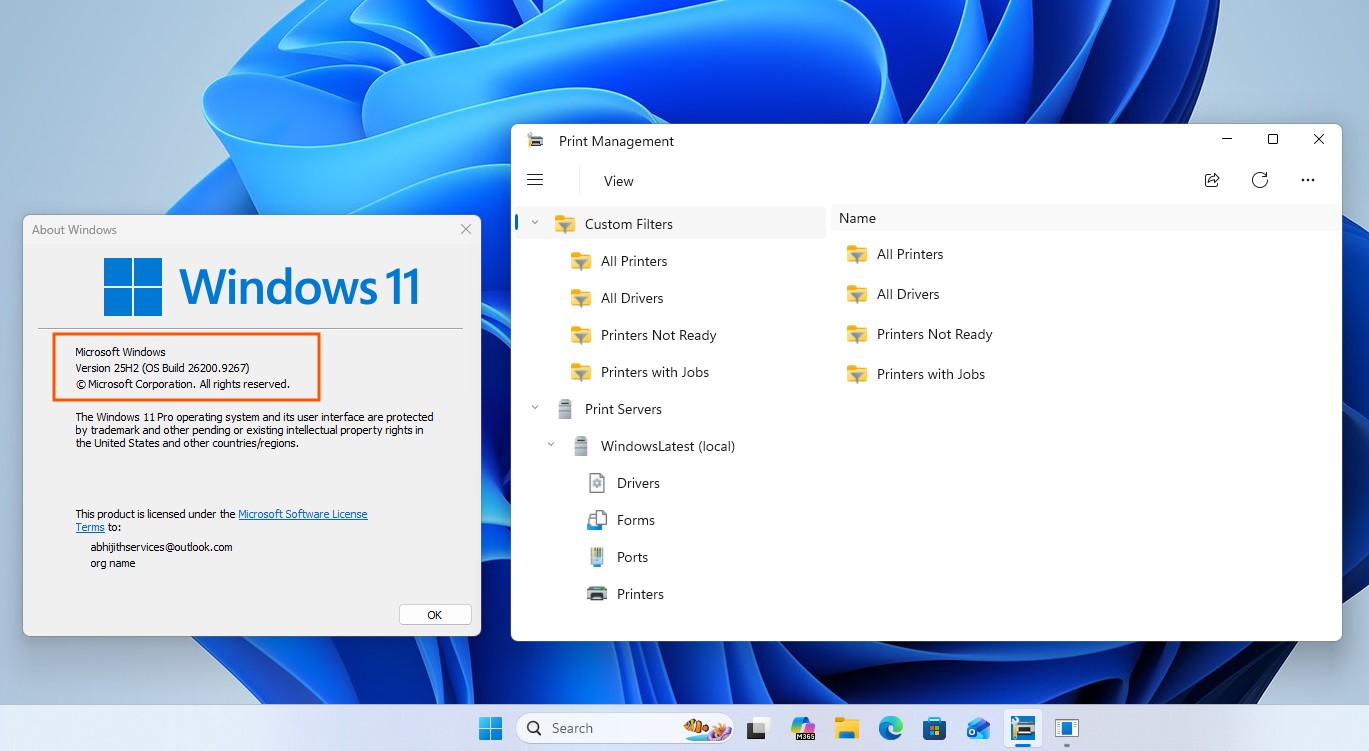
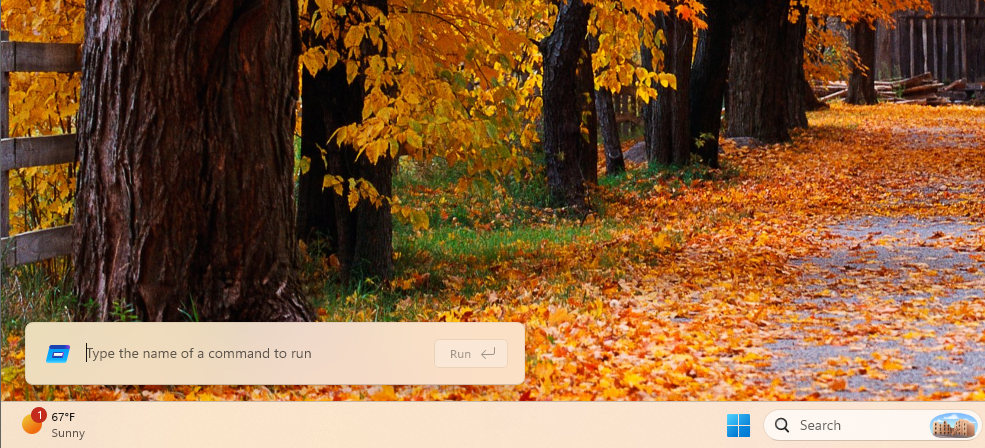
Microsoft has been progressively modernizing system utilities that kept their original look for decades. The Properties dialog in File Explorer is getting a WinUI 3 version with dark mode, a Print Management tool built on WinUI 3 has already appeared to replace the traditional MMC console, a new Run dialog is in testing, and Microsoft has said even older components such as the Disk Defragmenter tool are inside the modernization plan. Marcus Ash, who leads Microsoft's Windows design and research group, previously said the company had begun examining how legacy tools including the Registry Editor could be modernized — so this sample is one visible piece of a much broader review of Windows' inherited interface layers.
The wider native-UI push is measurable outside system tools too. PowerToys moved six utilities to WinUI 3 during 2026 and, as of November 5, seventeen utilities plus the settings app were running on WinUI 3, with the v0.103.3062 pre-release on November 4 updating the Windows App SDK to 2.6.4, Win2D to 1.4.0 and WebView2 to 1.0.4314.35. One practical consequence for anyone testing Reactor software: the runtime underneath is still moving, so a sample that builds today can break when the next Windows App SDK lands.
Unresolved issues remain the same three that decide whether any redesigned admin tool survives contact with enterprise users: compatibility between old and new utilities, functional completeness, and resource usage. For a tool as low-level as the Registry Editor, users care less about the visual refresh than about reliability, full feature parity and long-term compatibility. If the WinUI build ever reaches Windows 11 for real, it would rank as the most significant interface overhaul of the Registry Editor in decades — but until Microsoft publishes a product plan, it is an experimental development project.
Common misconceptions worth correcting
- "Windows 11 is getting a new Registry Editor." No. regedit.exe remains the system component; the WinUI 3 build is a developer sample in the Microsoft.UI.Reactor repository.
- "It is just regedit.exe with a modern theme." No. The About page identifies a separate application, and the tree, menus and dialogs are real WinUI controls driven by Microsoft.Win32 API calls.
- "This is Microsoft's answer to Electron bloat, so Reactor will replace XAML." Microsoft's documentation says the opposite: Reactor is a new way to describe WinUI content, and the framework does not introduce its own rendering engine or a browser-based interface.
- "It is safe for routine ticket work." Not yet — favorites, .reg files, hive loading and permission controls are incomplete.
- "Screenshots of the app are Microsoft's final design." They come from a self-compiled sample, so spacing, controls and wording can differ from anything that ships later.
Frequently asked questions
Is this the Registry Editor that ships with Windows 11?
No. It is an experimental sample inside Microsoft.UI.Reactor. Microsoft has not announced a plan to replace regedit.exe, though the company has said legacy tools including the Registry Editor are being studied for modernization.
Which Windows build was tested, and did it edit the real registry?
Windows 11 Build 26340.9882. Yes — values under HKEY_LOCAL_MACHINE\SOFTWARE matched the traditional Registry Editor, and key and value operations behaved on the live registry.
Do I need to learn XAML to build something like it?
No, that is the point of Reactor: interfaces are described in C# with MVU state handling such as UseState and UseEffect. Microsoft still recommends XAML and MVVM for production applications, and the experimental packages carry no support commitment.
Can I use it to deploy registry fixes to other machines?
Not today. Import and export work through the clipboard only, there is no .reg file selection, and the export-all function covers only HKEY_LOCAL_MACHINE. Use regedit.exe or a scripted approach for deployment.
Should IT support teams add it to their toolkit?
As a training and evaluation tool, yes — the layout is unchanged, so the learning cost is minimal. As a primary editor, no, until favorites, permission management and file import complete.
Action advice for the next 30 days
- IT support staff: install nothing on production machines. Keep regedit.exe as the editor of record, and use the sample only to rehearse the layout for staff who will eventually face a redesigned tool.
- Developers: prototype with the preview package or the winapp Reactor templates to learn the MVU style, but hold product work on XAML and MVVM. Note the prerequisites the demos skip — the .NET 10 SDK and Developer Mode.
- Efficiency and tooling buyers: judge this by completeness, not looks. Our Software data check on the "make every tool replaceable" advice is the right lens: an experimental UI should never become a dependency you cannot swap out.
- Everyone: watch for the follow-up sample apps Microsoft said it would cover the next month, and for any statement that ties these experiments to a dated Windows 11 feature update. Absent that, treat every screenshot as preview-of-preview.
Sources
- Microsoft.UI.Reactor project repository and documentation: github.com/microsoft/microsoft-ui-reactor and official docs for 0.1.0-preview.16
- Windows Developer blog introducing the framework, October 21, 2026: Microsoft.UI.Reactor: a C#-first way to build WinUI apps
- Microsoft Learn, using the winapp CLI with WinUI (Reactor template requirements): learn.microsoft.com; WinAppCLI v0.7.0 announcement, September 25, 2026
- Microsoft registry guidance and command reference: Windows registry information for advanced users and reg export
- Original hands-on compilation and test report, November 8, 2026: Windows Latest
- PowerToys WinUI 3 migration figures, November 6, 2026: 163.com report