
MyTechDailyNews Software Guide: How Open Source Teams Should Use GitHub ACCESSIBILITY.md
GitHub's new recognition of ACCESSIBILITY.md gives open source maintainers one predictable place to publish goals, supported environments, known barriers, and reporting steps. For users and contributors, that means fewer searches across issues, wikis, and audits; for teams, it means accessibility context survives ownership changes. This MyTechDailyNews Software guide turns the update into a practical checklist: what to write, where to file it, how to test it, and which common wording claims to avoid.
The most useful version is not a long policy document. It is a short, honest page that tells a person what the project tries to do, where the gaps are, what to report, and what will happen after the report arrives.
What exactly did GitHub make discoverable?
The change is a placement change with durable effects: GitHub now surfaces a project accessibility statement on the repository overview when ACCESSIBILITY.md exists in a supported location, and repositories can inherit one from an organization default. That reduces the need for users to hunt through closed issues, wiki pages, or audit PDFs before they understand whether a barrier is already known.
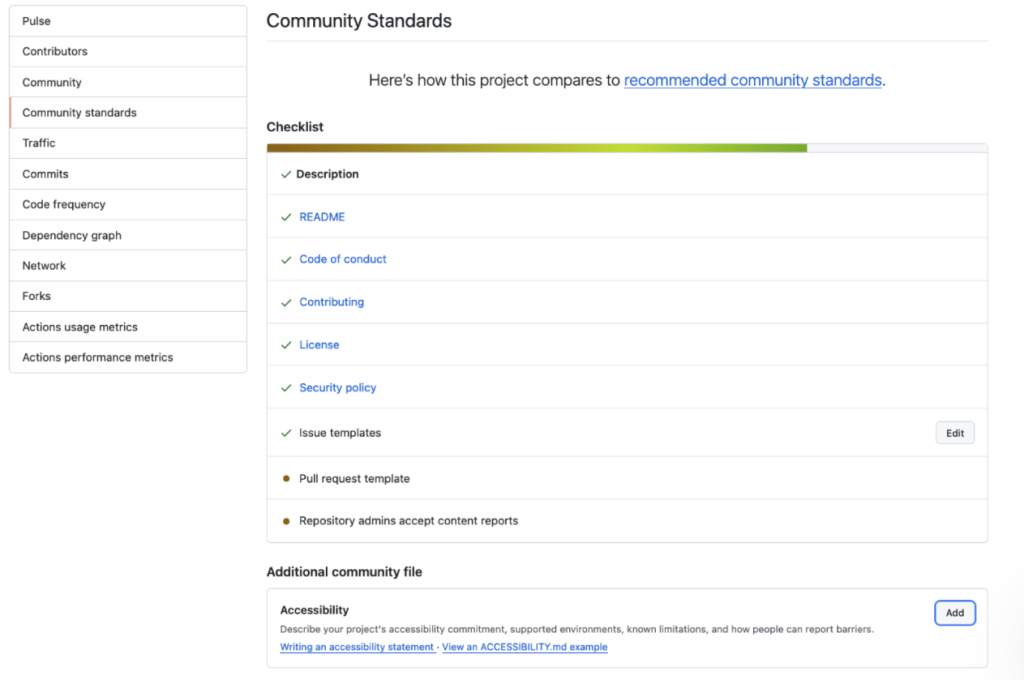
GitHub's October 2026 enterprise roundup records that repositories can highlight ACCESSIBILITY.md from the repository root, .github/, or docs/; public repositories can also start from a concise template inside Insights > Community Standards. In practical terms, accessibility now sits next to the other health signals a maintainer already reviews.
Where teams should place ACCESSIBILITY.md
| Location | Best fit | What it signals to users | Maintenance trade-off |
|---|---|---|---|
| Repository root | Small libraries, CLIs, and single-purpose tools with few docs directories. | The statement is easy to spot when someone browses the repo. | Needs care when other top-level files multiply. |
| .github/ | Projects grouping Community Standards, contributing guides, and security policies. | Accessibility is treated as a community expectation, not an afterthought. | Maintainers must remember the file is in a subdirectory. |
| docs/ | Documentation sites, design-system repos, or larger products with separate user guides. | Users can find the statement in the documentation flow. | Keep the file short; do not bury it under deep navigation. |
| Organization .github/ repository | Multi-repository projects that share one reporting process or support statement. | Repository-level expectations are uniform across the organization. | Individual repos may need a local override when tools differ. |
The file location matters less than naming, ownership, and update cadence. A file that is discoverable but stale can mislead people faster than no file at all.
Why is a separate statement better than scattered accessibility notes?
A separate statement gives accessibility the same durability as other community health files: it survives staff turnover, becomes part of code review, and gives users a predictable reporting route before something breaks. The statement is the place for the summary; issues, pull requests, and audit notes can contain evidence and follow-up work.
GitHub's community health file pattern already tells contributors what matters:
- Contribution guidelines explain how changes are proposed.
- Codes of conduct define acceptable participation.
- Security policies explain how to report vulnerabilities.
Recognizing ACCESSIBILITY.md adds the missing peer for disability-related expectations. It also gives maintainers a home for limitations and workarounds. The file can name the platforms, browsers, input methods, and assistive technologies a project supports or has tested, and can state what has not yet been verified.
Another default helps routing: new repositories include an accessibility issue label, so teams can separate barrier reports from feature requests while keeping triage visible. The label is not the statement; the statement explains how to use it.
What belongs inside ACCESSIBILITY.md?
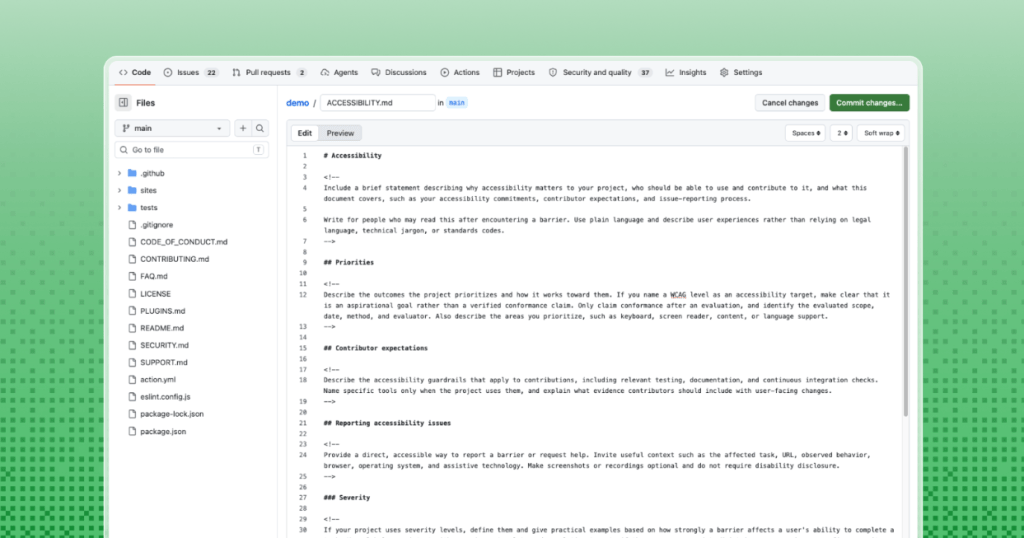
Write only the parts the project can keep current: a short purpose section, user-facing barriers, contributor expectations, a reporting path, and an owner. A starter file should be replaceable, not a legal manuscript; accuracy is more useful than completeness.
- Priorities and goals: Name the user experiences that receive attention and explain why accessibility matters to the project.
- Contributor expectations: List the checks, screenshots, terminal transcripts, or review practices expected from human contributors and coding agents.
- Supported environments: Specify platforms, browsers, keyboard-only paths, and assistive technologies that the project has tested or supports.
- Known limitations: Describe the barrier as an experience, not a diagnosis; include workarounds and links to remediation issues where possible.
- Reporting path: Provide a direct way to report a barrier without requiring disability disclosure, mandatory screenshots, or recordings.
- Response process: State how maintainers acknowledge, triage, track, and update reporters; if severity levels are used, keep maintainer confirmation during triage.
- Ownership: Name the team or role responsible for keeping the statement current.
- Feedback: Explain how users and contributors can suggest changes to the statement or the accessibility practice.
Useful reporting prompts ask for the task, page, observed behavior, browser, operating system, and assistive technology. They do not ask someone to prove a disability. A clear sentence such as “If the workaround fails, tell us what happened and we will update the status” is more actionable than a broad promise of compliance.
What can project examples teach teams?
The strongest examples combine a real barrier, a practical workaround, and a contribution rule. They answer two different readers: the person trying to use the software today and the person preparing the next pull request.
GitHub CLI's accessibility statement gives users a terminal-specific answer: table output can be hard to follow with a screen reader, and the file offers a command that prints pull request numbers and titles one per line instead. For developers changing prompts or output, it asks them to show results with relevant accessibility settings enabled. That pattern turns a vague principle into a reviewable requirement. GitHub's 2025 engineering post on building a more accessible GitHub CLI also notes that the team is exploring table-formatting choices that can be interpreted more easily by screen readers, which is the kind of forward-looking but bounded detail a statement should carry.
The GitHub Annotation Toolkit statement does something similar for design handoffs. Its Figma library uses canvas position, connecting lines, and matching numbers to communicate relationships visually, while access to individual canvas objects may not convey what those relationships mean. The file therefore asks collaborators to provide a structured text description that identifies each annotated element, its intended semantics and behavior, and any relevant ordering. It also says plainly that the library has not undergone keyboard-only or screen-reader testing. Readers receive both a workaround and a clear statement of what remains unverified.
Can ACCESSIBILITY.md claim WCAG conformance?
No, unless the claim is backed by evidence that is as specific as the target. Naming Web Content Accessibility Guidelines and a level can communicate intent, but intent is not a verified conformance result. The safer wording is “we aim for” or “we have tested against,” followed by what was evaluated and what was not.
Master guidance already warns that a target does not establish conformance. A real claim needs the evaluated scope, date, method, and evaluator. W3C's Understanding Conformance documentation describes the same need for a claim to identify scope and evaluation details; otherwise the statement becomes a marketing sentence rather than a usable signal.
For software teams, a useful sentence might be: “We have tested the command-line help output with NVDA on Windows and VoiceOver on macOS for version 1.4, but we have not tested long tabular listings or PDF exports.” It is not a complete audit, but it tells users what to trust and what may require a workaround.
What are the most common mistakes?
The most common mistake is publishing a template instead of writing a project truth. A placeholder-filled file can look official while giving maintainers no operational answer and users no reporting path.
- Over-claiming: Saying “fully accessible” without scope, date, method, or evaluator is harder to recover from than naming gaps.
- Vague barriers: “Some components may have issues” is not useful. Describe the affected task, behavior, and workaround.
- Missing owner: Without a named team or role, the file drifts as maintainers change.
- Burdening reporters: Asking for disability proof, mandatory recordings, or repeated context discourages reports.
- Ignoring agent workflows: If coding agents open pull requests, the statement must say what evidence they need to produce for accessibility-sensitive changes.
- Static policy: An ACCESSIBILITY.md file is documentation, not a one-time release artifact; it needs review when platforms, browsers, or assistive technology support changes.
How should a team publish the first version quickly?
Start small and publish before the wording is perfect: choose one accurate page, one owner, and one reporting route, then let the issue tracker fill in the details over time. A short honest file is better for users than a long aspirational one.
- Inventory the gaps. Search existing issues, documentation, and team notes for barriers that users have already reported. List the five that cause the most repeated confusion.
- Pick the location. Use .github/ when aligning with Community Standards; use docs/ when the product has a documentation site; use the organization .github/ repository when many repositories share the same process.
- Use a starter, then delete boilerplate. GitHub's Insights > Community Standards path and the Open Source Accessibility Toolkit can provide a first draft. Keep only statements the team can verify and maintain.
- Add the user path. State how to report a barrier, what context helps, what optional evidence looks like, and what response maintainers can reliably provide.
- Test the statement. Read it with a screen reader, test link names, and check that the file renders on the repository overview before promoting it in release notes.
A good first release note does not say “we solved accessibility.” It says: “The repository now has an ACCESSIBILITY.md file listing supported environments, known terminal output issues, screen-reader workarounds, and the route for barrier reports.”
Frequently asked questions
Is ACCESSIBILITY.md required for every repository?
No. It is a durable place for information that would otherwise disappear across issue trackers, guides, audits, and private conversations. Small personal repositories can still benefit, while large organizations should use it to coordinate defaults.
What if the project has not tested any assistive technology?
Say that plainly and describe the known risk. The statement can explain that limitations are reported through an issue label or Community Standards path, and that maintainers will record what testing is planned next.
Can a coding agent update the statement?
Yes, but the file should explain the human review expectation. If an agent proposes changes to prompts, output formatting, or design annotations, it should provide accessibility context, test notes, or a workaround request that a maintainer can check.
Should the statement include screenshots?
Screenshots and recordings can be helpful evidence for maintainers, but they should be optional for reporters. A barrier report needs to start from the user's experience, not from proof requirements.
MyTechDailyNews Software action advice
If you maintain an open source project, publish a minimal ACCESSIBILITY.md now, name one owner, and link the file from Community Standards. If you contribute to one, read the statement before submitting accessibility-sensitive changes and include the requested evidence. If you evaluate software for adoption, treat a current statement as a practical signal: it shows whether the team can communicate limitations, route barrier reports, and keep accessibility context after personnel changes.
This guide is prepared for MyTechDailyNews by Sarah Chen, Tech Daily. For corrections or software-tip requests, email hello@techdaily.com.
Reference sources
The links below are the verifiable sources used for file placement, CLI examples, and conformance wording.
- GitHub Docs: Creating a default community health file — describes ACCESSIBILITY.md as a community health file for goals, barriers, and reporting process.
- GitHub Enterprise Insights: October '26 roundup — records repository overview highlighting for ACCESSIBILITY.md in supported locations.
- GitHub Blog: Building a more accessible GitHub CLI — May 2, 2025 engineering post on screen-reader output and table formatting.
- W3C WAI: Understanding Conformance — guidance on conformance claims and scope.