
How to Stop the Windows 11 Sticky Keys Popup: Microsoft Adds a Permanent "Never" Switch in the 26H2 Beta
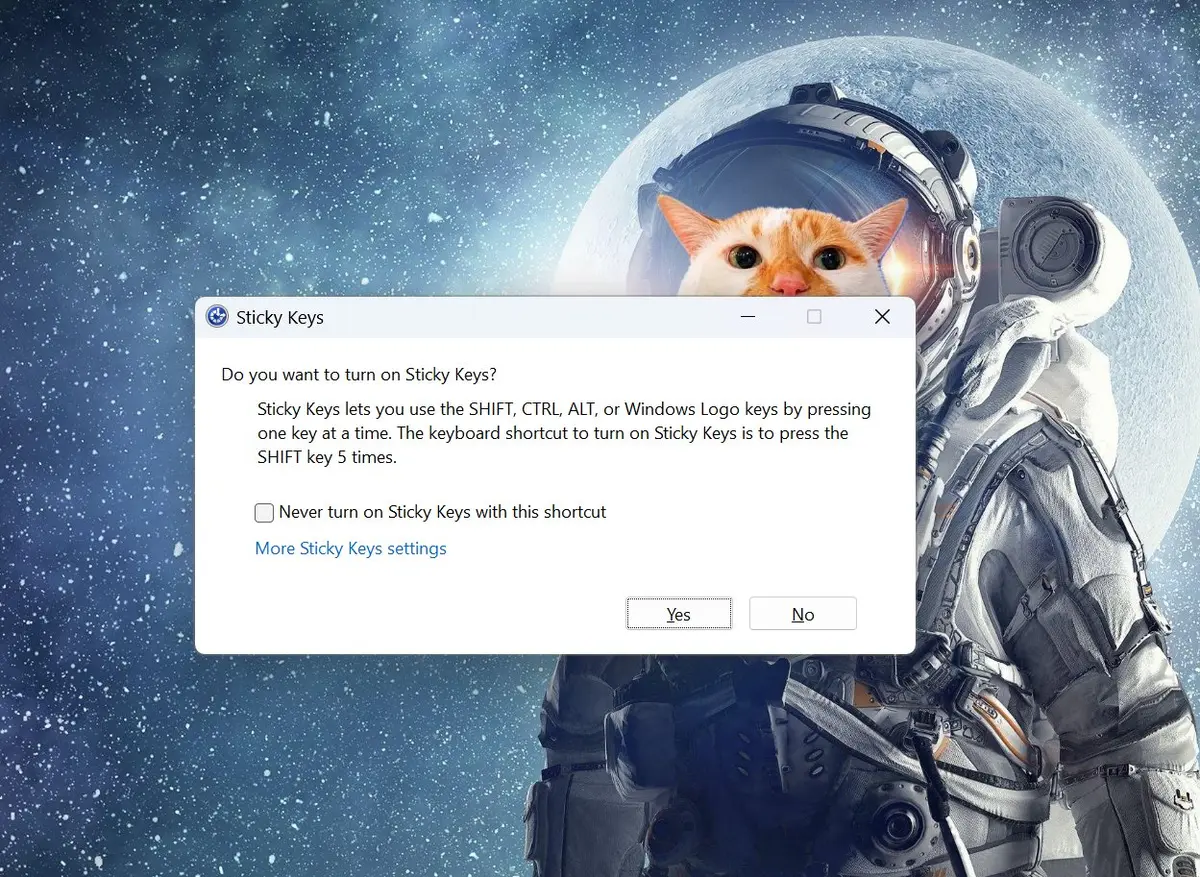
Tap Shift five times mid-game and Windows 11 interrupts you with the Sticky Keys dialog. On today's stable release the only real fix is Settings > Accessibility > Keyboard > Sticky Keys, where you clear the shortcut option. In the Windows Insider preview, Microsoft has finally moved that choice into the popup itself: tick one new checkbox and the shortcut stops asking forever.
What exactly changed in Windows 11 26H2 Build 26320.9876?
Short answer: nothing about the accessibility features themselves — only the escape route. The dialog that appears after you press Shift five times now carries an opt-out, so refusing the shortcut no longer requires a detour through Settings.
Microsoft's release notes for the Beta channel state it plainly: "The dialogs that ask whether you'd like to turn on Sticky Keys or Filter Keys are being updated, making it easier to dismiss these prompts." That update landed with the Beta flight that moved insiders onto Windows 11, version 26H2, raising the build number to 26320 (patch 26320.9876, delivered via KB51320999 to Beta testers on November 6, 2026). Neowin, which flagged the change first, captured the wording on the Sticky Keys window: a checkbox reading "Never turn on Sticky Keys with this shortcut" — the option that blocks activation through this shortcut. The Filter Keys window gets the equivalent control.
Two details matter for anyone deciding whether to care. First, the same dialog revision is listed in the Experimental Channel's Build 26340.9882 notes, so this is a cross-ring UI experiment rather than a single-build curiosity. Second, that build also ships a redesigned Search panel, Windows Hello low-light sign-in improvements and new Live Captions controls — the keyboard-dialog tweak is unrelated to those, and it is the only part of the package that touches daily typing.
The feature is still in Windows Insider testing. Microsoft has not said whether, or when, the change reaches every Windows 11 device.
What are Sticky Keys and Filter Keys, and why do they still ship in Windows 11?
Conclusion: they are not leftovers or bugs — they are keyboard aids that date back to Windows 95, more than three decades old, and they keep firing accidentally because their activation shortcuts collide with gaming and fast typing.
- Sticky Keys lets you press modifier keys in sequence instead of holding them together. Tap Ctrl, release it, then tap C, and you still get a copy — no two-hand reach for users who cannot hold Ctrl+C, Alt+Tab or Shift+Arrow combinations.
- Filter Keys tells Windows to ignore very brief or repeated keystrokes, which helps people whose hands tremor or bounce on the keys. The side effect is that keys appear dead if it switches on unexpectedly.
Each has a hotkey that is one of the shortest paths to an accidental popup: Shift five times for Sticky Keys, the right Shift key held for eight seconds for Filter Keys, and Num Lock held for five seconds for Toggle Keys, according to Microsoft's own accessibility shortcut list. Gamers hammering Shift for sprint, and writers capitalising constantly, hit those thresholds all the time.
| Feature | What it does for you | Shortcut that nags | Typical misfire | How to stop the prompt today |
|---|---|---|---|---|
| Sticky Keys | Sequential instead of simultaneous modifier presses | Shift pressed five times | Sprint spam in games; fast Shift typing | Accessibility > Keyboard > Sticky Keys, clear the shortcut option |
| Filter Keys | Ignores short or repeated keystrokes | Right Shift held eight seconds | Keyboard looks broken mid-typing | Accessibility > Keyboard > Filter Keys, clear the shortcut option |
| Toggle Keys | Beeps when Caps, Num or Scroll Lock changes state | Num Lock held five seconds | Unexpected beeping on laptops | Accessibility > Keyboard > Toggle Keys, turn the shortcut off |
How do you silence the popup without joining the Insider programme?
The stable-channel path takes about twenty seconds and does not require the new checkbox:
- Open Settings with Win + I, or press Win + U to jump straight to Accessibility.
- Choose Keyboard in the left-hand list.
- Expand Sticky Keys, then clear the checkbox that allows the Shift shortcut (sometimes listed as the keyboard-shortcut option), and switch the feature off if nobody on the PC needs it.
- Do the same under Filter Keys for the eight-second right Shift trigger.
- Prove it worked: tap Shift five times fast. No dialog means the hotkey is really gone.
If you prefer working from the popup itself, click "Go to Settings" inside the dialog — it opens exactly the page above — and never click Yes, which turns the feature on.
What if Filter Keys has already locked your keyboard?
This is the variant support desks see most often, and it does not look like a settings problem at all: typing produces nothing, or the keyboard seems to respond only with a clicking sound. Dell's troubleshooting article on exactly that symptom sends users to Accessibility > Keyboard > Filter Keys rather than to a hardware replacement.
Recovery, in order of speed:
- Hold the right Shift key for eight seconds to toggle Filter Keys off again.
- If keys will not register, use the mouse: Start > Settings > Accessibility > Keyboard > Filter Keys > toggle off.
- Then clear the shortcut checkbox so the same accident does not repeat during a meeting.
Should you disable the shortcuts completely? The accessibility trade-off
Analysis rather than vendor claim: switching the hotkey off is safe for most households and offices, because it removes only the accidental entry point, not the capability. AbilityNet's walkthrough for one-handed keyboard use assumes Sticky Keys is turned on from Accessibility settings, not necessarily via the Shift shortcut — so a user who genuinely needs the feature can still reach it through Settings or Win + U. What you should not do is strip the feature itself from a machine a relative, colleague or child depends on for sequential key presses.
One more caveat that trips up IT support: the Sticky Keys and Filter Keys state lives in the per-user registry path HKEY_CURRENT_USER\Control Panel\Accessibility\StickyKeys (the Flags value), which is why the popup returns on a second account, a freshly created profile or after a clean reinstall even though you "disabled it last time". For a shared kiosk, training cart or family PC, the change has to be applied per account — or pushed centrally if your Windows edition supports policy management. For readers tracking how software projects expose this kind of keyboard-dependency information, our guide to how open-source teams should use GitHub's ACCESSIBILITY.md file explains where durable accessibility notes now live.
Five mistakes that bring the popup back
- Confusing "feature off" with "prompt off". The dialog can still appear if the shortcut remains enabled; clear the shortcut, not just the toggle.
- Assuming the change is already on your PC. The permanent checkbox exists only in Windows Insider previews on the 26H2 builds — 26320.9876 in Beta and 26340.9882 in Experimental.
- Expecting machine-wide effect. These values are stored per user account, so every profile needs its own pass.
- Clicking Yes to "explore the option". That enables Sticky Keys immediately and can change how shortcuts behave until you switch it back off.
- Removing accessibility features from managed devices to stop tickets. You delete a keyboard aid some users need; disabling only the hotkey solves the interruption instead.
What Microsoft has not answered yet
Three open questions decide whether this is a footnote or a real fix. Whether the updated dialog ships with the stable 26H2 release, and in which optional update, is unannounced. Whether the new checkbox is on by default or must be ticked once is not stated in the release notes, so current insiders still see the prompt at least once. And whether the "Go to Settings" button will remain in the dialog is unknown. Insider-stage interface changes regularly stall before general availability — the same waiting pattern we documented for Chrome Canary's horizontal tab scrolling, where the feature was visible in test builds long before it reached ordinary users.
FAQ: the Windows 11 keyboard prompts, answered
Why does Windows keep asking me about Sticky Keys when I press Shift?
Because the Shift-five-times hotkey is enabled by default. It exists so users with limited hand mobility can turn the feature on without navigating menus. The dialog is the confirmation step, and until Microsoft's new checkbox reaches stable builds, the Settings page is where you switch the hotkey off.
Is the new option available to everyone on Windows 11 26H2?
No. As of the November 6, 2026 Beta flight it is limited to Windows Insider accounts on Build 26320.9876, plus Experimental build 26340.9882. Microsoft has not committed to a rollout date for the general channel.
Does disabling Sticky Keys break anything else?
No. Modifier combinations keep working normally; you simply lose the sequential-press aid and the popup. Nothing in Office, browsers or games depends on the hotkey.
Which shortcut caused my popup — Sticky Keys or Filter Keys?
Read the dialog title. Sticky Keys is the Shift-five-times prompt; Filter Keys comes from holding right Shift for eight seconds and makes keys feel unresponsive; Toggle Keys is the five-second Num Lock beep setting.
Action checklist before you close this tab
- On a stable Windows 11 device, clear the Sticky Keys and Filter Keys shortcut checkboxes now; you do not need to wait for Microsoft.
- Verify with the five-tap Shift test after the change, and repeat for every user account on the machine.
- If you run Insider builds on Build 26320.9876, tick "Never turn on Sticky Keys with this shortcut" once and note whether the prompt survives a restart.
- Keep the underlying features available for anyone who uses sequential key presses; disable only the hotkey.
- On managed fleets, script the per-account change or wait for stable-channel release notes before touching policy.
Sources
- Microsoft — Windows 11 Insider Preview Release Notes, Beta Channel Build 26320.9876: https://learn.microsoft.com/en-us/windows-insider/release-notes/beta/preview-build-26320-9876
- Microsoft — Windows keyboard shortcuts for accessibility (Shift five times, right Shift eight seconds, Num Lock five seconds): https://support.microsoft.com/en-us/accessibility/windows/windows-keyboard-shortcuts-for-accessibility
- Neowin via Windows Forum — report on the "Never turn on Sticky Keys with this shortcut" checkbox: https://windowsforum.com/news/windows-11-beta-tests-permanent-dismissal-for-sticky-keys-and-filter-keys-prompts.451386/
- Dell Support — "Keyboard Does Not Respond, Clicking Heard When Trying to Type in Windows" (Filter Keys diagnosis): https://www.dell.com/support/kbdoc/zh-cn/000137690/
- AbilityNet — How to use Sticky Keys to operate the keyboard one-handed in Windows 11: https://mcmw.abilitynet.org.uk/how-to-use-sticky-keys-to-operate-the-keyboard-one-handed-in-windows-11
Written by Sarah Chen for the MyTechDailyNews Software desk. Contact the editorial team: hello@techdaily.com.