
MyTechDailyNews Software Guide: Win16 binary support on 64-bit Windows through winevdm
By Sarah Chen, Tech Daily
Older software may still be stored as Win16 binaries created during Windows 1.x, Windows 2.x, Windows 3.0, or Windows 3.1. On a 64-bit Windows host, winevdm is the adapted 16-bit Windows emulator that lets those binaries run, and the relevant runtime names are otvdm.exe, otvdmw.exe, winevdm.exe, install.inf, and otvdm.ini.
For MyTechDailyNews readers, the main software-level conclusion is narrow but useful: winevdm is for Win16 program execution and installer behavior; it is not a complete replacement for DOSBox or MS-DOS Player when DOS emulation is required.
What version to fetch
- Download stable version.
- Download latest version (unstable).
Installation flow
- Download or compile the program.
- Run the install shortcut, or right-click install.inf and select Install.
- Once that is done, Win16 binaries can be executed directly.
- If Windows Update initializes the registry, repeat the installation step.
- To remove it, run uninstall.reg.
Loading a 16-bit target
For direct program launch, drag a Win16 executable onto otvdm.exe, or start otvdmw.exe.
If the failure message says VCRUNTIME140.dll is missing, add Microsoft Visual C++ Redistributable for Visual Studio 2017 (32-bit).
Console commands
winevdm.exe [--app-name app.exe] command line
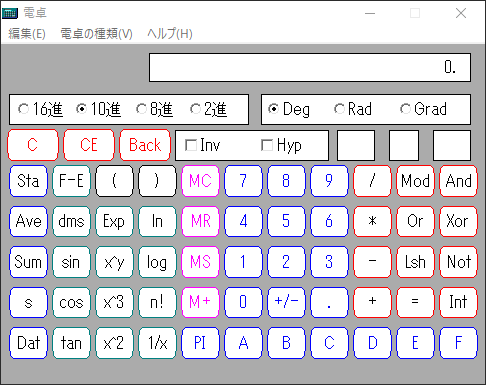
winevdm.exe CALC.EXE
The same winevdm.exe command path can also launch DOS executables in a DOS emulator-like manner. Use the VDMDOSVER environment variable to set the DOS version.
DOS emulation is incomplete. For DOS workloads that need fuller compatibility, choose DOSBox or MS-DOS Player.
Task-based comparison
| Reader task | winevdm path | Documented note |
|---|---|---|
| Run an older Windows program | otvdm.exe or otvdmw.exe | Win16 binaries can be executed directly after installation. |
| Run a 16-bit installer | install.inf | 64-bit Windows can start an alternative installer which is not 16-bit when it detects a 16-bit installer. |
| Preserve a settings file location | Redirected %WINDIR% path | Some Win16 programs save settings in %WINDIR%<filename>.ini; recent Windows does not allow that save location, so winevdm redirects it. |
| Run a DOS executable | winevdm.exe in a DOS-emulator-like mode | DOS emulation is incomplete; DOSBox or MS-DOS Player are recommended. |
| Rebuild the project | Visual Studio 2017 or cmake | Build paths are separate from runtime paths. |
Internal architecture notes
The program contains an emulator and compatibility layer rather than a single launcher. One documented reason for a CPU Emulator is that 64-bit Windows cannot modify LDT because NtSetInformationProcess(,ProcessLdtInformation,,) always returns error.
- CPU Emulator.
- wine based Win16 to Win32 conversion codes.
- Relay routines from 16-bit to 32-bit are autogenerated by convspec.
- DOS emulation for Win16.
- 16-bit <=> native HANDLE conversion.
- It includes compatibility-problem fixing work: fix compatibility problems, fix compatibility problems.
A sample conversion function is:
BOOL16   WINAPI   DestroyWindow16 (  HWND16   hwnd  )
{
return   DestroyWindow (  WIN_Handle32 ( hwnd ) );
}
A sample autogenerated relay line is:
53 pascal - ret16 DestroyWindow ( word ) DestroyWindow16
Runtime control file
Configuration is stored in otvdm.ini.
Installer integration mechanism
The project uses a Windows installer behavior: when 64-bit Windows sees a 16-bit installer, it can launch an alternative installer that is not 16-bit.
%WINDIR% settings relocation
Some Win16 programs try to save settings to %WINDIR%<filename>.ini. In recent Windows versions, saving to %WINDIR% is not allowed, so winevdm redirects the save path.
IDE rebuild path
- Install Visual Studio 2017.
- Edit PropertySheet.props.
- Compile.
Repository build path
git clone https://github.com/otya128/winevdm.git
cd winevdm
mkdir build
cd build
cmake ..
make
Common misconceptions
- Myth: winevdm is a full DOS emulator. Reality: DOS emulation is incomplete, and DOSBox or MS-DOS Player are recommended for DOS coverage.
- Myth: installation is permanent after the first use. Reality: if Windows Update initializes the registry, the installation step must be repeated.
- Myth: all legacy settings files can still be written to %WINDIR%. Reality: saving to %WINDIR% is not allowed in recent Windows, so redirection is needed.
- Myth: missing VCRUNTIME140.dll is an application bug alone. Reality: the documented fix is to install Microsoft Visual C++ Redistributable for Visual Studio 2017 (32-bit).
FAQ
- What is winevdm for? It allows programs for Windows 1.x, Windows 2.x, Windows 3.0, and Windows 3.1 to run on 64-bit Windows by handling Win16 binaries.
- Which executable names matter at runtime? otvdm.exe and otvdmw.exe are used for loading Win16 programs; winevdm.exe is the process form used on the command line.
- Where do settings live? See otvdm.ini.
- How do I remove the integration? Run uninstall.reg.
- What build tools appear in the material? Visual Studio 2017, cmake, git, and github.com are referenced.
Action recommendations
- For everyday Win16 software use, install through install.inf, then use otvdm.exe or otvdmw.exe.
- For installer issues, use the install.inf mechanism rather than expecting the 16-bit installer path to behave like a normal 32-bit installer.
- For settings-save failures, remember the %WINDIR% restriction and that winevdm provides redirection.
- For DOS executables, switch to DOSBox or MS-DOS Player when the task depends on complete DOS behavior.
- For rebuilding from source, pick Visual Studio 2017 for the IDE path or cmake for the repository path.
Data citation
The guide is based on the winevdm material and preserves the cited facts: Windows 1.x, Windows 2.x, Windows 3.0, Windows 3.1, Win16, Win32, 64-bit, 16-bit, 32-bit, otvdm.exe, otvdmw.exe, winevdm.exe, install.inf, Windows Update, Microsoft Visual C++ Redistributable for Visual Studio 2017, Visual Studio, cmake, git, github.com, wine, DOSBox, MS-DOS Player, 53, install, and 2017.