
Software Review: Trimble Connect Scheduling Puts Real-Time AI on the Gantt Chart — Worth Piloting?
By Daniel Lopez · Software desk, MyTechDailyNews
Short answer: no, it does not re-plan your job by itself. The capability Trimble introduced at the Trimble Dimensions User Conference watches live project data, scores schedule risk, and proposes edits that a person approves before anything moves. Propose-don't-apply is the whole story here, and that is why I would pilot it on one active job before anyone nears a master baseline.
Picture the usual Monday morning. A concrete pour slips because a submittal sat unanswered, a crane window shifts with the forecast, and the crew's three-week look-ahead is a spreadsheet copy nobody reconciled with the master since Friday. That gap — not the absence of a Gantt chart — is where schedules rot. The pitch with this release is that the gap can be monitored continuously instead of hand-audited every week.
What Trimble actually put on the market
What launched is an AI-assisted view-and-update layer inside Trimble Connect, not a separate planning suite you must migrate your whole department into. The master schedule remains the master; the engine sits above it and reads what is already flowing through the platform.
Concretely, the tool links the master schedule with live project data such as look-aheads, RFIs, weather forecasts, daily reports and submittals. On the platform side the agentic planning engine pulls from the Trimble Connect common data environment and from Trimble Connect Project Management records, compares current conditions against historical patterns, flags risk, and suggests adjustments for review before they are applied.
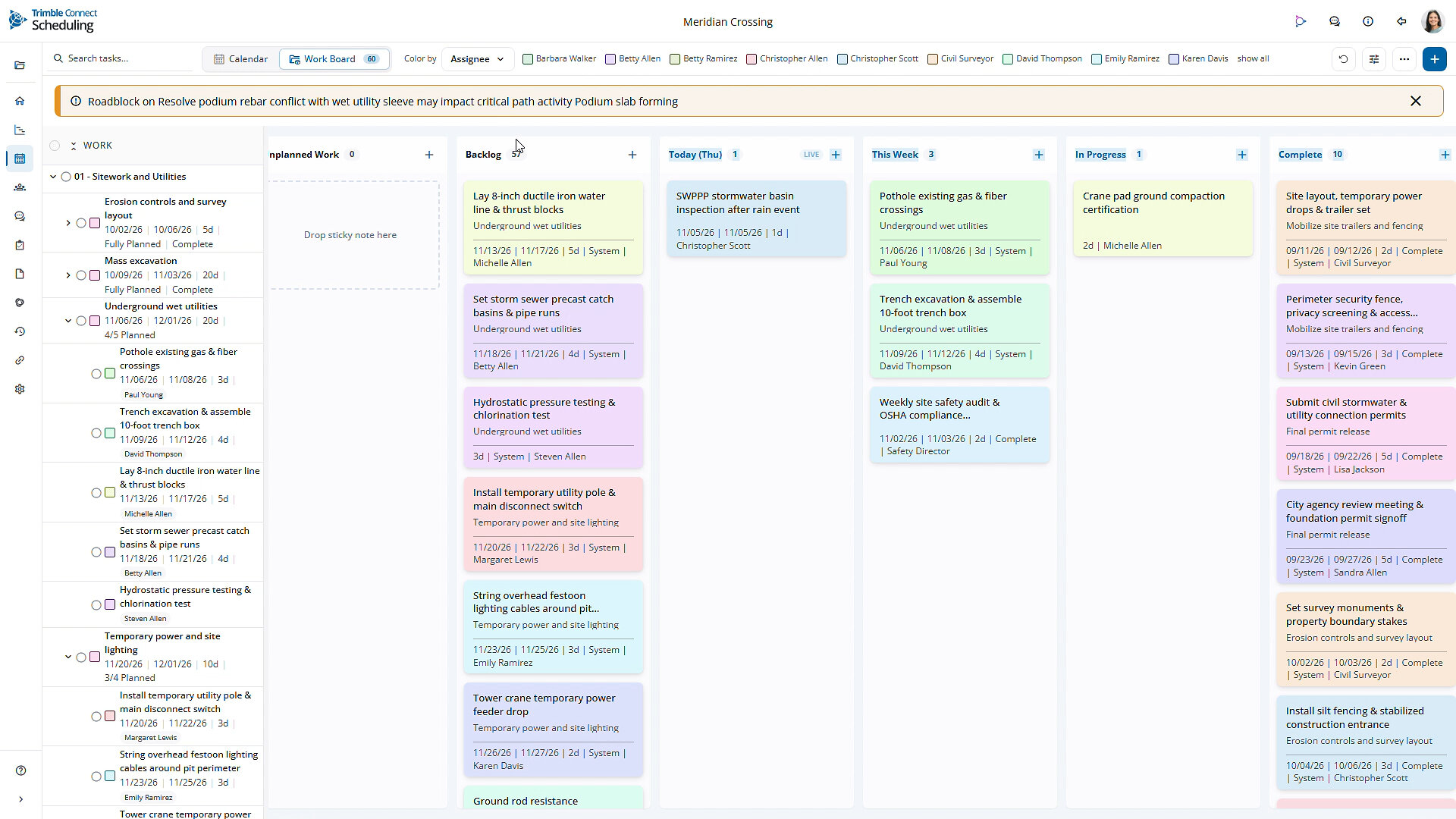
Fig: the value proposition in one line — multiple project data sources reviewed continuously so a centralised schedule can be corrected while there is still float left to spend.
The capability list, in my own words and ranked by how much it actually changes my day:
- Risk keeps being recalculated. BCF topics, RFIs and weather feeds are read as inputs to a live risk score rather than as separate inboxes.
- Slips get a remedy attached. Conflicts such as an unanswered RFI or a weather window are paired with options like float use or activity resequencing.
- Field and master finally share one picture. Jobsite look-ahead tasks are tied to the master Gantt, so the crew view and the project view stop drifting apart.
- Your existing plan still counts. Contractors can build schedules in the tool or import from Primavera P6, MS Project and similar products while keeping logic and baselines.
- More seats at one table. Field leaders, project managers, schedulers, estimators and executives review the same scheduling state.
- The model is construction-specific. It is trained on Trimble construction project data rather than generic text.
Why the timing matters more than the feature list
Because the failure this targets is data latency, and project teams only recently have enough of their job data living in one place for latency to be watchable.
Crew availability, late deliveries, change orders, equipment problems and weather routinely move a schedule, and most offices still absorb that churn with spreadsheets, whiteboards, email and text threads. That fragmentation produces version mismatches and kills early risk detection. It is also not a small problem: a 2024 peer-reviewed analysis of project records reported that 52.17% of projects suffered time overruns, with growth ranging from 24.4% to 514.71% (ScienceDirect), while a white paper on the true cost of project delay treats 20–30% schedule growth as the ordinary case (ceacisp.org). Anything that shortens the distance between a field event and a master-schedule edit is attacking that number directly.
The vendor-side evidence for why this arrived now is that contractors were already in the loop. Over the past several months, contractors used the system to support schedule organisation and communication, which is how the suggestion format got shaped. The same conference also made the prerequisite obvious: JE Dunn CIO John Jacobs joined the opening stage to say "we've embraced Trimble end-to-end and it's changed everything," with the company reporting zero rework cost year-to-date for 2025 (trimble.com blog). Read carefully, that is a warning as much as a testimonial: an AI that reads your project data only earns useful answers if the data is already single-sourced.
One trend note I keep coming back to. On Trimble's transportation side, the company publishes concrete ROI arithmetic for its AI features — its TMT Fleet Maintenance AI Invoice Scanning reportedly saved more than 136,000 minutes across 19,500 invoices versus manual entry (unite.ai). No equivalent measured figure has been published for scheduling yet, which tells me this release is earlier in its evidence cycle than the marketing suggests.
How I would run a 30-day test
- Import the current plan once from Primavera P6 and once from MS Project, then diff imported logic, calendars and baselines against the source before trusting a single suggestion. Oracle's own exchange documentation shows that baseline and scenario fidelity changes depending on whether you move data as XML or XER (Oracle Primavera Cloud docs) — so choose the format deliberately, not by habit.
- Pick a job where field data already lands in the platform. If daily reports arrive as email attachments, the engine has nothing to read and your pilot will look like a failure of the tool.
- Run risk monitoring for three weeks and log every suggestion with an accepted or rejected tick. That log is your false-positive rate, and nobody has published one.
- Measure only two things: hours between a field event and the master update, and the count of version mismatches caught before they reached the field.
- Write the approval rule down first — which role may accept a resequencing, who owns a rejected suggestion, what happens at the contract-change boundary. My broader point on this is in the piece on whether an agent needs its own permission map.
- Only then decide whether the look-ahead-to-master link can retire the spreadsheet.
Old workflow versus the new flow
| Question | Spreadsheets, whiteboards, texts | With Trimble Connect Scheduling |
|---|---|---|
| Where risk first appears | In a weekly meeting, after someone notices | In a live score built from BCF topics, RFIs and weather |
| Who touches the master | One scheduler, manually, often late | Proposals generated for a named reviewer to approve |
| Look-ahead vs master | Two documents, two truths | Linked, so jobsite work and project tracking align |
| Existing planning files | Rekeyed by hand | Imported from Primavera P6 or MS Project with logic and baselines intact |
| What still breaks | Everything is manual | Anything not captured in the platform stays invisible to the engine |
Shortcomings: five things the launch leaves open
- No published pricing or packaging. There is no stated licence tier, add-on cost or minimum platform commitment, so the honest answer to "what does it cost" is: ask your Trimble account team.
- No accuracy numbers. Suggestion quality, false-positive rate and how often a proposed resequencing survive review are all unreported. Judge these yourself in the pilot log from step 3.
- It inherits your data hygiene. A missed RFI status or a stale daily report becomes a wrong risk assessment, and the wrong assessment arrives faster than a human one would.
- Weather is an input, not a promise. Forecast feeds are probabilistic; teams that treat a weather-driven suggestion as fact will re-plan twice.
- Access is narrow for now. General contractors and subcontractors across construction sectors in North America can reach it — owner-side and international users are outside the first window.
Four misconceptions I keep seeing in coverage
- "AI updates the schedule automatically." It does not. Adjustments are proposed for review before they are applied.
- "This replaces the scheduler." The reviewer role gets more important, not less, because every accepted change is a human decision on record.
- "Import and you are live." Import moves logic and baselines; it does not move your field reporting discipline.
- "Real-time means real-time truth." It means real-time reads of whatever your teams actually log in the platform.
My verdict: pilot it where the data already lives, wait where it does not
If your jobsite daily reports, RFIs and submittals already run through the platform, this is a low-regret pilot: the marginal work is configuring review rules, and the return is measured in hours of early warning. If your project truth still lives in email and a shared drive, buy nothing yet — fix capture first, then look at the wider Trimble Connect AI layer I walked through earlier, and let your pilot start one quarter later.
Action list before you schedule a demo: name the two metrics from step 4, name the reviewer who owns approvals, and ask the vendor for one reference job that has run the flow long enough to report accepted versus rejected suggestions. Full product detail is published on trimble.com.
Trimble Connect Scheduling FAQ
Does the AI change my schedule without asking?
No. It monitors conditions, assesses risk and suggests adjustments for review; the change is applied only after someone approves it.
Can I keep working in Primavera P6 or MS Project?
Yes. Schedules can be imported from Primavera P6, MS Project and other tools while preserving logic and baselines, or built and revised inside the tool.
Which data sources feed the risk engine?
Look-aheads, RFIs, weather forecasts, daily reports and submittals, read from the Trimble Connect common data environment and Trimble Connect Project Management, including BCF topics.
Who can use it today?
General contractors and subcontractors across construction sectors in North America.
Sources
- Trimble product page — trimble.com
- ScienceDirect (2024), time-overrun analysis of construction project records
- CEACISP white paper, "The True Cost of Project Delay"
- Oracle Primavera Cloud, Import/Export to P6 documentation (XML versus XER behaviour)
- Trimble blog, JE Dunn technology adoption at Dimensions
- unite.ai, Trimble Insight 2026 AI announcements and invoice-scanning figures