
Quick Share SDK Inside Your Apps: A Hands-On Guide to In-App File Sharing on Android and iOS
Anyone who has tried to move a 40 MB video from an Android handset to a friend's iPhone knows the two annoying parts: the jump out of the app you were already using, and the wait while a cloud link is built, copied and eventually expires. Google's fix is to pull the transfer path out of the system sheet and drop it into the app itself. The headline piece is the Quick Share SDK, a developer kit scheduled for the first half of 2027 that lets third-party apps on Android and iOS call peer-to-peer sharing directly. Below is the practical version of that story: the share flow before and after, the integration steps a developer faces, a compatibility checklist you can run today, and the privacy settings worth tightening while you still have time.
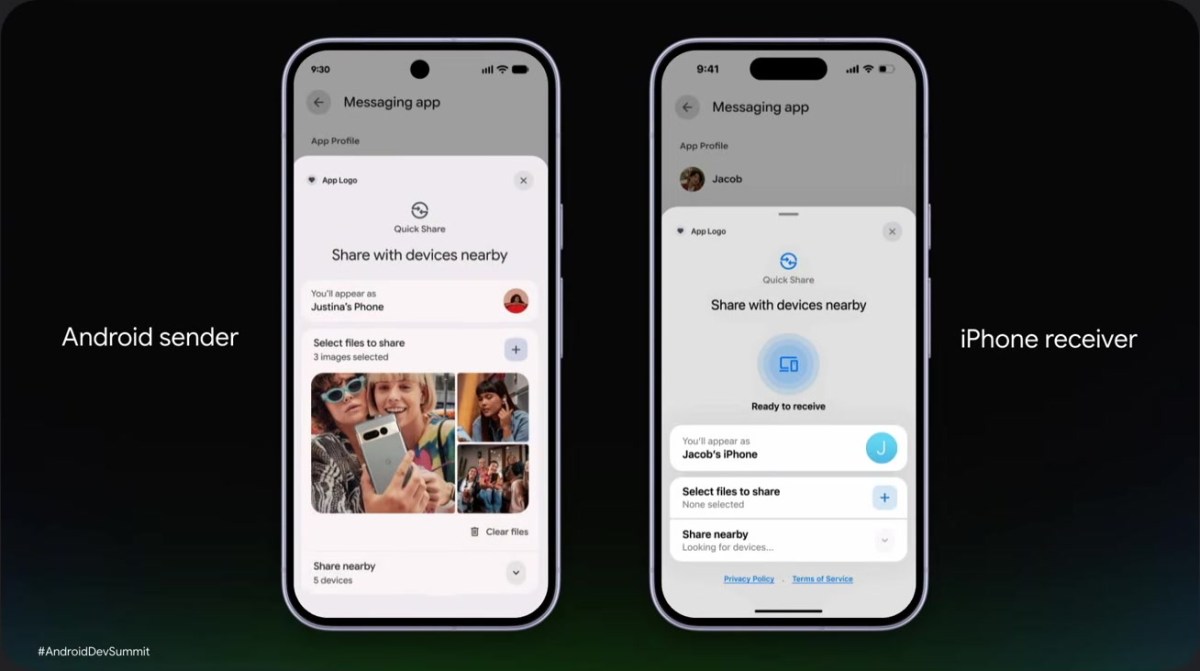
Three releases in a row, and where the kit fits
The developer kit is the third move in a quick sequence. Over the past year, Quick Share first opened interoperability with Apple's AirDrop on Pixel hardware, and that bridge then widened to more Android devices. This August, Google shipped Tap to Share, which removes the discovery step: you bring the tops of two unlocked phones together, NFC performs the handshake and Wi‑Fi Direct carries the bulk of the file, as Android Authority and Lifehacker both described when the feature reached the Pixel line. The Quick Share SDK, presented at Google's developer event and first reported by 9to5Google on 2 November 2026, is the instalment that reaches the apps on your home screen.
What changes in the share flow
| Stage | How it works today | With an app built on the SDK |
|---|---|---|
| Starting a transfer | Leave the app, open the system share sheet, then a full-screen Quick Share view | The transfer is called from inside the app, no handoff to system UI |
| Picking the target | Full-screen picker replaces the app you were in | A bottom sheet slides up over the app and shows a preview of the outgoing files |
| Content marked sensitive | Thumbnails render at full size on an unlocked screen in public | The app can flag items as sensitive so previews are hidden automatically |
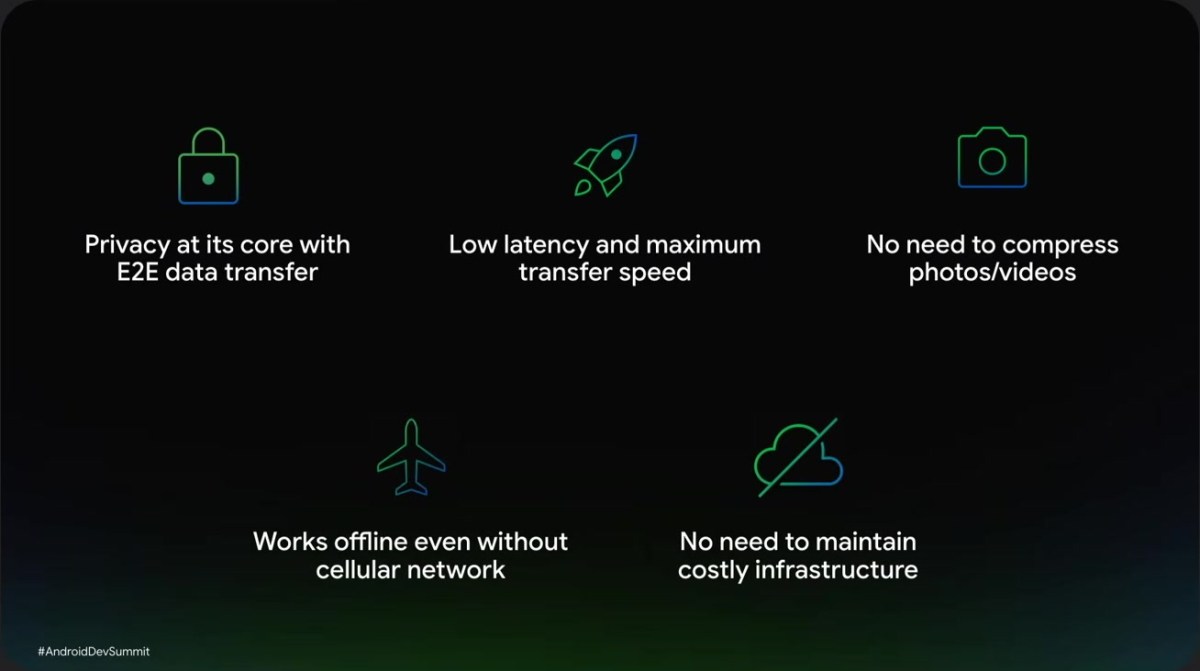
| Transport | Local path between two devices, end-to-end encrypted | Same local path, plus automatic hotspot creation and Wi‑Fi Direct on supported hardware |
| Photo and video quality | Original resolution, no cloud round trip | Unchanged: no compression, and nothing consumes mobile data, even offline |
| Receiving side | The receiving app usually has to be open | Paired with Tap to Share, the target app can launch itself once the file lands |
Google's own framing is that this turns Quick Share from an operating-system capability into an ecosystem one. Nothing in the announcement, however, means the button appears in your favourite app automatically: the SDK is the plumbing, and adoption is still a per-app decision.
For developers: about 20 lines of code, in order
Google describes the integration as deliberately shallow. The work breaks down into four calls:
- Initialise a QuickShareClient inside the app's sharing entry point.
- Attach the files or media the user selected.
- Launch the bottom-sheet UI, which carries previews and a sensitive-content toggle.
- Subscribe to transfer events through a Kotlin Flow so the app can show progress, completion or failure.
Two points that matter for planning, not just for coding. First, no extra server infrastructure is required: the payload travels device to device, so teams that currently run a relay or generate expiring links can retire that cost for nearby transfers. Second, Google has confirmed an iOS build of the kit, which puts iPhone-side apps in the same picture instead of leaving them as receivers only. Treat both as targets rather than shipping facts: the timeline Google gave is the first half of 2027, and a public API surface with a version number and support policy is what tells you it is genuinely safe to build against.
For users: the checklist to run now
- Radio requirements. Quick Share needs Bluetooth and Wi-Fi active on both ends; Wi‑Fi Direct is what produces the fast, low-latency transfer, and it is only available on hardware that supports it.
- Windows side. Google's support documentation requires a 64-bit edition of Windows 10 or later, with Bluetooth and Wi-Fi present; machines running Windows on ARM are not supported, so an ARM laptop is the most common silent failure.
- ChromeOS and older Android. The feature is built into ChromeOS and into recent Android releases; older or heavily modified vendor builds may expose a differently named settings entry, which is the first thing to check when a device never appears in the picker.
- iPhone today. If you send from an Android phone to an iPhone now, the AirDrop visibility on the Apple device has to be set to "Everyone for 10 minutes", and the receiver must tap Accept. That step is the current equivalent of what the SDK is meant to smooth over.
- Offline transfers. Because nothing goes through a cloud service, transfers complete on a plane, in a subway tunnel or with mobile data switched off.
- Volume limits. Nearby sharing is bounded by radio range and device performance, not by an upload quota — but vendor builds of Quick Share may cap simultaneous recipients, so check before moving a full camera roll.
Permissions and privacy: tighten these three settings
Nearby sharing is convenient precisely because it skips pairing, and that is also why it has an attack surface. A systematic study of AirDrop and Quick Share published by researchers at the CISPA Helmholtz Center on 25 June 2026 (arXiv:2606.26967) reported six weaknesses spanning iOS, macOS, Android and Windows, in protocols the authors estimated run on more than five billion devices. The findings include crashes in the sharing service and a fixed defect in Google's Windows client, with the root cause being the always-listening background process that accepts pre-authentication traffic within radio range. Coverage by Help Net Security and The Hacker News confirmed that the flaws were reported to the vendors and that the Windows issue was patched.
Translate that into three settings checks:
- Never leave discovery permanently open. Set visibility to contacts or to yourself, and use a timed "everyone" window only for the minute you are actually transferring — a direction Google itself is moving in, since 9to5Google reported in February 2026 that the always-on "Everyone" mode is being removed from Android, bringing it in line with the iPhone behaviour.
- Accept only transfers you expected. Every send still needs a tap on the receiving device, so an unsolicited prompt is the signal to switch visibility off, not to accept "to see what it is".
- Keep the desktop client updated. The Windows app is where the patched defect sat, so treat it like any other network-facing utility with a regular update cadence.
One reassuring detail from Google's earlier security write-up on the AirDrop bridge is worth carrying into the SDK era: the company said the cross-platform code path was written in the memory-safe language Rust and externally penetration-tested by NetSPI. That is a design posture, not a guarantee, but it is the right expectation to hold for the developer kit as well. On the app side, remember that the sensitive-content flag only hides a preview — it does not lock the file once it lands, so it is a shoulder-surfing measure, not access control.
Four misconceptions to correct now
- "SDK announced means it works in my apps." It does not. Availability depends on each developer adopting the Quick Share SDK after release.
- "Local, encrypted means the file is stored nowhere." It means it never passes through a server; the copy that arrives on the receiving device is still an ordinary file the recipient can keep or forward.
- "Wi‑Fi Direct is the same as tethering a hotspot." The kit creates the connection automatically between the two devices; it is a peer link, not a route to the internet, and it does not spend your data allowance.
- "No compression means every format arrives identical." Google's statement covers the transport not re-encoding photos and videos; individual apps remain free to change what they hand to the sharing layer.
FAQ
When can I expect in-app sharing in the apps I use?
The kit is planned for the first half of 2027. Real availability follows app updates, so expect a staggered rollout across the months after that rather than a single switch-over date.
Does my current Quick Share setup need changing?
No. Transfers already run over the local path between two devices with end-to-end encryption, and the existing share sheet keeps working. The change is where the button lives, not how bytes move.
Will iPhone apps be second-class receivers?
Google has said it will ship an iOS version, so an iPhone app can initiate a share too. Whether Apple's App Review process or vendor policies add friction is not something Google has addressed.
Is Tap to Share required for the kit?
No, but the two combine well: with Tap to Share involved, the receiving app can open itself after the transfer finishes, which removes the last manual step on the far end.
Action plan
- This week. Audit visibility on every phone and PC in your household or fleet, confirm the Windows machines are 64-bit and not ARM, and update the desktop client.
- Before your next trip. Test one offline transfer of a large photo between two devices, so you know the speed you get in a real environment and can stop paying a cloud bridge for the same job.
- This quarter (if you ship software). Identify the one flow where users most often leave your app to send a file — exports, receipts, image uploads to a colleague — and put it on the list for the first release after the SDK goes stable.
- 2027. Re-check device coverage rather than app promises. Quick Share already runs on more than 3 billion devices across Android, ChromeOS and Windows; the value of the Quick Share SDK depends entirely on how quickly that installed base meets apps that use it.
The practical takeaway for MyTechDailyNews readers is smaller than the headline but useful: nothing you do today breaks, the transfer engine is unchanged, and the win is measured in taps saved and servers not built. Fix your visibility settings now, keep the desktop client patched, and treat the app-level share panel as a 2027 feature that you should evaluate per app, not assume exists.