
MyTechDailyNews Software Guide: partyline for Reticulum — Encrypted Voice Rooms, Codec Profiles, and 30-Second Server Setup

For readers who evaluate communication software from a daily-use perspective, partyline is most useful as a Reticulum-native group voice application built on LXST and inspired by Mumble. The practical claim is straightforward: it provides encrypted realtime group voice and audio over any Reticulum transport capable of >6 kilobits per second, while an easy to host lightweight server and protocol lets an operator spin up a partyline server in under 30 seconds. This MyTechDailyNews Software guide reshapes the project into installation decisions, permission controls, codec selection, terminal workflows, systemd deployment, broadcast rooms, and slow-link push to talk room configuration.
Software positioning and core capabilities
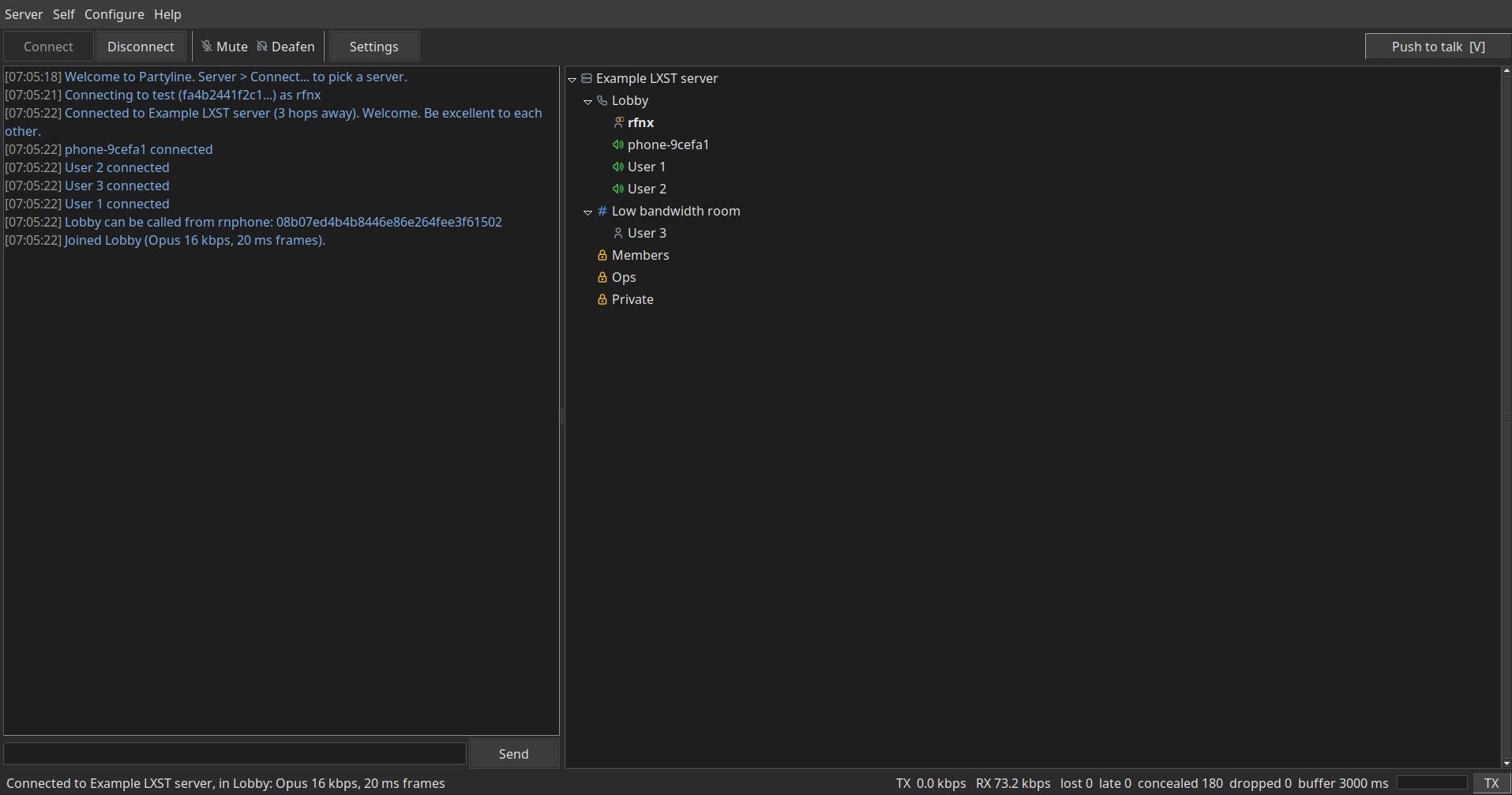
partyline sits in the niche where Reticulum transport, LXST audio protocol, and room-based group voice meet. For software users, the value is not broad messaging, but real-time voice with server-controlled rooms, dial-in compatibility, and profile choices that can stretch from fast links to very slow ones.
- Encrypted realtime group voice and audio over any Reticulum transport capable of >6 kilobits per second.
- An easy to host lightweight server and protocol lets an operator spin up a partyline server in under 30 seconds.
- Per room access and channel control is available, covering open rooms, identified users only, allow lists of identity hashes, or a password; servers can also require a password or an allow list.
- Dial-in can let rnphone and other LXST clients such as Sideband and MeshChatX call the server and land in a room too, when enabled.
- Each room can have its own LXST codec, configured by the server, from Opus for fast links to Codec2 down to 700 bps for slow ones.
- A GUI and terminal client provide multiple language support.
Compatibility checklist before installing
Use this checklist as the first gate for desktop clients, laptops, or server hosts where software compatibility affects the rollout.
- Requires Python 3.11 or newer.
- Install with pip install partyline.
- For a system wide push to talk key, add the optional extra with pip install 'partyline[hotkeys]'.
- The graphical client uses Tk, which pip cannot install. On most OS/Distros it may already be installed by the system.
- If Tk is not already present on Debian or Ubuntu run sudo apt install python3-tk, and on Fedora run sudo dnf install python3-tkinter.
- Source installation requires Python 3.11 or newer, Reticulum, and LXST.
Step-by-step installation paths
There are two software deployment routes: a normal pip install and a source install. The source route is relevant when you need to inspect the repository or install from an RNS-based source instead of PyPI-style distribution.
Pip path for standard installs
- Confirm Python 3.11 or newer is available.
- Run pip install partyline for the base package.
- Run pip install 'partyline[hotkeys]' only if you want a system wide push to talk key.
- If you plan to use the graphical client, verify Tk separately because pip cannot install it.
Source path from repository
- Clone https://github.com/RFnexus/partyline.
- Enter partyline and run pip install .
- Alternatively, install via rngit with git clone rns://4cf8a0651c4d73cacd0f93ac1d95e80a/public/partyline.
- For a system wide push to talk key, install the optional extra with pip install '.[hotkeys]'.
- This installs three commands: partyline, partyline-server and partyline-client.
Client operation: GUI, server browser, and terminal control
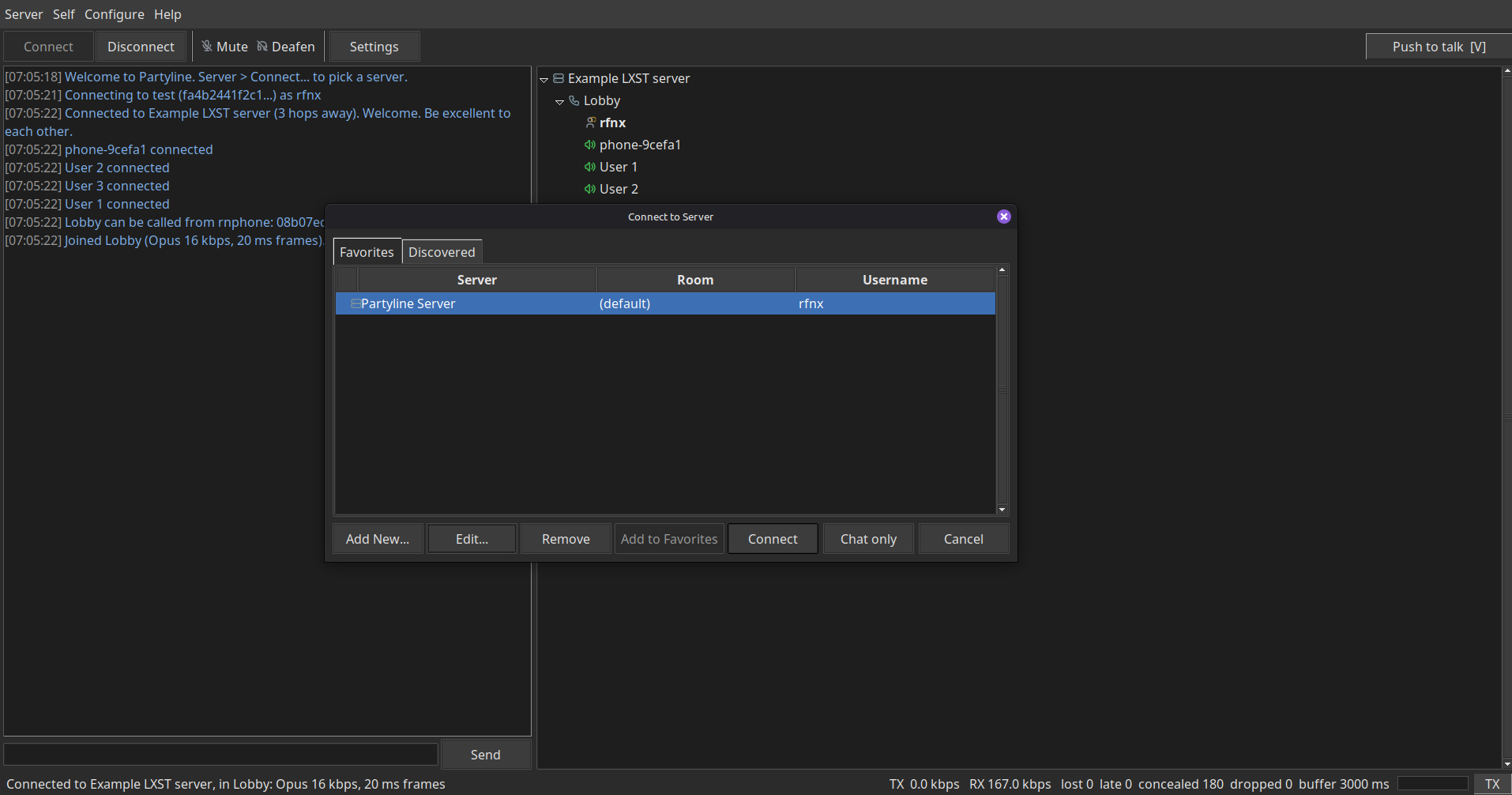
Start the GUI client with partyline. Connect opens the server browser. Add a server by its hash, or use the server browser to find discovered servers from announces. Double click a room to join it. Settings has the audio devices, transmit mode, push to talk key, and UI appearance options.
Terminal client workflow
Use partyline-client HASH --name Bob --room Lobby.
Commands are /join, /say, /poke, /who, /mute, and /deaf. Type /ptt to toggle push to talk.
Operators can also use /kick, /ban, /smute, /op, and /move.
Server startup, room configuration, and dial-in behavior
Start a server with partyline-server --name 'My server' --profile opus-high. The server prints its destination hash for clients and, with dial-in enabled, the number rnphone users call if configured for rooms. For rooms, access lists, operators, a server password and dial-in, copy server_example.json and start with partyline-server --config server.json.
Available --profile codecs for rooms:
| Profile | Mode | Bitrate |
|---|---|---|
| opus-high | Opus voice | 16 kbps |
| opus-med | Opus voice | 8 kbps |
| opus-low | Opus voice | 6 kbps |
| c2-3200 | Codec2 | 3200 bps |
| c2-2400 | Codec2 | 2400 bps |
| c2-1200 | Codec2 | 1200 bps |
| c2-700 | Codec2 | 700 bps |
| music-low | Opus music | 14 kbps |
| music-med | Opus music | 28 kbps |
| music-high | Opus music | 56 kbps |
opus-high-med-low and the Codec2 modes are meant for voice, and music-high-med-low is meant for streaming music or broadcasting to a room. As a rule, use the highest bitrate your link can carry.
Data reference: capacity and codec numbers used in this guide
For software evaluation, the useful figures are not vendor background but the thresholds and bitrate choices that determine whether a room is stable. The key data points are listed below.
- General transport threshold: >6 kilobits per second.
- Lightweight server startup target: under 30 seconds.
- Opus voice profile values: 16 kbps, 8 kbps, and 6 kbps.
- Codec2 voice profile values: 3200 bps, 2400 bps, 1200 bps, and 700 bps.
- Opus music profile values: 14 kbps, 28 kbps, and 56 kbps.
- Slow-link PTT room threshold: more than a steady ~3.5 kbps throughput.
- Documented ptt_jitter_ms example in the configuration table: 9000.
Deploy as a systemd service for long-running servers
To install as a systemd unit, find the server command with which partyline-server, then create /etc/systemd/system/partyline.service. This path is useful for IT support staff and self-hosters who need the server to start after boot and restart after failure.
- In the service file, use [Unit], Description=Partyline voice server, After=network-online.target, and Wants=network-online.target.
- In [Service], use Type=simple, User=partyline, ExecStart=/usr/local/bin/partyline-server --config /home/partyline/server.json, and Restart=on-failure.
- In [Install], use WantedBy=multi-user.target.
- Then run sudo systemctl daemon-reload and sudo systemctl enable --now partyline.
Broadcast rooms, music profiles, and example bot
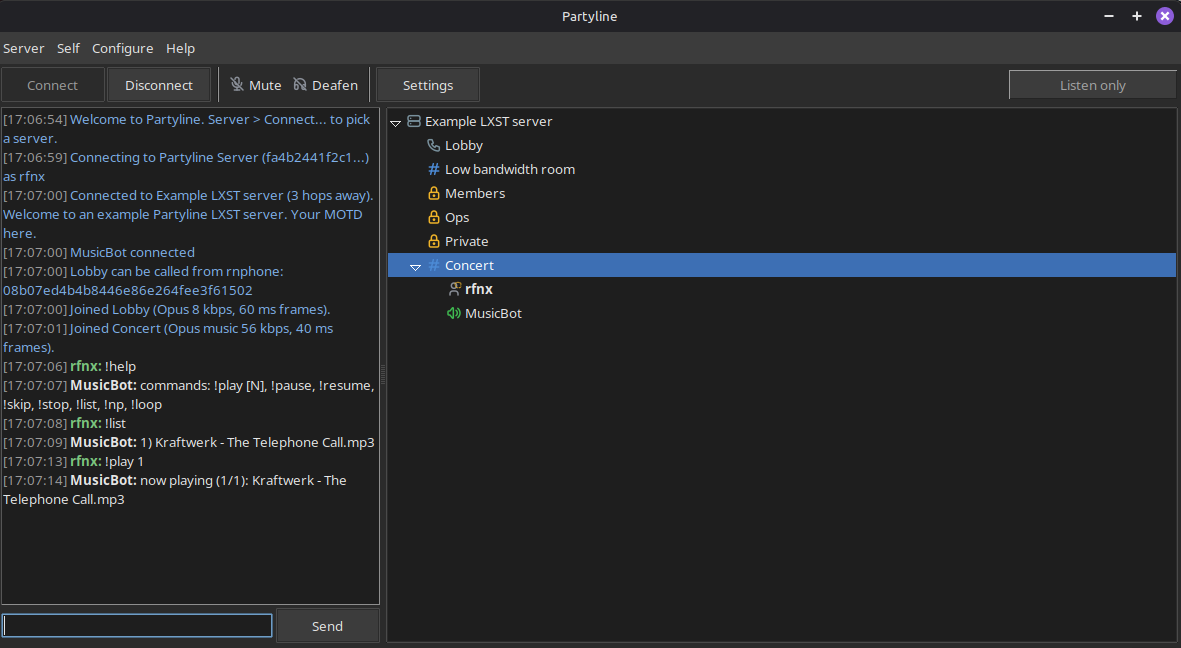
Server operators can also configure broadcast-only rooms for high quality music and audio using the LXST Opus CELT profiles. The options are music-high, music-med, and music-low. Music rooms are a special room type where only the listed identities can send audio. Add their identity hash, separated by commas, in music.
| Field | Example |
|---|---|
| name | Broadcast |
| profile | music-med |
| music | 0123456789abcdef0123456789abcdef |
| description | Music/broadcast room. Only listed identities may talk. Uses LXSTs Opus CELT profile |
Music Bot
An example music bot can be found under bots/music_bot.py. When partyline is installed with pip, run it with python3 -m partyline.bots.music_bot.
Push to talk rooms for slow links and constrained transports
PTT, or slow-mode rooms, are rooms designed to work over slower links such as LoRa, bare copper wire bitbashing, and packet radio. Anything with more than a steady ~3.5 kbps throughput can use a PTT room. They can co-exist with regular rooms in a partyline server, allowing both fast and slow clients to communicate over voice.
Unlike regular rooms there is a bit of latency. PTT rooms pack outgoing audio to fill the link's MTU, sending fewer, fuller packets instead of one frame per packet, and give every listener a larger receive jitter buffer to smooth out bursty arrivals over radio media such as LoRa.
Mark any room push to talk with ptt true. Optionally set ptt_jitter_ms to change the buffer depth. It is recommended to use PTT rooms with the Codec2 profiles.
| Room | Profile | ptt | ptt_jitter_ms |
|---|---|---|---|
| LoRa 1200 | c2-1200 | true | not set |
| Packet Radio Net 700 | c2-700 | true | 9000 |
UI translation workflow for localization contributors
The .po files are located in partyline/locale/. To update a translation, change the msgstr line under its English msgid. To add a language, copy partyline.pot to a new .po file and add it to LANGUAGES in partyline/i18n.py. Run python partyline/locale/compile.py, then open a pull request with your changes or submit it via LXMF.
Project disclosures and credits
Kimi K3 third party hosted API was used for the following tasks: I18N localization and UI gettext() implementation, translation of UI elements and of eo, es, nl, and ru PO files, and misc debugging and creation of rnsconfig.py RNS helper utilities.
Reticulum and LXST by Mark Qvist.
Mumble. Great software that just works. The best UI is stolen UI
Tree, toolbar and application icons from Tabler Icons; sound effects from Kenney interface sounds; Tin can telephone drawing in the logo from openclipart.org.
FAQ: software users, admins, and compatibility questions
Do I need Reticulum and LXST to run partyline?
partyline is a group voice application for Reticulum, built on LXST. The source installation requirements also list Reticulum and LXST alongside Python 3.11 or newer.
Can partyline send encrypted voice over slow transports?
Regular encrypted realtime group voice and audio can use any Reticulum transport capable of >6 kilobits per second. For slower conditions, PTT rooms are designed to work when there is more than a steady ~3.5 kbps throughput, and Codec2 profiles go down to 700 bps.
Is dial-in automatic for every server?
No. Dial-in can let rnphone and other LXST clients such as Sideband and MeshChatX call the server and land in a room too, when enabled. The server also prints the number rnphone users call only if dial-in is enabled and configured for rooms.
Can the graphical client work if Tk is missing?
The graphical client uses Tk, which pip cannot install. On most OS/Distros it may already be installed by the system; otherwise, on Debian or Ubuntu run sudo apt install python3-tk, and on Fedora run sudo dnf install python3-tkinter.
What is the difference between the GUI and terminal client?
The GUI provides the server browser, room join flow, and settings for audio devices, transmit mode, push to talk key, and UI appearance. The terminal client uses partyline-client HASH --name Bob --room Lobby and commands such as /join, /say, /poke, /who, /mute, and /deaf, while operators can also use /kick, /ban, /smute, /op, and /move.
Action recommendations for MyTechDailyNews readers
- Confirm the Reticulum transport is above >6 kilobits per second before using a regular room.
- Install Python 3.11 or newer first, then choose the pip path or the source path and verify that three commands are present: partyline, partyline-server and partyline-client.
- Use the GUI for server browsing and settings, or use partyline-client HASH --name Bob --room Lobby when you need a minimal terminal client.
- For a quick server test, start partyline-server --name 'My server' --profile opus-high, then move to server_example.json when you need rooms, access lists, operators, a server password and dial-in.
- For broadcast or music use, select music-high, music-med, or music-low and remember that music rooms restrict sending to listed identities.
- For LoRa, bare copper wire bitbashing, or packet radio, create a PTT room with ptt true and use Codec2 profiles such as c2-1200 or c2-700; adjust ptt_jitter_ms when smoothing is needed, with 9000 shown as a documented example.
- For production-like uptime, deploy as a systemd unit with ExecStart=/usr/local/bin/partyline-server --config /home/partyline/server.json, then run sudo systemctl daemon-reload and sudo systemctl enable --now partyline.
Common misconceptions to avoid
- 'Any Reticulum link works immediately.' The feature description is limited to any transport capable of >6 kilobits per second, and PTT rooms still require more than a steady ~3.5 kbps throughput.
- 'Fast setup means no configuration.' A lightweight server can start in under 30 seconds, but rooms, access lists, operators, server password, and dial-in depend on JSON configuration.
- 'Tk arrives with pip.' The graphical client uses Tk, which pip cannot install, so Debian or Ubuntu users may need python3-tk and Fedora users may need python3-tkinter.
- 'Music rooms are open to everyone.' Music rooms are a special room type where only the listed identities can send audio.
- 'PTT rooms behave exactly like regular rooms.' Unlike regular rooms there is a bit of latency, because PTT rooms pack outgoing audio to fill the link's MTU and give every listener a larger receive jitter buffer.
The MyTechDailyNews takeaway is that partyline is most compelling when you need encrypted group voice over Reticulum with software-level control over rooms, permissions, codecs, and server operation. Start by verifying the transport threshold, then use the profile table as your selection guide: Opus profiles for faster links, Codec2 profiles for constrained links, and music profiles only for broadcast or streaming use. If you are supporting users or operating a server, treat the JSON configuration, Tk availability, terminal commands, and systemd unit as the four compatibility checkpoints before deployment.