
Survival LLM Review: How a Free Local AI Assistant Keeps Working Without Internet on Mac and Windows
Most assistants on the market are thin clients: cut the connection and the product stops existing. Survival LLM takes the opposite route, and that is why it earns an install slot on a curious machine. It is a free, open-source desktop app that keeps both the language model and the reference library on local storage, then answers blackout food-safety, burn-care and water-purification questions while naming the sources it read. The installer is the small part — 212 MB on Mac, 25 MB on Windows — and the heavy payload arrives during first run, which is where every practical decision in this review sits. Below: the capabilities that matter, the memory-based model tiers, the disk and compatibility checklist, the setup path, and the privacy picture.
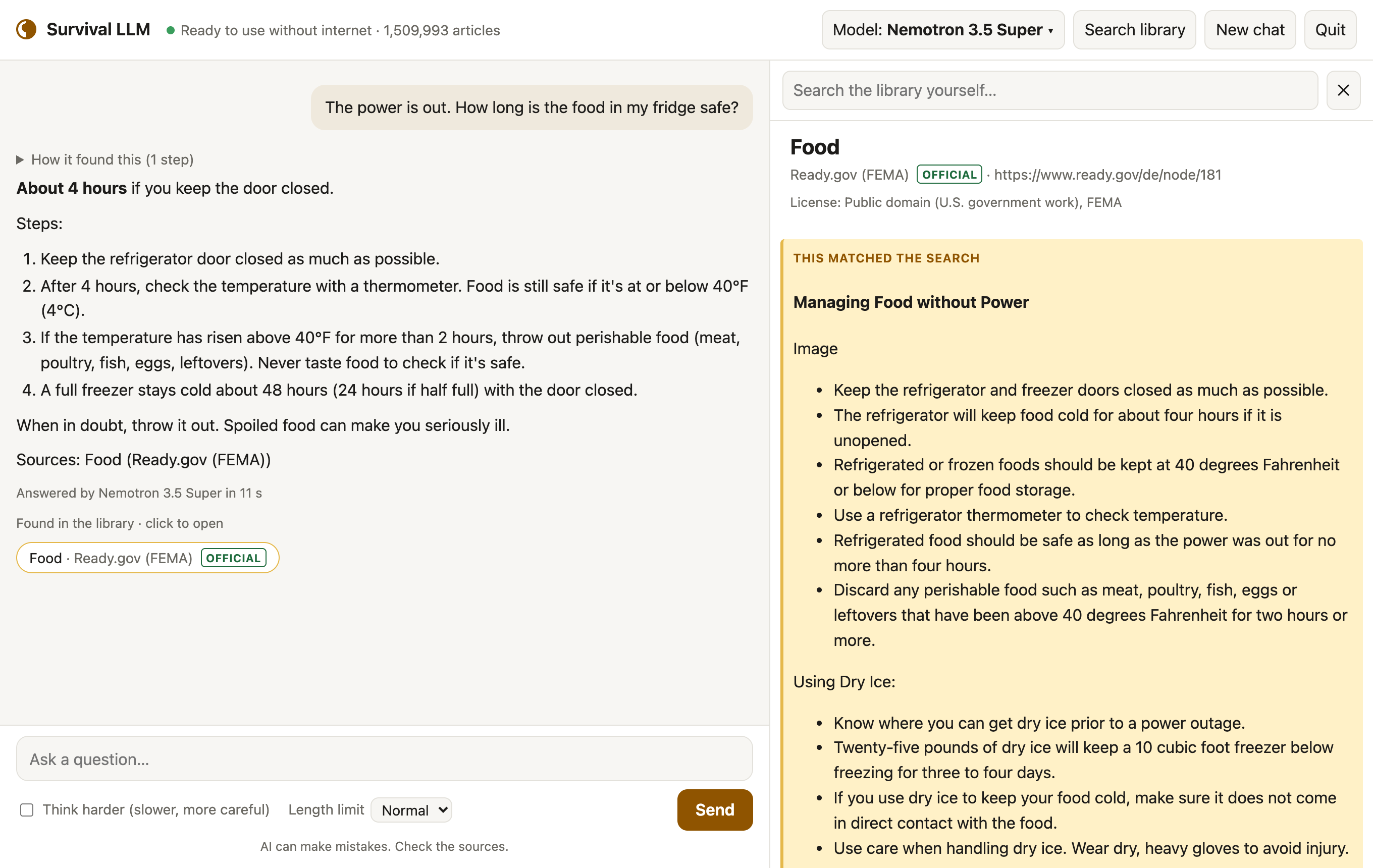
Three capabilities define the product
Local execution, offline by default
Because the model and the library are both stored on your computer, a prompt is processed on the machine and nothing you ask leaves it. The only moment a live connection is required is the initial download.
Sourcing you can audit
Every reply arrives with the list of articles it read; selecting one opens the article and highlights the exact passage used. That single design choice is what keeps the smaller, less accurate tiers defensible in real use.
Emergency-weighted content
The collection is not a mirror of the general web. It leans toward crisis reference: medical material, FEMA and CDC guidance, survival manuals, how-to and repair documentation, and about 930,000 Wikipedia articles.
Model tiers: the variable that decides quality
The application binary is identical everywhere. At launch it reads installed memory and pulls the model that fits, so more RAM means a smarter model — and a dramatically larger download. Treat the matrix below as the real buying decision between an older laptop and a roomy workstation.
| Your computer | Model the app assigns | Emergency test score | Model download |
|---|---|---|---|
| Mac with 128 GB or more memory | NVIDIA Nemotron 3.5 Super | 21 of 22 right | 80 GB |
| Mac with 32–96 GB | Qwen3.8 27B | 21 of 22 right | 18 GB |
| Windows PC with 32 GB or more | NVIDIA Nemotron 3.5 Lightning | 19 of 22 right | 25 GB |
| Mac or PC with 16–31 GB | IBM Granite 4.2 8B | 14 of 22 right | 6 GB |
The label "Right" in this scoring means the answer captured the main point of official guidance. Twenty-two blackout and first-aid prompts formed the question set, and the results were graded blind during testing on an earlier build of the library. Since smaller models slip more often, the interface always surfaces the source beside the answer — read it before acting on anything.
Storage, compatibility and time: the pre-install checklist
| Item | Figure to plan around |
|---|---|
| App installer — Mac | 212 MB |
| App installer — Windows | 25 MB |
| Library, full set | 9 GB download / 19 GB installed |
| Library without Wikipedia and iFixit | 1.3 GB download / 3 GB installed |
| Permanent free space to keep | the model's size plus 5 GB |
| Extra room during install | about 27 GB for the full library, 10 GB for the smaller one |
| Mac requirement | Apple Silicon Macs (M1 or newer) on macOS 14 Sonoma or newer |
| PC requirement | 64-bit Windows 10 or 11 |
| Setup window | 20 minutes to about 2½ hours |
| Actual interaction time | about 5 minutes |
Read that as a sizing exercise rather than a footnote. On the top Mac tier the model alone is 80 GB, so a machine in the 16–31 GB band that lands on IBM Granite 4.2 8B is being asked to do something categorically different from a 128 GB or more memory workstation running NVIDIA Nemotron 3.5 Super.
Install it in three steps, then go offline
Clicking is short and waiting is long: about 5 minutes of interaction inside a job that runs 20 minutes to about 2½ hours depending on hardware and line speed.
- Pull the Survival LLM package for Mac or Windows and unzip it. On Windows, right-click the archive and choose Extract All.
- Launch it — double-click Survival LLM on a Mac, or open the extracted folder and double-click Survival LLM.bat on Windows.
- Finish first-run setup in the app's own window while you are still online. It fetches the AI engine (already built into the Mac app), the model tier chosen for your memory, and the library; let all three complete before you disconnect.
Expect pushback from the operating system on the first open, because the app is not sold through an app store. On Mac, click Done at the warning, then open System Settings > Privacy & Security, scroll to the "Survival LLM was blocked" entry, click Open Anyway and confirm with your password — a one-time approval. On Windows, click More info and then Run anyway.
What is on the shelf
The reference set is stored as plain text taken from openly licensed material — some of it non-commercial-only — plus public-domain sources, all searchable in a fraction of a second:
- about 930,000 of Wikipedia's most-read articles
- WikiMed medical encyclopedia
- MedlinePlus, from the U.S. National Library of Medicine
- UK Medicines A to Z, public sector information
- WikEM emergency medicine
- Ready.gov (FEMA) emergency guides
- CDC travelers' health material
- U.S. military medicine and survival manuals
- micromort risk references: life tables and U.S. death rates
- wikiHow how-to guides
- iFixit repair guides
- Appropedia, covering appropriate technology
- Stack Exchange Q&A on home repair, cooking, gardening, the outdoors and ham radio
Licensing travels with the content: each article displays the license of its own source, and the full list with licenses ships with the app.
Permissions, privacy and your own documents
There is no account to create and no tracking layer. Questions never leave the computer, and once setup ends the app keeps running with the network switched off. You can extend the corpus with your own PDFs, Word documents, ebooks and notes — a generator manual or a household emergency plan, for instance — and the assistant searches them as well, while those files stay local. Maintenance is one click too: Check for updates at the bottom of the window installs a new version and keeps your models, library and personal files intact.
Power draw is the underrated constraint
A local model is at least honest about its cost. Measured on a MacBook Pro, generating an answer pulls about 100 W for 5 to 40 seconds per question, so a full battery yields roughly 100 to 300 answers before it is flat. That runs comfortably off a small generator or power station, but it reframes the app as a burst tool rather than an all-day chat companion.
Common misconceptions
- "Offline means frozen content." The app carries an updater — Check for updates — that installs a new version without wiping your models, library or files.
- "The biggest model can be trusted blind." Even the strongest tiers finished at 21 of 22 right, and the smallest at 14 of 22 right. Citation checking is the feature, not the fine print.
- "This is just another chatbot." Replies are anchored to specific local articles, with the passage actually used highlighted.
- "Local means closed." Your own PDFs, Word documents, ebooks and notes can join the searchable set with no upload step.
- "Any laptop qualifies." Apple Silicon Macs (M1 or newer) on macOS 14 Sonoma or newer, or 64-bit Windows 10 or 11, are the compatibility floor.
FAQ
When does it need internet?
Only during setup, while the AI engine, the model and the library download. After that it works fully offline.
How much free space should I reserve first?
Count the model's size plus 5 GB of permanent headroom, then add the transient install room: about 27 GB for the full library, or 10 GB if you skip Wikipedia and iFixit.
Can I act straight on a medical answer?
Treat the reply as a pointer. Models make mistakes and smaller models make them more often, so open the cited article — WikiMed, MedlinePlus, WikEM, or the relevant CDC or Ready.gov page — and read the highlighted passage first.
Which tier is worth the download?
The Mac with 32–96 GB and the Windows PC with 32 GB or more bands sit at 19 of 22 right and above. The 16–31 GB tier, at 14 of 22 right, is usable but is the one to double-check.
What does it cost?
Nothing. Survival LLM is free to use and its source code is open source.
Action advice for a first install
- Read your RAM before committing. Memory, not the processor, chooses the tier, and the tier chooses the accuracy band.
- Pick the library variant deliberately. Full at 9 GB download and 19 GB installed, or 1.3 GB download and 3 GB installed without Wikipedia and iFixit.
- Block real time. Plan for 20 minutes to about 2½ hours, knowing only about 5 minutes of it is clicking.
- Clear the security prompt once, then test disconnected. After setup, switch the network off and ask three questions you can judge — burn care, blackout food safety, water purification.
- Index the documents that are yours. Generator manuals, medication lists and family plans belong in the same searchable set as the public references.
- Keep verification habitual. Every answer carries its sources; opening them is part of the workflow rather than an optional extra.
For a column that normally tracks version numbers and changelog bullets, this one is a different kind of software story: the engineering interest here is not what the app adds while online, but what it refuses to need. It will not outperform a cloud model on a healthy connection. With the connection gone, an assistant that shows its sources, indexes your own manuals, and asks for 5 GB of headroom plus a model download is hard to argue against — as long as you arrive with enough memory for one of the stronger tiers and the habit of clicking the citation.