
Software Desk Breakdown: Where a Line You Draw in Obsidian Canvas or Heptabase Actually Gets Stored
Pan an empty board, drop a handful of notes on it, drag an arrow between two of them, and screenshots from either app look interchangeable. MyTechDailyNews Software readers usually ask a sharper follow-up: once the window closes, where does that arrow live? The answers push in opposite directions. One product serialises the arrangement into a plain file you can open in any text editor; the other records it as a relationship attached to cards that exist independently of every board. That design choice, not the drawing toolbar, decides how portable your thinking stays and whether your links ever accumulate.
What follows maps the storage layers underneath Obsidian Canvas and Heptabase, adds a repeatable six-step test you can run in either app tonight, and closes with selection guidance for the three reader profiles our desk hears from most: local-file purists, visual researchers, and writers whose deliverable is a manuscript rather than a picture.
The Fork in the Model: Files, Cards, and Context
Short form: Obsidian Canvas keeps visual layout inside individual .canvas files that follow the open JSON Canvas specification, while Heptabase renders whiteboards as non-owning views laid over a central Card Library.
Practical consequence: a connector drawn in the first tool leaves the underlying notes structurally unchanged, while a connector drawn in the second becomes something both endpoint cards remember. Canvas arrows travel freely between external tools yet never enter the vault index. Heptabase relationships compound across boards yet never escape the vendor's proprietary ecosystem.
Side-by-Side: Atomic Unit, Links, Context, Portability
| Architecture dimension | Obsidian Canvas | Heptabase |
|---|---|---|
| Atomic unit | Markdown notes plus .canvas board files sitting on local disk | cards that exist workspace-wide, independent of any board |
| How layout is stored | embedded references gathered into one open JSON Canvas document | live views mapping the same global cards onto many boards at once |
| What a drawn arrow becomes | coordinate data inside the board file: portable, but invisible to the graph | a relational entry surfaced in the Card Info panel: indexed, but app-bound |
| Whether the note knows its surroundings | no. Placement metadata belongs to the canvas file, not to the note | yes. Every card lists the boards holding it and the cards touching it |
| Export behaviour | the file itself is the export; scripts and third-party viewers can parse it | text leaves as standard Markdown; boards leave as images or flat lists, and the interactive graph is lost |
| Best fit | roadmaps, architecture sketches, throwaway visual brainstorming | cumulative research where spatial links should compound over years |
Obsidian Canvas: a Visual Layer Sealed Inside a File
Local-first storage sets the ceiling
Obsidian starts from the premise that a knowledge base is nothing more than a folder of plain-text Markdown documents, which is why a vault survives an abandoned app and moves between machines without ceremony. The same premise creates the constraint: a canvas has to be just another file, so there is no external place available in which a relationship could be kept.
What actually lands on disk
Creating a board produces a standalone .canvas document written to your vault in JSON form, and that single fact splits the experience in two:
- Text typed straight onto the board is imprisoned there. Bang out ten quick thought cards on a canvas and those fragments exist only inside that .canvas file; they never become independent notes until each is manually rewritten as its own Markdown document.
- Files dragged in from outside appear as windows, not copies. Dropping an existing .md note onto a board shows an editable viewport into it, while the canvas holds nothing but a reference to that file's path.
Arrows are coordinates, not relationships
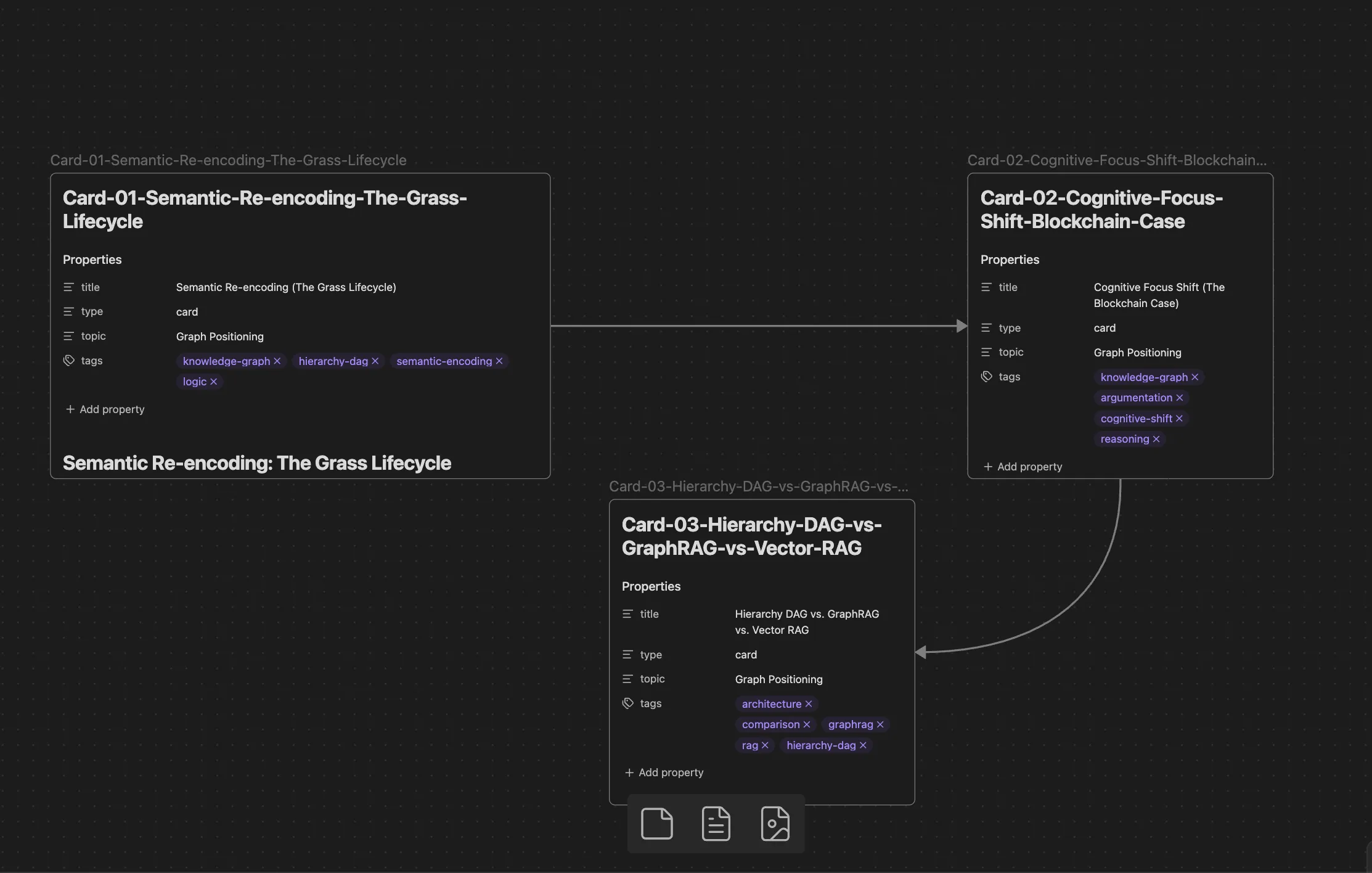
In spatial tools, connectors often carry as much meaning as the boxes they join. Every arrow on a board, however, is persisted purely as visual coordinate data inside that specific .canvas file. Nothing is written as a Markdown link or a [[wikilink]], so an arrow running from Note A to Note B records no relationship in the core link engine and stays absent from the global Graph View.
Board users raise this repeatedly. In an Obsidian community forum thread introducing the Canvas Links plugin, one participant summarised the situation:
“visual connections in the canvas are not actual links and so don’t show up in graph view.”
Plugins can bridge embeds and expose which boards reference a given file, but the lines themselves remain localised layout data rather than relational graph edges.
Context never travels with the note
Because the architecture is strictly file-centric, .md and .canvas documents stay structurally apart. A note embedded across several boards is merely observed from the outside; the file carries no metadata about its visual placement:
- opening it in the ordinary editor reveals nothing about which boards currently contain it;
- it has no awareness of the neighbouring cards arranged next to it;
- it cannot see the arrow labels or connectors pointing at it.
Close the board and that spatial context stays behind in the file, reducing the note to an isolated strip of linear text.
Desk verdict on the file-embedded layer
Strengths cluster around visual brainstorming, process flowcharts, and system mapping. Because every connector stays inside the board, the model is a weak fit for atomic notes whose links should accumulate across many boards over time.
Heptabase: a Thinking Workbench That Remembers Placement
Boards that own nothing
The second tool inverts the starting assumption. A whiteboard is not a container file wrapping independent documents; what a note is is separated from where a note is seen.
The card, not the file, is the atomic unit, and the official documentation on Fundamental Elements is explicit:
“Whiteboards do not own cards. All cards belong to the Card Library. The same card can be placed on multiple whiteboards at the same time.”
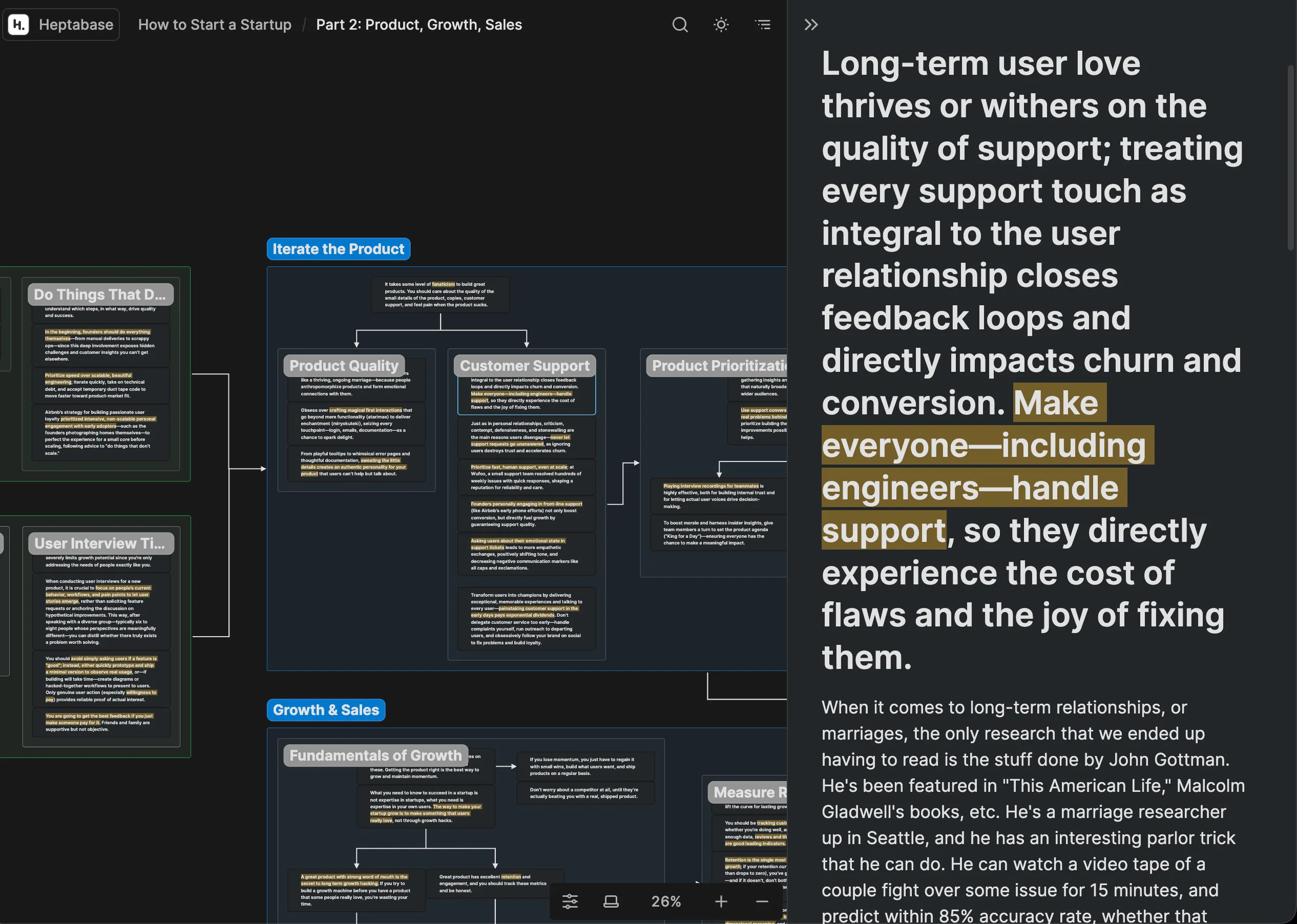
Since boards are non-owning views over that central library, positioning a card neither nests nor isolates it. The identical card can sit on several boards at once without duplicated content or broken sync, and an edit made on one board shows up everywhere that card appears.
What the Card Info panel surfaces
Draw a line between two cards and the relationship materialises outside the board itself:
- Card A's panel lists Card B among its connected cards, together with the whiteboard on which the arrow was drawn;
- Card B's panel shows the inbound connection from Card A;
- selecting either entry jumps to the exact spatial coordinate on that whiteboard.
Inline @mentions still handle linear cross-references inside card text; board lines add a distinct spatial linking layer that cards carry with them wherever they are opened.
Relational history that survives leaving the board
Global cards keep their history workspace-wide. A card's info panel discloses every whiteboard currently containing it, every card connecting into or out of it across all boards, and a jump link back to its precise position on any referenced board. That visual and relational context stays reachable even when you examine the card outside any board.
The cost of that integration: export fidelity
Deep context is paid for in portability. Canvas arrangements survive as standalone .canvas files following the open JSON Canvas specification, so any external script or third-party tool can parse them. Heptabase, by contrast, manages cards, connections, and coordinates inside its proprietary system. Cards export into standard Markdown files, and whiteboards export as static images or linear card lists, but the interactive visual lines and relational graph connecting those cards cannot be written into an open visual format such as JSON Canvas. The exchange is explicit: vendor-neutral file durability for a tightly integrated spatial workspace.
Desk verdict on the card-native model
The model rewards visual researchers building cumulative lines of inquiry, because relationships established on whiteboards compound across the workspace over time. Adopting it nevertheless means committing to a specialised proprietary ecosystem instead of relying on plain-text files.
Run It Yourself: Six Steps to See What a Line Stores
- In Obsidian, create a new .canvas file and open it; confirm the file appears in your vault folder on disk.
- Drag two existing Markdown notes onto the board, then type ten throwaway cards beside them.
- Draw an arrow from the first note to the second, save, and reopen that first note in the regular editor.
- Open the vault's global Graph View: the arrow you drew is missing, and the ten board cards never appear as nodes because they were never files.
- Now repeat the exercise in Heptabase: place two cards on a whiteboard, join them, and open each card's Card Info panel.
- Verify the reciprocal listing (outbound on one card, inbound on the other), click an entry to jump to the coordinate, then export that board and watch the interactive layer collapse into an image or a flat list.
Misconceptions Our Desk Keeps Seeing
- Assuming a canvas arrow is a backlink. It is layout data in the board file, and the graph never learns of it.
- Assuming cards typed on a canvas become notes. They stay inside the .canvas file until converted by hand.
- Assuming a note "knows" its boards. Placement metadata lives in the canvas, not in the Markdown document.
- Assuming a Heptabase export preserves the web of links. Text and pictures move; the interactive spatial graph does not.
- Assuming both tools are equally offline-first. The canvas side runs entirely on local plain text and local JSON with no account or network requirement, while Heptabase supports client-side offline editing around a proprietary cloud database.
When a 2D Board Is the Wrong Shape
Once the storage model is clear, the remaining limits belong to dimension rather than vendor. For readers whose primary goal is producing a structured argument, flat boards meet natural ceilings:
- 2D arrows carry no explicit logical semantics. A connector between Card A and Card B signals association, not reasoning: it never states whether an idea supports a claim, refutes an assumption, or functions as a prerequisite.
- Flattening costs coherence. Boards spread thought across spatial coordinates, whereas essays, reports, and memos are read sequentially. Turning a sprawl of positions into a manuscript still means manual collapsing, and the underlying logical skeleton is usually what gets lost.
A Third Pattern: Explicit Proposition Trees
Whiteboards optimise visual brainstorming; documents optimise sequential reading. Bridging messy exploration and rigorous writing means modelling the logical dependencies between ideas, their claims, evidence, and counterarguments, rather than the 2D coordinates of a board.
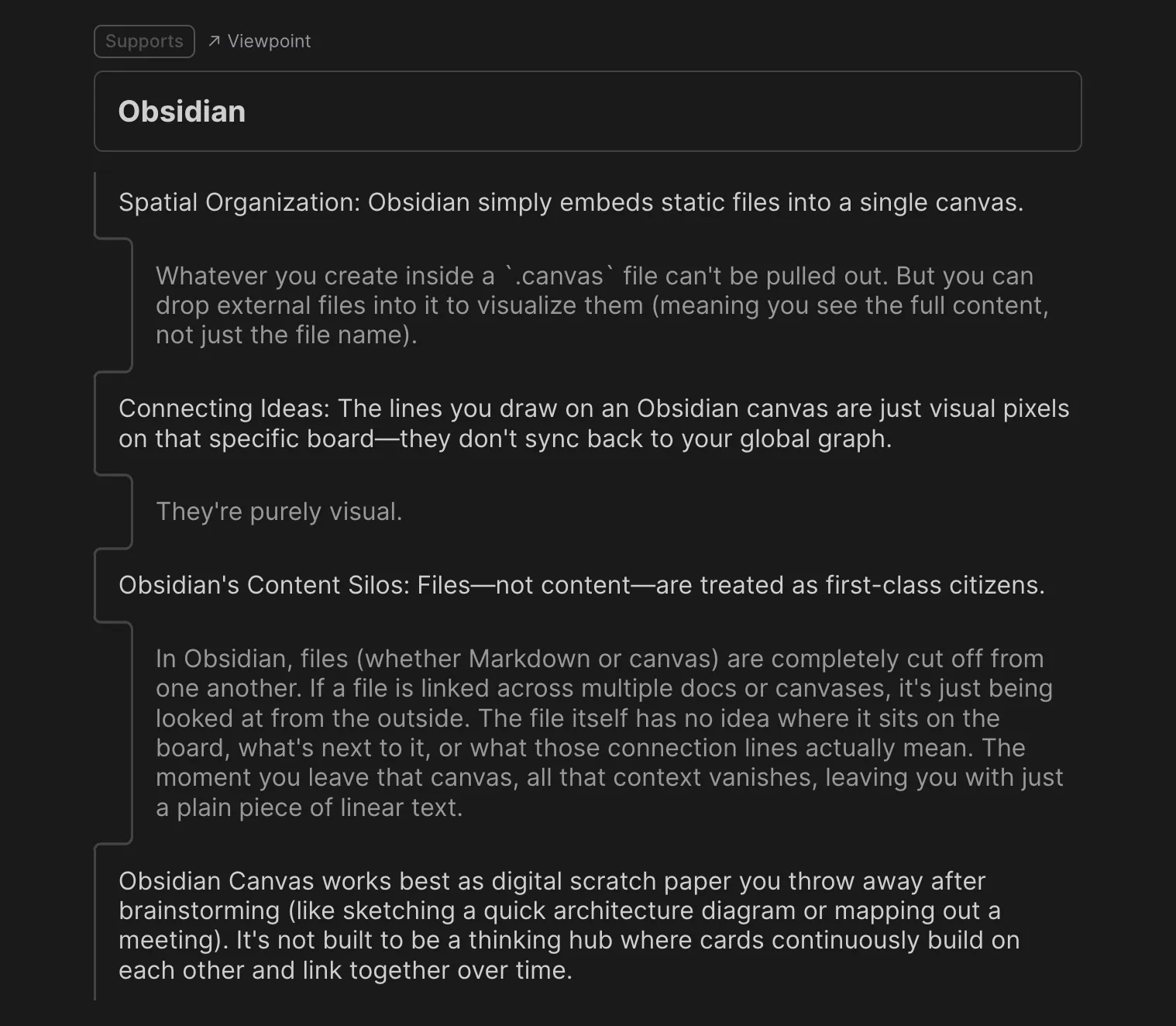
The interactive proposition tree that structured this article's own argument can be explored on FluxLinks.
Action Advice: Match the Model to Your Horizon
- Choose Obsidian Canvas when local-first data ownership, plain-text durability, and standard Markdown matter most, and you only need a lightweight spatial board for diagrams, concept maps, or temporary scratchpads.
- Choose Heptabase when your research accumulates visually, with atomic cards, PDF highlights, and spatial connections compounding into a persistent relational network across topics, provided you accept a proprietary database schema.
- Reach for a proposition tree when your bottleneck is turning exploration into structured prose rather than seeing it as a map.
- Whichever you pick, test the exit before you commit: run the six steps above on your own material before migrating anything you could not rebuild.
FAQ: Storage, Graphs, and Migration
Can Heptabase content be moved into Obsidian?
Text can. Cards export their content into standard Markdown files, and those files import directly into an Obsidian vault. Boards do not: they export as static images or linear lists, so the interactive visual lines and spatial coordinates connecting those cards cannot be written into an open visual format like JSON Canvas, and a spatial relational graph cannot migrate seamlessly between the two tools.
Do canvas connectors register as backlinks in Graph View?
No. Connection lines and arrows persist strictly as layout data inside that individual .canvas JSON file; they never write [[wikilinks]] into the connected Markdown notes, and they appear neither in the global Graph View nor in backlink panels.
Can several canvases share and update one live card the way Heptabase does?
Yes and no. The same .md note file can be embedded across multiple .canvas files, and text edits to that note stay in sync. The connections, neighbouring cards, and arrow labels on each board, however, remain isolated inside their respective .canvas files, and the individual note has no native awareness of which canvases embed it or how it is linked across them.
Is Obsidian Canvas fully local-first compared with Heptabase?
Yes. It operates entirely on local plain text and local JSON files, requiring no user account and no network connection. Heptabase supports client-side offline editing, but its unified card library and cross-device sync are built around a proprietary cloud database architecture.
Disclosure: the author of this piece builds FluxLinks, and neither Obsidian nor Heptabase sponsored it. Written by Sarah Chen for the Tech Daily team, publishing on MyTechDailyNews. Questions about this coverage: hello@techdaily.com.