
Nietzschian Debugger Hands-On: This Question-Only CLI Refuses to Fix Your Bugs
By Sarah Chen — Tech Daily
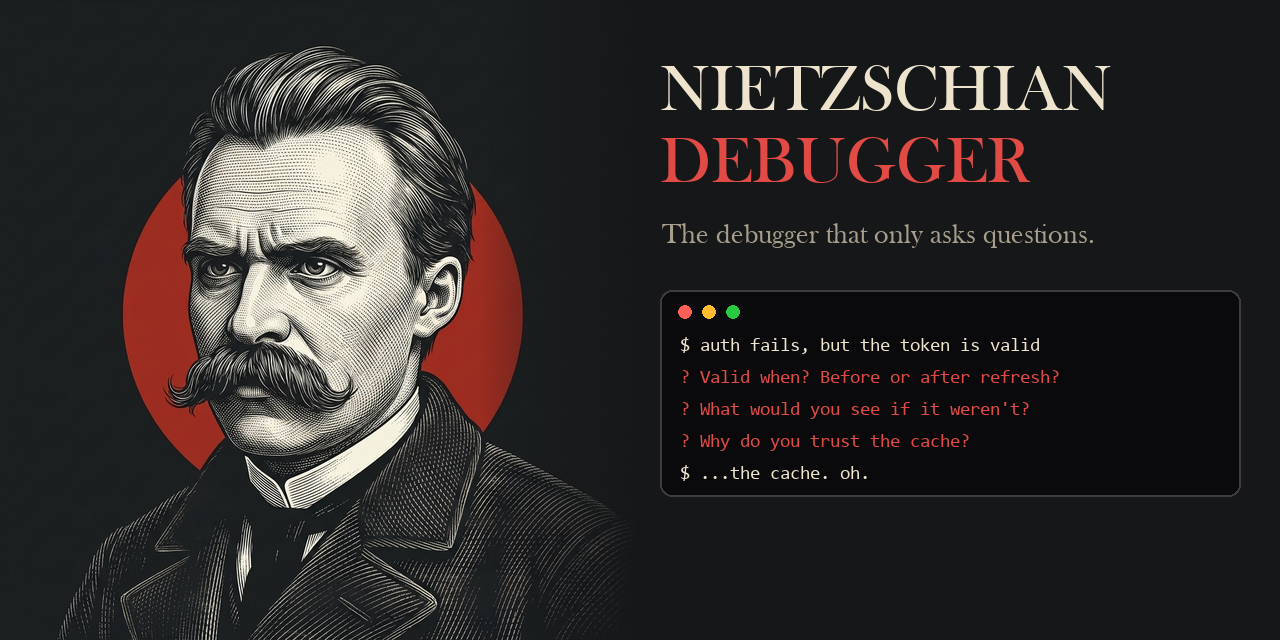
Paste an error trace into a typical coding assistant and the reply arrives pre-packaged: a diff, a snippet, a copy button. The command line utility Nietzschian Debugger, now published on npm as v0.1.0, withholds exactly that. Every response it produces is a question, and a run only ends when you have walked yourself to the root cause. For readers who want a usable verdict rather than a philosophy essay: this is a deliberate friction tool, worth installing when retention matters more than speed.
The project states its own motto — “What doesn't kill your code makes it stronger.” — and builds the entire interaction model around it: challenge the assumptions you carried into the bug, force a look at the evidence you have been side-stepping, dismantle weak reasoning until only what is verifiable survives, and leave the aha! moment to belong to you, not to a model.
What the tool does, and what it will never do
- Confronts, not repairs. A pasted failure never returns a patch; it returns a follow-up.
- Interrogates vagueness. Words like "it seems random" are treated as unfinished work, not as findings.
- Insists on evidence. Logs, diffs and file paths are demanded before any theory is entertained.
- Closes on your own conclusion. The session is marked solved only when you articulate the root cause.
Its stated grievance is a familiar one: developers copy-paste from ChatGPT, ship, repeat, and gradually nobody in the room can explain the codebase. The counter-position quoted in the project's own framing is “He who has a why to debug can bear almost any how.” — which doubles as the honest warning label: you are installing something engineered to slow you down.
Installation: two supported paths
- Published release via npm. No permanent install required — run
npx nietzschian-debugger. - Source install from the repository (current source requires Python 3.10+):
pip install git+https://github.com/DilawarShafiq/nietzschian-debugger.git, then invokenietzschian debug "your bug".
Prerequisites before the first run:
- Node.js >= 20 for the npm release, or Python >= 3.10 for the current source.
- An Anthropic API key, supplied by you (BYOK) — there is no hosted account and no bundled quota.
Set the key per platform
- Linux / macOS:
export ANTHROPIC_API_KEY="sk-ant-..." - Windows (PowerShell):
$env:ANTHROPIC_API_KEY = "sk-ant-..." - Windows (CMD):
set ANTHROPIC_API_KEY=sk-ant-...
Three intensity levels: choose before you paste
| Level | Tone | Where it earns its keep |
|---|---|---|
| socrates | Warm, guiding, scaffolded questions | Juniors building fundamentals |
| nietzsche | Direct, confrontational, no hand-holding | Default choice for everyday debugging |
| zarathustra | Brutal, adversarial, hostile to weak reasoning | Seniors who want real pain |
The flag changes a session's temperament without changing its rule set:
- Default run:
nietzschian debug "My API returns 500 but only on Tuesdays" - Gentler guidance:
nietzschian debug --intensity socrates "My login endpoint fails randomly" - Maximum pressure:
nietzschian debug --intensity zarathustra "Memory leak in production" - Scoped to real code:
nietzschian debug "Auth fails in ./src/middleware/auth.ts"
A v0.1.0 session, from vague report to root cause
The published example opens with a report that says only “403 for some users.” The first rebuttal targets the vagueness: what separates the failing accounts from the working ones? When the reply comes back that it appears unplanned, the tool reframes Random as the word we reach for when we have not looked hard enough, and sends you to the server logs behind those 403 responses.
The logs show expired JWT tokens on the failing side, which earns the next question: what changed recently in the auth path? The answer — the token TTL moved last week and existing sessions were never invalidated — arrives from the developer, not from the CLI. The run closes as solved, recorded as 4 questions to root cause.
Every finished session also prints a debugging profile as bar charts: assumption-checking rated strong, evidence-gathering moderate, root-cause speed strong — followed by the parting line from Friedrich Nietzsche, “Man is something that shall be overcome.”
Commands you can issue mid-session
| Input | Effect |
|---|---|
| solved / found it | End the session on a confirmed root cause |
| I give up | Receive one lifeline question, then exit |
| exit / quit | Abandon the session immediately |
| Ctrl+C / Ctrl+D | Force quit |
Feature set, and the permissions questions it raises
- No answers, ever. Every response is a question; there is no flag that prints the fix.
- Real code reading. A referenced file path is opened and inspected rather than swapped for generic sample code — in practice, that means the contents of those files travel to the model.
- Contextual philosophy. Nietzsche when you are avoiding, Seneca when you are overwhelmed, Sun Tzu when you need strategy.
- Growth score. Debugging skills tracked across sessions with visual bars.
- Session history. Transcripts are written locally to .nietzschian/sessions/ for trend tracking — treat that folder with the same sensitivity as source code, especially on shared machines.
- Sliding context. Long sessions do not crash; older turns are summarized transparently.
Answer-first assistants vs. question-first debugging
| Traditional AI assistant | Nietzschian Debugger |
|---|---|
| “Here's the fix” | “What have you tried?” |
| Makes you dependent | Makes you dangerous |
| You learn nothing | You learn everything |
| Fast but shallow | Painful but permanent |
| The AI gets smarter | You get smarter |
Common misconceptions
- “This is a novelty repo.” The release ships a published package, three intensity modes, actual file reading, persisted history and 121 tests.
- “It is a faster way to close tickets.” It is slower by design; the payoff is measured in weeks of retained skill, not minutes saved.
- “It can replace my assistant.” It has no answer path at all, so unfamiliar frameworks and active incidents are outside its use case.
- “Local history means local inference.” Reasoning still happens remotely against your own Anthropic key; only the transcript stays on disk.
Who it actually suits
- Junior developers who want to learn the system instead of pasting over it
- Senior developers who miss the difficulty that made them sharp
- Engineering managers who want their team thinking rather than prompting
- Bootcamp students building debugging intuition from scratch
- Anyone who believes the strongest developer is the self-reliant one
How to fold it into your week without losing time
- Start with the ephemeral npm route; switch to the pip source install only when you need behavior that has not shipped yet.
- Calibrate on one low-risk bug at --intensity socrates before accepting the default tone.
- Always include a real path in the bug string, because file-less symptom reports generate only abstract questions.
- Add .nietzschian/sessions/ to .gitignore and lock down its permissions on the first run.
- Cap usage at one or two sessions per day so the tool never competes with a delivery deadline.
- Re-read the growth score after a month and decide on evidence whether the friction is buying capability.
Under the hood: development, stack and license
Contributors clone the repository, install it in editable mode with pip install -e ".[dev]", run pytest (121 tests) and launch the CLI locally with nietzschian debug "test problem".
- Python >= 3.10
- Claude API called through the Anthropic SDK
- Click for the CLI surface, Rich for terminal rendering
- pytest as the test runner
Distribution terms: MIT.
FAQ
Does it ever hand me the fix?
No. The single concession is one lifeline question when you surrender, after which the session terminates.
Which runtime do I need?
Node.js >= 20 for the packaged release; the repository build requires Python 3.10+, i.e. Python >= 3.10.
What does it cost?
There is no subscription. You bring an Anthropic key and pay for the tokens each session consumes.
Does my code leave the terminal?
Yes. Referenced files are read and sent to the Claude API via the Anthropic SDK; only transcripts are stored locally.
Can a whole team run it?
Each developer runs it in their own terminal with their own key and their own .nietzschian/sessions/ folder; there is no server component.
Should I use it during an outage?
No. Reserve it for root-cause practice and learning; incident response still needs answers, and this tool refuses to give them.
Verdict for software buyers and daily tooling: v0.1.0 is a small, opinionated CLI measured against a different metric than the assistants it rejects — not how quickly the patch lands, but how much reasoning remains with the developer after the terminal closes. Keep your answer-first tools for deadlines, point this one at a bug a day, and let the growth score decide whether the discomfort justifies the API bill.