
MyTechDailyNews Software Case File: From Next.js to Hono for a 100 Lighthouse Blog

For MyTechDailyNews Software readers, the practical value in the bloffy.co migration is not only that every Lighthouse category ended at 100. It is the chain of decisions that produced that outcome: selecting a content platform that matched the writer’s workflow, using a CDN for global reach, testing repeatedly with pagespeed.web.dev, recognizing that a framework’s client runtime may be useless on a static page, and allowing a simpler tool to replace a heavier one when the evidence points that way. The case was maintained by an ordinary solo developer, which makes the constraints more relatable than a large corporate rewrite.
By Sarah Chen.
What the case shows at first glance
- The objective was a lightweight, fast, uncluttered blog that could host multiple blogs while staying accessible.
- Medium, Blogger, Ghost, WordPress, Hugo, and Bear Blog were evaluated, but none solved every practical requirement.
- Caching, CDN delivery, and image processing created strong scores first; the final clean 100 issue came from framework JavaScript.
- The Next.js pre-migration test used Next.js 16.1.6 and still exposed legacy and unused code.
- Hono removed the unnecessary client runtime, cut unused code to 407 bytes, and reduced the long task from 309.3ms to 68.01ms.
Platform fit: why familiar blog tools felt wrong
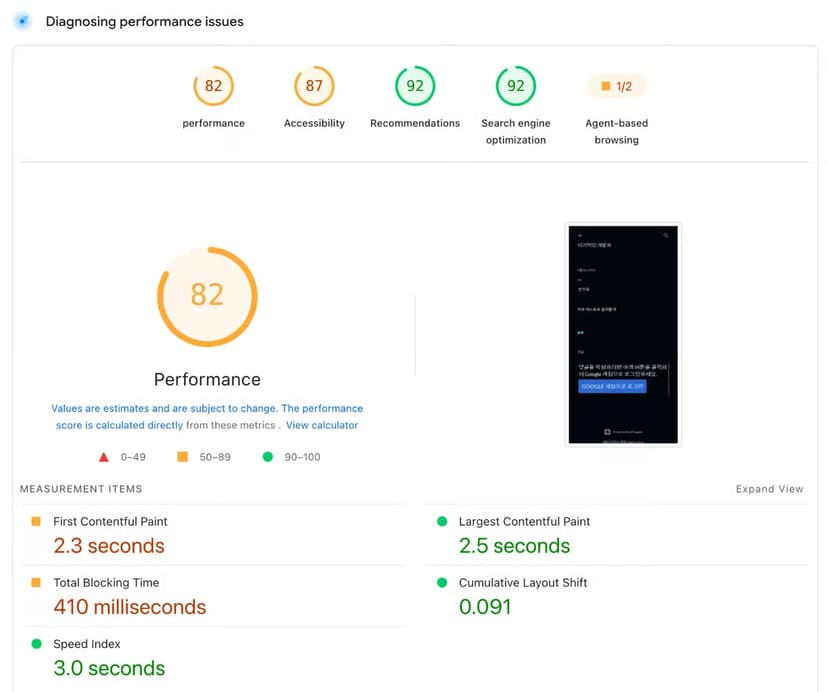
Medium and Blogger are the default names many people mention, but this project found them feature-heavy, and their measured performance was also underwhelming.
Blogger
Medium
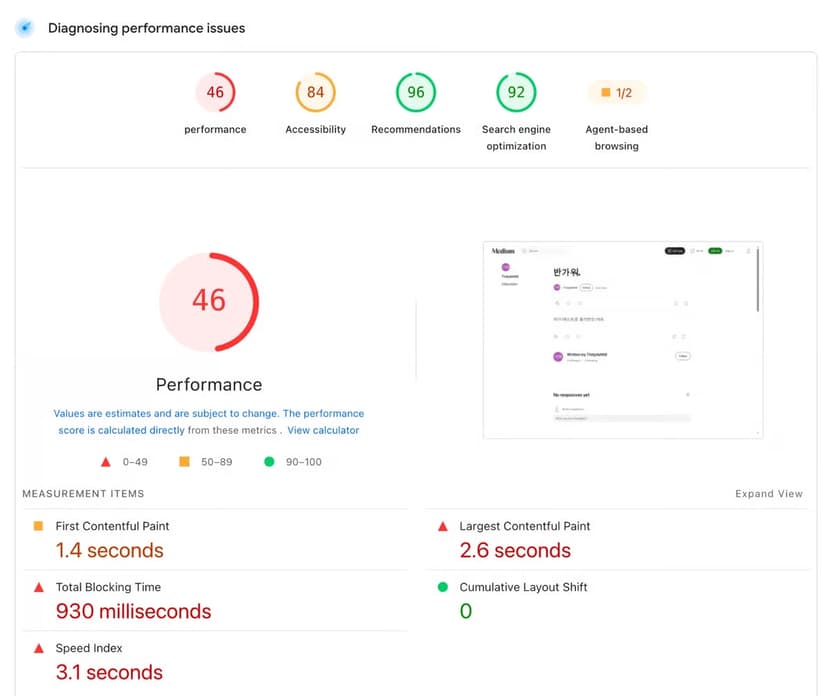
The numbers were alarming enough to keep looking. The daily editing flow was another problem: working directly with Markdown, HTML, and CSS still felt awkward. Every score cited here was checked through pagespeed.web.dev.
Other options had their own costs. WordPress was rejected over plugin hell. Ghost required self-hosting; ghost.org existed, but it felt far too costly, and editor issues surfaced after version upgrades, making maintenance tedious. Hugo was the strongest in that group, yet setup still demanded effort. The preferred experience would have been closer to something like SaaS.
Bear Blog matched the speed goal and earned respect for its product stance, but minimalism became a limitation, and the editing experience did not work well. If AdSense support and free image attachments were available, staying might have been likely. The custom result ended up at bloffy.co, trying to be as fast as Bear Blog while adding more usable function.
Step-by-step: the work behind the 100 Lighthouse score
Step 1: Treat caching as infrastructure, not a finishing touch
Caching was the first high-value change. Once cache handling is correct, speed improves sharply, and Next.js made those decisions convenient. ISR is available, and fetch is extended with a next option for cache control. Applying those tools thoughtfully moves a site far ahead.
A global audience complicates the model. Nearby visitors receive fast responses from regional caching, but remote visitors still encounter network latency. A CDN is therefore part of the architecture. Deploying a Next.js app to Vercel includes a CDN automatically. Vercel is convenient and not the problem, but its Pro plan begins at a steep price, serverless cold starts remain troublesome, and reliance on the Vercel ecosystem is hard to ignore.
Cloudflare became the better fit because most applications and large-scale infrastructure can operate there at no cost. Later, the author concluded that Next.js caching was not really necessary. Publishing one post would force invalidation across two caches, making management painful. For a static website, a CDN alone seemed enough. That was reason number one for not needing Next.js.
Step 2: Make images the cheap part of the page, not the expensive part
A modern image can easily cross 10MB. Publishing those files without processing wrecks performance. The work is tedious: create resized variants for devices, compress files, and then manage the delivery layer. Earlier work used an AWS Lambda serverless function to resize and compress uploads stored in S3, served through CloudFront. That gave precise control at the cost of recurring maintenance.
For this blog, Cloudflare’s Image Transformations was the practical choice. Even the free tier includes 5,000 images, so it was used without hesitation. The case acknowledges that such praise can sound like Cloudflare sales talk, but the project is only an ordinary solo developer effort.
Step 3: Accept a high score, then find out why it is still not perfect
Once cache rules and image delivery were in place, the Next.js version reached the first measured state.

The measurement used Next.js 16.1.6. The numbers were good, but they stopped short of the goal: a clean 100 with no asterisks, so the remaining issue needed investigation.
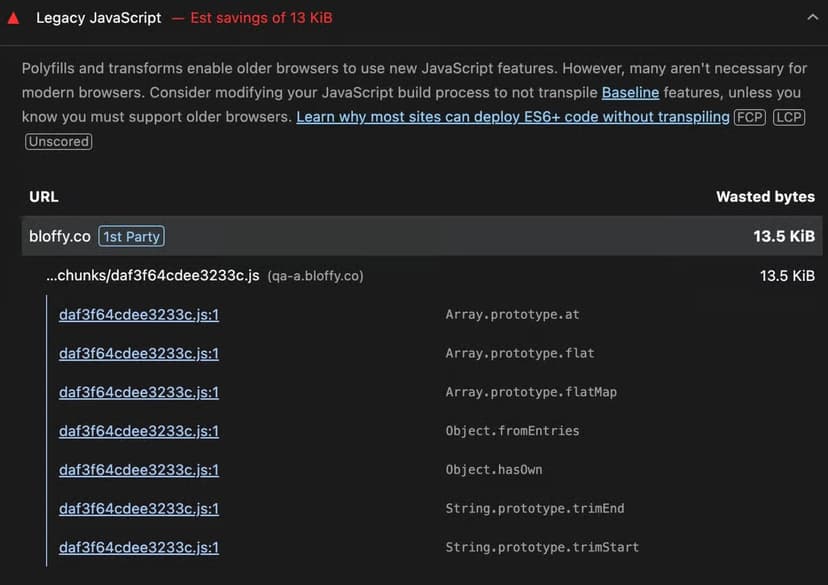
The audit found a substantial amount of legacy JavaScript. It was not application code; it came from the framework runtime shipped by Next.js.
Step 4: Check whether the framework runtime is justified by the page
The page was static and had zero interaction. Every page was pre-rendered with ISR, and the author believed the Next.js guidelines had been followed. As a test, all client components were removed, leaving only server components, and the retest did not change the score.
Hydration was an obvious suspect, but it was not the whole story. Next.js always ships a client runtime, even for static pages. With only server components, runtime chunks, hydration, and the RSC payload for the router all remain. The reason is that next/link and next/image are themselves client components marked with 'use client', so those two pieces alone can pull in the runtime and trigger hydration.
If next/link and next/image were also removed, the App Router’s own runtime, including the router and error boundaries, still persisted. There is no official way to reduce it to zero; the only option was a hack: stripping the scripts out of the rendered HTML. At that point, the question became unavoidable: If I’m going to do that, why am I even using Next.js?
The unused-code finding then settled the case.
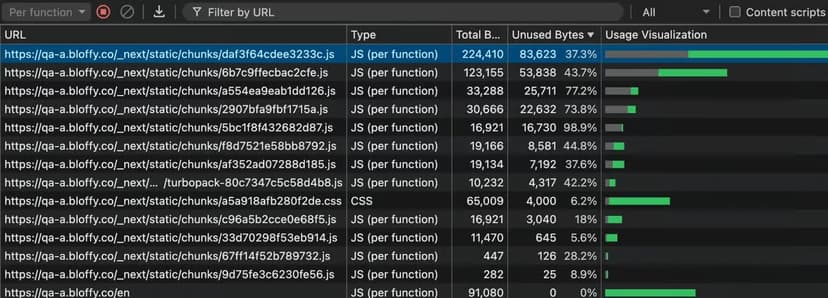
The unused JavaScript volume alone was 230,460 bytes. For a mostly static site, that is not good. Static pages rarely need JavaScript, and unused code is the least useful form of it.
The decision still hurt. Was dropping Next.js for the sake of 5 points the right call? A lot of time had been invested in the public-facing web app.
Step 5: Choose a smaller framework instead of stripping the old one with hacks
In the end, blog quality won out. Even if the gap was only 5 points, Next.js was removed entirely. The author judged that Next.js’s excess features would not be needed long term. Full vanilla was considered, but framework productivity and infrastructure benefits still mattered. Hono was selected because its technical philosophy matched the goal. The phrase “Fast and simple” described exactly what the blog needed, and JSX support was a bonus. The migration cost did not look too big.
The result finally reached 100.
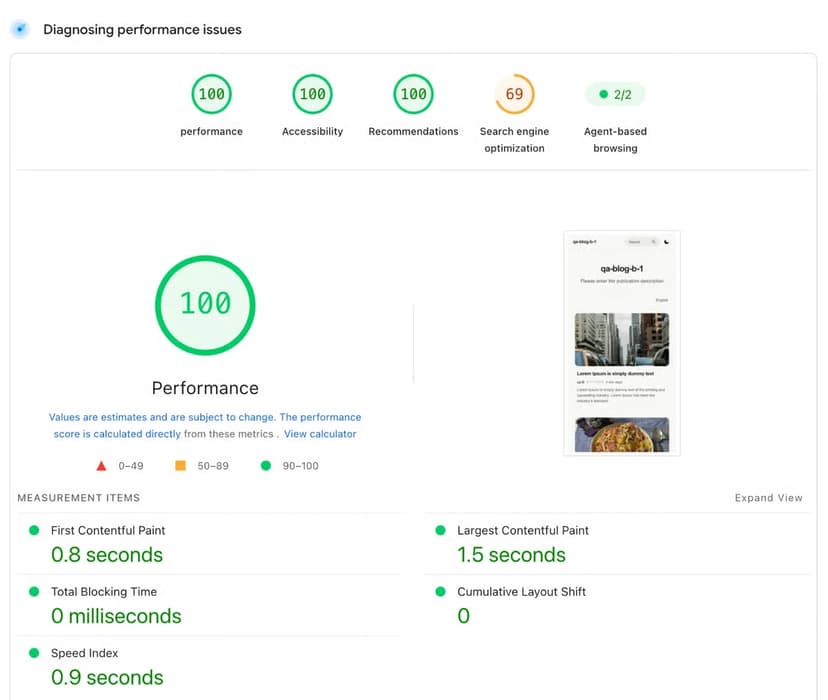
The blog then achieved 100 across the board. Readers can run the type of page discussed through pagespeed.web.dev.

The page had no JavaScript, unused code fell sharply to 407 bytes, and build time decreased by about 40%.
The SEO score of 69 needs context: that site was built for testing, and it deliberately blocks search indexing. That is why it is 69.
The article notes that when every category in DevTools reaches 100, Lighthouse even shows fireworks.
Hono vs. Next.js measured performance
The comparison below keeps the measured screenshots from the case side by side. It is not only a score difference; it is a runtime difference on a page that did not need interactivity.
| Next.js result, server components only | Hono result |
|---|---|
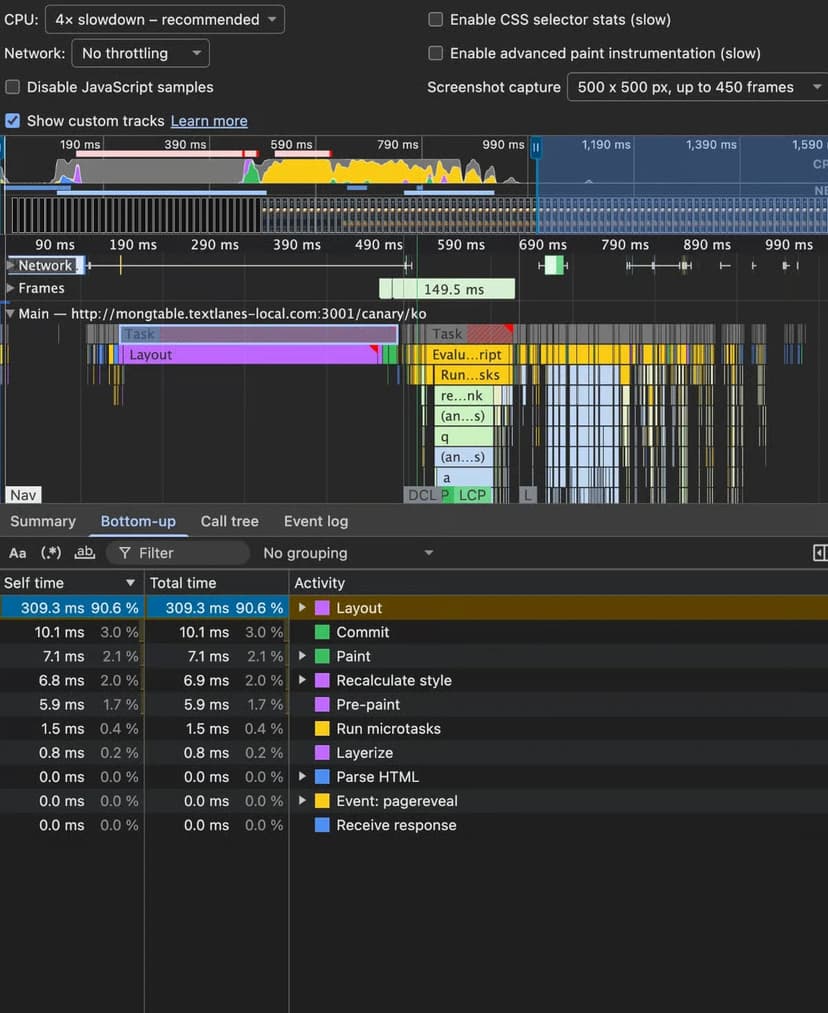 | 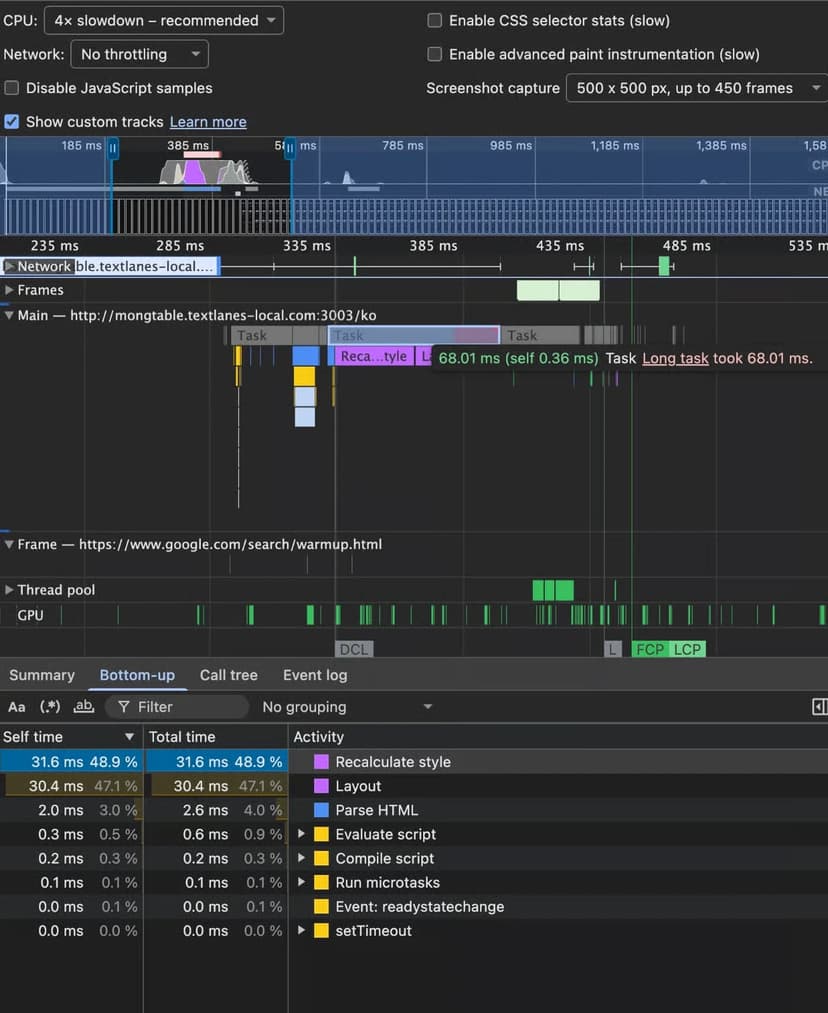 |
The first long task before visible rendering measured 309.3ms on Next.js. The equivalent Hono build measured 68.01ms, or roughly 78% faster.
Data reference: the numbers that framed the decision
| Data point | What it meant in the case |
|---|---|
| 100 | The final target across every Lighthouse category. |
| 10MB | A size a modern image can exceed before processing. |
| 5,000 images | The free-tier volume available through Cloudflare’s Image Transformations. |
| 16.1.6 | The Next.js version used before migration. |
| 230,460 bytes | The unused JavaScript amount found on the Next.js build. |
| 5 points | The gap that made leaving the old framework feel questionable. |
| 407 bytes | The unused code volume after the Hono build. |
| 40% | The reported build-time reduction after migration. |
| 69 | The SEO result on a test site that deliberately blocks indexing. |
| 309.3ms | The long task measured on Next.js. |
| 68.01ms | The long task measured on Hono. |
| 78% | The approximate improvement implied by the long-task comparison. |
Common mistakes in this kind of optimization
- Assuming a static page has no client runtime. The Next.js experiment with only server components still shipped runtime chunks, hydration code, and RSC payload.
- Blaming hydration alone. Removing client components did not move the score because framework code remained.
- Keeping a framework because it is familiar. When the only path to zero runtime is to strip scripts from rendered HTML, the framework choice itself becomes suspect.
- Ignoring unused code. 230,460 bytes of unused JavaScript is still too much for a site with little interaction.
- Reading a test SEO score out of context. The 69 value came from a site intentionally blocking search indexing.
FAQ: when does a static site really need Next.js?
Does a static blog need JavaScript?
For a static blog with zero interaction, the case argues that remaining JavaScript, hydration included, did not provide a useful benefit. It left behind unnecessary JavaScript, so in most cases such runtime code is simply not needed.
Is Next.js the wrong tool?
No. For an interaction-heavy app, Next.js can be a great framework. In fact, the management app for this blog is built with Next.js.
When is a CDN enough?
For a static website, the case concluded that a CDN alone seemed enough after the caching model became painful. Invalidating two caches for a single post made management harder than needed.
Should image handling be custom-built?
Only if exact control and ongoing maintenance are worth it. The earlier AWS Lambda, S3, and CloudFront path worked, but it required regular maintenance. The blog used Cloudflare’s Image Transformations because even the free tier includes 5,000 images.
Can a smaller framework be the practical upgrade?
Yes. Hono’s “Fast and simple” philosophy matched the blog’s goal better than a heavier framework, and the migration achieved the desired clean 100 result without the legacy runtime problem.
Action advice for MyTechDailyNews Software readers
- If your page is static, audit the actual runtime, not just the component model. The final score can remain unchanged after removing client components if framework chunks remain.
- Before choosing a blog or content platform, test its measured performance with pagespeed.web.dev and review the raw-code workflow you will need every day.
- If global delivery matters, use a CDN early. For static publishing, avoid designs that force multi-layer cache invalidation unless you need it.
- For images, prefer a managed transformation pipeline if the free tier covers your volume; Cloudflare’s Image Transformations and its 5,000 images free tier were enough for this case.
- If the only way to reach a clean 100 is to hack away scripts from rendered HTML, treat that as a framework-fit signal rather than a performance bug.
- Keep heavier tools for the right surface: a public static blog and an interactive management app can use different software, and the case did exactly that with Hono and Next.js.
The lesson for MyTechDailyNews Software readers is not to chase a framework headline. It is to let the page’s actual job decide the software stack. For static content, the case shows that removing unneeded runtime, simplifying cache layers, controlling image payloads, and re-measuring with pagespeed.web.dev can be enough to move from a near-perfect result to 100.