
Software Explainer: A Five-Step Git Workflow for AI Coding Agents Using Markdown Task Files Instead of Jira
An AI coding agent can only act on the material that lives inside the repository it works from. That constraint is why requirements, plans and results are increasingly moving out of external ticket tools and into Markdown files versioned by Git, placed beside the code and the documentation. This Software explainer on MyTechDailyNews breaks down the "Tasks as Code" pattern: what changes in the workflow, the five steps, an example layout built on three repositories, the access and privacy settings to configure, and a checklist for choosing the surrounding tools.
Why the ticket system is the missing input
Because code is the source of truth for AI coding agents, they perform best when everything they need is inside the repository. Most teams still manage requirements and tasks in external tools such as Jira or Redmine, so those instructions sit outside the agent's working context. Plain Markdown files close the gap: the agent reads the code and the requirements in one place, and every edit to a task becomes versioned and reviewable like any other commit in the project. Docs as Code already supplies the blueprint for this shift, and a web interface that syncs with Git can keep technical writers and product owners involved without pushing them into the command line.
Docs as Code came first
Standalone documentation software has already given way to Markdown files stored in a Git repository. Today that content usually sits in a /docs folder inside the code repository, a practice known as Docs as Code or Docs Like Code.
AI coding agents make the model more useful rather than less. They read the documentation to understand a system, change the code, and update the relevant documentation within the same workflow. Documentation stops being a separate activity that must be finished afterward and becomes part of software development itself.
Tasks as Code: the same principle applied to work items
Development tasks follow the same logic. Stored as Markdown files, they can be read directly by an agent, used to plan the work, and updated with the outcome. Git then keeps the task history available next to the history of the software and its documentation.
Spec-Driven Development (SDD) already reflects this idea: Markdown specifications define the intended behavior before an AI agent implements it. A task file can serve a similar purpose, and the level of detail follows the work. A small maintenance task may need only a short description, while a complex feature may require acceptance criteria, technical decisions, dependencies and testing requirements.
SDD is often supported by dedicated tools such as Spec Kit, but a simpler start is enough: treat the task file itself as the specification. That keeps the transition low-risk because nothing beyond Git and an agent is required.
External ticket tools vs. Markdown task files in Git
| Aspect | Tasks in Jira or Redmine | Tasks as Markdown files in Git |
|---|---|---|
| What the agent sees | Nothing by default — the work items live outside the repository | Code, requirements and docs read in one place |
| Change history | Managed inside the ticket tool | Versioned and reviewable like any other commit |
| Docs linkage | Handled as a separate follow-up activity | Documentation updated inside the same workflow |
| Where access is configured | In the ticket tool | In Git, per repository, so tasks can stay private |
| Minimum to start | The external tool you already run | Git plus an agent; a folder of task files is enough |
| Non-technical contributors | The ticket tool's own UI | Optional Git-synced browser interface |
The five-step workflow
The daily loop is deliberately short, and the human approval gate sits before any code is touched:
- Describe the task. Record a brief description of the change or feature to implement.
- Analyze the requirements. The agent reads the task file and inspects the relevant code and documentation.
- Create an implementation plan. The agent adds a proposed solution and identifies the changes it intends to make.
- Review and approve. A developer reviews the plan and authorizes implementation.
- Implement and report. The agent changes the code, updates the documentation where necessary, and appends an implementation report to the task file.
Description, plan and report stay together in one file, which makes it easy to re-read the original requirements, understand the planned approach and see what the agent actually changed. The approval step is what keeps people in control: the agent does not move directly from task description to implementation, so the plan can be reviewed and corrected first.
An example setup: three repositories on one machine
A practical arrangement splits the material into three separate Git repositories: Code, Documentation and Tasks. The reason is permissions. Documentation may be public, while tasks can contain sensitive information about unfinished security fixes, internal planning, or features that have not yet been announced. Separate repositories let you configure access independently and keep tasks private.
On a local machine, a developer clones the documentation and task repositories into folders inside the code repository. Both folders are listed in the code repository's .gitignore file, so the parent repository does not track their contents. Each cloned repository keeps its own Git history and can be committed, pushed and synchronized independently.
/code-repo/src/tests/docs— a separate documentation repository/user-guides/admin-manuals/developer-docs
/tasks— a separate private task repository/release-123task-551-something-descriptive.mdtask-552-something-descriptive.md
.gitignore— excludes docs and tasks
All information is now available to a local coding assistant such as Claude Code or OpenCode. When a task is implemented, the agent reads the task, analyzes the code, implements the change and updates the relevant documentation. The implementation report remains with the task, while the actual code changes are recorded in the code repository. Referencing the task filename in a Git commit helps connect the implementation back to the original requirements.
Grouping tasks into release folders adds a second benefit: the agent can use completed tasks and Git history to draft the changelog and release notes, and the same information can also help identify documentation that needs updating.
Three interfaces, one set of files
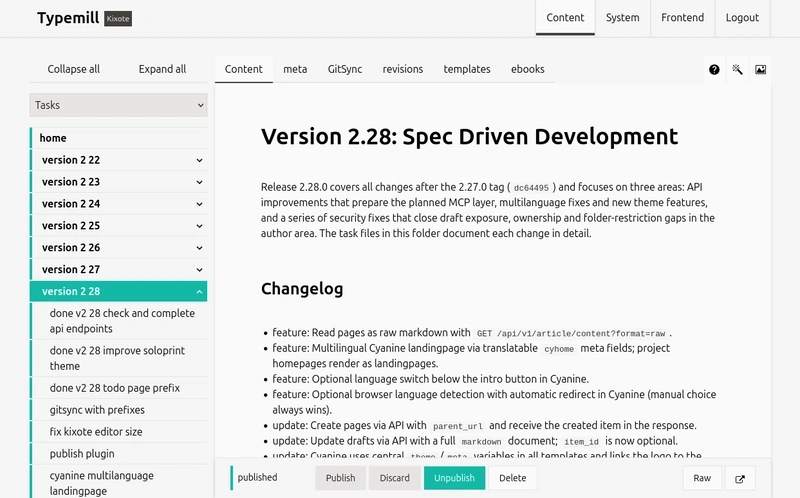
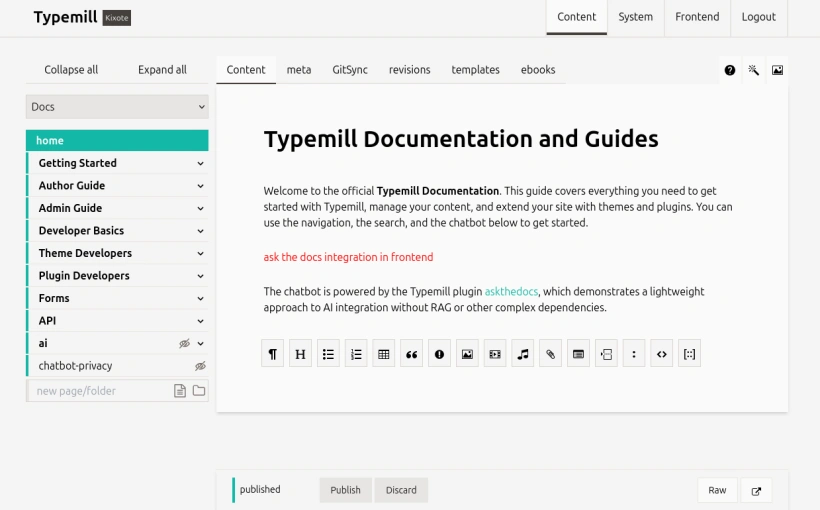
Git and an AI coding agent are sufficient to run this workflow. A browser-based interface adds another way to browse, edit and organize the files without replacing Git as the underlying version control system. Typemill, for instance, can synchronize content with Git repositories, and because it supports multiple repositories you can configure a separate project for private tasks alongside the documentation project — managing both through the same interface even though the content lives in separate repositories.
Tasks:
Documentation:
The same files can be reached through three interfaces:
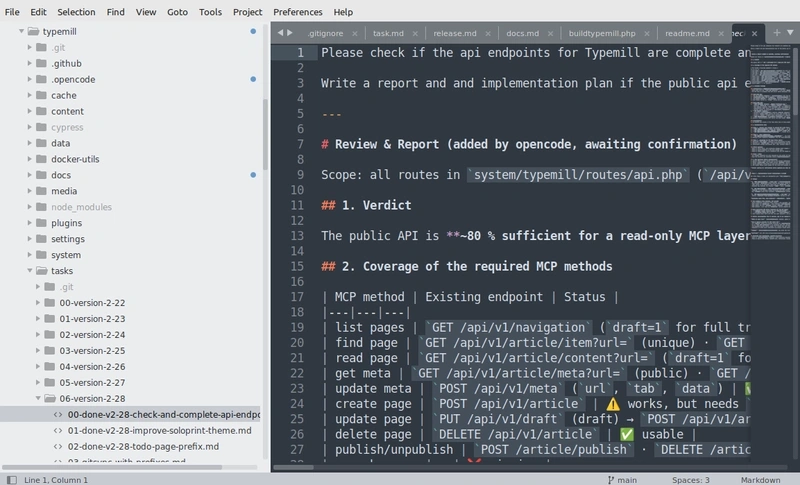
- In an IDE: developers and AI agents work directly with the local repositories.
- On GitHub: contributors review changes and edit files through the repository interface.
- In a browser: Typemill provides an interface for reading and managing tasks and documentation.
Each interface plays a different role. The IDE supports implementation, GitHub provides repository-level collaboration, and the CMS offers a content interface and publishing platform for non-technical users such as product owners and technical writers. Git remains responsible for version history and synchronization. The useful distinction here is that the interface does not have to own the data: it is a convenient way to work with files that remain portable and accessible to other tools.
The numbers in this model
Every count below is taken from the workflow described in this explainer, not from a vendor benchmark: five steps in the task loop, three Git repositories in the example setup, three interfaces reaching the same Markdown files, and one task file carrying description, plan and report together.
Permissions, privacy and compatibility notes
- Privacy risk: task files can expose unfinished security fixes, internal planning and unannounced features — which is why they get their own repository and their own access rules.
- Tracking risk: keep the cloned docs and tasks folders out of the parent repository by listing them in
.gitignore; otherwise the private content is pulled into the code history. - Compatibility: any setup that keeps Markdown files in Git and gives agents access to them will work; Typemill and a flat-file CMS are only one quick option for experimenting.
- Local and self-hosted: teams retain control over their data, privacy and infrastructure.
- AI-provider lock-in: prefer interfaces that offer generic integrations so developers can choose their preferred AI provider.
Checklist: properties to look for in a toolchain
- Git-native: tasks and specifications are readable files managed through Git and connected to the code and documentation.
- Docs and tasks together: one interface provides access to both documentation and task management.
- File-based: Markdown remains readable, portable and independent of a particular platform.
- Self-hosted: teams retain control over their data, privacy and infrastructure.
- Open to AI services: developers can choose their preferred AI provider, and the interface should offer generic integrations rather than lock users into a single service.
Common misconceptions
- "The agent should start coding as soon as the task exists." No: the plan is reviewed and approved first, so people stay in control.
- "Every task needs a full specification." The needed level of detail depends on the work; a small maintenance task may need only a short description.
- "You need a dedicated SDD product." Spec Kit supports Spec-Driven Development, but treating the task file itself as the specification is enough to begin with Git and an agent.
- "Docs and tasks belong in the same repository." They often need different access rules: documentation may be public while tasks stay private.
- "A web UI replaces Git." The browser interface is another way to reach the files; Git remains responsible for version history and synchronization.
- "Ticket-system features are mandatory." Assignments, comments, kanban boards and sprints are an open question once agents do most of the work — probably not all of them are still needed.
FAQ
Do I need Typemill to use Tasks as Code?
No. Git and an AI coding agent are sufficient to run the workflow. Typemill is one quick option for teams that want a browser interface for non-technical contributors.
Which assistants can actually read the task files?
Local coding assistants such as Claude Code or OpenCode can read tasks, code and documentation once the repositories sit inside the same folder tree.
What keeps sensitive tasks out of a public repository?
Tasks stay in their own Git repository with independently configured access, and the cloned folder is listed in the code repository's .gitignore so the parent repository does not track its contents.
Does this change release documentation?
Yes, in a practical way: with tasks organized into release folders, the agent can use completed tasks and Git history to draft the changelog and release notes.
What happens to product owners and technical writers?
They keep working through a Git-synced web interface instead of the command line, while the files themselves stay portable Markdown.
Action advice for your team
- Start with nothing more than a folder of task files committed to Git.
- Run the five steps on a single maintenance task, keeping the review-and-approve gate before implementation.
- Put documentation in a
/docsfolder so specs, code and tasks are read in one workflow. - Split tasks into their own repository as soon as they mention unfinished security fixes or unannounced features, and exclude the clone via
.gitignore. - Add a Git-synced browser interface when product owners or technical writers need to read and manage the same files.
- Use release folders and Git history to let the agent draft changelog and release notes for human review.
The more interesting question is what happens next. Once tasks follow documentation into the repository, new software and interfaces designed for this model will appear, and developers, product owners and technical writers will need a shared place to work with agents as part of that workflow. The version-control layer is already in place, so a folder of Markdown files, Git and one agent is enough to test the pattern on a real task and judge what it changes for your team.