
Software Guide: MacOS Workarounds v1.0 for the Apple Network Server Preproduction ROM
By Sarah Chen for Tech Daily, published on MyTechDailyNews. Feedback for the Software desk can be sent to hello@techdaily.com.
This guide treats MacOS Workarounds v1.0 as a software package for a real task: making a preproduction ROM useful without discarding the machine's original purpose. The package changes boot-time behaviour, repairs device visibility, and makes restarts predictable on an Apple Network Server, a 1996 Apple system first sold at a $10,000+ price and shipped to run Harpoon, a superset of IBM AIX. For IT operators, efficiency users, and retro-system administrators, the value is not nostalgia; it is a smaller maintenance loop and a clearer compatibility boundary.
What v1.0 changes for the operator
- The MACE Ethernet path is repaired, so the on-board Apple Network Server network port becomes usable under Mac OS rather than depending on Open Firmware assumptions.
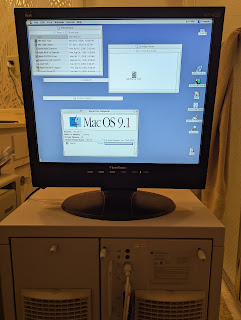
- The on-board video path is enabled in 8-bit mode, giving the ANS a usable internal display for testing and for AIX-to-MacOS restart work.
- The ANS can restart back into Mac OS without a manual PRAM zap, which removes one of the most annoying failure modes in the first preproduction-ROM experiments.
- Because the package targets the preproduction ROM, AIX can still boot, preserving Harpoon and the machine's historical reason for existing.
Hardware lineage you need to recognise
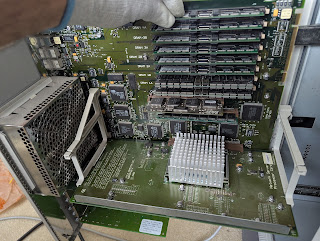
The server is a Power Macintosh 9500 relative in a server chassis, which explains the long-running confusion about whether it could also run Mac OS. The lower-tier ANS 500 arrived in one enthusiast collection as a nearly-new hand-me-down after Steve Jobs convinced Gil Amelio to cancel the machine and a campus vendor stopped supporting it. The three machines anchoring the project are that ANS 500, the ANS 700 used for testing, and a battery-bombed EVT prototype called a Shiner ESB once located at Netscape. In 1997, then-CTO Ellen Hancock said a ROM swap could let the ANS boot Mac OS and Windows NT. Those ROMs were dismissed as vapourware until a former Apple employee presented a working dump of both the preproduction ROM and the later ANS Mac OS ROM. A prototype Windows NT ROM also surfaced, but pieces are missing, so native Windows NT boot remains unfinished.
ROM choice is the compatibility gate
The project begins with a clear version split: the preproduction ROM is 1.1.20.1, while the production ROM is 1.1.22. The production ROM was the default; the preproduction ROM is unusual because it supports both AIX and Mac OS-era software more usefully than the later Mac OS ROM dump. The following table compresses the decision an operator must make before installing anything.
| ROM or dump | AIX boot | Cache and performance | On-board Mac OS path | Why the v1.0 software is needed |
|---|---|---|---|---|
| Preproduction 1.1.20.1 | Yes | Supports L2 cache | Boots Mac OS, but with known gaps in video, Ethernet, front SCSI controller, and restart | Fixes or works around MACE Ethernet, internal video, and NVRAM-related black-screen restarts |
| Production 1.1.22 | Official Harpoon / IBM AIX role | Official production behaviour | Mac OS boot was removed from production systems | The package is not a substitute for the preproduction requirement |
| Later Mac OS ROM dump | No | Appears unfinished, lacks proper L2 cache support, and runs slower | Mac OS only path | Cannot preserve the AIX history that makes the ANS interesting |
Step-by-step: preparing the boot path
- Confirm the machine: an Apple Network Server is required, and the tested software path expects the 1.1.20.1 preproduction ROM. Replica ROM DIMMs now exist; Joe's Computer Museum was listed as having stock at writing time, with a relationship to the Tinker Different forum where the project began. The original DIMM design was provided by Jeff Walther; Jeff assembled a batch for Joe Strosnider, who sells them and routes proceeds to forum maintenance.
- Install Mac OS to an external bootable SCSI volume. The documented setup uses a 25-pin BlueSCSI connected directly to the ANS rear SCSI port and powered by termination power. Create a blank disk image of the desired size on its micro SD card, then rename it to the desired SCSI ID; for the ANS, SCSI ID 2 is typical.
- If another vintage Mac with SCSI is available, perform the installation there. Choose an installer that can install Mac OS for any supported Mac, especially with model-specific CDs. Up to Mac OS 9.1 boot directly on the ANS; the guide uses 9.1. Mac OS 7.6 can work, late versions of System 7.5 might work, but at least 8.1 is recommended. For broad testing, treat Mac OS 8 and Mac OS 9 as distinct compatibility families rather than assuming a single result.
- If only the ANS is available, installation is harder. Use a blank disk image, a bootable MacOS CD ISO mapped to SCSI ID 0, and a Power Mac-compatible PCI video card. The tested card is a Twin Turbo 128MA; an ATI Mac-specific card of the era, such as the Rage Orion, should also be considered.
- Power off, unlock and open the mainboard drawer, remove the PRAM battery, install the preproduction ROM DIMM, then leave the drawer open and the machine fully depowered for several minutes before first boot.
Network, video, and PCI options
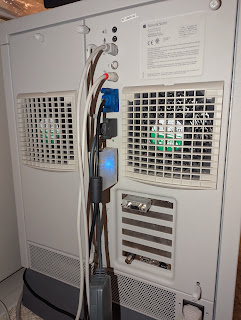
The testing ANS 700 can show a monitor on its video port, a BlueSCSI on the SCSI connector, and a Farallon AAUI-to-twisted-pair dongle on the on-board MACE Ethernet AAUI port; the AAUI connector is Apple's adaptation of AUI, which can be mistaken for the Mac DA-15 video connector. Slot 1 may hold the Twin Turbo card where the closest hardware relative, the 9500, would usually put it. For an alternative to MACE Ethernet, the documented collection has a rare 10Mbit ANS Ethernet PCI card in slot 6, ordered from Apple Austin during a leftover Shiner hardware clearance; Austin is the city associated with that Apple site. That card works in AIX and later Mac OS releases, not 7.6, possibly 8, and definitely 9. The only 100Mbit ANS Ethernet card in the collection is in the 500. If the goal is only Mac OS, a regular Ethernet PCI card compatible with a Power Mac can suffice.
From INITs and CDEVs to native drivers
Classic Mac OS users know INITs and CDEVs as extensions and control panels that extend the operating system. Device support needed a DRVR resource, which could live in a NuBus declaration ROM, in an INIT or CDEV during boot, or in an application loaded on demand. Desk accessories were also implemented as DRVRs. After the 1994 transition to PowerPC, some code still had to be 68K for backwards compatibility, which required emulation on a Power Macintosh and created a performance bottleneck.
Copland, Apple's stepwise attempt to modernise the operating system while Taligent and PowerOpen-A/UX 4 stalled, introduced a native driver architecture. It stored 68K code in a cooperative address space and treated it as data interpreted by the emulator; this included 68K portions of the Toolbox and even PowerPC-native System 7 applications. The design gave old software compatibility while denying privileges to the rest of the system and to the hardware abstraction layer. Native drivers themselves were PowerPC code fragments hooked into the HAL and the Name Registry, then placed in a lower execution region that booted early and was protected from user code. Although Copland did not ship, parts of it influenced Mac OS 8. Apple also moved from NuBus to PCI partly because IBM would not support NuBus in AIX 4. Starting with the 9500 in 1995, ROMs gained a Name Registry port and Eric Traut's faster dynamic recompiling 68K emulator, originally a Copland asset.
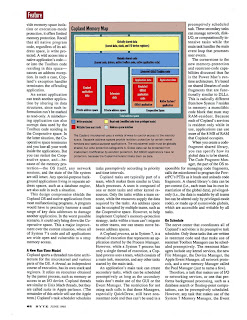
On these Power Mac machines, Open Firmware builds a device tree for every PCI card and board resource. The Code Fragment Manager then runs expansion-ROM and driver code from the Mac ROM. A low-level expert creates a Name Registry node for the device. Later, the Display Manager, SCSI Manager, or ATA Manager starts as needed while booting the Mac OS kernel. These managers implement family experts. When the MacOS File Manager and Resource Manager are active, the Extensions folder is scanned for ndrv code fragments; matching native drivers load before ordinary extensions and are wired in by the relevant family expert.
Inspecting the Name Registry on an ANS
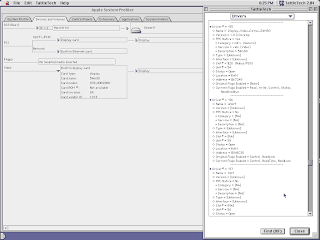
Apple supplied a PCI DDK 3.0 kit for card vendors, including debugging tools. The Display Name Registry browser shown in the source project came from the DDK version 3.0 on Apple Developer CDs. On an ANS 700 running Mac OS 9.1 with the 1.1.20.1 preproduction ROM, it reveals far more than PCI cards.
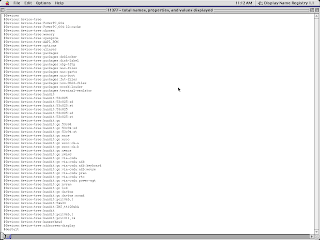
The tree includes the CPU, L2 cache, Mac ROM, and devices connected through Grand Central. Grand Central bridges PCI to older Mac hardware such as the AWACS sound path using a Crystal CS4217 codec, the internal SWIM III floppy controller, and the AMD AM79C950KC Super Combo CURIO. That chip contains equivalents of an NCR 53C96 SCSI controller for the external port, an AMD 85C30 serial chip, and an AMD 79C940 MACE Ethernet controller. The ANS has two Bandit PCI controllers mapped differently from the 9500, with reserved address space for up to four. Some nodes correspond to ROM software for the AIX booter and XCOFF loader rather than physical parts.
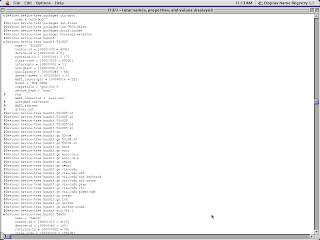
The browser can drill down into node properties. Two internally connected devices are especially relevant: one of the NCR 53C825 Fast'n'Wide SCSI-2 controllers and the Cirrus Logic 54M30 video chip, known to PC users as the STB Horizon+. A driver can match on mandatory name properties such as 53c825 or 54m30, or on optional compatible strings derived from vendor and device IDs.
The components inside MacOS Workarounds v1.0
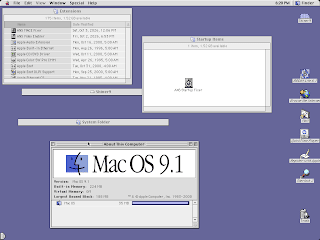
The package has three parts: ANS MACE Fixer in Extensions, ANS Video Enabler as an ndrv in Extensions, and ANS Startup Fixer in Startup Items. The first is an INIT that patches the Ethernet configuration; the second makes the internal video device usable; the third rewrites NVRAM to remove settings that break restarts.
Video Enabler extracted from the 2.0 ANS Mac OS ROM
The first driver built for the package was the ANS Video Enabler, taken from the 2.0 ANS Mac OS ROM. The extraction workflow used Hex Fiend, a hex editor with Tcl-based templates, and Eric Harmon's ROM Fiend extension to parse classic Mac ROM contents. ROM Fiend splits the ROM into declaration and system components, then lets the editor walk resources inside the system ROM.
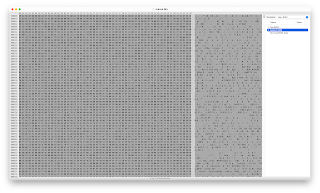
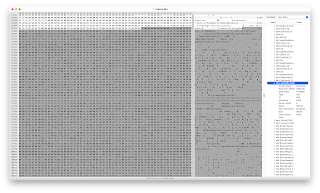
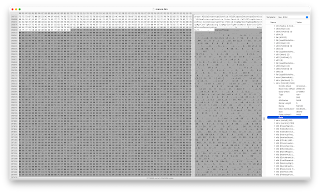
Inside the dumped ROM, the video driver resource was named 53m30, which was probably an error for 54m30. The data portion began with the Joy!peffpwpc sequence, marking a Preferred Executable Format container for an Apple PowerPC code fragment. The useful section was clipped from that sequence to the end of the data portion, producing a standalone binary.
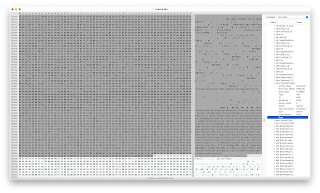
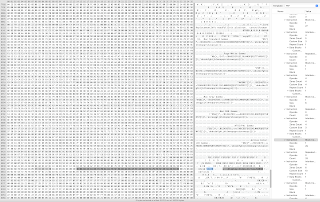
Native driver binaries carry a description block, often marked by mtej. The block stores the node name as a Pascal string and the driver name as a Pascal string beginning with a dot. A byte immediately before the driver-name length is $06; the set bits mean the driver opens on load ($02) and is controlled by a family expert ($04). PCI DDK guidance says video drivers should set those two bits. The relevant service categories appear as ndrv for a native driver and vido for a graphics device.
Production ANS systems can still start without such a Mac OS ndrv because Open Firmware and ANS ROM code handle initial display, while Harpoon AIX has its own drivers. The Mac OS path was never officially supported, so the absence of a proper Mac OS video driver is expected, not a defect that appears only after ROM swapping.
Making the extracted driver loadable
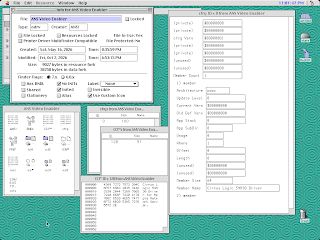
To load the extracted video code as an extension, the file type must be ndrv rather than INIT, and a skeletal cfrg resource tags the single code fragment. Optional resources were added for an icon suite, version string, and Extensions Manager description. The icons were adapted from Hubert Chan's M.A.C. icon pack, which was far easier to work with than drawing replacements in ResEdit.
Early loading and visual checks
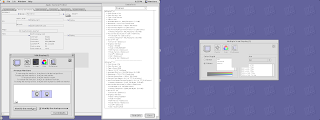
When the driver is loaded from disk, there is no Happy Mac on the internal video, but the screen turns on before the usual INITs because ndrv files load early. They are also not disabled by holding SHIFT at startup, because turning off a display driver could leave the machine unusable. Once boot finished, the native video driver appeared in TattleTech.
MACE Fixer and Startup Fixer: removing the black-screen loop
The second part of the package is the ANS MACE Fixer, an INIT that patches the Ethernet configuration. The third is the ANS Startup Fixer, an application placed in Startup Items that rewrites NVRAM on every boot to remove settings Mac OS installs incorrectly. The problem was noted in an earlier article from January: Mac OS behaves as if the ANS were a Power Macintosh 9500, creating an inappropriate nvramrc Open Firmware startup script and setting input and output devices to serial port ttya. On the ANS back panel, ttya is serial port 2. On Open Firmware 1.0.5 systems common in beige PCI Power Macs, that choice mostly keeps Open Firmware on serial while video and ADB remain console. On ANS 1.1.x firmware, the settings are obeyed because Harpoon AIX and Shiner NetWare were expected to run over serial. That is why the machine can come up with no video after a Mac OS restart unless NVRAM is corrected.
The source notes also carry archival technical references such as $0d, PowerExpress, Power Macintosh 9700, and 9700. In this rewrite they are treated as preserved source identifiers, not as new requirements added by MyTechDailyNews.
Data points used in this guide
- Release year cited for the server: 1996.
- Starting price cited: $10,000+.
- Preproduction ROM version: 1.1.20.1; production ROM version: 1.1.22.
- Test operating system: Mac OS 9.1; recommended minimum: 8.1; possible older paths: 7.6 and late System 7.5.
- External SCSI identifier: SCSI ID 2; boot CD identifier: ID 0.
- Driver toolkit: PCI DDK 3.0, including the Display Name Registry browser.
- Network cards tested: 10Mbit ANS Ethernet PCI and 100Mbit ANS Ethernet PCI.
- Video depth enabled by the workaround: 8-bit.
- Firmware comparison boundary: Open Firmware 1.0.5 versus ANS 1.1.x serial behaviour.
FAQ
Does the package remove the AIX side of the Apple Network Server?
No. The preproduction ROM path keeps AIX boot available. That is central to using the ANS as both a Harpoon server and a Mac OS test system.
Can I start with the production 1.1.22 ROM?
No. The compatibility gate is the 1.1.20.1 preproduction ROM. The production ROM is the historical default, while the workaround package targets the preproduction ROM's mixed capability.
Is Mac OS 9.1 the only practical version?
The guide uses Mac OS 9.1 because it boots directly and the documented setup is stable there. 7.6 and late System 7.5 may work, but 8.1 or later is the safer recommendation; evaluate 8 and 9 separately when testing extensions.
Do I need a PCI graphics card if internal video is enabled?
Not always for basic Mac OS, but the internal video workaround remains limited to 8-bit mode and does not expose all chip capabilities. A PCI card may simplify installation or provide a second display path.
What about Windows NT?
It remains unfinished. A prototype ROM exists in the source narrative, but missing pieces mean native Windows NT boot is not a supported result of this v1.0 package.
Common misconceptions
- A repaired MACE Ethernet path means every Apple Network Server networking setup is now plug-and-play; it still depends on correct ROM, driver loading, and the right PCI or AAUI choice.
- An ndrv behaves like a normal INIT; native drivers load earlier and survive extensions-off startup.
- Installing Mac OS writes harmless settings; on 1.1.x firmware the ttya change can remove the console, so the Startup Fixer is not optional if you want repeatable restarts.
- The package is only a video hack; it also addresses the Ethernet path and NVRAM rewrite needed for stable reboots.
Action advice for editors, IT testers, and retro labs
- Before flashing or swapping ROM DIMMs, label the drawer, power state, and PRAM battery status in a maintenance log.
- Write down SCSI IDs immediately: the external boot volume, the CD ISO, and any other SCSI devices must not collide.
- Run one boot into AIX and one into Mac OS after each software change, then test a normal restart; the first cut of this package was built around that cycle.
- Keep notes on internal-video limitations, especially the 8-bit path and missing acceleration, before using the machine for productivity software.
- For software-only questions about this Software guide, contact Tech Daily at hello@techdaily.com; hardware sourcing remains outside the site's editorial remit.