
MyTechDailyNews Software: Evergreen Turns Quarterly GitHub Housekeeping into Two Scheduled Workflows
The maintenance cost of a repository often shows up away from code: a collaborator remains after a trial, a permission list drifts, and an old project stays open long after it stopped serving a purpose. That is the software-management gap Evergreen targets. The GitHub App turns two chores that are easy to postpone into scheduled, visible, and reversible workflows, using features an organization already has.
What Evergreen schedules
Evergreen centers on two recurring review patterns:
- Outside collaborator review. Every quarter, the app asks repository owners to confirm which outside collaborators should remain; unchecked people are removed.
- Stale repository detection. A repository with no human activity after a threshold is flagged, warned through an issue, and archived if the inactivity continues.
Why the defaults are safe
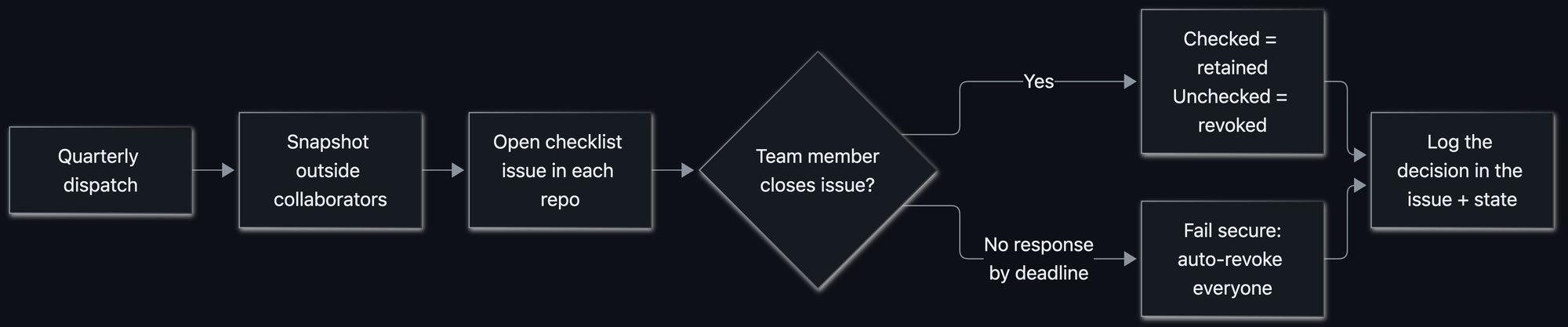
- Fail secure by default. No reply is treated as a decision to remove access, rather than leaving access open and hoping the review will be completed later.
- Keep every result recoverable. The app does not delete repositories or contents. Archived repositories remain restorable, and issue records capture access changes so restoring a removed collaborator is a copy-paste task.
One controller, many native parts
A small Go webhook server in a container provides the service, but the coordination is built from ordinary GitHub parts: a GitHub App, scheduled actions, webhooks, issues, custom properties, and plain files inside a repository. No exotic queue or bespoke dashboard is needed.
One controller repository keeps time. Four scheduled GitHub Actions workflows fire repository_dispatch events on a quarterly cadence, and the application wakes up to act:
| Day | Workflow | What happens |
|---|---|---|
| 1st | Stale repo review | Identify repositories lacking recent human activity and open a warning issue |
| 8th | Access review | Snapshot outside collaborators and open a per-repository checklist issue |
| 16th | Stale repo cleanup | Archive repositories that remain stale after the grace period |
| 23rd | Access cleanup | Revoke access for reviews that received no answer |
Each review starts two weeks before its cleanup, with a hard grace period so an accidental manual run cannot accelerate the process. Every workflow also accepts workflow_dispatch, allowing an operator to trigger a specific step when needed.
State that can be read through git history
Repository status is stored as JSON, with one file per repository, under state/repos/repo_id.json in the controller repository. A snapshot records who had access, when the review began, the deadline, the person who decided, and the outcome.
For example, after a completed review, a Hubber retained access for Alice while Bob was allowed to lapse. The saved state included repo_id 123456789, full_name “the-org/acme-trial”, last_seen_at 2026-04-13T00:05:00Z, deadline 2026-04-27T00:00:00Z, status “renewed”, collaborators Alice Example and Bob Example, renewed_logins “alice”, decided_by carol-hubber, decided_at 2026-04-15T16:42:10Z, and tracking_issue number 42.
Because the state is committed as files in git, the history can be inspected with git log. Asking why someone lost access last spring becomes a repository search, not a separate database query.
Issue-based review steps
Instead of pushing people into an admin panel, Evergreen puts the prompt in the repository being reviewed. When access review starts, each repository receives a checklist issue:
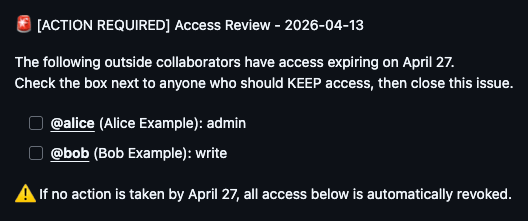
The reply is deliberately narrow: tick the boxes for collaborators to retain, then close the issue. The application consumes the issues.closed webhook event, reads the checklist, keeps selected users, and removes the others. It then adds a receipt comment that spells out exactly which accounts stayed and which accounts were changed.
Guarding privileged actions
Closing a review issue counts as an authorized decision. If someone outside the intended group closes it, Evergreen quietly reopens the issue and posts an explanation. In other words, only Hubbers who are permitted to make access choices can settle the review.
Reaching the right reviewer
The harder question was not which accounts to review but which Hubber should answer. The app follows a fallback chain:
- Use an evergreen_repo_owner custom property if the repository defines it, whether the value points to a user or an org/team.
- If no custom property exists, inspect recent issue and commit authors and copy the ones who are on the access review team, meaning the Hubbers working in that repository.
That makes ownership discovery automatic and avoids a manual owner list of who owns what.
Closing the loop when cleanup fails
When a deadline passes without a reply, the cleanup pass revokes every collaborator captured in the snapshot. The more delicate case is partial success: one removal completes, while another meets a temporary API error. Treating that mixed state as done would leave the audit record inconsistent.
So Evergreen fails closed. A failed removal keeps the review pending and the issue open; a later run retries the missing removals. The status becomes revoked only after every removal succeeds. Because removed or retained handles are written into the issue, restoring access means re-adding the listed accounts.
What the experience is meant to feel like
Housekeeping automation often becomes noise, so Evergreen tries to behave more like a considerate admin assistant:
- The work appears as an issue inside the relevant repository.
- Reviewers are chosen automatically, so nobody needs to ask who owns this?
- The prompt states the required action, the exact deadline, and the consequence of silence.
- A reminder comment arrives before the deadline to prevent surprise revocation.
- Org owners can opt out with evergreen_exempt_from_access_review or evergreen_exempt_from_archive.
Rolling out access and archival automation step by step
The original environment was large and active: 1,400+ Hubbers, plus many more customers and partners. The rollout goal was for the first run to feel like a non-event. A practical sequence follows:
- Run a dry pass first. Use DRY_RUN mode to log each intended write while leaving collaborators and repositories untouched, then read the output until the planned decisions are trusted.
- Overcommunicate before automation starts. Tell people what is coming, when it will arrive, and what they must do. Repetition is necessary: when a large group hears the same update for the seventh time, many may still be hearing it for the first time.
- Observe real behavior with Splunk. Structured logfmt logs go to a dedicated Splunk index. That visibility exposes edge cases such as empty collaborator lists, unusual permissions, and repositories with issues disabled before they affect users.
- Design around GitHub rate limits. Creating issues and comments across an organization can hit secondary rate limits for content creation: 80 requests/minute and 500/hour.
- Pace the workflow by construction. Process repositories in batches, space each content-creating call by a couple of seconds, sleep between batches to clear the rolling window, and count only repositories that actually create content.
Comparison: manual hygiene versus Evergreen-style automation
| Aspect | Manual approach | Evergreen-style pattern |
|---|---|---|
| Timing | Decisions happen when someone remembers | Checks follow a quarterly schedule |
| Access outcome | Silence can leave access open | Silence is treated as revocation, with recoverable records |
| Audit trail | Scattered comments, email, or tribal knowledge | JSON state files and git history |
| Recovery | Manual reconstruction of removed users | Issue receipt lists the handles, enabling a copy-paste restore |
| Scale | Owner research and cleanup requests grow with the organization | Native primitives handle reviews, warnings, and archival at 1,400+ Hubber scale |
Design lessons for software and IT administrators
- Make safety the default. If the safe result is automatic, teams only need to respond when they want to preserve access.
- Reuse native controls. Issues, webhooks, custom properties, and git history replace a separate UI, job queue, and audit database.
- Put prompts where work already happens. A repository issue is more likely to be seen than a dashboard nobody logs into.
- Write an undo trail. A clear issue log turns oops into paste these three handles into a Copilot session.
- Treat limits as product constraints. At organization scale, rate limits shape architecture instead of sitting in a footnote.
Common misconceptions before enabling automation
- Automation will destroy content. Evergreen never deletes repositories or their contents; archival is recoverable.
- Every repository gets churned the same day. Reviews open two weeks before cleanup, with a hard grace period.
- A failed cleanup can hide a half-applied change. The app fails closed and keeps the review pending until every removal succeeds.
- Only developers can maintain ownership information. Custom properties and recent authors can route reviews automatically.
FAQ for teams evaluating the pattern
What does Evergreen actually automate?
Two things: outside collaborator reviews and stale repository archival. The review workflow confirms who should retain access; the stale repository workflow flags inactivity, warns through issues, and archives untouched repositories.
What happens if no one answers an access review?
Access is revoked for the collaborators in the snapshot, because the safe default is removal. The issue still records the change, so an authorized Hubber can restore the right accounts.
Does Evergreen need a custom database?
No. State is stored in JSON files committed to the controller repository, which makes git history the audit trail.
Can people skip the workflow?
Yes. Org owners can set evergreen_exempt_from_access_review or evergreen_exempt_from_archive for exceptions.
What is the safest way to test it?
Start with DRY_RUN mode, review the logs, then communicate the schedule and deadline behavior before the first active cleanup.
Action advice for your next cleanup cycle
Do not begin with a broad organization-wide campaign. Pick one recurring chore: outside collaborator cleanup or stale repository archival. Schedule it on a quarterly cadence, open the decision as an issue, choose the notification fallback, run DRY_RUN, and then let GitHub Apps, GitHub Actions, webhooks, custom properties, and plain repository files do the rest.
Routine maintenance is rarely solved by a heroic sprint. The durable version is a schedule, a clear ask, a safe default, and a path back. Evergreen shows that a GitHub App can make repository hygiene routine by using the platform’s own primitives, so teams can spend less time policing access and more time shipping work.