
MyTechDailyNews Software Guide: Document Crunch and CrunchAI Risk Review for Trimble Workflows
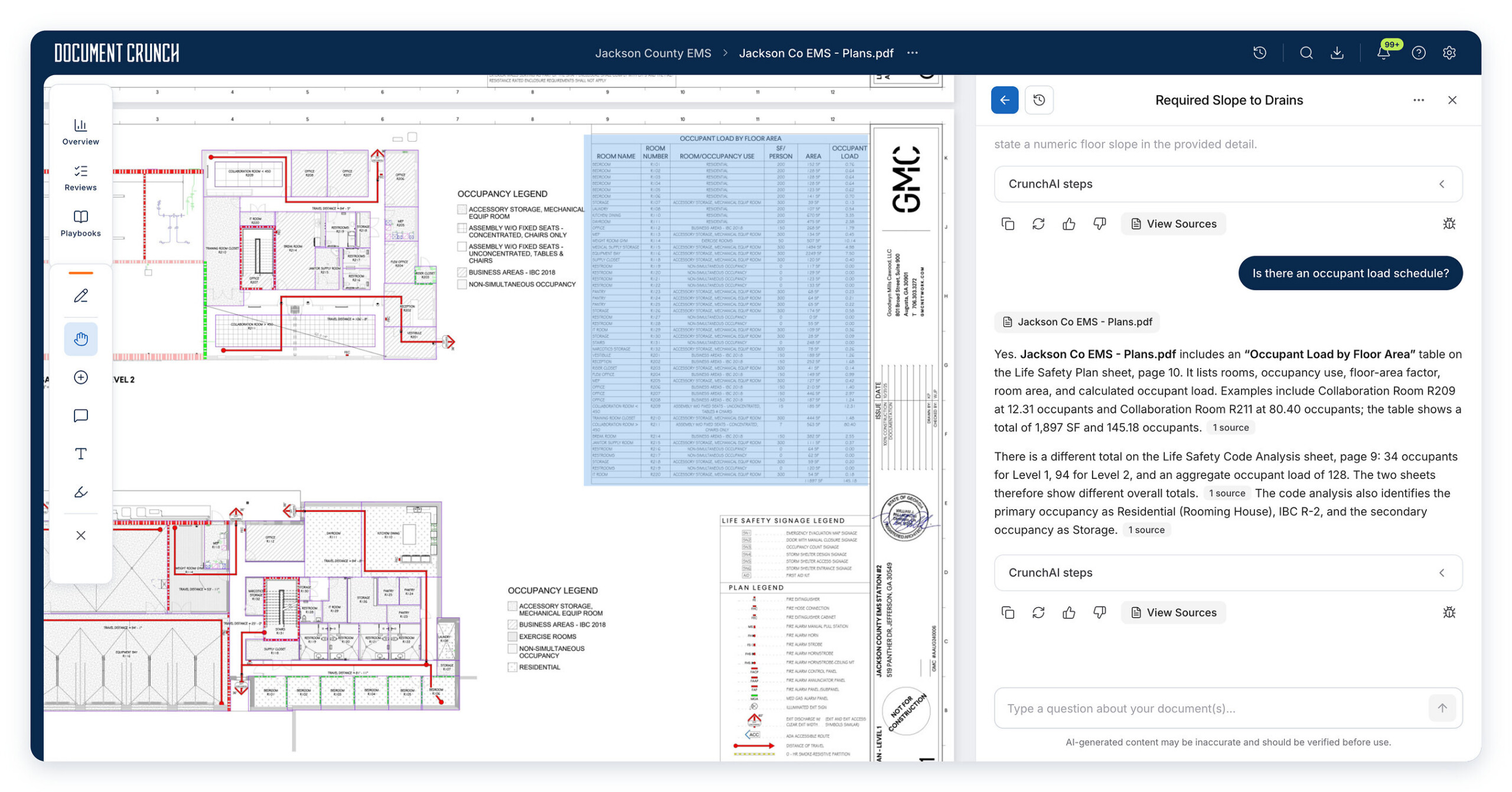
For teams preparing construction work, the most expensive problems often hide between documents rather than inside a single file. This MyTechDailyNews Software guide looks at a Document Crunch capability powered by CrunchAI that is aimed at Trimble construction workflows: contractors can review drawings together with contracts, specifications, and other project documents, then search and ask questions across a complete project set before construction starts.
The practical difference is not just faster chat. The feature is described as a way to surface scope gaps, conflicting requirements, and possible risks, then move those findings into a review workflow with citations back to source documents.
What the update is designed to help project teams do
General construction document review can become difficult when a drawing set contains large sheets of text-heavy content and when responsibilities are split across multiple files. The Document Crunch description says that CrunchAI extracts and indexes text from drawing sets, including notes, allowances, and scope-related language that may be spread over many sheets. A chat interface can then be used to ask about drawings, contracts, and specifications together.
- Compare document packages: The capability supports looking for scope gaps, conflicting requirements, and potential risks across drawings, contracts, specifications, and other project documents.
- Read drawing sets for text: It is described as able to extract and index text from drawing sheets, including scattered notes, allowances, and scope language.
- Verify evidence: Users are intended to check responses through citations linked to source documents rather than accept an answer as unsupported.
- Track the review: The shared project environment is described as including security and collaboration features that let teams discuss identified issues, track review activities, and monitor how risks are addressed.
- Turn findings into follow-up: Teams can move findings into standardized reviews and assign follow-up or resolution tasks.
Generic AI chat versus construction workflow review
The source material positions CrunchAI as different from broad AI document tools because construction work involves large drawing sheets, many related files, and responsibility language that needs to be connected across packages. The table below maps that distinction using only the described behavior.
| Review aspect | General-purpose AI challenge described by the source | CrunchAI behavior described for construction workflows |
|---|---|---|
| Large drawing sheets | May struggle to process large, text-heavy drawing sheets. | Extracts and indexes text from drawing sets, including notes, allowances, and scope-related language across sheets. |
| Cross-document consistency | May have difficulty connecting requirements across multiple project documents. | Lets users query drawings, contracts, and specifications together to investigate scope gaps and conflicting requirements. |
| Verification | Not described by the source. | Supports response verification through citations linked to source documents. |
| Response processing | Not described by the source. | Applies pre- and post-processing methods with agentic optimization for construction workflow responses. |
| Collaboration and tracking | Not described by the source. | Uses a shared project environment with security and collaboration features for discussion, review activity tracking, and risk monitoring. |
| Review handoff | Not described by the source. | Allows findings to move into standardized reviews and supports follow-up and resolution task assignment. |
| Availability | Not described by the source. | The construction drawings review capability is described as available to all users within existing Document Crunch workflows. |
Preconstruction checks that can be prioritized
For preconstruction review, the capability is described as useful when a team needs to understand whether a document package is complete, whether responsibilities are clear, and whether requirements align before a contract is awarded. Four common checks can be prioritized.
- Bid-set completeness: verify sheet indexes, look for missing sheets or specification sections, and flag discipline-level discrepancies.
- Requirement alignment: compare drawings with contracts and specifications to identify conflicting requirements, scope gaps, and unclear responsibilities.
- Standardized company checks: apply consistent checks to drawing sets and related project documents across teams.
- Issue closure before execution: resolve requirement and scope questions before contract award so fewer unresolved items carry into execution.
A review sequence that matches the described workflow
Users who need operational guidance can think of the capability in a sequence. The following steps do not introduce new features; they map the described tools into a review path.
- Choose the document set. Bring together the drawings, contracts, specifications, and other project documents that belong to the review scope.
- Ask a cross-document question. Use the chat interface to query the combined set, such as whether a requirement appears consistently or whether scope responsibility is defined.
- Inspect the evidence. Open the citations linked to source documents and confirm the relevant drawing note, contract clause, or specification section.
- Record the finding. Discuss the issue in the shared project environment, track the review activity, and monitor how the risk is being addressed.
- Convert the finding into work. Move selected items into standardized reviews and assign follow-up or resolution tasks to the appropriate people.
- Decide before execution. Use the verified findings to close requirement and scope questions before construction begins, consistent with the preconstruction focus described for the capability.
Compatibility, access, and privacy considerations
Because the capability works across project documents, teams should treat access, completeness, and version discipline as practical prerequisites. The source describes a shared project environment with security and collaboration features, but it does not provide detailed permission settings or privacy certifications. For evaluation, the relevant question is whether the workflow supports the project document types your team needs and whether review participants can verify answers through citations.
IT support teams and software evaluators may also want to confirm how the capability fits existing Document Crunch workflows. The announcement describes availability to all users within existing workflows, which suggests it is intended to work as an added review layer rather than a separate product surface.
Data citations and evidence checkpoints
- Document set scope: The described review targets drawings, contracts, specifications, and other project documents.
- Extraction scope: Drawing text extraction includes notes, allowances, and scope-related language spread across multiple sheets.
- Answer verification: Responses are expected to be checked through citations linked to source documents.
- Workflow integration: The described environment supports discussion, tracking of review activities, risk monitoring, standardized reviews, and follow-up or resolution tasks.
- Availability statement: The construction drawings review capability is described as available to all users within existing Document Crunch workflows.
Who should pay attention
The most relevant readers are not only software buyers, but also daily users of construction project documents. If your team regularly reconciles drawing notes with contract language, or if missing specification sections can create downstream disputes, the capability’s cross-document review and citation path are useful. It also fits reviewers who need standardized checks across teams and project managers who want risks tracked after they are found.
Developers and IT support personnel may care less about the drawing content itself and more about the integration pattern: an existing product workflow, shared project context, security and collaboration features, and traceable review output. In that sense, the announcement is mainly about workflow visibility and document-to-question alignment, not a generic AI chatbot feature.
Common misconceptions
- It is only a PDF chatbot. The described purpose is project-level risk review across drawings, contracts, specifications, and other project documents, with citations back to source text.
- Citation links replace human review. The source presents citation-linked verification as part of the workflow, so users still need to confirm that the cited document text matches the issue being discussed.
- It changes only answers. The described flow includes review tracking, risk monitoring, standardized reviews, and follow-up or resolution task assignment, which extends the work beyond question and answer.
- Every project package can be checked automatically without preparation. The capability is described as working with complete document sets; teams still need to assemble relevant drawings, contracts, specifications, and related project documents for meaningful review.
FAQ: What the Document Crunch update means for software users
What is the main function of the new capability?
It is intended to give contractors project-level risk review across construction drawings, contracts, specifications, and other project documents, using CrunchAI-powered search and querying.
Which document types can be queried together?
The source describes drawings, contracts, specifications, and other project documents as part of the same review set.
How do teams verify an answer?
Responses are described as verifiable through citations linked to source documents.
Does the capability work outside the Document Crunch review flow?
The announcement describes the capability as available within existing Document Crunch workflows.
Can it help before construction begins?
Yes, as described by the source, it supports preconstruction review by identifying scope gaps, conflicting requirements, unclear responsibilities, and potential risks before execution.
Action recommendations for evaluating the capability
- Map your highest-risk document pairings first. Start with drawings against contracts and specifications, because those are the combinations highlighted in the review focus.
- Test bid-set completeness questions. Check sheet indexes, missing sheets or specification sections, and discipline-level discrepancies, since these are explicit use cases in the description.
- Use citation traceability as an acceptance criterion. Confirm that an answer can be traced to a relevant drawing note, contract clause, or specification section.
- Verify workflow ownership. Determine whether your team can discuss issues, track review activities, monitor risk handling, and assign follow-up or resolution tasks inside the shared environment.
- Run a standardization pilot. Apply one company check to a representative drawing set across teams and see whether review output remains consistent.
- Measure preconstruction impact. Track whether unresolved scope and requirement questions carried into execution decrease, because the described goal is to address issues before construction.
For MyTechDailyNews Software readers, the useful takeaway is narrow but practical: Document Crunch’s CrunchAI capability is aimed at making Trimble construction workflows safer for document review, by helping teams search across project files, verify answers with citations, and move findings into a structured review and follow-up path before construction work begins.