
Shared Quota Rules for ChatGPT and Codex: A MyTechDailyNews Software Guide
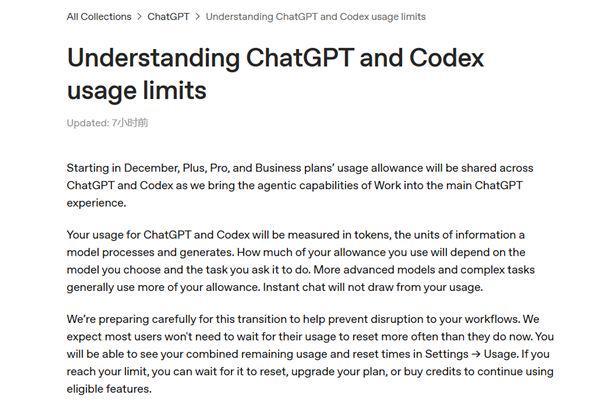
MyTechDailyNews readers who move between ChatGPT and Codex should now treat one pool, not two, as the practical limit for their account. The OpenAI notice describes a quota system measured in Tokens, where heavier model use and more complex tasks drain the same allowance faster. Instant chat remains outside the shared pool, so light conversation may continue while tool-based work draws from the balance.
What the shared quota changes for software users
- ChatGPT and Codex draw from a linked allowance for paid users.
- Token consumption rises with stronger model capability and more complex tasks.
- Instant chat does not consume the shared allowance described in the notice.
- The Settings—Usage view combines remaining quota and the next reset time.
How each usage path affects the balance
| Usage path | Quota effect | Why it matters |
|---|---|---|
| Instant chat | Does not occupy shared quota | Keeps basic conversation separate from tool work |
| ChatGPT requests using more capable models | Consumes shared quota faster | Complex model calls reduce the linked balance sooner |
| Codex tasks with higher complexity | Consumes shared quota faster | Any extra drain on one product lowers the other product’s available balance |
What OpenAI says about the transition
The company also said it prepared for the transition and expects most users will not need to wait for reset more often than before. That statement does not change the quota math, but it explains why the merged view becomes the control point for checking capacity.
Steps to check and preserve your remaining allowance
- Open your ChatGPT account settings.
- Go to the Settings—Usage page.
- Read the combined remaining quota and the next reset time.
- If the allowance is exhausted, choose the response that fits your work: wait for automatic reset, change to a higher subscription plan, or purchase points to continue.
FAQ: quota, reset, and Instant chat
Q: Does ChatGPT use the same allowance as Codex?
A: For paid users, the notice links the two services, so usage on one side can reduce the balance available on the other.
Q: Will every conversation drain the pool?
A: No. The notice says Instant chat does not occupy the shared quota.
Q: Where can I see the reset time?
A: The merged remaining quota and reset time appear in Settings—Usage.
Action advice
- Before heavy Codex work, check the combined balance in Settings—Usage.
- For routine discussion, use Instant chat to avoid consuming the shared pool described in the notice.
- For long tasks, wait for reset if the deadline is flexible.
- Consider subscription upgrade only if repeated exhaustion interrupts required workflows.
- Purchase points only as a short-term continuation option after the allowance runs out.
Common misconceptions
- Shared quota does not mean Instant chat is charged the same way; the notice excludes it from the shared pool.
- The pool is not measured by raw chat count alone; Tokens, model strength, and task complexity determine pace.
- Seeing one product low may reflect use of the other linked product, not only the current tool.