
Intelligent Assistant Inside Pages, Keynote and Numbers: How Apple's OpenAI-Backed Office AI Update Changes Daily Work
If you have ever cut a paragraph out of a document, pasted it into a chatbot, waited for a rewrite and then pasted it back to find the styling gone, you already understand the gap Apple is trying to close. The company is threading its AI capability directly into the three productivity apps people open before breakfast: Pages, Keynote and Numbers. The feature is called Intelligent Assistant, it is powered jointly by Apple and OpenAI models, and its defining behaviour is that it reads the file already on screen before it does anything else.
That is the practical distinction worth holding on to. This is not a question-and-answer box bolted to the side of the suite. It is an assistant that works on the current document or spreadsheet — drafting, rewriting, building slides, producing formulas and tidying data — and Apple has paired that with an open protocol that lets outside agents do the same. Here is a working breakdown of what changed, who can run it, how to use it, and where it can still embarrass you.
At a glance: the five changes worth reading first
- Intelligent Assistant arrives in Pages, Keynote and Numbers, taking context from the open document.
- The capability is supported by Apple plus OpenAI models rather than a standalone chat surface.
- Model Context Protocol (MCP) support opens the three apps to qualifying third-party AI agents on macOS 27 and later.
- It ships as a beta and is gated by Apple Intelligence-capable hardware, iOS 27 / iPadOS 27 / macOS 27, plus language and subscription terms.
- Pixelmator Pro, Logic Pro for Mac and iPad, and Final Cut Pro get their own AI upgrades, due in November and free for existing Creator Studio subscribers.
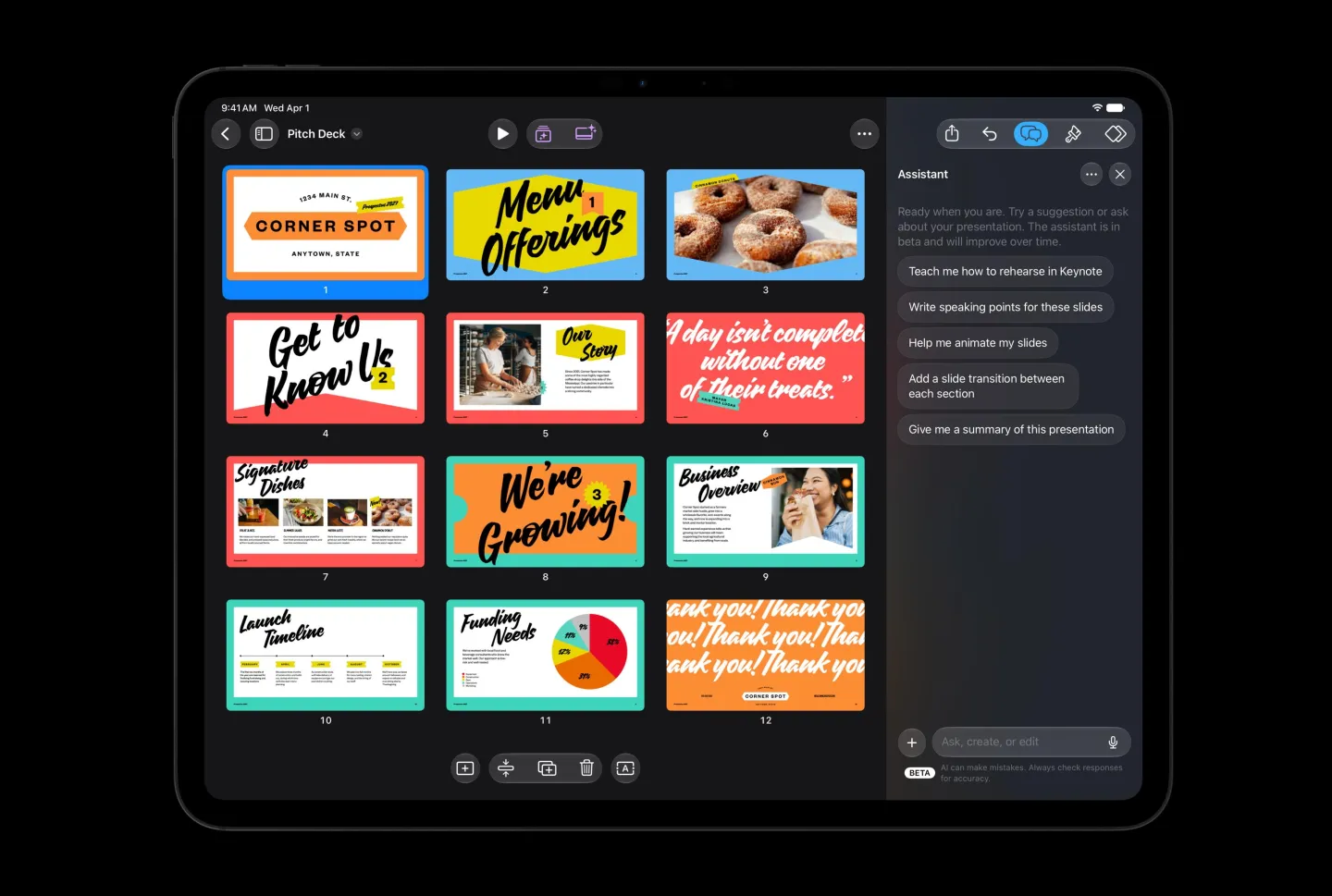
What the assistant does in each app
| App | Tasks you can hand over | Who gains the most |
|---|---|---|
| Pages | Draft an article, restructure paragraphs, retune tone, polish existing text, write a specific section, generate images or graphic elements, look up a topic and fold the findings into the document, explain how a tool works | Writers who never learned Pages' deeper feature set; teams standardising voice across long documents |
| Keynote | Build a presentation around a subject, generate slides, write speaker notes, add animation, refine pages already in the deck, produce images and graphics | People assembling business reports, teaching decks and project reviews under deadline |
| Numbers | Find patterns in a table, generate complex formulas, build custom tables, recommend chart types that fit the data, create summary tables, analyse trends | Users sitting on large data sets without formal analyst training |
Pages: the copy-and-paste loop falls away
In Pages the assistant handles both creation and repair. It can draft from scratch, reorder blocks of prose, adjust register, and edit what is already written. It can also be pointed at a section that needs to exist, asked for an image or graphic element, or queried for the latest information on a topic before that material is integrated into the file. For anyone who has never gone past the basics, it doubles as an in-context explainer: it describes how a particular tool is used and suggests improvements grounded in the document currently open. Compared with asking a separate chat window about your own text, the value here is mostly mechanical — drafting, checking and editing happen in one place, so the app-switching tax disappears.
Keynote: the unglamorous half of a deck
Keynote's version is aimed at presentation construction. Describe a subject and the assistant builds out the content, generates slides, writes speaker notes, adds animation and refines pages that already exist, plus produces the images and graphics that give a deck its visual structure. Making a presentation has always been three jobs at once: organising information, solving layout, and holding a narrative together. The pitch here is that those steps collapse into a single workflow — you describe the target in words, the software performs the operations.
Numbers: formula fluency borrowed from the model
Numbers is where the capability is easiest to justify in time saved. The assistant can look for patterns across a table, generate complex formulas, set up custom tables and suggest which visualisation actually suits the data. Apple's own examples are tasks most spreadsheet users eventually Google: analyse how a set of values is trending, build a summary table, or write a formula that performs a specific calculation. Describing that in natural language means you no longer need fluent function syntax to get an answer. One hard caveat sits next to the benefit: generated formulas and analytical conclusions still require verification, especially anywhere financial calculations or business decisions depend on them.
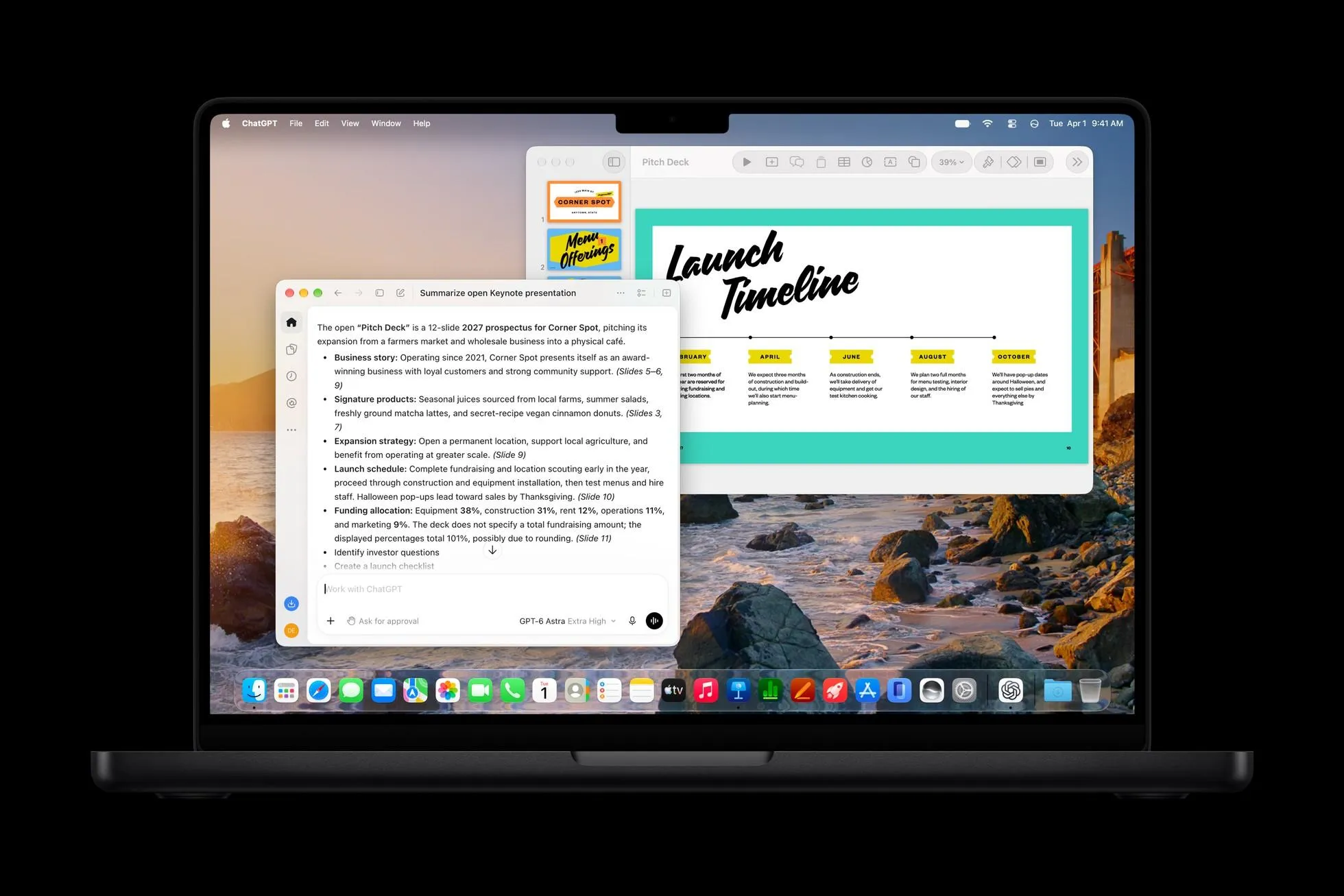
MCP turns the office apps into a surface for outside agents
The quieter half of this update may matter more long term. Apple is now allowing third-party AI agents to reach into its office apps: Pages, Keynote and Numbers support the Model Context Protocol (MCP) on macOS 27 and later, which lets qualifying external agents interact with them. MCP is an open protocol for wiring AI models to external tools, data sources and applications, so a model stops being a text generator and starts acting on authorised systems to complete narrower workflows. For productivity software the implication is structural — the assistant driving your document no longer has to be Apple's.
| Dimension | Built-in Intelligent Assistant | Third-party agent via MCP |
|---|---|---|
| Where it runs | Pages, Keynote, Numbers as a beta | Same three apps, macOS 27 and later only |
| Model behind it | Apple plus OpenAI models | Whatever model the outside agent uses |
| How work is scoped | Reads the context of the open file and edits it | Interacts with the app according to granted authorisation |
| Gatekeeping | Apple Intelligence-capable device, iOS 27 / iPadOS 27 / macOS 27, language and subscription terms | Agent must qualify under the protocol, plus the same macOS 27 floor |
| Best fit | Everyday drafting, slide building, formula and data clean-up | Users and teams already committed to a different assistant stack |
Eligibility checklist: what your setup needs to look like
- Hardware that supports Apple Intelligence — the assistant is not a universal rollout.
- Operating system at iOS 27, iPadOS 27 or macOS 27 or newer.
- MCP access specifically requires macOS 27 or later.
- Status is beta, so expect the feature set to move.
- Availability is additionally limited by language and subscription conditions; not every account sees the full capability set.
- Creative-app upgrades are dated to November and are free for existing Creator Studio subscribers.
A first-run workflow in six steps
- Confirm the floor before anything else: Apple Intelligence support, then iOS 27 / iPadOS 27 / macOS 27. If the OS is older, the rest of this list is moot.
- Check entitlement — language and subscription conditions decide which pieces you actually see, and because this is a beta your build may not show the complete task list above.
- Work from inside the file. Open the document or spreadsheet first so the assistant has context; describing your own text to a separate chat window reintroduces the round trips this update exists to remove.
- State the outcome, not the click path. Ask for the result you want — "restructure this section for an executive read", "turn these figures into a summary table" — rather than narrating steps.
- Hand over the mechanical 80 percent first: slide outlines, speaker notes, animation passes, tone normalisation, formula generation, chart suggestions. Keep narrative judgement and final layout decisions with a human.
- Audit before distribution. Re-read generated prose, re-check factual claims pulled into the document, and independently verify any Numbers formula before it feeds a report, a budget or a decision.
November creative-app upgrades worth planning around
Pixelmator Pro: describe the edit instead of building the mask
Pixelmator Pro gains a generative-editing capability named Generate Fill: describe the change you want in a region of an image and the software attempts to match the surrounding light, perspective and texture so the inserted content sits naturally in the frame. Historically that job meant careful selections, layers and retouching tools; now you say what should be added, removed or changed and the model produces the result. Quality is still variable — it depends on the image content, the prompt, and how well the model reads the scene.
Logic Pro for Mac and iPad: interface refresh plus an assistant
Logic Pro for Mac and the iPad version move to the Liquid Glass visual style and gain an AI assistant. Apple's example is a setup task: from a single prompt the assistant can create the basic configuration for a vocal recording track, and it can also help modify an existing music project. The Mac version of Logic Pro additionally gets a redesigned browser that uses on-device AI to analyse, classify and tag imported sound material.
Final Cut Pro: templates and stock brought in-house
Final Cut Pro is due to integrate MotionVFX templates, graphics, titles and transitions directly inside the app, and to ship a built-in Content Hub of creator assets including stock video, photos and backgrounds. For editors, the on-device tagging in Logic Pro points at the same underlying problem as asset libraries in Final Cut Pro: finding the right clip or sound usually eats more time than using it.
Permissions, privacy and compatibility risks to check
- Treat agent access as a data-sharing decision. MCP exists to let a model act on external tools according to authorisation, so before connecting a third-party agent to Pages, Keynote or Numbers, be explicit about which files that agent may read.
- Remember who supplies the intelligence. Intelligent Assistant is supported by Apple and OpenAI models; anything you place in the document is potentially material the assistant is working from.
- Keep confidentiality out of the pilot. Do not run regulated or client-sensitive documents through the beta while its scope and limits are still settling.
- Do not assume parity across platforms. The suite is reachable on iOS 27 and iPadOS 27, but MCP is a macOS 27 feature, so a workflow designed around an external agent will not follow you to an iPad.
- Expect accuracy failures on hard cases. Complex documents, financial data and professional creative work are exactly where generated output is most likely to be wrong or subtly off-brief.
Common misconceptions
- "It is just a chatbot with a document open beside it." No — the assistant is scoped to the file you are editing and performs edits, not only suggestions.
- "MCP means any AI tool can plug into Numbers." Only qualifying third-party agents, and only on macOS 27 or later.
- "A generated formula is ready to ship." It is a draft. Financial calculations and business decisions still need manual checking.
- "The November creative updates are free for everyone." They are free for existing Creator Studio subscribers.
- "Generate Fill replaces retouching skill entirely." It collapses work that used to need selections, layers and retouching tools, but the result still depends on the image, the prompt and the model's understanding of the scene.
- "Intelligent Assistant is a finished release." It is currently a beta with language and subscription limits in force.
FAQ
Is this the same as asking a general AI assistant about my text?
No. The point of the update is that the assistant inherits the context of the open Pages, Keynote or Numbers file, so drafting, restructuring, tone changes, slide generation and formula writing happen against that file instead of a pasted excerpt in another window.
Which apps and systems are covered?
Pages, Keynote and Numbers, on devices that support Apple Intelligence running iOS 27, iPadOS 27 or macOS 27 and later. MCP support for third-party agents is the macOS 27 line.
Can I bring my own AI agent into the office apps?
That is what MCP opens up: qualifying third-party agents can interact with the three apps on macOS 27 and later, which means a workflow is no longer forced to rely solely on Apple's built-in assistant.
Why do I not see the full feature set?
Availability is constrained by language and subscription terms, and the capability is distributed as a beta, so partial visibility is expected behaviour rather than a fault.
When do the Pixelmator Pro, Logic Pro and Final Cut Pro changes land?
Apple dates those to November, provided free of charge to existing Creator Studio subscribers.
Action recommendations
- Pilot on a throwaway file. Run one drafting pass in Pages, one outline pass in Keynote and one formula request in Numbers before you connect the assistant to live work.
- Write the review rule down now: assistant-generated text is copy-edited, and assistant-generated formulas are re-derived before anything financial or client-facing depends on them.
- Delay MCP adoption for shared or sensitive repositories until agent qualification and authorisation boundaries are clear in your own environment.
- Re-baseline your deck workflow. If slides, speaker notes and animation passes move to a single prompt-driven step, the time you reclaim should go to narrative structure, not to another tool.
- Pay attention to the November calendar. If your team holds Creator Studio seats, schedule the Pixelmator Pro, Logic Pro and Final Cut Pro changes into production rather than discovering them mid-project.
- If you manage a fleet, sequence the OS rollout to iOS 27, iPadOS 27 or macOS 27 first — everything above depends on it.
From chat window to embedded coworker
Read together, these changes describe a shift in position: the assistant stops being a window you visit and becomes a layer inside the file you are already working in — editing prose, assembling decks, writing formulas, tagging sound. Whether that converts into saved hours depends on three things this update does not settle for you: the accuracy of what gets generated, how much control you retain over it, and how well the apps cooperate with one another.
The competitive reading is unavoidable. Microsoft and Google have been pushing AI into their own productivity products for some time, and Apple's move answers that pattern on both fronts at once — a native assistant on the inside, and an open protocol inviting outside agents in. As natural-language operation and third-party agents spread through productivity software, the differentiator stops being which app offers the best editor and becomes which app can understand intent and carry a task to completion. For now, treat the assistant as a fast, well-informed junior: useful on first drafts and tedious mechanical steps, still not the person who signs off on the numbers.
Written by Sarah Chen, Tech Daily — Software desk at MyTechDailyNews. Corrections and tips: hello@techdaily.com.