
Buttons or Chat? The Software Checklist Behind Agentic Front Ends for MATLAB Apps
Most engineering groups eventually ship the same category of software: a custom app that wraps analysis code, a simulation model or a test workflow so a broad audience can run it, inspect results, compare cases and make decisions without editing what sits underneath. The trouble usually arrives later, after the first plot is on screen. Follow-up questions rarely follow a fixed path, and each new question tempts the author toward another panel. MyTechDailyNews Software looks at one structured answer to that spiral — a chat layer that may only trigger functions the app author has already approved, and that never invents new analysis.
How the loop actually works
An agentic front end is best understood as an AI chat-style layer sitting in front of actions the application author has already signed off on. The user asks in ordinary language, the agent selects from the registered tools, the existing engineering code does the work, the app renders an output, and the user reviews it. That cycle is what is usually called the agentic loop.
Two limits make the pattern usable in production engineering software. The agent's role is not to redefine the analysis: it chooses which approved analysis action to run based on what the user asks, and it cannot create a new analysis routine or change the underlying engineering. And the ambition stays narrow — the goal is not an open-ended system but a governed workflow in which the next approved step is easier to ask for.
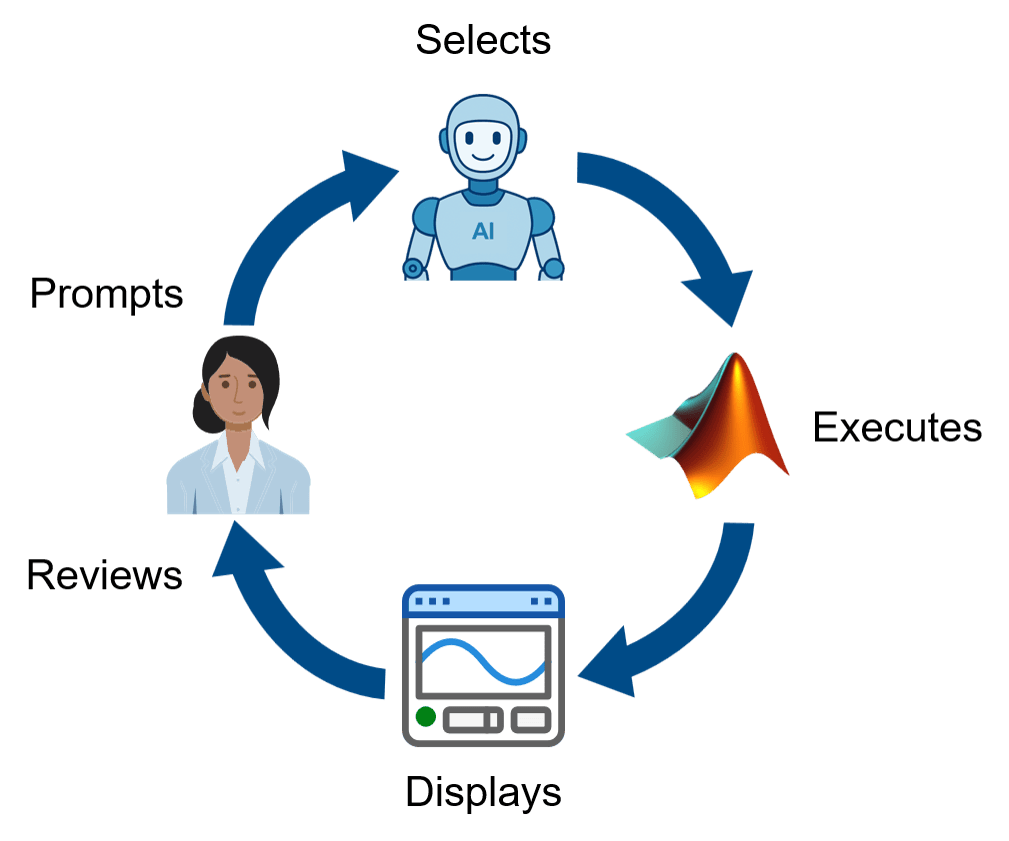 Figure 1: The agentic loop: user enters prompt -> agent selects approved function(s) -> functions execute -> app displays results -> user reviews results. Source: MathWorks
Prerequisite: a grounded workflow you already control
Conversations with customer engineering teams keep surfacing the same starting point, one MathWorks describes as a grounded workflow: the engineering logic, models and analysis functions are already defined and controlled by the workflow owner. The custom app gives users a guided process of inputs, plots, tables and reports, while people on separate but related teams run the analysis without touching the code or model behind it.
Fixed controls shine when the route is predictable — pick a file, choose the data, press the button, inspect the plot, export the report. They strain when users begin comparing cases, checking anomalies and asking what changed, because the workflow itself can be well defined while every possible question about its results cannot.
Fixed controls vs. a chat layer over approved tools
| Dimension | Fixed controls (buttons, panels, tabs) | Agentic front end |
|---|---|---|
| What the user does | Finds the right control, then presses it | Asks for what they want; the app carries out the next approved action |
| What the author builds per new question | Another button, comparison panel, anomaly tab, follow-up menu, help text | Generally nothing new — the approved function is already registered |
| Unknown next steps | Covered only by growing branching UI complexity | Navigates the existing workflow without mapping every path |
| User learning cost | Must learn where things live and what each control does | Less to learn before useful work gets done |
| Owner workload | More support and maintenance falls back on workflow owners | Less interface to build, teach and maintain |
| Best fit | Linear, stable workflow with a short action list | Known action set, unpredictable path through it |
Worked example: a battery lab assistant
A test engineer opens battery lab data holding several runs: a baseline case, a high-temperature case and a degraded case. The first prompt is simple — "show me the high-temp run". What happens next depends entirely on what the plot reveals: compare it with the baseline, check it for anomalies, or ask what stands out.
A conventional app can absorb all of that. Add more buttons, add a comparison panel, add an anomaly tab, add menus for follow-up questions, add help text so users know where to find everything. Those applications are legitimate solutions that MathWorks engineers have built with customers — and at some point the guide stops looking like a guide and starts looking like a confusing map of every possible route. That slows users down and puts more support and maintenance work back on the workflow owners. Buttons are great when the next step is obvious; they are far less helpful when someone is staring at a plot trying to decide what to ask next.
The loop changes only how the user moves through approved steps, not the engineering underneath. The assistant used to demonstrate this is a small MATLAB app with a chat panel on the left and analysis results on the right. Its agent is permitted four categories of action: list available runs, display a run, compare two runs, and run anomaly detection. None of those are arbitrary. Each one is an approved MATLAB function with defined inputs and outputs that the app author chose to expose, and they are the only actions the agent is capable of taking on the user's behalf.
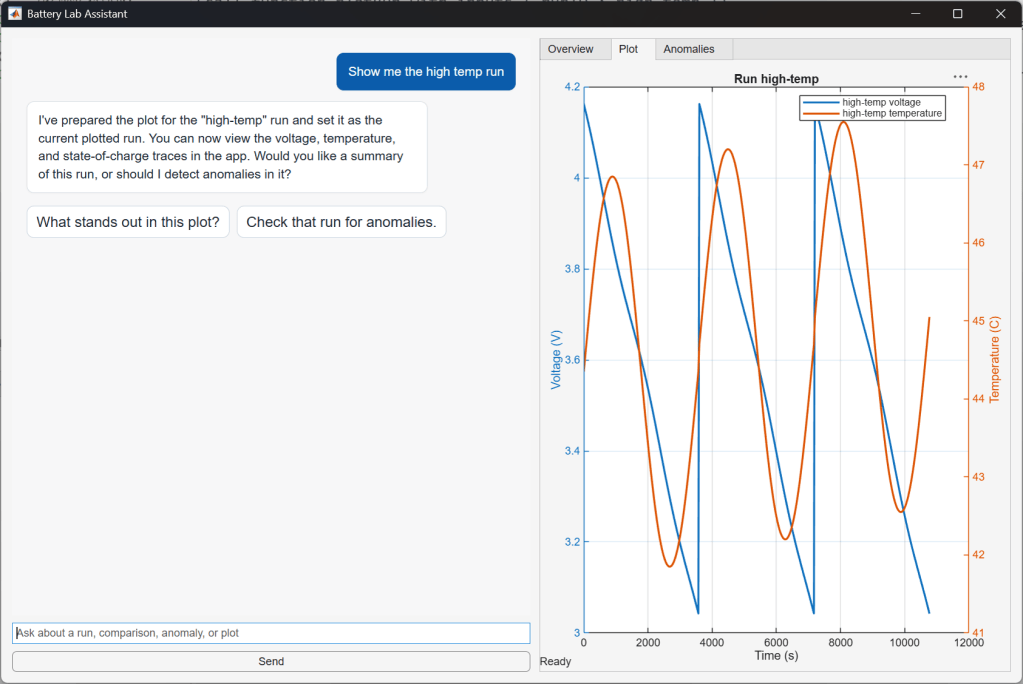 Figure 2: Full view of the app with message "show me the high-temp run" and results. Source: MathWorks
What reaches the user is a two-turn exchange: "show me the high-temp run", then, once the curve appears, "compare with the baseline". The agent does not invent a way of displaying data. It calls the approved MATLAB function for displaying a run, using the high-temperature run as input, and the app renders the outputs for review.
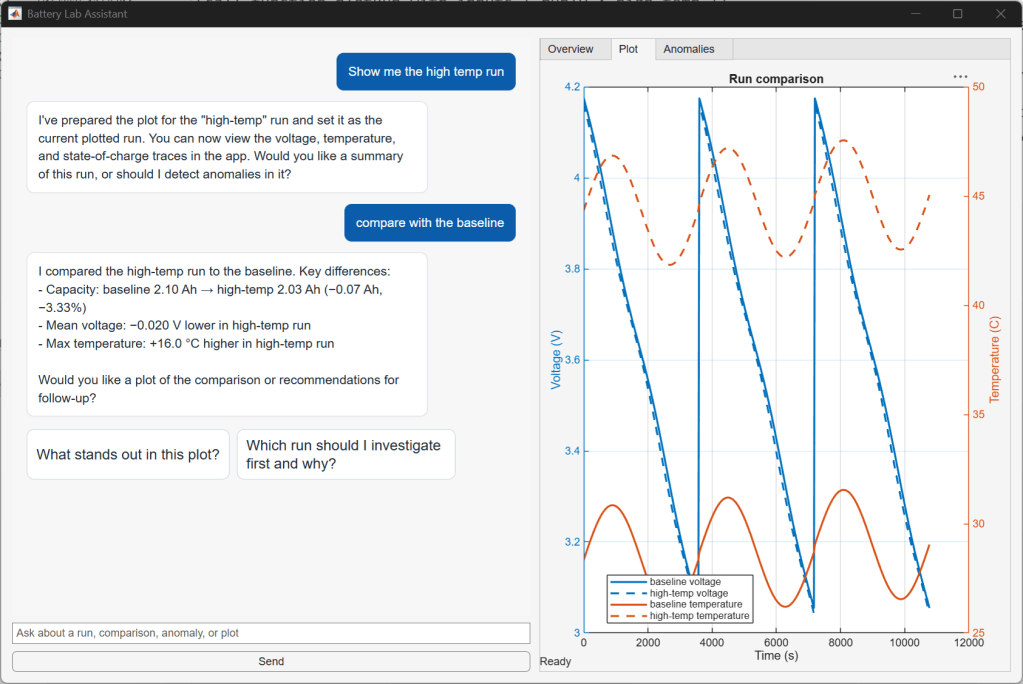 Figure 3: Screenshot of app showing message "show me the high-temp run" and chat response, followed by "compare with the baseline" and the response. Source: MathWorks
Under the hood: the MATLAB AI Agent SDK
The example is wired with the MATLAB AI Agent SDK, the framework that supplies this kind of loop: connecting to a large language model, keeping message history, registering MATLAB functions as callable tools with defined inputs and outputs, and managing shared agent state. The exact code is less important than the shape of the design. The decision that carries the weight is which MATLAB functions become tools available to the agent and what they return to the app.
Build sequence
- Confirm the workflow is grounded — logic, models and analysis functions defined and controlled by a named owner.
- Inventory the approved actions that already sit behind the current buttons and menus.
- Register the chosen MATLAB functions as callable tools with fixed inputs and outputs.
- Write a description for each tool, so the agent can pick between them based on the user's prompt.
- Decide what the large language model receives: raw data, summarized results, metadata, or only the prompt plus tool outputs.
- Render every tool result back through the app so the user reviews it and continues in natural language.
Numbers in the reference example
- 3 runs in the demo dataset: baseline, high-temperature, degraded.
- 4 categories of action exposed to the agent.
- 2 panes in the app UI: chat on the left, results on the right.
- The source's own counter-example: an app with three actions whose design team knows when to use them does not need this pattern.
- Attribution: the loop diagram, the battery lab assistant and the SDK wiring are documented by MathWorks for MATLAB.
Governance checklist: exposure, data, logging, review
Teams need to settle four questions before the panel goes live, because that is where the design work actually is.
- Exposure — which functions become agent-callable tools, and which stay manual-only.
- Data sent to the model — raw data, summarized results, metadata, or only the user's prompt and tool outputs.
- Logging — what the app records about each request and each executed action.
- Human review — where a person stays in the loop before an output turns into a decision.
When to skip the chat layer
An agentic front end should not be added to every app. When the workflow is linear and stable, ordinary controls are clearer. If the app has three actions and the design team knows when to use them, a chat panel probably adds more work than value.
The place to look instead is an app whose author knows the set of actions but cannot predict every useful path through them, because the next step depends on the result the user just saw. Battery test review is one shape of that problem; parameter studies, lab data checks, signal-processing reports and simulation result triage share the same shape.
Common misconceptions
- "The agent will perform new analysis." It will not. It selects which approved action runs; the engineering judgment remains inside the functions.
- "Chat replaces the application." The loop does not replace the app, the underlying algorithms or engineering judgment — it changes how a user moves through approved steps.
- "Fewer widgets means less control." The author still controls the MATLAB functions, the data and the outputs; the approved engineering actions remain the boundary.
- "The planning question is "where can we add chat?"" The useful question is "which approved actions should users be able to do through chat?" Designing around approved steps changes the experience on both sides.
FAQ
Do users have to touch the code or the model?
No. The point of a grounded workflow is that users on separate but related teams, or across the organization, can run the analysis without editing what is behind it.
Does the existing interface disappear?
No. Inputs, plots, tables and reports stay. The chat layer adds a second route to the same approved steps, so users spend less attention on the mechanics of the UI and more on the engineering question.
What is the real engineering change?
Less the code than the contract: which functions are exposed, what each returns to the app, what the model is allowed to see, and where a human reviews the result.
How do I know the app has passed the button stage?
When follow-up questions stop following a fixed path and every useful next step is becoming another button, panel or menu rather than another answer.
Action recommendations by reader type
| Reader | Next step |
|---|---|
| Application developers | List the approved actions already behind your controls, write one tool description each, and agree in advance what data reaches the model. |
| Workflow owners | Hold ownership of functions, data and outputs; set the logging policy and the human-review checkpoint before exposing any tool. |
| Efficiency-tool users | Use the chat route for exploration — comparing cases, checking anomalies, asking what changed — and keep fixed controls for the routine path. |
| IT support and software selection | Before adopting, confirm the underlying workflow is grounded and owner-controlled, and that the action set is stable enough to describe. |
This category deserves attention precisely because it refuses to be open-ended. Nothing here changes the analysis, the algorithms or the person who owns them; what changes is the cost of asking the next question. Once the exposed surface is defined as a set of approved actions instead of a set of widgets, a specialist workflow can reach more people without every possible path becoming more software to build, teach and maintain. The payoff appears when the boundary holds firm but the route across it is allowed to move — and that is the criterion worth holding any chat feature against.