
MyTechDailyNews Hardware Spec Check: Two Device Tree Entries Point to a Raspberry Pi Zero 3 W and Raspberry Pi 4 Model A
Two new entries in the Raspberry Pi Linux device tree point to unannounced boards: a Raspberry Pi Zero 3 W and a Raspberry Pi 4 Model A. Phoronix spotted the files first. For hardware evaluation, these descriptors are useful because they expose the SoC family, display paths, storage hints, wireless assumptions, GPIO compatibility, and possible boot changes before a spec sheet arrives. The information still needs caution, because kernel tree support and final retail hardware can differ, but the entries already tell evaluators what tests should matter: sustained compute, heat, boot reliability, peripheral compatibility, and whether trimmed I/O changes the buying case.
Raspberry Pi Zero 3 W: A Pi 4-class core in a Zero-sized board
The Raspberry Pi Zero 2 W launched almost exactly five years ago — tomorrow, in fact — and the most important signal in the Zero 3 W device tree is the SoC: the Broadcom BCM2711. That is the same quad-core Cortex-A72 chip found in the Raspberry Pi 4, and it replaces the Zero 2 W's quad-core 1GHz Cortex-A53 RP3A0. Earlier comparison data for the Zero 2 W against the Zero W is a useful baseline for the scale of this move, and it is worth checking how those two compare on sbc.compare. Per-core performance should improve substantially, and if clocks can get anywhere near Pi 4 levels in that tiny footprint, it will be a lot of compute for a Zero. The thermal question is the obvious one, because the BCM2711 is not exactly known for running cool, and there is not much board for the heat to spread into. The device tree does not reveal clock speeds, so we will have to wait and see whether it has been dialled back.
Device-tree evaluation points
- Storage ambiguity: The storage controller is configured with an 8-bit bus width, and a comment describes it as driving the eMMC/SD card, which only really makes sense for eMMC. That said, it is not safe to assume the feature will survive to production, because a Zero product lives and dies by its price tag. The original analysis treated this as a leftover or an option kept open during development, with microSD being what buyers should expect unless confirmed.
- Bootloader: The GPIO names include SPI flash lines, suggesting the Zero 3 W gets the same EEPROM-based bootloader as the Pi 4, while the Zero 2 W never had one. That should bring the Pi 4's boot options and normal bootloader update behavior, which matters for maintenance workflows.
- Display and power: There is a single HDMI output, with the second HDMI controller permanently disabled, and a power button defined on GPIO 46 and mapped to KEY_POWER. That could become a physical button or header for one, much like the Pi 5, though the final placement may not be known.
- Wireless and status: Wi-Fi and Bluetooth are wired up in the same way as the rest of the BCM2711 family, with a single ACT LED for status.
- HAT compatibility: The device tree preserves the usual 40-pin GPIO layout, GPIO 0-27 with the ID EEPROM pins, so existing HATs should be fine if the electrical definitions carry over unchanged.
Two more signals need caution: the PCIe controller is enabled, and there are lines named PCIE_PWR_EN and PCIE_DET_WAKE; the camera side also pulls in a 4-lane CSI configuration rather than the 2-lane one used by the Pi 4 Model B. It is worth noting that both device trees share a lot of copy-and-paste DNA, including a duplicated PWR_GPIO line name in the Zero 3 W file, so neither item should be read as a confirmed connector or camera decision until a board appears. PCIe exposure on a Zero would be notable, but it is not established here.
Raspberry Pi 4 Model A: The trimmed Model B pattern
A Raspberry Pi 4 Model A is the second unexpected entry. The last Model A was the Raspberry Pi 3 Model A+ back in 2018, and the pattern has been consistent: start from the Model B, remove the parts most users can live without, such as RJ45, some USB ports, or other I/O, and cut the price. The Pi 4 Model A appears to follow that recipe pretty closely, though the price comment may not quite hold in today's component environment.
- No Ethernet. The Ethernet controller is not enabled anywhere, and the GPIO lines that drive the Ethernet PHY on the Model B have been repurposed. That is very much in keeping with previous Model A boards.
- Single display path. The entry describes a single HDMI output rather than the Model B's dual micro HDMI, which simplifies the board but removes one display for multi-head work.
- No analogue audio or composite jack. The analogue audio pins are empty and the composite video encoder is disabled, so audio will be over HDMI, USB, or I2S if those paths are supported by the final software stack.
- Storage. microSD only, with the same 1.8V signalling support as the Model B for the faster UHS card modes.
- External antenna support. This is the most interesting hardware angle. There are two antenna control lines, ANT_CTRL1 and ANT_CTRL2, and overlay parameters named ant1, ant2 and noant, which is exactly how the Compute Module 4 switches between its onboard antenna and an external U.FL connector. If that carries over to the final board, it would be useful for anyone sticking a Pi in a metal enclosure.
- Boot, LEDs, and power. The entry includes PWR and ACT LEDs, the same SPI flash bootloader setup as the Model B, and the same power button definition as the Zero 3 W.
USB is not described by the device tree. On the Model B, the USB 3 ports used the PCIe bus, and the PCIe controller is enabled here too, so USB 3 is possible; however, the 3 Model A+ only had a single USB-A port, and a similar port count would be a reasonable expectation for the 4 Model A.
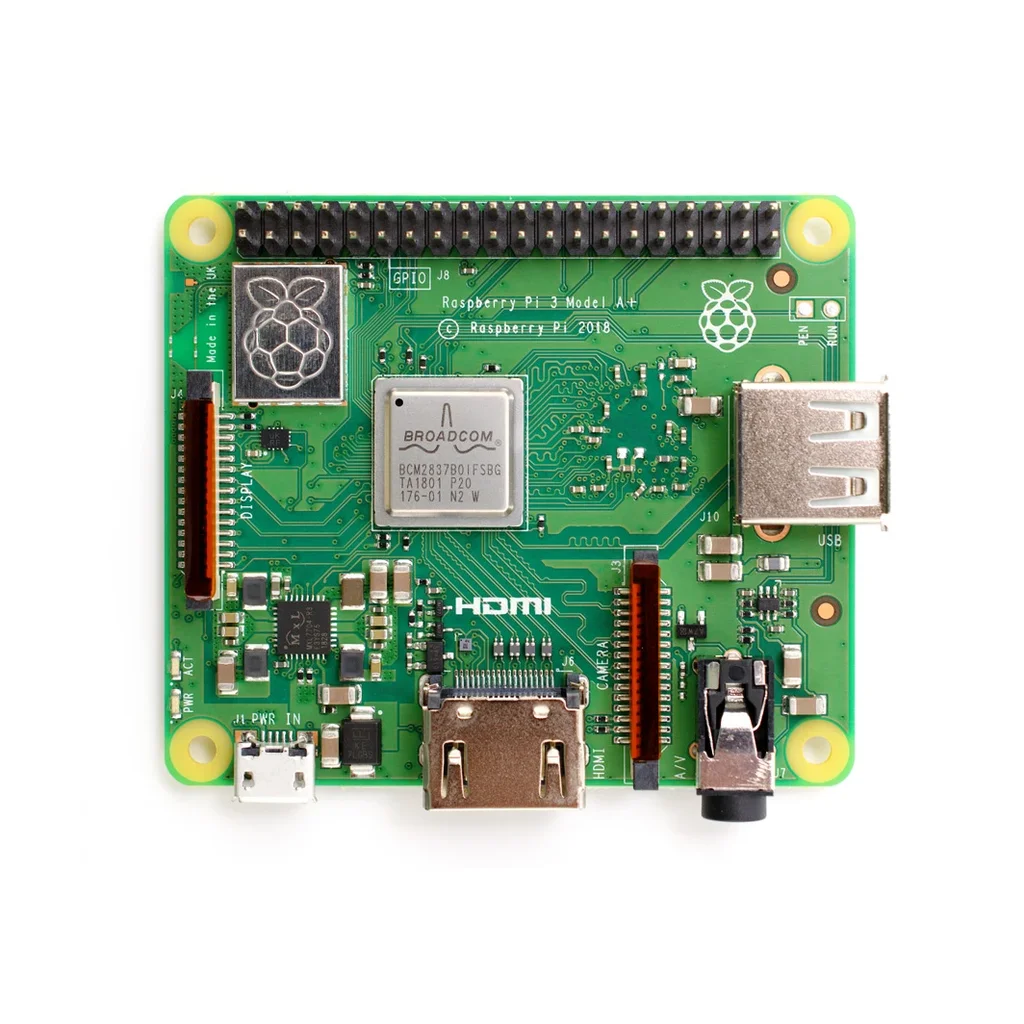
The previous Model A, the Raspberry Pi 3 Model A from 2017.
How do they compare for buyers?
The table below summarizes the device-tree evidence. Anything marked with an asterisk is an interpretation, not a stated specification.
| Item | Raspberry Pi Zero 3 W | Raspberry Pi 4 Model A | Raspberry Pi 4 Model B |
|---|---|---|---|
| SoC | Broadcom BCM2711 | Broadcom BCM2711 | Broadcom BCM2711 |
| CPU | quad-core Cortex-A72 | quad-core Cortex-A72 | quad-core Cortex-A72 |
| HDMI | 1x | 1x | 2x micro HDMI |
| Ethernet | No | No | Gigabit |
| Wi-Fi/Bluetooth | Yes | Yes, with antenna switching* | Yes |
| Storage | microSD unless eMMC option remains* | microSD | microSD |
| Analogue audio/composite | No | No | 3.5mm |
| SPI flash bootloader | Yes* | Yes* | Yes |
| Power button | Yes* | Yes* | No |
| LEDs | ACT | PWR, ACT | PWR, ACT |
What we do not know yet
Quite a lot. Device trees do not describe RAM, so there is no word on memory configurations, and there is nothing on pricing, clock speeds, connector types, or a release date either.
Pricing is the evaluation pressure point
Pricing is the big one for anyone deciding whether these entries become interesting products. Memory costs have not exactly been kind lately, as reflected in the 1GB Raspberry Pi 5 launch context. A lower-cost Pi 4 variant makes a lot of sense in that environment: the BCM2711 is a mature chip, it is well supported in software, and a cut-down board gives people who do not need a Raspberry Pi 5 something cheaper to reach for. The Zero 3 W is a tougher call, because the Pi Zero range has always lived and died by its price, and the BCM2711 may not be as cheap to build around as the RP3A0.
Common misconceptions
- A device tree file is a hardware specification. It is not; it is kernel support and can contain development leftovers, copy-pasted blocks, or options that never reach retail hardware.
- 8-bit eMMC/SD card signaling guarantees eMMC. The 8-bit bus width and the comment about the eMMC/SD card are suggestive, but microSD remains the conservative assumption for a price-sensitive Zero product.
- Enabled PCIe means exposed PCIe connectors. The controller may be enabled for internal paths, and the original analysis notes duplicated device-tree DNA such as PWR_GPIO, so connector expectations need board evidence.
- A trimmed Model A will automatically be a better value. The pattern is fewer interfaces, but pricing, RAM, clocks, and real-world thermals still decide whether the 4 Model A is useful.
Action advice for hardware evaluation
- For the Raspberry Pi Zero 3 W, test sustained quad-core load, surface temperature, clock behavior, and microSD performance first. The BCM2711 moves the product into a higher performance tier, but a small board makes thermals a primary decision factor.
- For the Raspberry Pi 4 Model A, map required I/O before purchase: Ethernet, second HDMI, analogue audio, composite output, and port count. If those are missing but external antenna support helps for enclosure work, the trimmed board may be practical.
- For compatibility, confirm GPIO 0-27, 40-pin, SPI flash bootloader behavior, and the power button interface on GPIO 46 before integrating HATs or cases.
- For comparison, use sbc.compare to benchmark the final Zero 3 W, 4 Model A, Pi 4 Model B, and Raspberry Pi 5 when retail units are available, then check power, wireless, storage, and boot options under identical loads.
Overall, the entries are interesting because they suggest a clearer performance path for the Zero line and a more focused Model A refresh for the Pi 4 platform. The external antenna option on the 4 Model A is the kind of practical detail that matters to builders, while the Zero 3 W's BCM2711 signal changes what buyers should expect from a compact Linux board. Until the final boards appear, treat the analysis as an early evaluation checklist rather than a spec sheet.