
Hardware Lab: What a $49.99 Zyxel XGS1010-12 Conversion Buys a LAN Moving 1 to 2.5 GbE
Spec sheets end at the port list, but a switch's real value is decided by what its firmware lets you touch. The build notes examined here treat a managed-versus-unmanaged gap as a costed question: how many dollars, how many minutes at a serial console, and how much revision risk stand between a shelf item sold without any configuration interface and the managed feature set on the box next to it. One open-box purchase argues that the boundary is thinner than the product page implies.
Triage first: which switch positions earn multi-gig silicon
Brian's plan is staged rather than wholesale — move the LAN from 1 to 2.5 GbE at the access layer, and reserve 10 GbE for selected spans. The notes are explicit that there is no single-event cutover, and that finishing the shift is optional.
Client link speeds set the queue order. Most endpoints associate wirelessly with the main router or with mesh points, so swapping switch hardware behind them buys nothing until they clear the Wi-Fi 5-plus-1 GbE backhaul threshold. On the copper side, most wired devices are 1 GbE-only, which pins any faster port to the lowest common denominator.
Three exceptions justify acting now: an Apple Mac Studio in the office that is 10 GbE-supportive; the highest-end of the three QNAP NASs in the furnace room, already upgraded for 10 GbE; and several MoCA 2.x adapters — including one in the furnace room — that may return to service later. Because the fast clients cluster in two locations, the multi-port switch at each of those locations moves to the front of the upgrade list.
Span quality is the remaining unknown. If the Cat 5e run joining those two locations does not prove 10 GbE-reliable, the fallback is already on the shelf: 50 feet of optical cable plus two SFP+ modules.
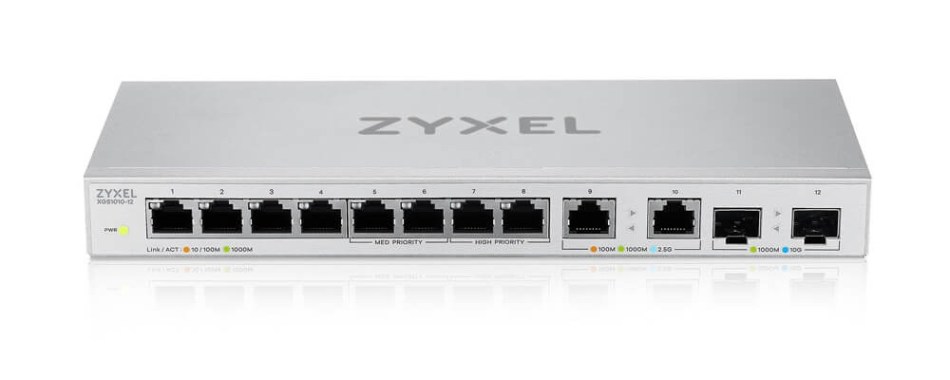
At the furnace-room nexus — the switch sitting beside the router and cable modem, carrying a mix of legacy and fast clients — the candidate was an open-box Zyxel XGS1010-12, $49.99 on eBay, never unpacked or used.
Read the port allotment before the firmware story
The front face settles the capacity arithmetic: eight 1 GbE ports, matching the quantity and speed of the TRENDnet TEG-S81g it replaces in that rack position, then two 2.5 GbE ports and two 10G SFP+ cages layered on top. Total port allotment at the location grows, and both the RJ-45 and SFP+ additions can deliver higher speeds than the incumbent allowed.
One physical detail arrived as an anomaly: no MAC address was stamped on the underside — the visible signature of an unmanaged SKU.
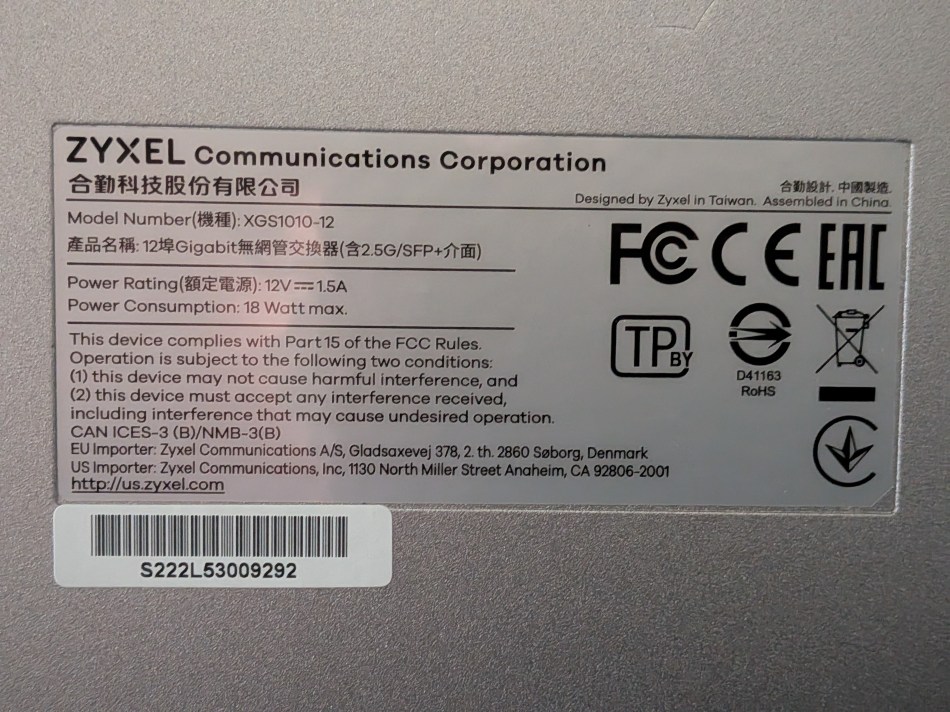
Spec comparison: incumbent, candidate, managed reference
| Attribute | TRENDnet TEG-S81g (incumbent) | Zyxel XGS1010-12, factory mode (candidate) | Zyxel XGS1210-12 (managed reference) |
|---|---|---|---|
| RJ-45 copper at 1 GbE | eight 1 GbE ports | eight 1 GbE ports | eight 1 GbE ports |
| Multi-gig copper | none | two 2.5 GbE ports | two 2.5 GbE ports |
| Fiber uplinks | none | two 10G SFP+ cages | two 10G SFP+ cages |
| User configuration GUI | none | none as it ships | yes |
| Reset button access | not noted in these build notes | not extended outside the case | PCB-mounted button brought to the exterior |
| MAC address stamp | not noted | absent | present |
| Price recorded here | not recorded | $49.99 open-box on eBay | not recorded |
Judged by visual commonality, the two Zyxel boxes could be twins apart from the product names on the front panels and that stamped MAC address; the hardware allotment matches except for the reset-button routing. Everything else is the software inside. One qualifier matters throughout: the unit at issue is an XGS1010-12 with hardware version A1.
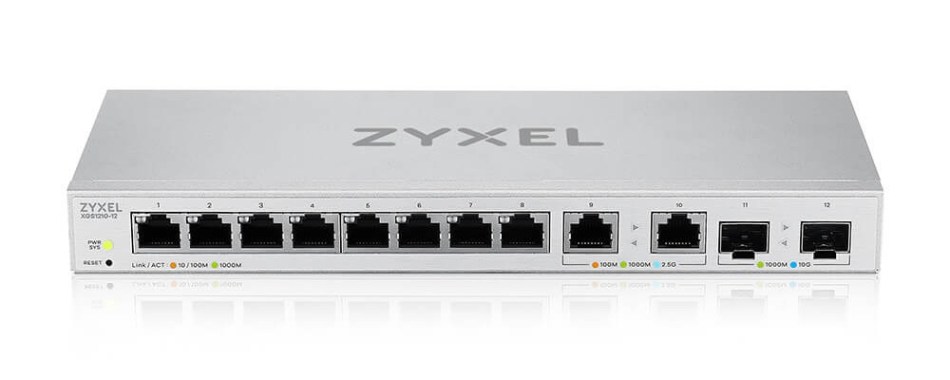
Know which tier you are paying for
Wikipedia's summary of the bottom tier is worth quoting because the build notes lean on it: such devices “have no configuration interface or options. They are plug and play. They are typically the least expensive switches, and therefore often used in a small office/home office environment.” Firmware may run inside, but it is usually non-upgradeable, and there is no settings panel or broader GUI to reach.
At the far end, managed switches are user-configurable and user-updatable. The classic reason to specify one is virtual LAN (VLAN) support, which isolates clients and groups so they cannot reach other groups and sometimes the WAN. The familiar consumer analogue is the “guest network” feature on many modern routers, letting visitors use the Internet without allowing them to “see” devices on the main LAN.
The same isolation logic applies to “smart home” IoT devices, so a hacked gadget cannot spread infection. Managed hardware can also prioritize traffic on a particular port for VoIP, hard-wire port bandwidth and duplex settings, enforce MAC filtering and other network access rules, aggregate multiple ports into one connection for a multi-port NAS, and monitor real-time network traffic conditions.
Between the extremes sits the “smart” switch: a subset of fully managed capability, across a subset of ports, presented in a friendlier way. A low-priced Tenda device illustrates the pattern with a front-panel multi-position configuration switch.
| Tier | Configuration surface | Feature scope | Example in these notes |
|---|---|---|---|
| Unmanaged | none — plug and play | no user settings; firmware usually non-upgradeable | TRENDnet TEG-S81g, and the XGS1010-12 as it ships |
| “smart” | simplified controls | a subset of managed features across a subset of ports | a low-priced Tenda unit with a multi-position front-panel switch |
| Managed | user settings and a broader GUI | VLANs, port priority, bandwidth/duplex hard-wiring, MAC filtering, port aggregation, traffic monitoring | Zyxel XGS1210-12 |
The console route: what a “no GUI” box still exposes
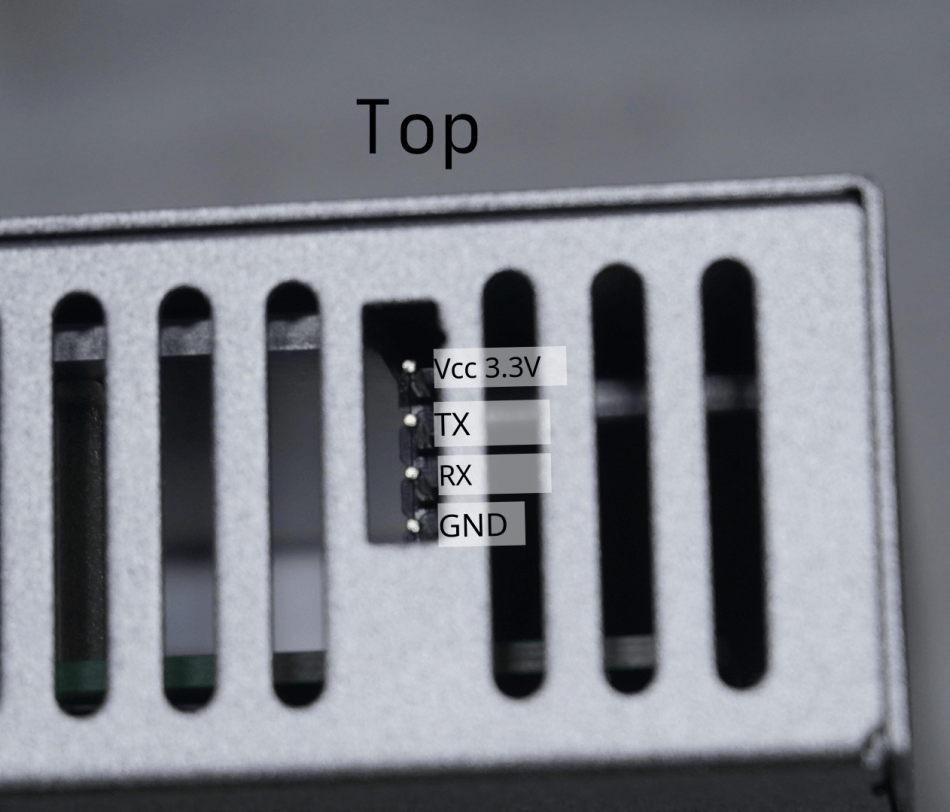
“But Brian,” you might ask, “I thought you said that unmanaged switches don’t have user-accessible GUIs?” Fair challenge — the objection covers GUIs, not a command-line user interface (CLI). What Redditor zeda1ert realized was that between two of the side passive airflow vents sat a standard UART console header.
The discovery surfaced before the hardware did. A Google search on the product code, run while waiting for eBay to ship, put a Reddit post near the top of the results, with follow-up posts from the original poster and broader r/homelab discussion describing how to hack the XGS1010-12 and upload XGS1210-12 firmware to it, converting the unit into the managed-switch version. The thread carries detailed instructions; three years later Brian chimed in there with a batch of questions, and zeda1ert — still monitoring the post — helped.
Conversion procedure, as executed
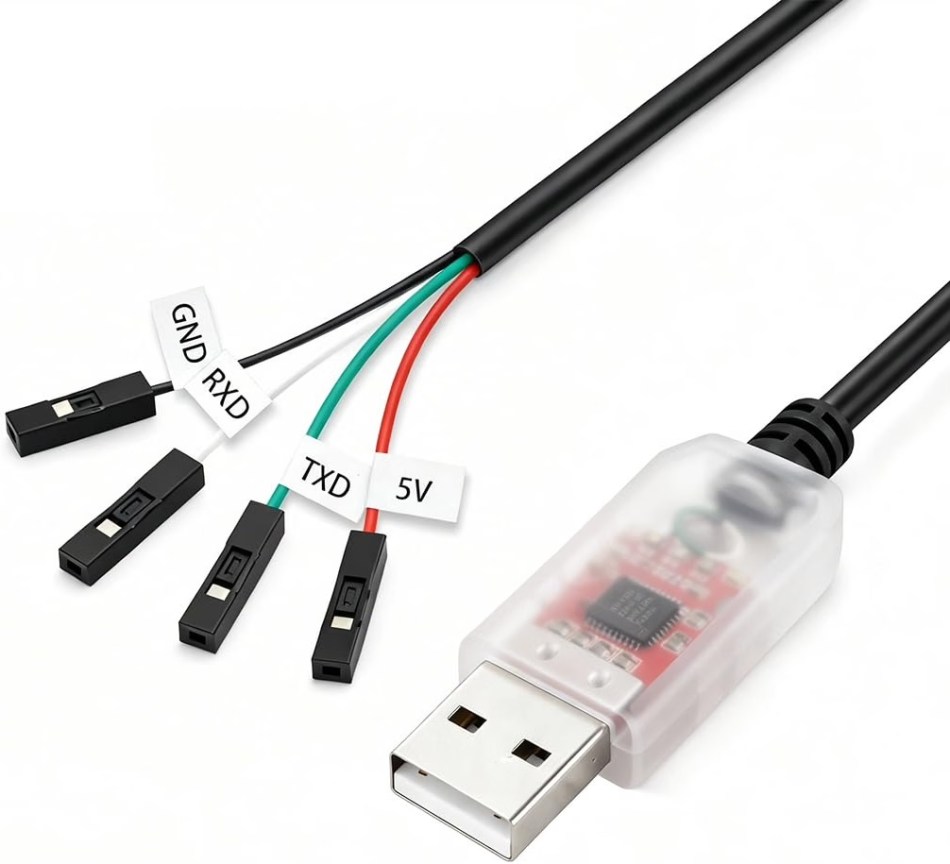
- Connect a USB-UART adapter between switch and computer. Both a 3.3V adapter and a 5V adapter work, because the switch’s 3.3-V UART circuitry is self-powered, so only Tx, Rx and GND need to be connected — although the latter’s cable is conveniently longer.
- Start a CLI terminal session using MacOS’s built-in command-line “screen” utility.
- Issue a timing-critical ESC to terminate the boot sequence before it finishes.
- Configure a MAC address for the switch, then set static IP addresses on computer and switch — different, but on the same subnet.
- Start a TFTP server session on the computer. MacOS has a built-in one, but it is command-line-based and fairly cryptic, so SoftPerfect’s freeware GUI utility was used instead.
- Download and install the most recent v1 XGS1210-12 firmware onto the switch.
- Reboot. The switch is now managed.
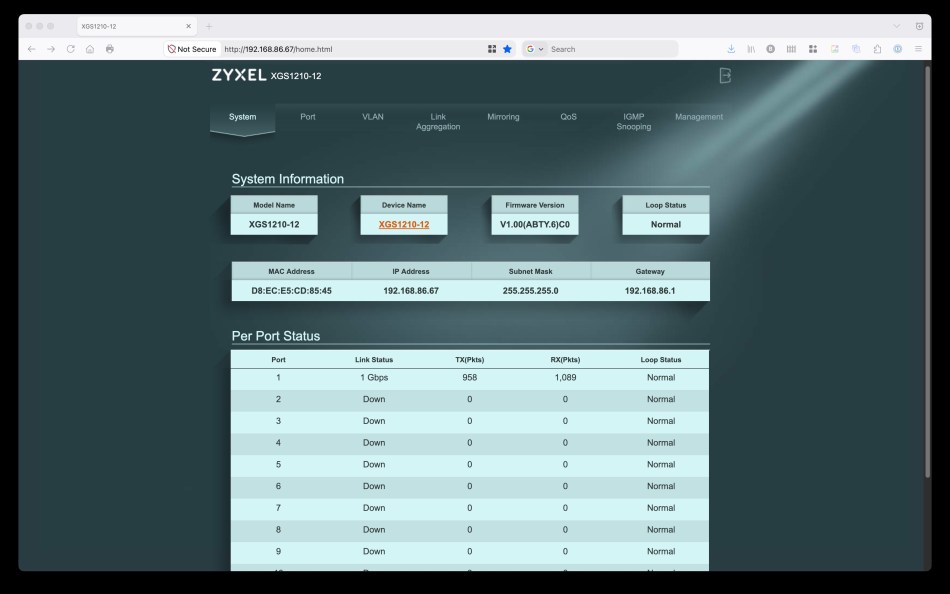
Rebooting deserves an aside. Speaking of “re”(boot), the missing exterior hardware reset button is not a practical problem, because the same reset outcome can be reached through the switch’s CLI or GUI.
Revision risk: the PHY swap that decides everything
Hardware version A1 is not a footnote. The distinction was initially important and remains so for “stock” firmware, although broadly no longer.
Partway through its product life, Zyxel redesigned the XGS1010-12, switching from Realtek's RTL8226 2.5 GbE PHYs to the newer RTL8221B, with reduced power consumption and lower heat dissipation. That change caused an incompatibility with legacy firmware for the XGS1210-12, which was not similarly hardware-updated: installing XGS1210-12 firmware on a version B1 XGS1010-12 left the multi-gig ports nonfunctional.
A further nuance involves the A1 revisions — A, B and C. Originally it was not possible to install any newer v2 XGS1210-12 firmware, such as patch 0 or patch 1 with OpenSSL vulnerability fix, on a version A1, revision C unit such as this one. Scrolling down the Reddit thread shows another contributor later figured out how, via resistor relocation, to spoof the board identifier and enable a successful v2 firmware update. That mod was not attempted here, because a more robust alternative next step is planned.
| Board | 2.5 GbE PHY | v1 “stock” conversion | Newer v2 image | Practical note |
|---|---|---|---|---|
| version A1, revisions A/B | RTL8226 | documented path used here | no revision-C block noted | matches the managed family's legacy image |
| version A1, revision C | RTL8226 | works | blocked until resistors are relocated to spoof the board identifier | the tier that cannot take patch 0 or patch 1 OpenSSL fixes out of the box |
| version B1 | RTL8221B | multi-gig ports end up nonfunctional | not documented in these notes | lower power draw and heat; OpenWrt support for these PHYs begins mid-2026 |
OpenWrt: the planned successor, not the starting point
Three years back, when the original Reddit post was published, OpenWrt development for the XGS1010-12 was immature and insufficiently staffed, and the available build was functionally incomplete. Much has changed since, notably support for version B1 units’ RTL8221B PHYs beginning in mid-2026, despite Realtek’s longstanding and ongoing open-source reticence.
Right now the v1 “stock” conversion covers everything this LAN needs. Because the switch is not exposed to the Internet, the ongoing “Heartbleed” OpenSSL compromise is not an operational worry here; a later migration to OpenWrt is likely, and its result would earn a follow-up write-up.
Common misconceptions this build exposes
- “Unmanaged means no user-facing interface of any kind.” True for GUIs only — a UART console may still sit on the board.
- “Managed features are an enterprise nicety.” Segmenting a “guest network” or a “smart home” device set is a home-scale need.
- “Firmware from a visually identical sibling always fits.” The RTL8226-to-RTL8221B PHY change broke exactly that assumption.
- “Newer firmware is always installable.” On version A1, revision C, the v2 image needed a resistor relocation first.
- “No exterior reset button, no recovery.” CLI or GUI reaches the same outcome.
Action recommendations for hardware buyers and IT procurement
- Measure the endpoint layer before specifying switches: wireless clients below the Wi-Fi 5-plus-1 GbE backhaul threshold and 1 GbE-only wired devices do not justify new hardware.
- Upgrade the positions where fast clients cluster — the desk holding the 10 GbE-supportive Apple Mac Studio, and the furnace-room location of the upgraded member of the three QNAP NASs.
- Record the hardware version and revision before ordering any image; the version A1 versus version B1 split determines whether the multi-gig ports work at all.
- Price the fiber fallback into the project: 50 feet of optical cable plus two SFP+ modules closes the gap if a Cat 5e span is not 10 GbE-reliable.
- Search community documentation by product code first — Google for the code, then the Reddit and r/homelab threads — because the conversion path was published years before this build.
- Keep a converted unit running a “stock” v1 image off the public Internet while its OpenSSL exposure remains unfixed.
Data points cited in this build
- Acquisition: $49.99 open-box on eBay, never unpacked or used.
- Port allotment: eight 1 GbE ports, two 2.5 GbE ports, two 10G SFP+ cages.
- Image applied: most recent v1 firmware from the managed “big brother”, the XGS1210-12.
- Timeline: guide published Three years back of the later discussion, questions added three years later, and newer-PHY OpenWrt support dated mid-2026.
For a hardware desk, the takeaway sits in the bill of materials rather than the firmware log: the cheapest line on a switch datasheet is not always the cheapest route to the capabilities listed on it. Here a mid-tier purchase plus one session at a serial console closed the gap between unmanaged pricing and managed control — and what remains open is a question of board revision, not of budget.