
MyTechDailyNews General Guide to 1990 Windows Crashes and Modern Software Reality
This MyTechDailyNews General explainer is for everyday tech readers who keep seeing the same comment thread: "software used to be better in the past", "we've forgotten how to program like we used to", and "software quality has been declining for decades." Those sentences feel plausible when today's apps seem heavy, yet the user experience from 1990 onward points in a different direction: old consumer software was often miserable.
There is a simple production arithmetic behind modern bloat. If code output grows by 10x while the error rate is not divided by 10, the released application will carry more defects. That does not make earlier software superior; it means today's volume and complexity create visible annoyances without restoring the past's reliability.
Yes, exceptional programmers such as John Carmack could hold a whole program in their heads and improve a codebase across decades. However, that kind of care did not describe the majority of software ordinary people actually ran.
What the mainstream desktop actually looked like
For most computer users, Windows was the default reality. Its market share peaked around 95%, with small differences depending on the source. A friend might own an iMac and claim Macs were better, but the proof was limited because not many applications existed for Macs. Linux existed too, and distributions like Debian supported real computing. My high-school impression was different: when trying to install Debian, the most valuable Linux application seemed to be anything that could edit XF86Config. Nearly every familiar machine was a Windows PC with an Intel or AMD processor, and that Windows environment carried many flaws.
There was one quality floor. Software often reached customers only once: on a floppy disk, CD, or ROM, boxed and shipped. That release had to function out of the box. This gave old products a baseline, but it did not prevent the failures users actually remember.
When the failure mode was total
The blue screen treated your workflow as optional
For much of my childhood, Windows stability was poor. Its equivalent of a kernel panic was the Blue Screen of Death.
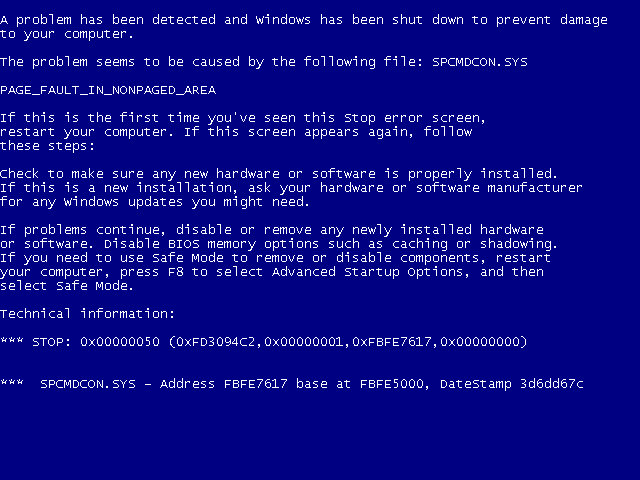
The blue screen of death in Windows XP, Vista and 7, courtesy of Wikipedia
The interruption could arrive during serious work or while you did nothing; timing was irrelevant. Device drivers were a major cause. New peripherals arrived with a floppy disk or CD containing drivers that told the operating system how to talk to the hardware. The tempting thought was: "Oh wow, so they sent out the device drivers on physical media? You can't update a physical disk once you ship it. Surely they took extra care to get everything right." That expectation was wrong. Some drivers were good, some were bad, and a single marginal driver could destabilize the whole machine.
Windows itself had code-quality problems too. Sometimes it failed to reclaim resources from programs that had exited, so the machine could slowly degrade until a crash felt inevitable.
Autosave was not a safety net
A computer that crashes often is bad enough; applications that did not autosave made it worse. Some programs had autosave but did not flush buffered writes, corrupting their own files.
It was normal to work for hours, then see either a blue screen or an application-failure pop-up. You might scream and click the document repeatedly, but the work was gone. Your consolation was telling others: "I was working on a document for THREE HOURS! And then the computer crashed and I lost everything. It was all gone. I had to redo it." There was always someone asking, "why didn't you save?" You did not need anger, because he was 2 weeks from having the same thing happen to him.
When I joined the Google Docs team back in 2010, we instrumented the Ctrl+s shortcut for fun. It did nothing except record that the key had been pressed. That "save" keyboard shortcut was in the top 5 non-editing user actions, just behind things like "move the cursor with arrow keys." Google Docs autosaves, but people had spent years or decades losing work, so they reflexively pressed save anyway.
Security was weak enough for a 9-year-old
When my sister and I were little, we liked stores with display computers. If no game was available, we could open MS Paint or Solitaire and play around for a few minutes.
Once, the display models had password-protected screensavers. My sister pressed Ctrl+Alt+Del, selected the screensaver application, and clicked "End Task." The protection was gone. The best minds of Microsoft were nothing next to the hacking talent of a 9-year-old.
That was the level of protection ordinary people had. Extended internet use could lead to advertising malware. After booting, pop-ups and pop-unders could appear even when you were not in a browser, so you ran another antivirus scan, or later used websites that could also scan for malware. Viruses could also bring the internet down once a year through simple tricks, such as "adding a macro to a Word document that sends emails."
Slowness and fragility became routine
Disk fragmentation: the family-repair ritual
Every techie knows the dusty corner of a relative's house where an old Windows machine barely worked and needed 20 minutes to start. You sighed and said, "let me fix this for you." Then you opened two programs, a process that took about 5 minutes: one cleared cache files and the Recycle Bin, while the other was Disk Defragmenter.
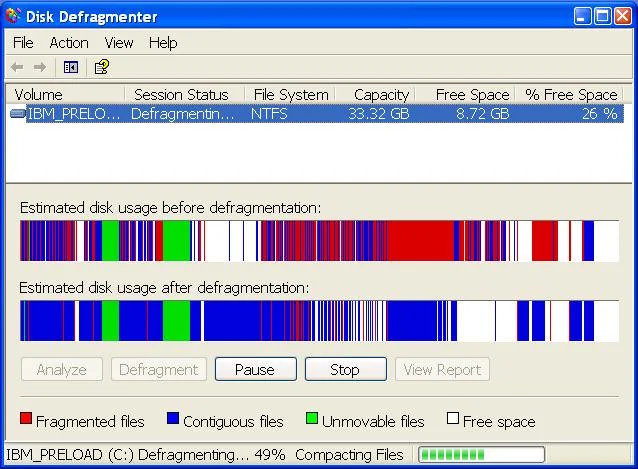
Your computer slowly became unusable if you never saw this window.
Hard drives in Wintel boxes stored data on spinning magnetic platters. A retractable arm with a small magnetic reader had to find the right position, then the disk moved to the start of a sector. As files accumulated, the Tetris analogy broke: a file did not always fit neatly before another file's record began, so it could be split across two or more places. Some fragmentation was unavoidable, but enough fragmentation made the computer slower and slower, until Grandpa's machine needed 20 minutes to boot.
Many modern filesystems, Windows included, handle defragmentation automatically in the background. That was not true then. You had to run Disk Defragmenter periodically yourself. By college, I found that Windows had a scheduler, so I left the machine on and let it defragment at 5 in the morning.
Memory limits changed program behavior
Applications were heavily memory constrained, so programmers saved bits and bytes everywhere. That internal choice often leaked into user experience.
At one point I had a poor video game version of Axis and Allies for the PC, released in 1998. Think Risk with a World War II setting. The AI was weak and usually easy to beat, but it had a flaw: if a country had more than 255 units, the entire game crashed. Because the AI also liked to turtle, a territory could become impossible to wear down. The game became a race to finish before the enemy forced a stalemate by triggering the crash.
The specifics may not be perfect, but that is what happened, to the extent that the memory survived 25ish years. During my freshman high-school programming class, one lesson was essentially, "here's why you all recognize numbers like 128, 256, and maybe 65536."
Physical media could destroy the software itself
Even a well-behaved program could be lost. If you scratched a game CD, you might stop being able to play it and ask friends for a spare copy of Red Alert just to finish a single-player campaign. The problem was not limited to CDs. My half-brother had a NES game called Dragon Warrior or something similar, but the cartridge was corrupted and he could not leave the first room. Even well-kept games could fail because the NES cartridge contacts could rust.
"But Jake, that's hardware and not software." The point is that old software was fragile and needed protection. It was not a choice between physical disks and online install where someone simply chose the disk. Distribution itself made software susceptible to degradation.
Online games exposed human behavior without guardrails
One of my earliest online games was Diablo II, and it showed me how people behave when a shared space has weak safeguards. Online games can attract players who do not actually want to cooperate but merely occupy the same space. Diablo II had design conditions that invited chaos:
- Client-side hacks were common. On PVP servers, some players used hacks to fire tracking arrows far beyond the range they should have been able to.
- Item drops were equally available to everyone on the server. As a party approached an act boss, allies could become rivals and spam-click when the boss fell.
- Death could strip your equipment. If your corpse remained on the ground and you died again, you lost everything you had worn. People forced full inventories by scattering cheap items on your corpse, hoping you would pick up trash before your corpse; then, after partial recovery, a second death could erase what you had managed to reclaim.
- Item duping glitches were numerous. They damaged the in-game economy because duped items became dominant, and they enabled scams: someone would claim to have just duped an item, wait for a curious player, then walk them through steps that ended with dropping the item for the scammer to take.
- There was no guild system, yet people still ran guilds. Without built-in trusted identification, guaranteed friendlies were hard to confirm.
By Diablo III, many of these lessons had been addressed. There were extra guards against duplicated items, bosses gave players individual drops so party members did not compete for loot, and corpse recovery did not require the same risky item-collection dance. These were hard-won changes.
The Turbo button reveals the absurdity of the old compatibility story
I began using my family's computer around 1990 after learning to read. It was a beige 286 with the monitor on top, a 5.25" floppy drive, a power button, a reset button, and a TURBO button. The TURBO button was meant to be ignored normally, but you could press it when you needed to slow the processor.
Why slow it down? IBM's first desktop computers ran on the 8088 processor at 4.77MHz, not GHz. Later machines became faster, but many programs had been written assuming that fixed clock speed for animation, game frame rates, and timing. A faster CPU could make such programs unusable. Manufacturers responded with a simple solution: add a TURBO button that slowed the CPU on demand, so a program with timing issues could run at a comfortable speed.
I never needed to use the TURBO button in anger, and I believe the programs that benefited were mostly older games; our newer educational games did not need it. When editing this post, I considered cutting the section, but it captures the strangeness: it would be like having an "Original iPhone" button on the side of an iPhone so that the Notes app could work.
Modern software is not perfect, but it solved worse problems
Today's software has real flaws. It can be bloated and slow. It is produced by too many people and can be too complex. There are too many cooks in the kitchen. As work is delegated more and more to agents, users and creators may also lose understanding of what happens underneath.
Still, the better response is not nostalgia. The argument from experience is that process isolation, online updates, higher-level languages that abstract common pitfalls from C and C++, and game designers using the system clock for timing are worth defending. Steam and Windows Update also represent progress. If nostalgia asks you to return to the old release process, it is asking you to keep the part that fell by the wayside.
A plain-language comparison
| Topic | Old desktop reality | Modern point in the debate | What readers should notice |
|---|---|---|---|
| Distribution | Software often shipped once on a floppy disk, CD, or ROM, and had to work out of the box. | Updates and services, including Windows Update and Steam, change how software is delivered. | The old quality floor did not make failures pleasant. |
| Failure | A marginal driver or Windows resource problem could end your session with a blue screen. | Process isolation and online updates are presented as reasons not to return. | Random crash-free work is valuable. |
| Work loss | Autosave could be absent or corrupting, and users reflexively pressed save even in Google Docs. | Automatic saving can make the old "save" reflex unnecessary. | Loss of hours is more emotionally important than interface purity. |
| Performance | Wintel spinning disks fragmented over time, and Disk Defragmenter was a manual repair task. | Modern filesystems can defragment automatically in the background. | Slow machines often have structural causes, not just "too many apps." |
| Media fragility | CD scratches, NES cartridge corruption, and rusty contacts could make software unusable. | Software can be reinstalled and updated, while old physical copies rot. | Preserving old software was an active burden. |
FAQ for general tech readers
Was the Windows market so dominant that nostalgia had a point?
Windows' share was enormous, around 95% at its peak, so personal anecdotes from iMac, Macs, Linux, or Debian owners were exceptions rather than the default. The prevalence also meant that Windows' problems affected a very wide audience.
Did better programmers solve the problem then?
Programmers like John Carmack were real, but they did not write most of the consumer software people depended on. The day-to-day stack included buggy drivers, OS resource issues, adware, and fragile media.
Why did people keep pressing save if autosave existed?
Because years of losing THREE HOURS of work created muscle memory. Even the Google Docs experiment showed that the shortcut's only effect was recording the press, while it ranked in the top 5 non-editing actions.
Does this mean modern software is excellent?
No. The critique of modern bloat, slowness, complexity, and too many cooks remains valid. The conclusion is that those defects are preferable to constant crashes, insecure systems, manual defragmentation, and fragile physical media.
Common misconceptions
- Nostalgia treats the quality floor of boxed releases as evidence of overall goodness, ignoring that drivers and OS bugs could still destroy a session.
- It treats great programmers as if they represented all software, even though ordinary users ran many low-quality applications.
- It assumes physical media was safer, though scratched CDs, corrupted NES cartridges, and rusted contacts proved the opposite.
- It equates old security simplicity with safety, even though a 9-year-old could bypass a screensaver and a Word macro could spread email spam.
- It mistakes today's visible annoyances for a return-worthy system, despite the value of autosave, online updates, automatic defragmentation, and process isolation.
Action suggestions for readers and teams
- When you read "software quality has been declining for decades.", ask which failure mode is being compared: crashes, data loss, security, performance, or distribution fragility.
- Treat user habits born from old pain as design debt: autosave, background defragmentation, and update delivery should be explicit improvements, not invisible assumptions.
- For product teams, keep the old quality floor concept—shippable reliability—but pair it with the modern safety nets of online updates and process isolation.
- For everyday users, preserve context: if you use tools that autosave, let the system do the saving; if you rely on older workflows, make recovery a feature of your setup.
- For tech discussions, use concrete memories rather than vibes: a blue screen at 20 minutes boot delay, a defrag window, a 286 TURBO button, or a 255 units crash tells the story better than saying quality simply fell.
For MyTechDailyNews General readers, the takeaway is practical: old computing had a few appealing constraints, but its ordinary experience included crashes, lost documents, adware, fragmentation, fragile media, and weak security. Modern software can feel messy because it is larger, more distributed, and more complex. That mess is real, yet it is a different problem than the constant failure users lived with since 1990. The better response is not nostalgia; it is keeping the modern safeguards while criticizing modern bloat.