
Android Apps Inside the Windows 11 Search Box: A Practical Setup Guide for Phone Link Streaming
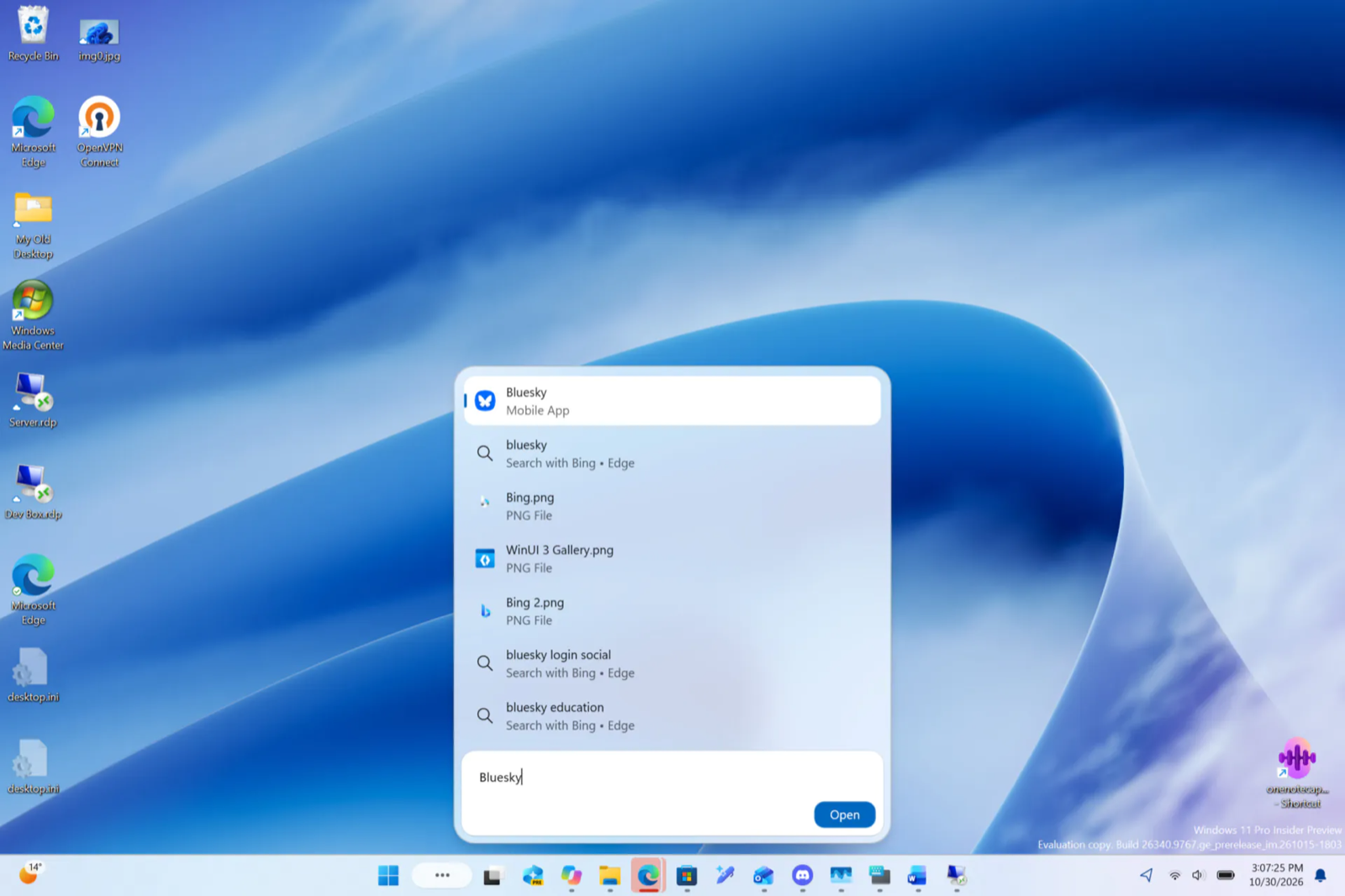
Type an app name into the taskbar Search box on a Windows 11 test build and the top hit may no longer be a document or a web suggestion. It can be something living on the phone beside your keyboard. Tap Open, the app starts on the handset, and its portrait screen lands in a window on your desktop where the mouse and keyboard take over. That is the cross-device behaviour Microsoft is now previewing, and for anyone who keeps chat tools, reading apps or work logins on the phone only, it reshapes a small daily routine rather than adding one more spec-sheet bullet.
Below is the working version of this story for ordinary users: what the preview really does, the exact pairing sequence, a compatibility checklist to settle before you lose an evening to it, the traps that break the connection, a myth-versus-fact pass, and a short FAQ.
What the preview actually puts on your screen
The plumbing runs through Phone Link, Microsoft's companion app for pairing a handset with a PC. Nothing is installed on the computer. The application keeps executing on the Android device, and the PC contributes only three things: a bigger display, a keyboard, and a mouse. Phone and computer must stay connected while you use it.
Right now the search-driven entry point sits in the Windows 11 Experimental preview channel, not in the stable release. Once a compatible device is paired, typing the name of an installed app surfaces it among the taskbar results with a "mobile app" label underneath. After launch, the vertical screen of the phone is mirrored into the Phone Screen window and the phone's status bar rides along at the top.
The distinction that matters is against the Windows Subsystem for Android, the older approach that ran Android apps locally on the computer through a virtualisation layer. Microsoft abandoned that route, so streaming from the handset is currently the official way to get Android software onto Windows 11. Hands-on coverage from Windows Latest published on 31 October 2026 tested the behaviour with a Surface Laptop 7 paired to a Samsung Galaxy A26 running Android 16, and noted that Microsoft had not yet written the feature into its release changelog, meaning it remains a discovery from testing rather than a committed shipping feature.
Setup sequence: pairing to first launch
- Confirm your PC is running a build from the Windows 11 Experimental preview channel; the search shortcut to phone apps is not in the stable channel.
- Open Phone Link on the computer and start a new connection, choosing the Android option rather than iPhone.
- On the handset, make sure the Link to Windows bridge that the manufacturer ships is present and signed in to the same Microsoft account you use on the PC.
- Put the phone and the computer on the same Wi-Fi network. Microsoft lists this as a hard requirement for Phone Link, along with Android 10 or newer on the handset.
- Complete the Bluetooth pairing as well. The master setup path treats it as optional but recommends it, and it is the single most common fix when the stream stutters or drops.
- Work through the permission prompts on the phone during first pairing; expect several, since notifications, apps and screen access are granted separately.
- In the taskbar Search box, type the app name, look for the "mobile app" label, and select Open. The Phone Screen window appears on the desktop within a second or two.
- Drive the app with keyboard and mouse. Treat the phone as the engine room: keep it awake, charged and on the same network for the whole session.
Compatibility checklist: settle these before you start
| Item to verify | What must be true | Where to confirm it |
|---|---|---|
| PC build | A Windows 11 Experimental preview build, with Phone Link updated | Windows Update channel settings; the Phone Link app page |
| Phone OS | Android 10 or later on the handset | Settings, About phone |
| Network | Both devices on one Wi-Fi network, not one on cellular and one on broadband | Wi-Fi name on each device |
| Brands in scope | Samsung, HONOR, OPPO, ASUS, vivo, Xiaomi, iQOO, realme and OnePlus are the names Microsoft lists | The Windows Phone Link compatibility list |
| Model-level gate | Whether your exact model qualifies is decided by the OEM, usually through a factory-installed connection-to-Windows mechanism | Check the handset's preinstalled apps and regional firmware |
| Reality check | Texting and notifications can work while app streaming does not | Trial the Phone Screen feature before assuming full support |
Six traps that break it
- Assuming a successful pairing proves everything. Completing calls and messages setup does not activate app streaming; the streaming capability is a separate, OEM-controlled layer.
- Split networks. A phone on mobile data, a PC on a guest SSID, or two access points on isolated VLANs all silently defeat the link. One shared network, ideally the less congested 5 GHz band your router already offers.
- Expecting an installed app. There is no icon in the Start menu, no local copy, no offline mode. If the phone is dead or off-network, the window has nothing to show.
- Buying the wrong model for the workflow. A unlocked or imported handset, or one with region-specific firmware, may lack the manufacturer bridge even when the brand appears on the supported list.
- Judging preview behaviour as final. The feature is absent from the changelog, so sorting order, labels and availability can change between test builds without notice.
- Reaching for touch-first games. Portrait streaming suits chat, feeds, forms and light tools; action games designed around multi-touch still feel wrong through a mouse.
Myth versus fact
- Myth: Android on Windows is back the way it was. Fact: the Windows Subsystem for Android and its Amazon Appstore route were retired on 5 March 2025 and are no longer delivered through the Microsoft Store, so today's option is streaming, not local execution.
- Myth: any Android phone qualifies. Fact: support is limited to the brands Microsoft names, and within those brands the OEM decides model eligibility.
- Myth: iPhone owners get the same trick. Fact: Phone Link for iOS, which requires iOS 16 or later and a PC with Bluetooth Low Energy, covers calls, messages, notifications, contacts and file sharing, but there is no app streaming.
- Myth: this turns a laptop into an Android development box. Fact: the goal is convenience across devices, not a full app environment; heavy installs, sideloading and background services stay on the phone.
- Myth: smoothness is guaranteed. Fact: picture quality and responsiveness ride on the shared Wi-Fi path, so a crowded network shows up as delay long before your PC looks underpowered.
How this route compares with the alternatives
| Approach | Where the app runs | Status | Best fit |
|---|---|---|---|
| Phone Link streaming via taskbar Search | On the phone, mirrored to the PC | Preview in the Windows 11 Experimental channel | Keyboard-first use of chat, reading and light work apps |
| Windows Subsystem for Android | Locally on the PC through a virtual layer | Abandoned by Microsoft, support ended 5 March 2025 | Existing offline setups only, no future updates |
| Third-party emulators | Locally on the PC | Outside Microsoft support | Testing an APK without touching a real handset |
Should you bother today?
If you already live in two windows — a laptop for writing, a phone for everything that needs a login or a camera — the value is real and immediate: fewer context switches, one less device to hold. If you wanted a way to run mobile games or full Android toolchains on the desktop, this is not it. Test it with a low-stakes app first, then decide whether it belongs in your daily flow.
FAQ
Do I have to install the Android app on my PC?
No. The app remains on the phone. The PC receives the screen and sends your clicks and keystrokes back.
Where did the feature come from, officially?
It appears in the Windows 11 Experimental preview channel and was documented through testing by Windows Latest rather than through a Microsoft changelog entry, so treat it as preview behaviour.
My phone is on a supported brand but the option is missing. Why?
Brand lists are only the outer boundary. Model support depends on the OEM and on whether the device ships with the connection-to-Windows mechanism. The Windows Phone Link compatibility list is the place to check your exact model.
Can I use it with an iPhone?
Not for apps. iPhone pairing gives calls, texts, notifications, contacts and files, but app streaming is an Android-only capability.
Is it safe for banking or corporate apps?
Be conservative. Your phone screen, including sensitive notifications in the status bar, is rendered on another machine. Preview builds are also subject to change, so keep financial and regulated work on the handset until the feature ships formally.
What should I do when it stops working after a reboot?
Reopen Phone Link first, confirm one shared Wi-Fi network, check that Bluetooth is still connected, then re-run the permission prompts on the phone. Only after that should you suspect the test build itself.
Action plan
- If your PC is on a Windows 11 Experimental preview build, run one 15-minute trial with a single chat or reading app and see whether the mirrored window feels natural.
- Before buying your next handset, cross-check the model against the Windows Phone Link compatibility list if cross-device work matters to you; the brand alone is not a guarantee.
- Keep the pairing tidy: same Wi-Fi, Bluetooth enabled, and no battery saver on the phone during sessions.
- Do not build a business process on an undocumented preview. Wait for Microsoft to describe it in the changelog.
- Have a working or broken example of your own? Send it to the MyTechDailyNews desk at hello@techdaily.com and we will fold it into the follow-up guide.
Search boxes were supposed to find files, not to open a phone. With this preview, Microsoft is nudging the taskbar toward a control panel for everything you own, and the lesson for readers is simple: check compatibility before you invest the setup time, treat the phone as the true host, and keep anything sensitive out of the mirror until the feature leaves preview.
Written by Sarah Chen, MyTechDailyNews technology desk. Feedback and tips: hello@techdaily.com.