
Windows 11 27H2 in 2027: A Practical Prep Guide for Everyday PC Users
Windows 11 27H2 is Microsoft's planned 2027 edition of Windows 11, and the reporting around it suggests the update will replace core system components rather than simply switch features on through a small enablement package, the way 25H2 and 26H2 worked. That makes it closer to the full 24H2 upgrade of 2024 than to any monthly patch. The practical answer for readers: nothing has to change on your desktop today, but a little preparation now turns the eventual switch into routine maintenance.
For years the assumption across the tech press was that a brand-new Windows 12 would appear around this point in the roadmap. The direction indicated by the coverage is different: the company appears to be betting on deepening Windows 11 rather than rebranding it, and this release is being described as the most consequential system upgrade since 24H2, with expected gains in performance, stability and everyday responsiveness. Below is the same story rebuilt around what a normal reader can do with it: a calendar, a checklist, the traps, and the questions that keep coming up.
What is Windows 11 27H2, and how does it differ from 25H2 and 26H2?
Conclusion first: it is a full operating-system upgrade, not a feature unlock. Everything else in this guide follows from that single distinction.
During the current cycle, Windows 11 25H2 and 26H2 share the same servicing platform base. On an eligible device, moving from one to the other usually means downloading a small update package and rebooting once, because the code is already present in the build and is merely activated.
The plan for 27H2 is different in kind. It is expected to follow the model Microsoft used for the 24H2 release in 2024, replacing or heavily rewriting core OS components, which forces a wider compatibility validation pass and a longer test cycle. People familiar with the work also indicate that Windows Insider preview testing aimed at 27H2 could start earlier in 2027 than usual, precisely because there is more surface area to check.
One piece of context worth adding to the picture: according to reporting by Windows Central's Zac Bowden and by Windows Latest, the Windows 11 population is currently split across two platform branches. Most PCs running 24H2, 25H2 and 26H2 sit on the Germanium base, while 26H1, limited to newer Arm hardware, runs on the newer Bromine base. Microsoft has reportedly confirmed that 26H1 devices will not receive 26H2 and will move directly to 27H2, which is expected to reunite everyone on one platform again, internally reported as Strontium and expected to be finalised in the first half of 2027. That reunification, rather than any single feature, is what makes the release feel heavy.
Translated to your desk, that means a bigger download, a longer setup pass, and a stronger reason to check drivers and business applications before pressing update. Reporting adds that a full upgrade of this type replaces the system while keeping your apps, files and settings, the pattern used by 22H2 and 24H2, but the weeks right after such a release are historically a compatibility window rather than a safe first-day upgrade.
Which dates between now and 2027 belong in the calendar?
| Time window | What is expected | Why it matters to you |
|---|---|---|
| this month: Ignite 2026, held November 17 to 20 at the Moscone Center in San Francisco | First public look at the redesigned default wallpaper set is expected | The earliest visible sign of what the 2027 release will look like |
| January 2027 | Broader rollout of the new wallpaper designs | A deliberate warm-up ahead of the year's major system update |
| first half of 2027 | Next platform baseline, reported as Strontium, is expected to be locked down; Windows Insider builds ramp up | Where driver, app and enterprise compatibility signals will first appear |
| second half of 2027 | Windows 11 27H2 ships in a phased rollout, in line with Microsoft's usual autumn window | The main event: a full system replacement for every Windows 11 user |
| October 13, 2026 | End of updates for the 24H2 Home and Pro editions, per Microsoft's own lifecycle fact sheet | Anyone still on 24H2 has a patching problem now, not in 2027 |
Worth stating plainly: as of this writing Microsoft has not officially confirmed the final feature list, the hardware requirements or the exact release date of 27H2. The lifecycle date in the last row of the table is confirmed public information; the rest is planning intelligence that readers should treat as provisional.
What performance change will you actually notice?
Start with what Microsoft has published rather than what is rumoured. The company says the recent round of system work aimed at devices with 8GB of memory has paid off, and according to Microsoft's internal testing the latest optimisations make Windows 11 respond up to 20% faster and lift multitasking performance by up to 40%.
Two caveats turn that from headline into usable information. First, these improvements are already reaching devices supported by Windows 11 26H2, so they are not exclusive to a future version and are better read as evidence of direction than as a preview of 27H2. Second, both figures are lab maxima, so the benefit on a specific machine depends on how much of your day was previously spent waiting on memory.
The mechanism is ordinary housekeeping rather than magic. In a write-up published on the Windows Experience blog on November 3, 2026, Navjot Virk, corporate vice president for Windows Experience, explained that Windows can now hold up to 2GB more active data in memory instead of pushing it out to slower storage, and that on machines with 8GB or less, Widgets load on demand only when opened, freeing more than 200MB for applications. The original post is available from Microsoft here.
The second performance thread involves Intel. Advanced Performance Extensions (APX) is an expansion of the 64-bit x86 instruction set whose defining trait is raising the number of general-purpose CPU registers from 16 to 32, which cuts memory accesses and instruction overhead so that well-optimised 64-bit applications work more efficiently. Signs of support have already surfaced in experimental Windows 11 builds, and Tom's Hardware has reported an APX toggle appearing in preview builds as early enablement for Intel's coming Nova Lake silicon.
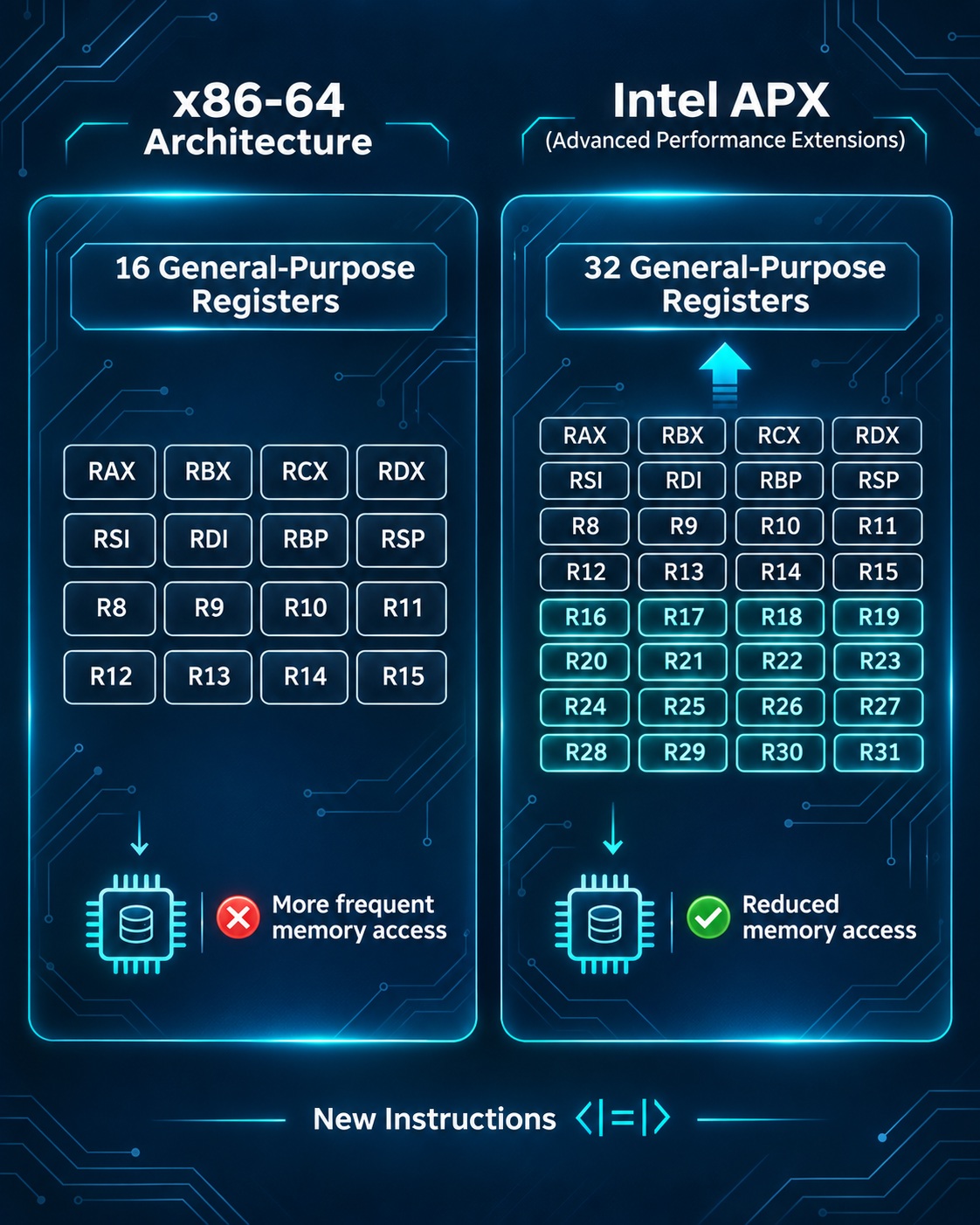
Two practical points follow, and they are the ones most coverage skips. Microsoft has not confirmed that APX will be part of the final 27H2, and its real-world payoff depends on future processors and on the software ecosystem rebuilding for it. There is no consumer chip shipping today that can use those extra registers, so APX is a reason to watch 2027, not a reason to go out and buy a new laptop now.
A buying note, flagged as our analysis rather than a Microsoft claim: memory-intensive AI workloads have been squeezing component prices, and some budget machines are again shipping with 8GB. The operating-system work described above genuinely helps those configurations, but anyone buying for heavy multitasking in the 2027 era will still find 16GB the safer default.
Will anything actually look different? The wallpaper change explained
The other change readers will notice without any settings menu involved is visual. Microsoft plans to retire the design that has defined the platform since Windows 11 arrived in 2021: Bloom, the abstract folded-fabric image credited to the Spanish design studio Six N. Five, is expected to give way to a new default.
Early information points to colourful folded geometric shapes wrapped in clouds, with two distinct treatments: consumer editions are expected to lean into themes such as gaming, productivity, creation and performance, while Windows 11 Pro keeps a colour scheme closer to the existing Bloom look. These backgrounds may be shown for the first time at Ignite 2026 this month, with a wider rollout planned for January 2027, ahead of the year's major system update.
For home users the effect is trivial: a custom background or a rotating spotlight image is untouched, and the change is reversible in a couple of clicks. For anyone managing a fleet, it deserves one extra check, because a swapped default image can quietly alter branded desktops and lock screens after a machine is rebuilt on the new base.
How to prepare your PC in seven steps
- Confirm where you stand today. Press Win+R, run winver and note whether you are on 24H2, 25H2 or 26H2; that answer decides the rest of the list.
- Close any servicing gap first. If your machine is still on the 24H2 Home or Pro editions, move to a version that is still receiving security updates now, rather than waiting for 2027 to fix a patching hole you already have.
- Create headroom on the system drive. A full system replacement needs more working space than a monthly cumulative update, so clear old downloads and stop running the disk near capacity.
- Refresh drivers and firmware from your PC maker's own support page. Printer, audio, network and VPN drivers are the classic casualties of the first week after a major version ships.
- Back up, then test the backup by restoring a single folder. A green tick in a backup window proves far less than a file that actually comes back.
- Write down the three or four applications your work collapses without, and check what their vendors say about upcoming Windows versions before committing your main machine.
- Pick your risk lane deliberately. If you want an early view, use a Windows Insider channel on a spare device, never the machine you rely on for payroll, deadlines or schoolwork.
Common misconceptions worth skipping
- "27H2 is really Windows 12 with a different name." The reporting points to continued strengthening of Windows 11 rather than a rebrand next year. Microsoft has not formally denied a future Windows 12, but nothing in the current route suggests one is imminent.
- "It will install like the last two updates did." The light-touch enablement package experience of 25H2 and 26H2 is explicitly not the expected path for 27H2.
- "APX will make all my programs faster." Only rebuilt 64-bit applications running on chips that implement Advanced Performance Extensions can benefit, and neither condition is met by computers on sale today.
- "A new wallpaper means a finished operating system." The visual refresh runs on its own track, with a January 2027 rollout, and is meant to pre-heat the release rather than signal it.
- "8GB is enough now, the numbers prove it." The 20% and 40% figures are lab maxima on optimised paths; they reduce how much memory Windows itself consumes, but they do not add RAM to your machine.
- "I should wait before buying a PC." Feature scope and timing are unconfirmed, while support dates are fixed; buy against your budget and workload, not against a rumour.
FAQ: the questions readers keep asking
Do I need to do anything today because of Windows 11 27H2?
No. The useful responses are the boring maintenance ones: stay on a supported version, keep drivers current, back up, and leave the platform change until Microsoft publishes requirements and a date.
Will the update wipe my apps, files or settings?
Reporting on how this class of upgrade works indicates it replaces the whole system while preserving applications, files and settings, the pattern used by 22H2 and 24H2. That is the expectation, not a guarantee, so a verified backup still belongs in your plan.
Is Microsoft abandoning the Windows 12 idea?
Not officially. The signs point to a route in which 27H2 carries the weight of a generational upgrade and extends the lifecycle of Windows 11, which reduces the need for a renamed product in the short term while leaving the long-term question open.
Which machines stand to gain the most?
Two groups. Budget configurations with 8GB of memory, which are the direct target of the responsiveness and multitasking work already shipping on devices supported by Windows 11 26H2; and later, professional and gaming machines running rebuilt 64-bit software on chips that support APX.
How will I know when the details are official?
Three places settle it: the event stage at Ignite 2026 this month, the Windows Insider blog as preview builds appear, and Microsoft's release health and lifecycle pages, which publish supported versions and end-of-update dates.
The takeaway for everyday users
Read as a news item, this is a roadmap story: a 2027 platform change that will do the work a rebrand was expected to do. Read as a household tech decision, it is a maintenance window you can prepare for cheaply. The gains already visible, up to 20% in responsiveness and up to 40% in multitasking on 8GB hardware, are reaching supported devices now; the deeper changes, whether component replacement, APX support for 64-bit applications or a post-Bloom visual identity, arrive with the release itself.
So the sensible posture is unglamorous: keep your machine on a version that still receives security updates, tidy up disk space and drivers, confirm your critical applications are supported, and let the Windows Insider cohort absorb the early surprises. When the 2027 rollout begins, the people who did that housekeeping will be the ones for whom a once-in-several-years upgrade is just another reboot. MyTechDailyNews will keep tracking this from the consumer angle rather than the engineering one, starting with what emerges from Ignite 2026 this month.
Sources and further reading
- Microsoft Windows Experience Blog, "Raising the bar for 8 GB Windows 11 PCs: what's improved and how to get it" (November 3, 2026): https://blogs.windows.com/windowsexperience/2026/11/03/raising-the-bar-for-8-gb-windows-11-pcs-whats-improved-and-how-to-get-it/
- Microsoft Learn, Windows 11 Home and Pro lifecycle factsheet: https://learn.microsoft.com/en-us/lifecycle/products/windows-11-home-and-pro
- Tom's Hardware, on the APX toggle appearing in Windows 11 preview builds and Nova Lake enablement: https://www.tomshardware.com/software/windows/intels-apx-offers-better-performance-in-windows-11-according-to-new-insider-setting-microsoft-begins-early-enablement-for-advanced-performance-extensions-on-nova-lake-cpus
- Windows Latest, on 26H1 and 26H2 merging into Windows 11 27H2 in the second half of 2027: https://www.windowslatest.com/2026-08-24/microsoft-details-windows-11-26h2-ahead-of-this-years-feature-update/
- The Verge, on Microsoft's Windows 11 speed and memory improvements: https://www.theverge.com/news/1011891/microsoft-windows-11-speed-memory-improvements
- Moscone Center event listing, Microsoft Ignite 2026, November 17 to 20: https://www.moscone.com/events/microsoft-ignite-2026