
A MyTechDailyNews Field Guide to the Text Flood in Messages: Why Delete and Report Spam Beats Replying STOP
It starts with a buzz and ends with a small act of triage. The number is unknown, the wording is warm, and the pitch is political or commercial — sent, in my case, to a state I stopped living in a few years ago. Texas issued the receipts: In the past month alone, dozens of these texts have landed, frequently multiple per day.
Here is the mix I have accumulated. They seem to be mostly from Republicans, but it is genuinely a little bit of everything: Democrats, independents, PACs, pollsters who present themselves as unbiased, pollsters who obviously are not, and even those strange false flag texts that circulated. I do not remember signing up for anything, and I certainly would never have intended to. My number simply ended up on some list.
Why a Buzz in Messages Lands Heavier Than an Email Buzz
For general readers this is the part worth noticing: the channel decides how intrusive a message is. Text is my highest-signal communication channel. Almost everything that appears there comes from family and friends, plus the occasional 2FA code, so the little red notification bubble means far more in Messages than it does in other apps. That asymmetry is exactly why politicians, marketers, and scammers want to get in there so badly — it is the equivalent of walking past the family photo wall to hand someone a flyer.
It is not only the elections, either. The volume has become noticeably worse over time. This year I have started to receive a large number of these messages, sometimes as many as one a day:
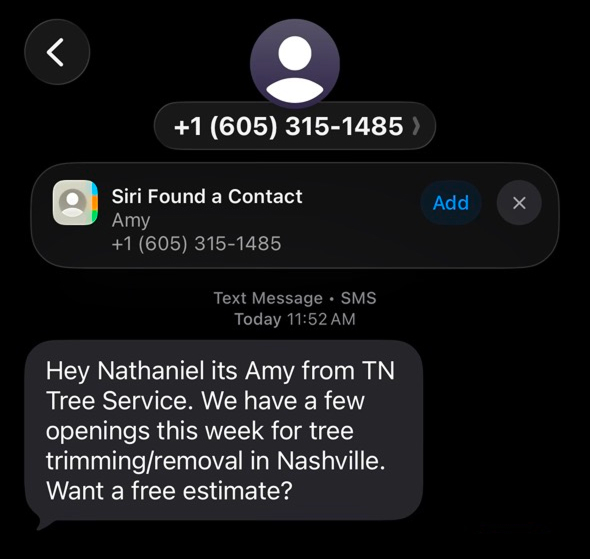
Some of the messages I received while preparing this post
And the packaging is deliberately disarming. Despite seeming personal and handwritten, these messages also reveal themselves to be part of a larger campaign if you reply STOP. (Shouldn’t this be illegal, by the way?)
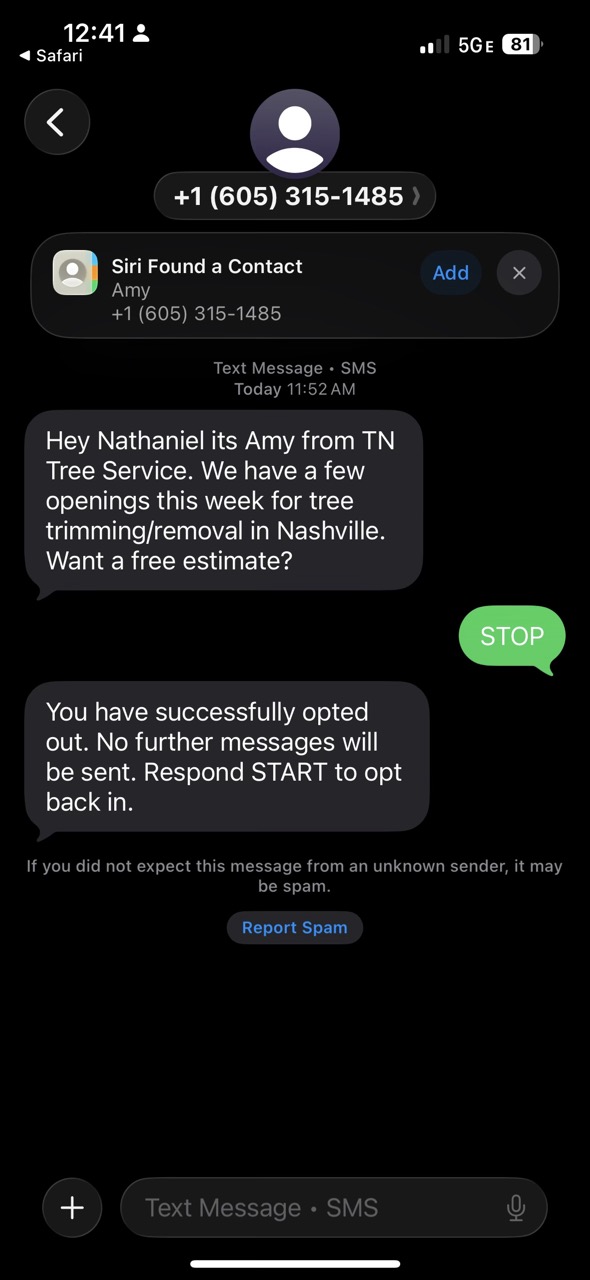
The Obvious Fix I Keep Declining
On paper the solution is simple: reply STOP to all of these, and eventually you should receive fewer, right? Except I have not done that, and I do not want to. Apart from that experiment above, I have instead chosen Delete and Report Spam for every single one of these texts — even though it does not seem to accomplish anything.
What feels absurd is the platform side. Apple has actually added a Spam folder to Messages, and there are a few things in there. But even though I have been reporting all of this stuff as spam for months, if not longer, none of the new messages I receive seem to be filtered into the Spam folder.
Three Ways Out, Compared
| Option | What you are doing | What this account shows in practice |
|---|---|---|
| Reply STOP | Send the keyword back to the sender | The “simple” answer; in that experiment it also exposed the message as one thread in a larger campaign |
| Delete and Report Spam | Delete the thread and flag it to the platform | My default for every one of these texts, even though nothing new is routed into the Spam folder |
| Delete and Stop | A shortcut that sends STOP on your behalf | Found Recently, and it appears mutually exclusive with Delete and Report Spam |
Why Replying STOP Feels Like Agreement
After some reflection, I think I figured out the real reason for my hesitation: replying with STOP feels like I am accepting this vision of the world. If I reply STOP, I am basically saying, “Okay, you’re allowed to send me whatever you want, and then I have to send back STOP for you to knock it off.” I want to fundamentally reject that framing. Mass-texting and spam campaigns should not get that right by default, and the burden should not be on me to individually opt out of every single one of these campaigns.
The Change I Would Like to See From Apple
If you are reading this and you work on iOS at Apple, please help. This feels like a great use case for all this new Apple Intelligence, similar to the AI adblock experiment I ran a while back. If I report something as Spam, perhaps an option could appear asking, “Filter messages like this to Spam?” and the unwanted text could be added to a list of examples. The next time I receive a text from an unknown number, the LLM could read the list of spam examples, and if the new message is similar, it could go to Spam. That is just off the top of my head; I am sure there are even better ideas to combat this.
The Built-in Shortcut That Still Splits the Job
Recently, I did find a “Delete and Stop” option, which automatically sends the STOP message for me. But it seems that “Delete and Stop” and “Delete and Report Spam” are mutually exclusive. You would think that reporting a message as spam would also automatically send a STOP message, but the number of texts I have received from Don Huffines despite reporting each one suggests otherwise.
Checklist: What to Do When a Spam Text Lands
- Read the tone before you react. Warm, handwritten-looking wording is not proof that a real person wrote to you.
- Pick your exit on purpose. Replying STOP is the standard route; Delete and Report Spam is the one I use because I do not want to accept the framing.
- Check what the Spam folder is actually catching. A folder existing is not the same as incoming messages being filtered into it.
- Look for a combined action. If you only see Delete and Stop, understand that STOP is being sent for you, and that it may not also report the text.
- Keep expectations honest across channels. The same dynamic shows up in email and in voice calls, not just in texts.
Common Misconceptions
- “One STOP reply and the problem is solved.” It is the answer that looks simple, yet I have not leaned on it, and the reporting I have done so far has not visibly changed what arrives.
- “Flagging spam trains the filter instantly.” In this account, reporting for months, if not longer, has not moved new messages into the Spam folder.
- “This is only an election-season nuisance.” Marketing texts, marketing email, and robocalls belong to the same pattern.
- “A personal-sounding text came from a personal sender.” Replying STOP can reveal the campaign machinery sitting behind the message.
- “At least email and calls are already solved.” They are not: marketing email still piles up even after opting out, and calls still arrive despite the Do Not Call registry.
FAQ: The Questions This Flood Keeps Raising
Does replying STOP actually reduce the noise?
That is the promise built into the system: send the keyword and the sender is supposed to stop. In practice I have not relied on it, apart from that experiment above, partly because the reply also confirmed that a supposedly handwritten note was one thread in a bigger campaign.
So why not just reply STOP anyway?
Because of what the reply concedes. STOP asks me to accept a world where “Okay, you’re allowed to send me whatever you want, and then I have to send back STOP for you to knock it off.” is the normal arrangement, and I would rather keep the burden where it belongs.
Is there already a filter doing this work?
Partly. Apple has added a Spam folder to Messages and it does hold a few items, but after reporting these texts as spam for months, if not longer, none of the new messages I receive seem to be filtered into it.
What is the ask being made to Apple?
A smarter loop on iOS, built on Apple Intelligence: when I report something as spam, offer “Filter messages like this to Spam?”, keep that text as an example, and let the LLM compare future unknown-number messages against that list, as in the AI adblock experiment I ran a while back.
Why not use the automatic opt-out?
Because the shortcut is not complete. Recently I found a “Delete and Stop” action, but it appears mutually exclusive with Delete and Report Spam, and messages from Don Huffines kept arriving even after I reported every one of them.
Is this a politics-only problem?
No. The same shape shows up in marketing texts, in marketing email that ignores opt-out links, and in voice calls that ignore the Do Not Call registry.
Action Advice and the Longer View
For a day-to-day reader, the practical takeaway is small but concrete: treat the opt-out prompt as a choice, not a chore. Decide whether you want to reply STOP, choose Delete and Report Spam, or use Delete and Stop when it appears — and check whether the Spam folder is really catching anything, because in my case it has not.
As for the outlook: the realistic hope is that the volume calms down after the election, and somebody, somewhere, does something about the rest. I was going to say we already solved this for email, but I am not really sure we did — these days I receive tons of marketing messages despite always trying to opt out on every single website whenever I purchase something, and I still get multiple spam calls a day even though I am on the Do Not Call registry. So the working conclusion is that whoever wants our money or our vote keeps finding a new door, and the message delivery systems we trust most are the ones worth pushing hardest to close it. Next on the watchlist: whether they ever figure out how to get into my Slack.