
The Everything Project Takes On Everyday Software with MIT-Licensed Alternatives: A MyTechDailyNews Explainer

Somewhere in your bookmarks are half a dozen tabs you open every working day: a spreadsheet, a chat app, a doc, maybe a photo editor. A project now in circulation wants to hand you its own versions of all of them, free and open source, and it wants to do it in one place. The Everything Project is described as a mono-repository whose goal is to rebuild and open-source the world's software from scratch, publishing each result under the MIT licence.
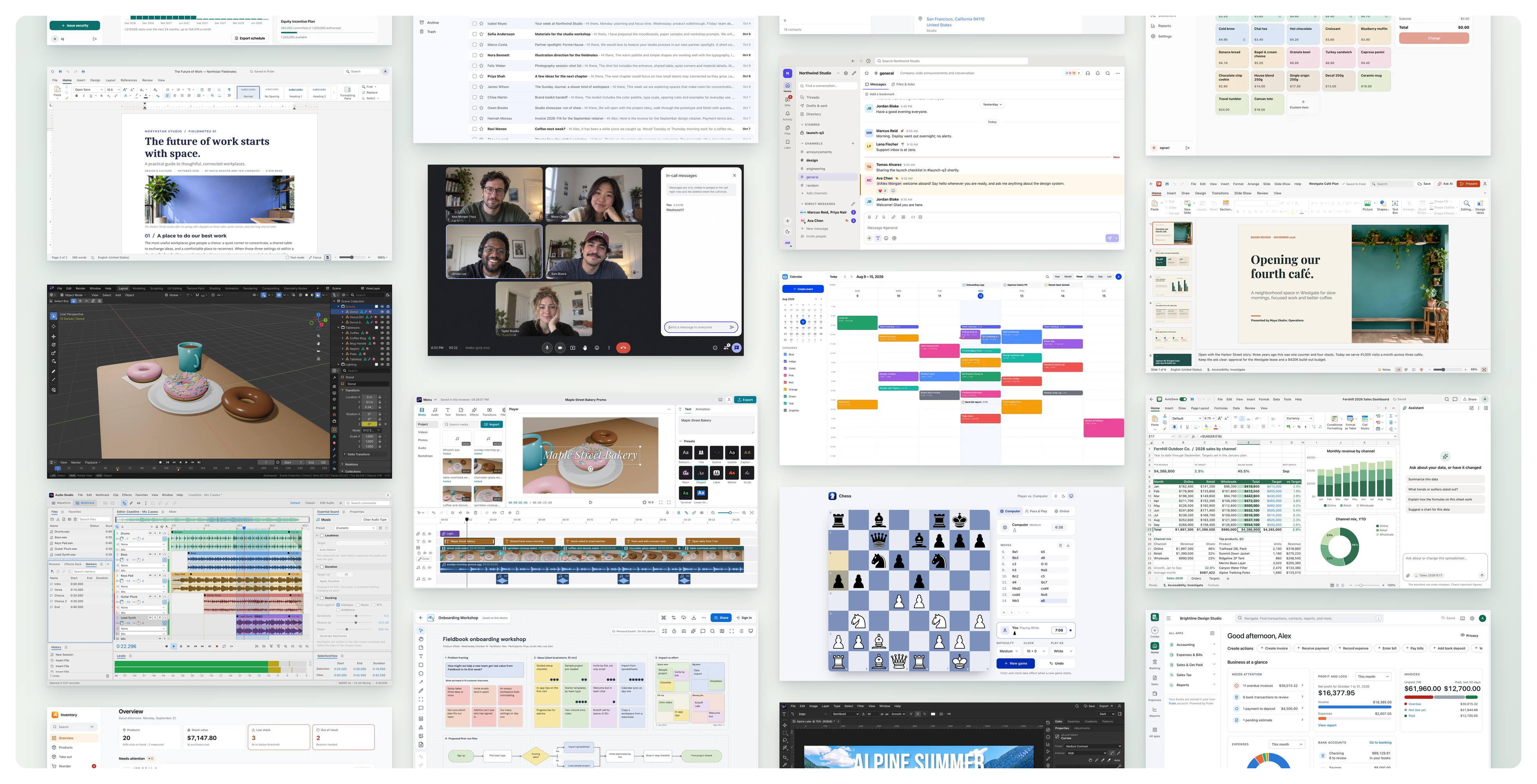
That framing matters for a general audience, because this is not a single headline app. If the name of the tool you currently pay for — Slack, Photoshop, AutoCAD — shows up in its comparison lists, the point of the project is exactly that: a recreated, free equivalent for the proprietary software you already rely on, with every application and tool developed under the umbrella stored together in one repository.
How the work is organised
Rather than sorting by technology stack or release date, the repository groups its rebuilt programs by the kind of job they do. Nine shelves cover the everyday computing range, from desk work to design, from bookkeeping to board games. Here is the full category list as the project presents it:
- Office
- Collaboration
- Creative Tools
- Engineering
- Productivity
- Finance
- Business
- Developer Tools
- Games
Running it yourself: the shortest path from clone to preview
You do not need a full engineering environment to look at the code, but there is one hard requirement: Node.js 22.12 or newer. Once that is in place, the workflow is the one most browser-based tools already use — clone with git, step into the individual application folder, install dependencies with npm, and start a local preview. Because the whole catalogue lives in a single repository, you work on one application at a time by changing into its folder:
git clone https://github.com/HeyPuter/everything.git
cd  everything/src/[app-name]
npm install
npm run dev
Desk work first: the Office shelf
Start here if you want the most familiar comparison. The Office line-up covers the documents, numbers, slides, sketches, files and records that fill a typical workday, and each rebuilt app is positioned against three or four incumbents you may already have licences for.
| Rebuilt application | Proprietary tools it points at | Entry points |
|---|---|---|
 Spreadsheet | Microsoft Excel, Google Sheets, Apple Numbers | Try it | Source |
 Documents | Microsoft Word, Google Docs, Apple Pages | Try it | Source |
 Presentation | Microsoft PowerPoint, Google Slides, Apple Keynote | Try it | Source |
 Whiteboard | Miro, Microsoft Whiteboard, FigJam | Try it | Source |
 PDF | Adobe Acrobat, PDF Expert | Try it | Source |
 Notes | Microsoft OneNote, Evernote, Apple Notes | Try it | Source |
 Records | Airtable, Microsoft Access, Baserow | Try it | Source |
Working with other people: the Collaboration shelf
The second shelf is about the parts of the day that involve someone else: calls, message threads, inbox, address book, schedule and the paperwork that needs a signature. For readers who joined a company after the pandemic, these are the tabs that make remote and hybrid work feel normal.
| Rebuilt application | Proprietary tools it points at | Entry points |
|---|---|---|
 Meetings | Zoom, Google Meet, Microsoft Teams | Try it | Source |
 Teamchat | Slack, Microsoft Teams, Google Chat | Try it | Source |
 Email | Gmail, Microsoft Outlook, Apple Mail | Try it | Source |
 Contacts | Google Contacts, Apple Contacts | Try it | Source |
 Calendar | Google Calendar, Apple Calendar, Outlook Calendar | Try it | Source |
 Signatures | DocuSign, Adobe Acrobat Sign, Dropbox Sign | Try it | Source |
Making pictures, sound and video: the Creative Tools shelf
Creative work is where the ambition is easiest to see, because the reference products are the industry standards most hobbyists learn the names of before they learn the menus. Editing a photo, cutting a clip, drawing a logo, mixing a vocal, building a beat or shaping a model each get their own rebuilt studio.
| Rebuilt application | Proprietary tools it points at | Entry points |
|---|---|---|
 Photo Studio | Adobe Photoshop, Pixelmator | Try it | Source |
 Video Studio | CapCut, Adobe Premiere Pro, Final Cut Pro, DaVinci Resolve | Try it | Source |
 Vector Studio | Adobe Illustrator, CorelDRAW, Affinity Designer | Try it | Source |
 Audio Studio | Adobe Audition, Sound Forge | Try it | Source |
 Music Studio | FL Studio, Ableton Live, Logic Pro | Try it | Source |
 3D Studio | Autodesk Maya, SketchUp | Try it | Source |
Drawing, modelling and wiring: the Engineering shelf
This is the shelf that reaches professionals who normally buy very expensive, very specific software. Four rebuilt programs cover drafting a part, designing a solid model, laying out a circuit board and planning a building — the same four workflows that AutoCAD, SolidWorks, Altium Designer and Revit have long served.
| Rebuilt application | Proprietary tools it points at | Entry points |
|---|---|---|
 CAD | AutoCAD, DraftSight, BricsCAD | Try it | Source |
 Parametric | SolidWorks, Autodesk Fusion, Autodesk Inventor | Try it | Source |
 Circuits | Altium Designer, Autodesk Eagle, OrCAD | Try it | Source |
 Building Design | Autodesk Revit, ArchiCAD, Vectorworks | Try it | Source |
Staying on top of the week: the Productivity shelf
If your main interest is "can I run my whole working life from a browser tab I own?", this is the test bench. Task lists, project boards, team documentation, hours logging and questionnaires are all rebuilt here, and each maps onto tools many readers already pay a monthly fee for.
| Rebuilt application | Proprietary tools it points at | Entry points |
|---|---|---|
 Tasks | Todoist, Microsoft To Do, TickTick | Try it | Source |
 Projects | Trello, Asana, monday.com | Try it | Source |
 Wiki | Notion, Confluence, Coda | Try it | Source |
 Time Tracking | Toggl Track, Harvest, Clockify | Try it | Source |
 Surveys | SurveyMonkey, Google Forms, Typeform | Try it | Source |
Books, bills and budgets: the Finance shelf
Small business owners will recognise this shelf fastest, because it covers the paperwork that turns a side project into a real company: keeping accounts, sending invoices, tracking what was spent, and recording who owns what. Rebuilt versions sit alongside QuickBooks Online, Xero, Carta and the rest.
| Rebuilt application | Proprietary tools it points at | Entry points |
|---|---|---|
 Accounting | QuickBooks Online, Xero, Wave Accounting | Try it | Source |
 Invoicing | FreshBooks, Zoho Invoice, Wave Invoicing | Try it | Source |
 Expenses | Expensify, SAP Concur, Zoho Expense | Try it | Source |
 Cap Table | Carta, Pulley | Try it | Source |
Running the company: the Business shelf
The largest shelf by row count is also the least glamorous, which is precisely why it is interesting. Customer relationships, support queues, contracts, checkout counters, stock rooms, equipment lists, recruiting, rota scheduling, nurseries, field visits, law practice, vehicles and rental properties each get a rebuilt program instead of a per-seat subscription.
| Rebuilt application | Proprietary tools it points at | Entry points |
|---|---|---|
 CRM | Salesforce, HubSpot CRM, Pipedrive | Try it | Source |
 Help Desk | Zendesk, Freshdesk, Intercom, Help Scout | Try it | Source |
 Contracts | ContractSafe, Juro | Try it | Source |
 Point of Sale | Square POS, Shopify POS, Lightspeed | Try it | Source |
 Inventory | Zoho Inventory, Sortly, inFlow Inventory | Try it | Source |
 Assets | Asset Panda, EZOfficeInventory | Try it | Source |
 Hiring | Greenhouse, Lever, Workable | Try it | Source |
 Shifts | Deputy, When I Work, Homebase | Try it | Source |
 Childcare | brightwheel, Procare, HiMama | Try it | Source |
 Field Service | Jobber, Housecall Pro, ServiceTitan | Try it | Source |
 Legal | Clio, MyCase, PracticePanther | Try it | Source |
 Fleet | Fleetio, Samsara Fleet Maintenance, Whip Around | Try it | Source |
 Property Management | Buildium, AppFolio, Rent Manager | Try it | Source |
For people who write the software: Developer Tools
Only one program is listed so far in this category, and it is the one most non-engineers have still seen: the window where someone pokes at a web service and reads the reply.
| Rebuilt application | Proprietary tools it points at | Entry points |
|---|---|---|
 API Client | Postman, Insomnia, Hoppscotch | Try it | Source |
And a games cabinet at the end of the hall
The last shelf is the lightest and the most human. Five rebuilt pastimes come with descriptions of how you can actually play them — against the machine, against a friend, locally or online — which is a useful reminder that the project is building complete products, not screenshots.
| Rebuilt game | How you play it | Entry points |
|---|---|---|
 Chess | Play against the computer or a friend, with clocks and online play. | Try it | Source |
 Backgammon | Play against the computer or a friend, locally or online. | Try it | Source |
 Checkers | American checkers against the computer or a friend. | Try it | Source |
| Solitaire | Klondike (draw one or three, optional Vegas scoring) and Spider solitaire, with optional cloud saves. | Try it | Source |
 Sudoku | Four difficulty levels, daily puzzles, and hints that explain the logic. | Try it | Source |
The licensing fine print worth reading
All contents, sub-projects, modules and components of the repository are licensed under MIT unless explicitly stated otherwise. The exception is the small print that trips people up: third-party libraries included in the repository may remain subject to their own licences. If you are planning to reuse anything commercially, that sentence is the one to check first.
Three readings of this project that are easy to get wrong
- "One repository means one product." It does not. The mono-repository is a container for all applications and tools developed under The Everything Project; you still enter an individual application folder such as everything/src/[app-name] and install for that app alone.
- "Everything inside is MIT, no questions asked." MIT covers the project's own contents, sub-projects, modules and components unless stated otherwise, while bundled third-party libraries may keep their own licences.
- "This is just a free clone of a word processor." The stated scope runs across nine categories — Office, Collaboration, Creative Tools, Engineering, Productivity, Finance, Business, Developer Tools and Games — from Spreadsheet and Email through CAD, Accounting, CRM and API Client.
Questions readers ask first
What is being offered here?
Free, open-source recreations of proprietary software, organised as a mono-repository whose stated aim is to rebuild and open-source the world's software from the ground up.
Which licence applies?
MIT, unless explicitly stated otherwise. Third-party libraries inside the repository may remain under their own licences.
What do I need before running an app locally?
Node.js 22.12 or newer, plus git to clone the repository and npm to install dependencies and start the development preview.
Is Microsoft Excel or Adobe Photoshop itself included?
No. Spreadsheet, Photo Studio and their neighbours are rebuilt alternatives positioned against Microsoft Excel, Google Sheets, Apple Numbers, Adobe Photoshop and other incumbents — not copies of them.
Where does the code live?
In one repository, cloned from HeyPuter/everything on GitHub; the Source entry next to each application leads to its code, and the Try it entry is the starting point for the running version.
A practical checklist before you swap anything
- Confirm Node.js 22.12 or newer is installed, since that is the stated floor for the setup.
- Clone the repository once with git rather than downloading individual apps, so all categories arrive together.
- Pick a single application folder under everything/src/ — start with something low-risk such as Tasks or Sudoku.
- Run npm install followed by npm run dev to get a local preview.
- Open your current paid tool side by side and test one real job from your week, not a demo file.
- Check the licence note on any third-party library the rebuilt app bundles before you use it in client work.
Rebuilding the software people touch every day is the kind of project that is easy to dismiss and hard to ignore, and whether you poke at the code or simply watch the category tables grow, the useful takeaway is the same: the barrier to owning your own tools keeps getting lower. MyTechDailyNews will keep tracking how far The Everything Project takes it. This piece was written by Sarah Chen for Tech Daily — spot a factual slip or have a lead on open-source tooling? Write to hello@techdaily.com.