
MyTechDailyNews Verdict: Synology's 9.8 NAS Bugs, Aging DSM Branches, and What to Patch or Replace First
For a Synology NAS owner, the September 18 SA-26:13 notice is less an abstract security bulletin than a household-office maintenance decision. It says the company fixed eight flaws, two of which have a CVSS 3.1 base score of 9.8. The practical question is not only whether a patch exists, but whether the device branch can keep receiving one and whether the backup setup can survive an attacker who never touches a phishing link.
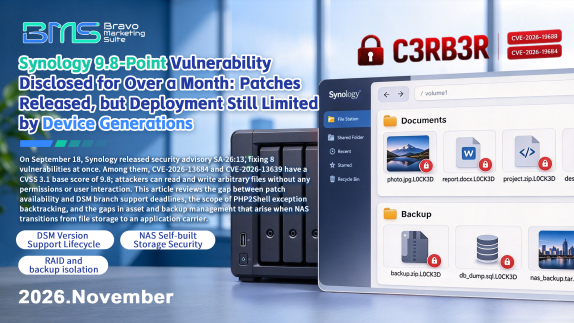
(The image illustrates the analysis of two Synology vulnerabilities)
By October 29, the advisory had been public for more than a month. A device that reaches the fixed build is no longer affected by either 9.8-rated flaw. The open question is whether the device's DSM branch can still move forward at all, because each branch has its own support window under the software lifecycle policy.
At a glance: the three decisions hiding inside one advisory
- Severity: CVE-2026-13684 and CVE-2026-13639 each carry CVSS 3.1 9.8. The advisory says a remote attacker can read and write arbitrary files and cause denial of service.
- Preconditions: The attack path requires no privileges and no user interaction, so stronger passwords and staff awareness training do not, by themselves, block it.
- Remedy: The Mitigation field reads None. There is no temporary configuration workaround in the notice; an upgrade is the only documented fix.
| Reader situation | Patch status in SA-26:13 | Main trade-off | MyTechDailyNews recommendation |
|---|---|---|---|
| DSM 7.4 or DSM 7.3 device | Upgrade to DSM 7.4-90075 or DSM 7.3.2-86009-4 | Usually the cleanest route; a reboot or service window may be required | Apply the fixed build during a planned maintenance window, then confirm the exact version. |
| DSM 7.2.1 or 7.2.2 device | Upgrade to DSM 7.2.1-69057-12 or DSM 7.2.2-72806-9 | A patch exists, but the DSM 7.2 branch entered its maintenance end in December 2025 | Patch now, then plan a replacement, cloud offload, or a strictly isolated network position. |
| DSM 7.1, 7.0, or 6.2 device | The PHP2Shell statement was later widened to cover 7.1, 7.0, and 6.2, but SA-26:13 does not promise all eight fixes for every branch | The machine may accept today's patch without gaining a reliable security future | Treat this as a refresh trigger if the device hosts web apps, keeps business data, or exposes management services. |
| NAS accessed over the internet for convenience | No mitigation is listed | Every open interface becomes part of the risk picture | Close nonessential services and move remote access behind a controlled channel such as VPN or an equivalent private tunnel. |
| Backup copy lives on the same NAS | Patching protects code, not stored files | RAID can copy ransomware activity to every member disk | Create a separate offline, cloud, or permission-isolated copy and test that it can be restored. |
Why the 9.8 score changes the decision, not just the mood
The two identifiers are CVE-2026-13684 and CVE-2026-13639. The first sits in DSM's SCGI component and is classified as improper output encoding and escaping, CWE-116. The second sits in the login logic and is classified as insufficient entropy, CWE-331. The notice gives both the same operational impact: remote arbitrary file read or write plus denial of service.
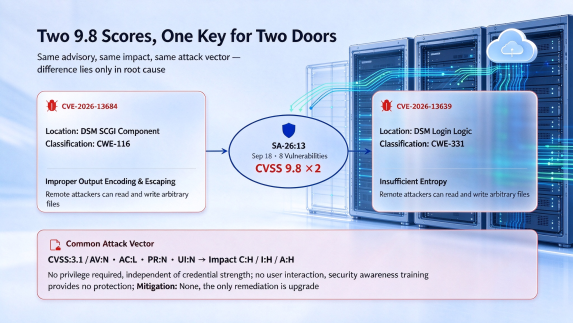
(The image details the two 9.8-rated vulnerabilities)
Both vulnerabilities share the vector CVSS:3.1/AV:N/AC:L/PR:N/UI:N/S:U/C:H/I:H/A:H. Under CVSS 3.1 scoring rules, attack vector, attack complexity, privileges required, and user interaction already take their worst practical values. The distance from 9.8 to 10.0 is caused by scope: if the damage could cross a security boundary, the same measurement set would produce a perfect 10.
Translated for a general audience, PR:N means an attacker does not need an ordinary NAS login first. The weakness is not simply that someone used a weak password. UI:N means nobody must open an attachment, click a link, or install an app. The attack can be machine-to-machine. That is why this kind of flaw feels different from a laptop infection: a NAS is usually left running, and the administrator is not at the keyboard when the door is tested.
The Mitigation field says None. In many advisories, this section would suggest a temporary workaround: disable a feature, restrict a port, or filter traffic at a boundary device. Here, the absence of a workaround raises the practical value of two ordinary controls: keeping the device version current and keeping the device away from avoidable public exposure.
The rollout trap: a patch exists, but branch support may not
The advisory lists four repaired versions: DSM 7.4-90075, DSM 7.3.2-86009-4, DSM 7.2.2-72806-9, and DSM 7.2.1-69057-12. Those builds correspond to four maintenance branches of DSM 7.x, which nominally covers the installed base of devices that are still under normal update expectations.
The constraint is the lifecycle schedule. Synology's software lifecycle policy places the end of maintenance for DSM 7.2 in December 2025, the end of extended support for DSM 7.1 in June 2025, and the end of extended support for DSM 6.2 in September 2024. As of October 2026, only DSM 7.3 and DSM 7.4 remain inside the regular security update window.
This is where home users and small businesses often misread the situation. A rack-mounted NAS is commonly depreciated over five years, yet eight or ten years of actual use is normal because the main components are disks: swapping one drive keeps the box alive, so a full replacement rarely has an obvious business case. By contrast, one major DSM version is typically supported for three to five years. Hardware can still be in service while the operating system is past its support window, and procurement teams rarely price that gap.
For devices on older branches, the repaired version and the support status do not line up neatly. A device can install the patch, but no further updates after it are promised. That is not the same as saying the old branch is immediately exploitable; it means the owner has to stop assuming that a future fix will arrive if the next incident is disclosed.
Two official references help non-specialists orient themselves. Synology's Product Security Advisory index lists SA-26:13 as a critical DSM item in resolved status, and Synology's DSM update Knowledge Center advises setting the NAS to automatically install important updates so security fixes are not blocked by manual memory alone. The second point matters for everyday readers: if a device is old enough to be missed during routine checks, the update mechanism should not depend on remembering to look at a webpage.
Why a PHP exception backport is a warning about device age
One separate response indirectly measures how large the older DSM population still is. On October 22, Synology published a public statement on two high-severity PHP vulnerabilities, CVE-2026-109618 and CVE-2026-109619. Its Product Security Incident Response Team said PHP2Shell's impact was confined to systems running certain PHP dependent packages and listed Calendar, IDrive, Joomla, KodExplorer, MailStation, MediaWiki, phpMyAdmin, vtigerCRM, Web Station, and WordPress.
On the day the statement appeared, the PHP security update covered DSM 7.4 and DSM 7.3. The text was then revised twice: on October 28 to add DSM 7.0 and DSM 7.1, and on October 29 to add DSM 6.2. All three were already end-of-life. A selective backport like that is unusual, and the need for it suggests enough devices remain on those branches that ignoring them is not a credible option.
There is a trade-off hiding in that action. A single component's patch can be backported, but the SA-26:13 advisory makes no comparable commitment that the fixes for all eight vulnerabilities reach every branch. The statement also notes that the PHP component built into DSM serves internal systems and, by design, has no externally accessible modules; risk from that built-in component is assessed as minimal, with fixes scheduled for later DSM releases. For readers, this splits two ideas that often get confused: whether the device is on a patched DSM branch and whether the PHP runtime behind installed packages is patched are separate facts.
When a NAS becomes a small server without a server budget
NAS was originally positioned as file storage. Once deployed, its role often expands: the device stays online, offers a web management interface, and accepts package installation, so it ends up hosting internal knowledge bases, public-facing sites, or media libraries. For a small or mid-sized organization, that route can look cheaper and faster than requesting a dedicated server.
The affected package list maps that drift. By function it covers website building with WordPress and Joomla, knowledge bases with MediaWiki, database administration with phpMyAdmin, file browsing with KodExplorer, customer relationship management with vtigerCRM, and mail and calendaring with MailStation and Calendar. In a properly governed environment, systems of this kind belong on dedicated servers maintained by specialist staff. In practice, they often sit on a storage device managed alongside other duties by administrative or part-time staff.
Once a NAS runs PHP, its security posture becomes tied to the PHP ecosystem rather than only the appliance vendor. On October 21, 2026, the PHP project fixed two unauthenticated remote code execution vulnerabilities rated 9.2 under CVSS v4.0. W3Techs data from the same day placed PHP at 69.3% of websites that use a known server-side programming language, of which 34.8% run on branches the project no longer updates: PHP 7 at 27.0% and PHP 5 at 7.7%. PHP instances sitting on storage devices are part of that unsupported population, and they usually fall outside website asset inventories and application security testing scopes.
Update channels are not unified either. Packages arrive through Package Center, while the runtime ships with system updates, and the two paths differ in release cadence and when changes take effect. In the PHP2Shell statement, Synology notes that dependent packages restart automatically once the PHP update completes, whereas MailStation has to be updated by hand. That detail matters: even after an administrator has run the system update, each dependent component still needs a state check.
The forensic problem is more immediate. Such devices often have audit logging switched off or keep logs locally for only a few days. Both 9.8-rated flaws allow writes to arbitrary files, and at the file-system level those writes can leave no obvious anomaly. Incident response normally follows an order: establish whether compromise occurred, decide whether a reporting obligation is triggered, and then clean up and restore. If logs are overwritten, the first step becomes impossible.
RAID is not backup insurance: a cost-side reality check
A common misconception about self-built storage is to treat RAID as a guarantee of data safety. RAID guards against disk failure; it does not cover encryption, accidental deletion, or operator error. Ransomware encryption looks like ordinary writes at the file-system level, and RAID can faithfully replicate that activity to every member disk.
The Sophos report State of Ransomware 2026 offers a cost-side reference. The report is the seventh edition in the series, based on a survey run from January to March 2026 among 2,158 IT and security leaders in 17 countries, at organizations with 100 to 5,000 employees. Its figures: 56% of attacks succeeded in encrypting data, average recovery cost was US$1.7 million, and the median ransom payment was US$769,000.
The link to NAS is backup homogeneity. If production data and backup copies sit on the same device, the encryption process makes no distinction between them. A backup is only as good as its isolation from production, in both physical and permission terms; a copy inside the same chassis fails that test. The most common small-business setup is exactly one device serving as both production storage and backup.
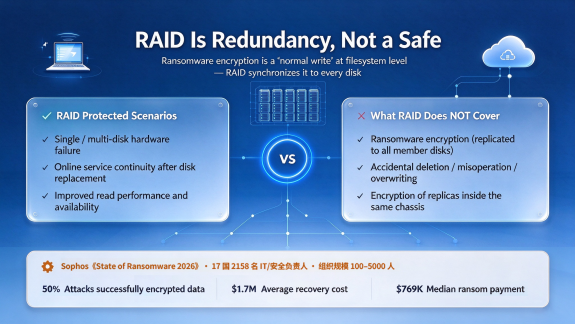
(The image illustrates the limits of RAID and the independence of backups)
Directory permissions are not asset governance
Even when the technical controls are handled, NAS management remains centered on directories and permissions. It can answer whether a person may read or write a folder. It cannot answer whether a file is the correct asset.
Brand asset management sits on a different dimension. A single key visual raises questions such as: how many revisions did the published version go through, and who approved them; which territories and term does the license cover; where does the same asset appear across multilingual sites, e-commerce platforms, and offline materials; how far does one change propagate; and which assets may external partners access, at what downloadable specifications?
These questions describe the attributes and state of an asset, not where it is stored. A directory structure helps people retrieve files manually; it does not carry rules. A simple test is available: at the last brand identity update, how long did it take to replace the asset across every site and every piece of collateral, and who signed off on completion? If that answer requires several people to reconstruct the trail, the organization is still at the file management stage, not the asset management stage. Digital Asset Management, or DAM, is the product category designed for that scope, with version history, rights expiry flags, and controlled external access as its usual jobs.
Common mistakes to avoid before deciding
- Confusing no mitigation with nothing to do. The notice gives no temporary workaround, but exposure reduction, isolated backups, and prompt upgrades remain useful.
- Assuming a current DSM build automatically means every PHP package is patched. MailStation's manual update note is a clear exception to the assumption.
- Keeping management services open because remote access is convenient. These flaws do not require a valid user account, so the public entrance itself is the risk.
- Treating RAID, snapshots on the same chassis, or another drive inside the NAS as true isolation. Encryption can still spread if the backup surface is reachable.
- Buying a new NAS without checking the old apps. If the migration carries PHP-dependent packages from a device with a long installed age, the same support gap can reappear in a newer chassis.
FAQ: quick answers for readers deciding today
Should I update immediately or wait for community reports?
For a device that can safely reach the fixed version, the answer is immediate but managed: choose a maintenance window, confirm backups, and apply the patch. The advisory lists no mitigation, and Synology's own update guidance encourages automatic installation of important updates so security fixes are not blocked by manual checking.
My device is on DSM 7.2. Is it safe once I patch?
It closes the current SA-26:13 flaws if it reaches the fixed version for its branch. But DSM 7.2's maintenance phase ended in December 2025, so the device should no longer be treated as a long-term supported platform without a compensating control plan.
Do I need to replace the NAS?
Replace it first if the device is internet-facing, hosts web applications, stores business-critical data, or uses the same box as its only backup. If the device is offline, holds non-critical files, and has an isolated backup, replacement can be planned rather than rushed.
What is the simplest backup rule to remember?
One copy is not backup, and one chassis is not isolation. A practical version is: keep a copy on a separate device or service, make sure credentials or network permissions do not let the production system write to the backup on demand, and test a restore.
Does this mean NAS is a bad product category?
No. NAS remains attractive because it is familiar, affordable, and locally managed. The SA-26:13 story shows the cost: when a storage device becomes an application host and stays online for years, it inherits server-grade lifecycle obligations without always receiving server-grade maintenance attention.
Action checklist: what to do this week
- Record the exact DSM build. Do not rely on DSM 7.2 alone; compare the full build with DSM 7.4-90075, DSM 7.3.2-86009-4, DSM 7.2.2-72806-9, or DSM 7.2.1-69057-12.
- Confirm the update policy after upgrading. If local rules allow it, keep automatic installation of important updates enabled, as recommended in Synology's DSM update guidance.
- List installed packages and their owners. Calendar, IDrive, Joomla, KodExplorer, MailStation, MediaWiki, phpMyAdmin, vtigerCRM, Web Station, and WordPress deserve special attention because they appeared in the PHP2Shell scope.
- Reduce public access before relying on passwords. Close unnecessary services, and move remote access behind a controlled tunnel.
- Rebuild backup isolation. If a copy is in the same chassis, create a separate target, verify permissions, and test at least one restore path.
- Decide whether the device's lifecycle is the real problem. A device on 6.2, 7.0, or 7.1 should not be managed only by patching; it needs a replacement, offload, or stricter network isolation plan.
The MyTechDailyNews takeaway is not that every Synology NAS is in danger today. It is that the advisory exposes a familiar pattern: a security patch can be available long before the device population can actually keep taking patches. If you use a NAS like a hard drive, the issue is a firmware chore. If you use it like a small server, the issue is governance: version support, package inventory, remote exposure, backup independence, and asset records all have to be handled deliberately.