
MyTechDailyNews: How a Raspberry Pi DSKY Rebuild Lets Anyone Touch Apollo Guidance Computer History
Museum glass is usually the only thing standing between the public and the hardware that guided astronauts to the Moon. A maker in Calgary, Alberta has removed that barrier. Commercial aircraft avionics engineer Michael Newton leads the open-source project Recreate Apollo, which uses a Raspberry Pi computer and the Virtual AGC emulator to drive a 1:1 scale 3D-printed DSKY — the Display and Keyboard the crew actually pressed in flight.
Although the latest issue of Raspberry Pi Official Magazine is a weather-monitoring projects special, this build is hard to pass by, because anything space-themed is irresistible. When he is not on the flight line, Newton studies and recreates historical aircraft and spacecraft hardware using modern technology and techniques.
The machine being recreated, in brief
The Apollo Guidance Computer (AGC) was introduced by the Charles Stark Draper Laboratory at the Massachusetts Institute of Technology in 1966, three years before Neil Armstrong became the first human to set foot on the Moon. Each Apollo Command Module and Lunar Module carried one. On paper it looks underwhelming: its power was on a par with the Apple II computer with less than 100kB of memory and a clock speed of 1.024MHz. Yet, as Michael Newton points out, it allowed astronauts to execute navigation routines, autopilot manoeuvres, burns, orbital rendezvous, and Earth entry from their spacecraft. It was also the first computer to be based on silicon integrated circuits.
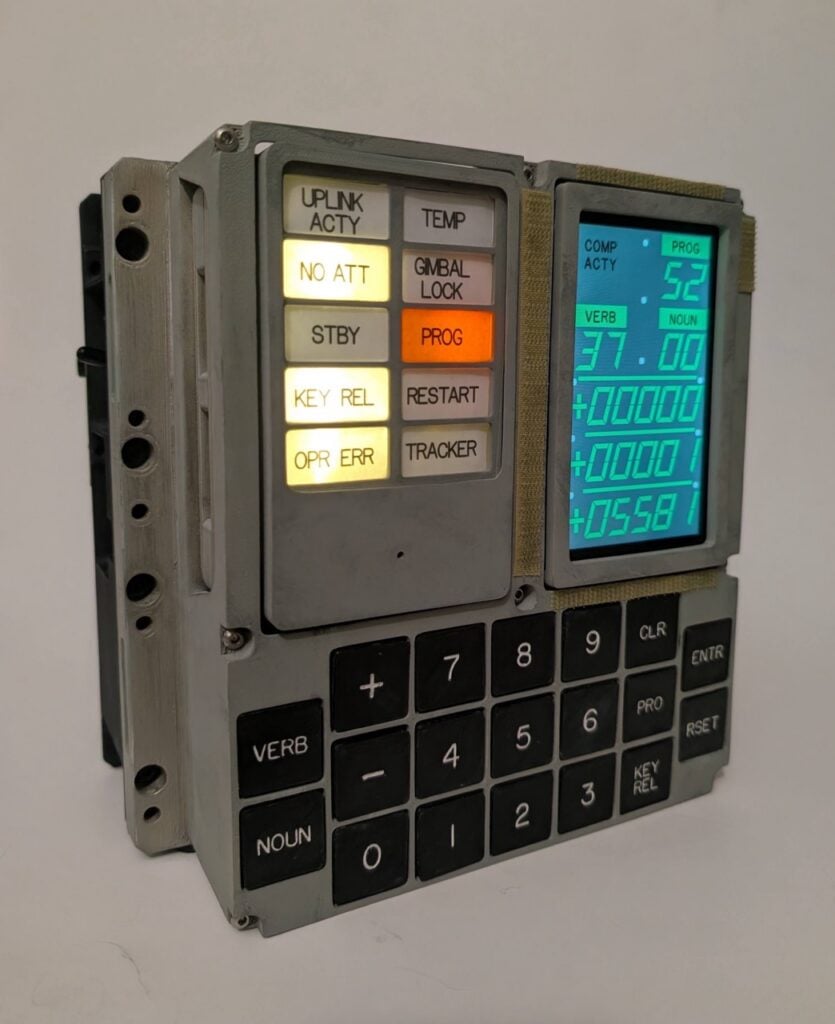 The enclosure tracks the original so closely that it reads like a panel taken off a spacecraft rather than printed on a desk
From archived drawings to a working panel
Michael is an engineer passionate about building historical spacecraft hardware with modern technology and techniques, and his 1:1 scale 3D-printed DSKY is the visible half of that work. Because it specifically runs the Apollo 13 Command Module software, it gives anyone the chance to get hands-on with a piece of computing and space history.
Michael says, “My interest in the project began many years ago when, during the COVID-19 pandemic, a group of Apollo enthusiasts began translating the original MIT Instrumentation Lab engineering documents into modern-day CAD files with the eventual goal of 3D printing,” and the documents became available after a public records request and were archived by the Virtual AGC group.
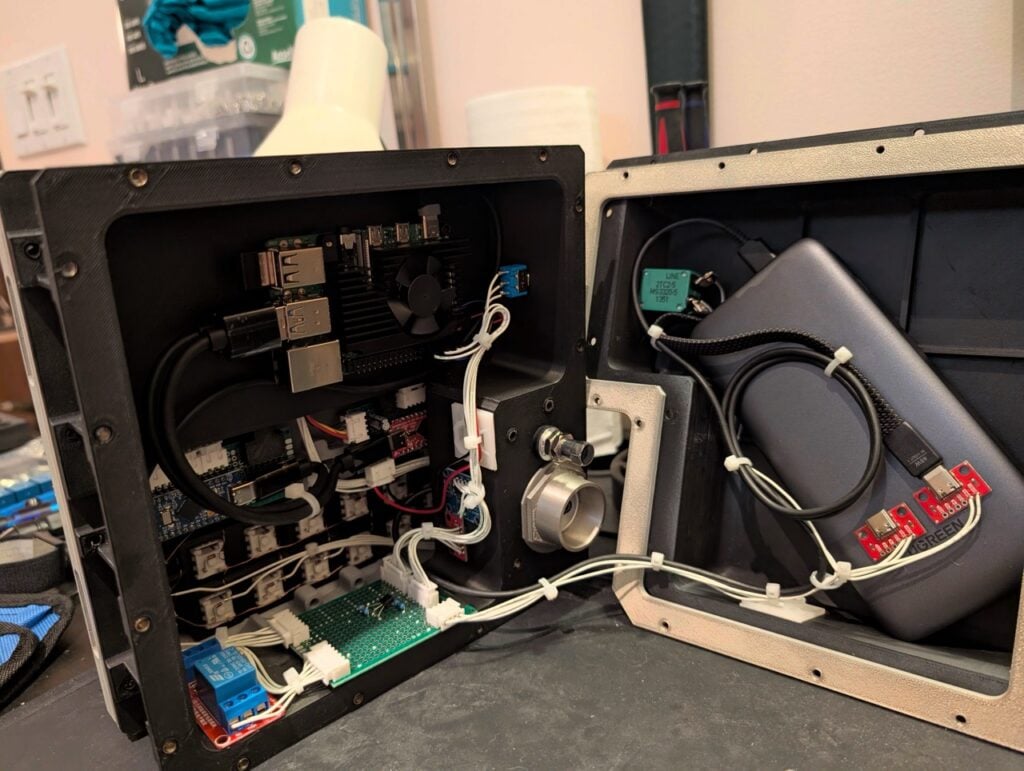 This DSKY is a prototype for an improved version, and every printed part follows archived NASA drawings
Michael says, “I lost touch with most of their progress as life carried on, but about a year ago I came across another maker named Eric who runs a blog called mkme.org and I saw that he had created a DSKY based off of the now nearly-completed drawings uploaded on GitHub. Unsure where he sourced his files, I went on the hunt for them himself. I found many in different GitHub repos or other open-source projects, but other parts needed some work to refine and some others still I had to model on my own. After a few weeks of work, I had a full set of .stp files ready to print that I was satisfied with. I purchased a 3D printer and began learning that world.”
Three jobs, done in order
Learning as he went, Michael broke the build into three main tasks:
- Case: print, finish, and paint it.
- Hardware: organise and wire it.
- Software: write the code.
He explains, “I tackled each part of the project over a few months, in that order, taking my time and learning as I went along,” and adds, “But one of my biggest goals for this project was documentation. I wanted anyone who is interested to be able to build one of these, even those with no prior knowledge. My guide, available on GitHub, is the fruit of those labours.”
How faithful is the copy? A quick comparison
| Element | Original AGC DSKY | Recreate Apollo build |
|---|---|---|
| Overall authenticity | Flight hardware | “Physically, the DSKY is about 90% authentic,” and “From the outside, I strived for a perfect visual representation and I’m satisfied where it’s at.” |
| Internal layout | Purpose-built mounting | Mounting points adjusted for the microcontrollers and the Raspberry Pi computer |
| Display fitting | PCB sized to the original holder | “I also needed to get a bit creative with the screen mounting, since the PCB that the screen mounts on is physically larger than the part designed to hold the original,” so “I modelled a clip-style holder for the screen and made a few minuscule adjustments to get the fit down perfect. The keycaps were also made a bit differently than the originals, since the lettering was too small for me to print with great definition. Even though the font matches the historical one (yes, someone recreated the font!), the words are just a bit larger.” |
| Open materials | Engineering documents | CAD models, schematics and a 100-page build guide, free on GitHub |
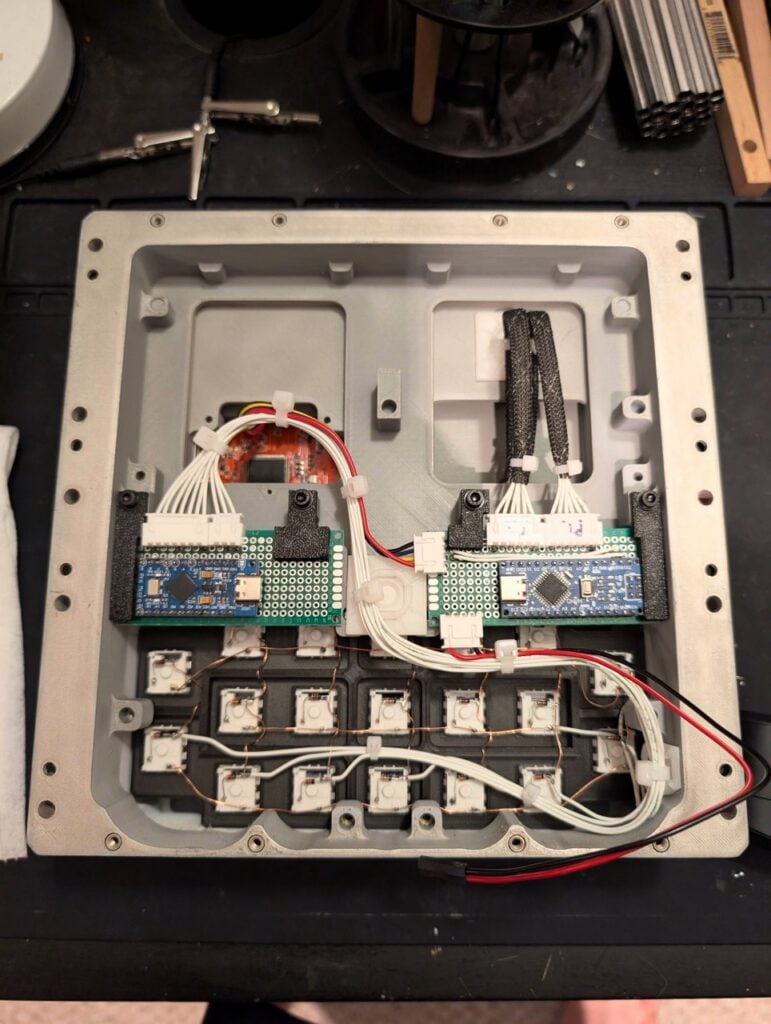 CAD models, schematics and a 100-page build guide are all free to use and view on GitHub
Why this single-board computer was the right engine
For Michael, a Raspberry Pi computer felt like a perfect fit. He says, “It is nearly purpose-built for this project,” and “It integrates through microcontrollers via USB, it doesn’t need a lot of power, it has wireless LAN built in for SSH and remote applications, and it also runs cool. Raspberry Pi OS is very easy to install, too, and you can create a custom distribution to send an entire OS instance to other users, which makes that section of the build easy to copy.”
More than that, the Raspberry Pi easily runs yaAGC, the VirtualAGC computer program that replicates every characteristic of the real AGC. He says, “This includes the unique asynchronous timing (interrupt) that saved Apollo 11 (1201/1202 alarm codes), the 15-bit-plus-one-parity word length, and the archaically slow 1.024MHz clock speed,” and explains the logic.
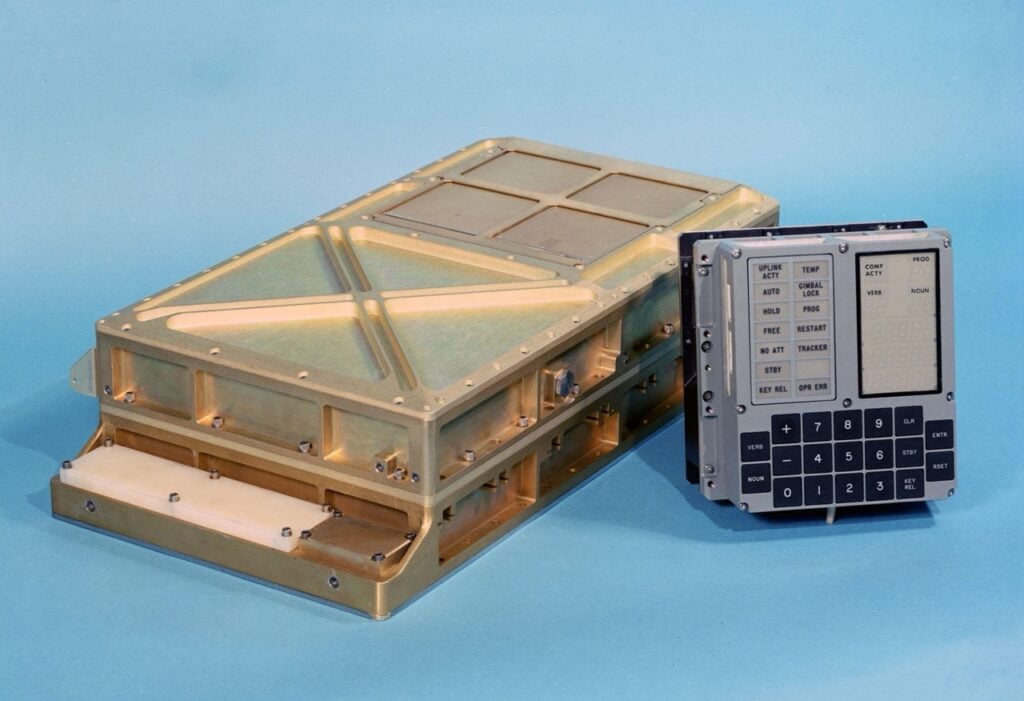 Above: the original Apollo Guidance Computer with its DSKY, as flown on Apollo spacecraft.
Source: Wikipedia
Clearing up the technical misunderstandings
The AGC’s data handling is fundamentally different from how modern computers are engineered: the individual 1s and 0s are arranged as a 15-bit data block with a single parity bit used for error checking. Michael says the emulation proved extremely difficult to achieve, but the programmers managed to emulate the AGC with the exact same logic, using the same timing, as the original. In other words, the panel is not a light-up model with a fake readout hiding behind it.
Michael explains, “Fundamentally, the exact same constraints are preserved in this emulation because the timing of the AGC is kept intact and the memory that the computer reads is virtualisation of the real code that was woven into core rope ROM and magnetised in the RAM,” and adds, “In fact, it emulates the real computer so well that, to me, VirtualAGC is not an emulator. It’s a real Apollo Guidance Computer that borrows your processor.”
What the build still cannot copy — and what comes next
The result is a fully usable device that lets people interact through a keypad. For that keypad, Michael used off-the-shelf mechanical keys with the highest actuation force and most solid ‘click’ he could find. He says, “I settled on Kailh Box Navy,” and “They feel and sound OK, and they are easy to get, but they are far from the real keypad.” He is currently looking to create a much more premium DSKY with a full aluminium body, better annunciators, and maybe a real electroluminescent display, which, he says, would incorporate a better keypad.
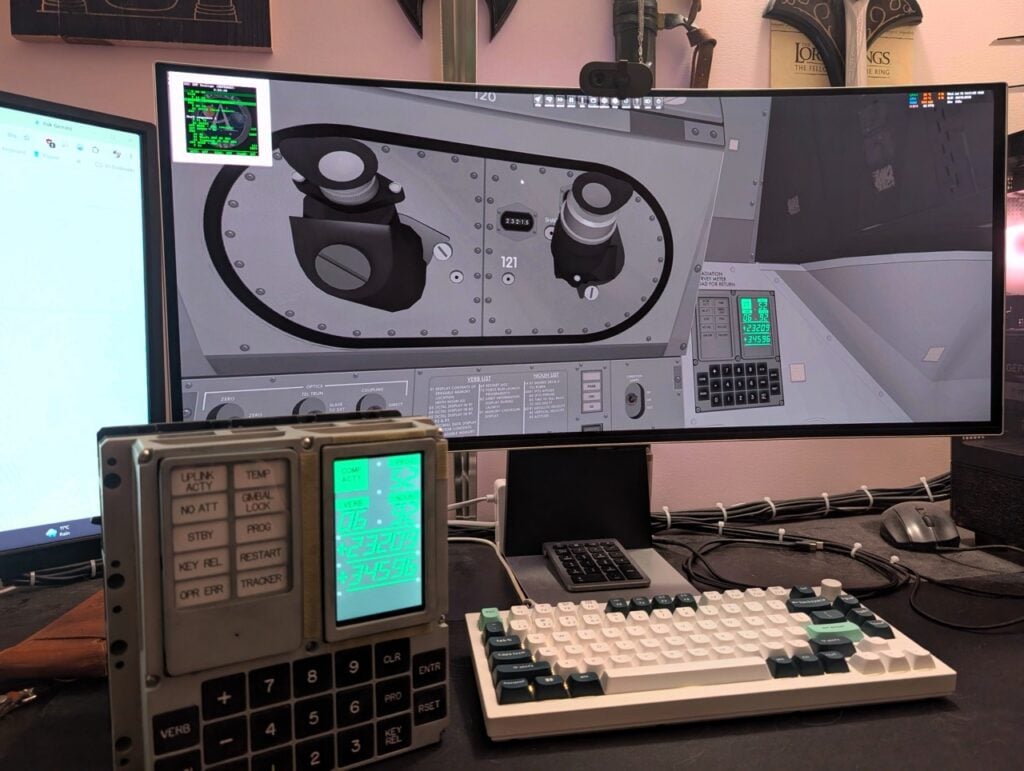 Long-pressing one key switches the panel into ‘peripheral’ mode, so the DSKY can work over a local network with Project Apollo – NASSP, an add-on for the Orbiter space flight simulator released on the PC, which simulates all of the Apollo missions
Beyond the desk, the project has taught Michael and others much more about the AGC, and the ingenuity of those behind the original computer is clear: “The memory alone was an ingenious design of magnetism and did you know that the Apollo Guidance Computer used only ONE type of logic gate: the 3-input NOR? All the mathematics, data movement, navigation, autopiloting, burns – everything, was just voltage levels going through 3-input-NORs, and the occasional diode arrangement. Truly incredible minds were necessary to design that kind of thing.”
FAQ
What exactly is a DSKY?
It is the Display and Keyboard of the Apollo Guidance Computer — the keypad-and-display interface through which astronauts gave instructions to the AGC and read its answers.
Is this a replica or a working computer?
Both. The case and panel are 3D-printed replicas at 1:1 scale, while the brain is a Raspberry Pi running Virtual AGC and yaAGC with the Apollo 13 Command Module software.
Do I need an engineering background to build one?
No. Michael’s stated goal was documentation that anyone could follow, “even those with no prior knowledge”, and the CAD models, schematics and 100-page guide are free on GitHub.
Can the DSKY drive a space flight simulator?
Yes. In peripheral mode it connects over a local network to Project Apollo – NASSP, the add-on for the Orbiter space flight simulator released on the PC.
What does the project still lack?
The keypad feel above all: Kailh Box Navy switches stand in for the original keys, and a premium rebuild with an aluminium body, better annunciators and possibly a real electroluminescent display is planned.
Checklist: what you can do with this story
- Read the build guide and CAD files on GitHub before buying any parts.
- Search different GitHub repos and other open-source projects for the printing files, then expect to model the missing pieces yourself.
- Sequence your effort the way Michael did — case, then wiring, then software — over a few months.
- Pick a single-board computer that is easy to install, low-power and network-ready, then install Raspberry Pi OS.
- Document your own steps as you go; that was the most valuable output of this build.
- Try the panel in a simulator if you fly Apollo missions on the PC.
The takeaway for everyday tech readers
The interesting part here is not nostalgia, it is accessibility. A machine that once flew to the Moon with less memory than a modern thumbnail can now be studied, pressed, wired and even simulated by ordinary hobbyists — because one engineer wrote everything down and published it. If that changes how you think about “old” technology, the fastest way to see it for yourself is to open the project’s repository and start with the guide.