
16GB Raspberry Pi Boards Jump $80 To $385: A Buyer's Checklist For The New Memory Prices
If a small single-board computer has been sitting in your shopping cart for months, the maths behind that purchase just shifted again. From today, the highest-memory version of the Raspberry Pi 5 costs $80 more than before, landing at $385, and the memory-densest compute modules move as well. The reason is not a redesign or a faster chip — it is a shortage of DRAM that has now stretched across two years and is being driven by the appetite of artificial-intelligence data centres. This guide walks through exactly what changed, how to tell whether the bigger memory option is worth it for your build, and what to do before you place an order.
What Actually Changed On The Price List
Raspberry Pi has applied selective increases to the products most exposed to memory costs, rather than lifting prices across the catalogue. The company says it has been trying to absorb and offset the pressure by qualifying alternative parts to create more sourcing flexibility, but a shortage of alternative 16GB DRAM supply — plus continuing component constraints — forced another round on its highest-density products. Updated figures for the affected modules are published in the product brief on the Compute Module 5 product page. Crucially, the company has not ruled out rollbacks: it describes the current memory landscape as difficult but ultimately temporary, and expects to reverse these increases once memory costs fall again.
| Configuration | Move | Practical takeaway |
|---|---|---|
| 16GB variant of Raspberry Pi 5 | +$80, now $385 | The most expensive single-board option in the range; only worth it if your workload genuinely stays resident in RAM. |
| 16GB Raspberry Pi Compute Module 5 variants | +$40 | Expect a bill-of-materials bump if you buy boards, carriers or products built on the module. |
| Raspberry Pi 500+ | Unchanged | The premium all-in-one desktop built into a mechanical keyboard still ships with 16GB of RAM at its previous price. |
| Lower-density and earlier models | No blanket increase | The usual way to dodge the surcharge: buy the memory tier you will actually fill. |
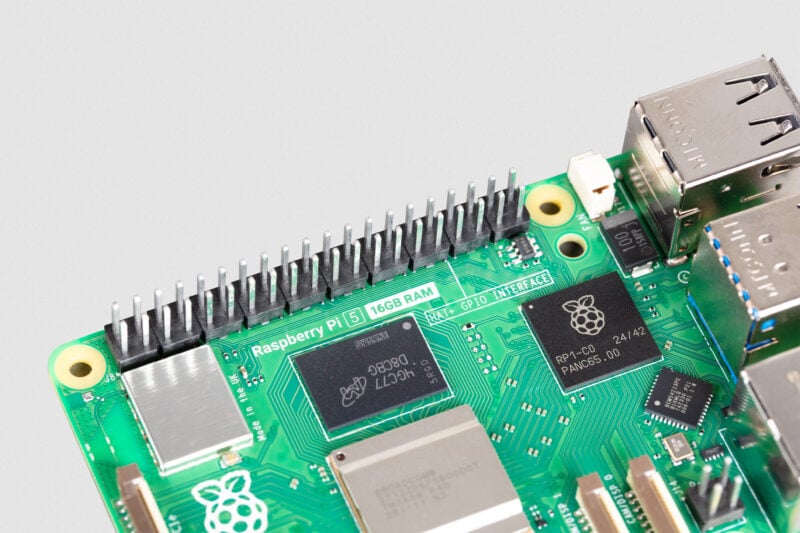
Why The 16GB Tier Takes The Biggest Hit
It helps to know why the pain is concentrated at the top of the memory range rather than spread evenly. Memory makers run a fixed amount of factory capacity, and AI accelerator products consume large stacks of high-bandwidth memory built on the same underlying DRAM process — think of a hotel that converts its standard rooms into suites because suite guests pay far more, leaving fewer rooms for everyone else. Industry analysts have described the current crunch as a supply-and-demand imbalance created by AI data-centre demand outrunning supply. Market researcher IDC flagged the risk to 2026 smartphone and PC pricing back in December 2025 (idc.com), and IEEE Spectrum's explainer on the shortage explains how AI's appetite for high-bandwidth memory is rippling out through consumer hardware (spectrum.ieee.org). TrendForce's estimate of a further quarter-on-quarter rise of around 20% in 4Q26 DRAM contract prices — reported via IT之家/Sina Finance on 21 October 2026 — also came with a nuance buyers should note: the pace of increase has slowed from earlier quarters as high base prices weaken consumer purchasing. For a hobbyist budget, that means the pressure is real but the curve is flattening.
Step By Step: Decide Whether 16GB Is Your Tier
Raspberry Pi's own advice to customers is to confirm they are not paying for more memory than required, and it points to lower-density variants, earlier Raspberry Pi models, or memory optimisation inside the application as the cheaper routes. Turn that into a repeatable four-step check before you order.
- Measure what you run today. Boot your existing build, open the System Monitor, or run
free -min a terminal after a normal day of use. If peak used memory sits far below a lower tier, that lower tier is your purchase. - Match the board to the job, not the ambition. Reference guides are blunt about baselines: raspberrytips.com notes Raspberry Pi OS is built to run well with as little as 1GB, while Engadget's 2026 guide recommends at least 2GB of headroom for a desktop that runs several programs or tabs at once (engadget.com).
- Price the software fix first. Removing the desktop from a headless build, trimming autostart services, or moving a hot cache to faster storage usually buys back the same headroom you would have paid the surcharge for.
- Buy through a vetted channel. Once you have chosen a tier, source it from the official distribution network at listed prices.
A commonly circulated workload table for single-purpose builds gives a sense of the spread: a router image such as OpenWrt sits around 0.25GB, media-centre images like LibreELEC land between 1GB and 2GB, a Nextcloud file server typically needs 1GB to 4GB, a Home Assistant smart-home hub is commonly sized at 2GB to 4GB, and a virtualisation host running several guests on Proxmox can want 8GB to 16GB (eefocus.com). Read that against the new pricing and the picture is clear: virtualisation hosts and local AI experiments are the realistic 16GB cases; most appliance-style projects are not.
Five Habits That Free Up Memory Before You Buy More
- Run 64-bit, and drop the desktop if you never look at it. A Lite build keeps RAM for your service instead of the window manager.
- Tune compressed RAM and swap instead of buying chips. Community guides on the Raspberry Pi forums cover zram and swapfile tuning, with the frequently repeated rule of thumb that swap should not be set above roughly twice the installed memory.
- Retire background apps and browser tabs. On a desktop build, the browser is the memory hog; kiosk setups with one purpose cost far less than general-purpose browsing.
- Upgrade storage speed, not memory size. A slow SD card makes a system feel short of RAM; NVMe-backed storage often fixes the perceived problem.
- Reconsider an earlier Raspberry Pi model. The company explicitly recommends older models with lower-density memory when a project does not need the current flagship.
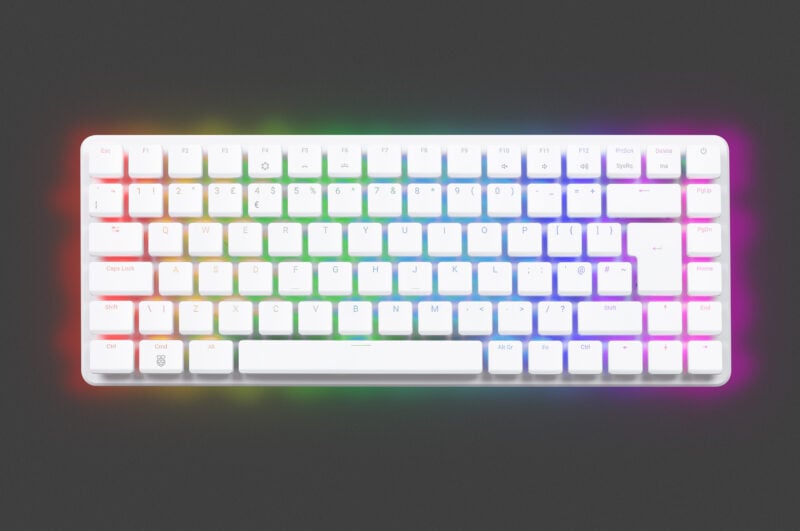 Raspberry Pi is holding the price of Raspberry Pi 500+, its premium all-in-one desktop computer.
Common Myths About The New Pricing
Myth 1: More memory automatically means a faster machine
Extra RAM only helps once your working set actually overflows. A project that peaks at 1.5GB will run at the same speed on 4GB as on 16GB — it will simply cost you the difference in price.
Myth 2: Every 16GB Raspberry Pi option got dearer
No. The 16GB Raspberry Pi Compute Module 5 variants rose by $40 while Raspberry Pi 500+ — which also carries 16GB of RAM — stayed at its previous price. For a household wanting a complete 16GB desktop rather than a bare board, the unchanged tier is now an unusual value pocket.
Myth 3: The cheapest listing online is the safest deal
Raspberry Pi itself warns that some bad actors have exploited current memory supply conditions to sell its products at inflated prices or offer items that are not what they appear. That warning is not theoretical: security reporting has documented boards with failing RAM reaching buyers through unauthorised resellers (hackster.io). All products remain available at official prices through the trusted global network of Raspberry Pi Approved Resellers; if there is any doubt, locate the nearest vetted supplier on the Approved Reseller page before paying.
Myth 4: These higher prices are permanent
The company states from the beginning that the present memory landscape is difficult but ultimately temporary, and that it expects to reverse the increases when memory costs fall again. Analyst reporting that the pace of contract-price growth is slowing supports a wait-and-see stance for anyone who is not time-pressured.
Myth 5: Only the board price matters
Cases, power supplies, cooling, SD or NVMe storage and licences add up. Price the whole kit before concluding that a lower-memory board plus a storage upgrade is not the cheaper path.
Your Action List For The Next 30 Days
- Log peak memory usage on every board you already own, and tag each one as under-used, correctly sized or genuinely short.
- For the short list, check whether a services or storage fix closes the gap before considering a denser tier.
- If you need 16GB for virtualisation or local AI, order sooner and confirm the tier twice — this is the configuration where the $80 increase bites.
- If your project is an appliance, quote the mid-tier or an earlier model instead, and note that new lower-density options have appeared in the range as the company tries to keep entry prices workable.
- Purchase only from the Approved Reseller page, keep the invoice with the official price on it, and bookmark the Compute Module 5 product page brief if you build products on modules.
- Set a reminder to re-check pricing in a quarter; if memory costs fall, the company has signalled the increases are reversible.
Frequently Asked Questions
How much has the 16GB Raspberry Pi 5 gone up, and what does it cost now?
From today the 16GB variant rises by $80, bringing it to $385.
Did the compute modules change too?
Yes. The 16GB Raspberry Pi Compute Module 5 variants are rising by $40, and updated prices are listed in the product brief on the Compute Module 5 product page.
Is Raspberry Pi raising prices on everything?
No. The company has deliberately avoided uniform increases across the whole range, and the price of Raspberry Pi 500+, its premium all-in-one desktop computer built into a mechanical keyboard and equipped with 16GB of RAM, remains unchanged.
Where do I learn to squeeze more out of less memory?
Individual customers can consult Raspberry Pi Official Magazine for guidance on getting the most from memory, or seek advice from other users on the Raspberry Pi forums, where the company's engineers often respond to enquiries as well. Business customers can contact Raspberry Pi to discuss memory optimisation for their fleets.
How do I avoid counterfeit or overpriced boards?
Buy through the official channel. All products remain available at official prices through the trusted global network of Raspberry Pi Approved Resellers, and the Approved Reseller page lists the vets suppliers by region.
Will this price come back down?
That is the stated intention. The company describes the memory market as difficult but temporary and expects to reverse these increases when memory costs fall again — which is a reason to size your build correctly now rather than buying a buffer you may not need later.
The Bottom Line
The story behind this price move is bigger than one board: two years of memory inflation, an AI-driven reshuffling of factory capacity, and a hardware maker choosing to protect entry prices while repricing only its densest configurations. For readers, the practical answer is the same either way — measure your workload, buy the tier you will fill, tune the software before the silicon, and use only vetted sellers. MyTechDailyNews will keep tracking the price sheet and report any reversal.
This guide was compiled by Sarah Chen, Tech Daily hardware desk. For buying-strategy questions or to flag a listing you suspect is not official, write to hello@techdaily.com.