
Phone Buried in the Taklamakan Desert for Over a Month Was Handed Back: The iPhone Recovery Playbook Most Owners Never Set Up
A phone buried under sand for more than a month in the Taklamakan Desert was returned on the morning of November 2 — a lucky exception, not a normal outcome. If your iPhone goes missing, the practical answer is fixed: open iCloud.com/find, sign in with your Apple ID, check the map, switch on Lost Mode with a callback number, and never remove the device from your Find My list.
What happened in the desert, and why it is not a tech success story
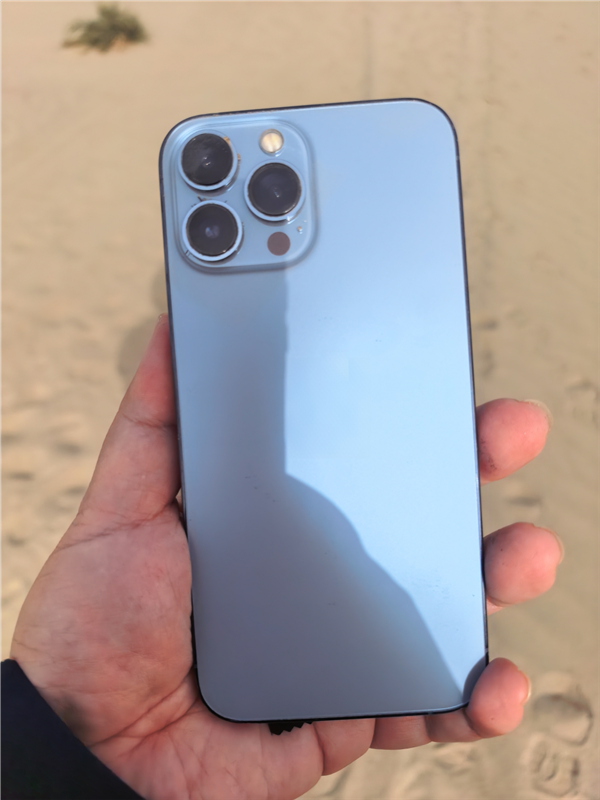
On October 31, the 12th batch of the Taizhou aid-Xinjiang command post organised an education field activity at the Gate of the Desert scenic area. While walking 12 kilometres along the sand sea, members of the group spotted a mobile phone half-buried in the ground — it had been lying there for more than a month, its body occasionally poking out of the sand.
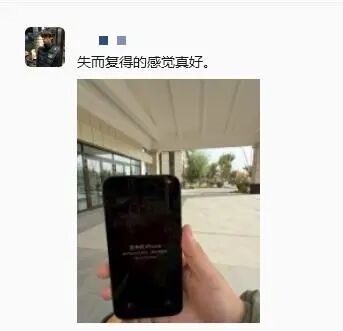
No owner could be traced on site, so the team carried the phone back to their base. After charging it and powering it on, they used a number stored inside the handset to contact the owner, a first-year student at Tarim University. First thing on the morning of November 2, the student arrived at the Taizhou aid-Xinjiang command post and collected the phone he had lost in the desert, saying: "When I lost it in the desert, I never imagined I'd get it back."
Three conditions that made the handback possible
- Foot traffic on the exact stretch of sand. A walking group covered the 12 kilometres where the phone lay. No satellite, no beacon and no app can substitute for someone physically passing by.
- A device that could still be revived. Staff charged the phone and booted it. A buried handset is just glass and metal until power returns.
- A contact route that survived the lock screen. The number they dialled was already inside the phone.
MyTechDailyNews analysis: none of those three conditions is an Apple feature. A phone lying under sand more than a month in a national park has no nearby Apple devices to relay its Bluetooth beacon, so Apple's Find My network was effectively silent. The desert case is a story about honest strangers — and strangers can only help if your settings make it easy to reach you.
What should I do in the first ten minutes after my iPhone goes missing?
Bottom line: sign in first, lock first, call second. Every minute you spend searching the sofa costs you battery life you cannot get back.
Open the web version of Find My
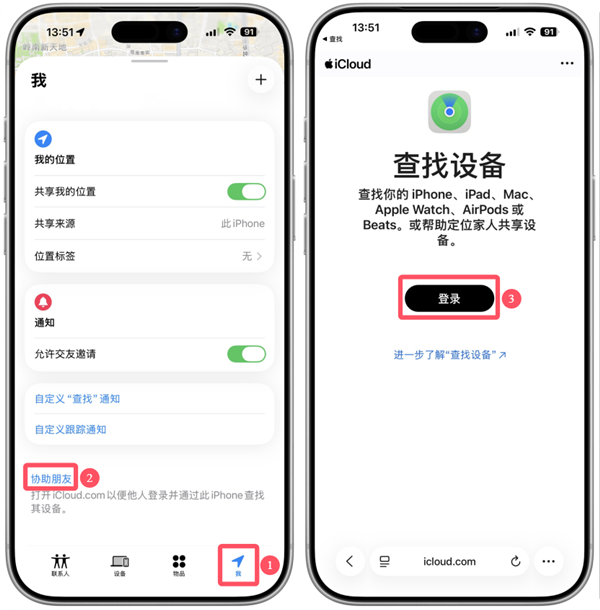
In any browser, load the iCloud Find My page and sign in with your Apple ID to see the device map. Official address: https://www.icloud.com/find
Ask someone around you to help
On a friend's iPhone, open the Find My app, tap the [Me] tab at the bottom right, then choose [Help a Friend]. Once the page jumps, tap [Use a different Apple Account] and sign in with the Apple Account linked to the missing device — you get your map without logging anyone out.
Check "Find My iPhone" is actually reporting
If Find My iPhone was switched on, the page shows the device position. Even when the phone is switched off or has no network, it can still surface an offline location through Apple's Find My network.
Switch on Lost Mode immediately
As soon as the device looks offline, enable Lost Mode: it locks the handset, protects your personal data, and lets you leave a callback number on the screen so a good Samaritan can ring you. Do this before you try anything else.
Treat remote erase as the last resort
Erasing protects your photos and messages, but it also ends your ability to keep watching the map. Only use it when recovery is realistically over.
Can I find an iPhone that is switched off or has a dead battery?
Yes, inside two hard limits: a small time window and a crowd requirement.
- How offline finding works. Apple's security guide describes the Find My network as locating missing devices that are within Bluetooth range of other Apple devices with offline finding turned on. The relay is anonymous and encrypted.
- How long the window lasts. Reporting from Engadget and CNET puts the findable period at roughly 24 hours after the phone is powered off manually, and noticeably shorter once the battery is fully drained.
- Where it stops working. Trails, deserts, empty carparks and late-night roads have no passing Apple devices. This is exactly why the desert phone came back through a walking group rather than through a map.
- What to do with a stale pin. Write down the last known location and its timestamp before you leave the page — that detail is the single most useful line in a police report.
How do I set up Lost Mode so an honest finder can actually reach me?
Bottom line: Lost Mode is the only iPhone feature built for the person who found your phone, not for the person who stole it. Apple's Activation Lock documentation states that marking a device as lost locks the screen with your passcode and lets you display a custom message with a phone number.
Practical message template:
- One short sentence in plain language: "This phone is lost — please call [number], reward offered."
- A second number that is not the lost SIM, ideally a family member or colleague, because the finder may not be able to reach the blocked line.
- Your own email address as a fallback channel if calls fail.
In the desert case, staff had to charge the phone and power it on before they could find a number inside. A lock-screen message would have cut that effort to zero — the same reason the next section matters most.
What happens to my bank cards, personal data and SIM?
- Cards first. Apple's iPhone user guide notes that on models supporting Apple Pay, a remote erase immediately suspends your credit, debit and student ID cards and disables Apple Pay even if the device is offline. Don't rely on that alone: call your bank and suspend the cards yourself.
- SIM second. Contact your mobile carrier to block the SIM so verification codes cannot be intercepted.
- Identity third. Change your Apple ID password, sign out of banking and mail apps on other devices, and enable two-factor authentication if it was off.
- Paperwork last. File a police report and keep the reference number. Dial *#06# to display your IMEI, or read it from the box or receipt — British Transport Police advise keeping that number recorded somewhere other than on the phone itself.
Which beliefs about a lost iPhone are actually wrong?
| Common belief | What Apple documentation and the desert case suggest |
|---|---|
| "Erase it straight away, security first." | Erasing wipes your tracking chance too. Lock it with Lost Mode first; erase only when recovery is hopeless. |
| "Taking the device off my Find My list is harmless." | Apple warns that removing a device from Find My removes Activation Lock, which is the feature that stops a handset being reactivated and resold. |
| "A dead battery means the phone is gone." | Offline finding can still place a powered-off phone on the map for hours, but only when other Apple devices pass nearby. |
| "The map tells me exactly who has it." | Location data can be hours old. Use it for reporting, not for confrontation. |
| "Some website can trace my phone by IMEI." | Consumer bodies describe IMEI as a blocking identifier handled by carriers and police, not a tracking tool sold to the public. |
| "Find My is set up by default, so I am covered." | Offline finding, the Find My network and a lock-screen contact can all be off. Check them today. |
What should I do right now, before anything goes wrong?
- Open Settings on your iPhone and confirm Find My iPhone is on, and that offline finding through the Find My network is enabled.
- Switch on the option that sends the last known location when the battery is critically low.
- Turn on two-factor authentication for your Apple ID and make sure the recovery email is still yours.
- Dial *#06# and photograph the IMEI; store it in a note or email, not only on the phone.
- Add an emergency contact and medical ID to the lock screen, so a finder can reach someone without unlocking anything.
- Set a strong numeric passcode rather than a biometric-only unlock, so Lost Mode has something to enforce.
- Keep the purchase receipt: it is the fastest proof of ownership for a carrier, an insurer or an officer.
Frequently asked questions
How long do I have to act after my iPhone disappears?
Minutes matter more than days. The Find My map is live while the phone has power and connectivity, and offline finding keeps a narrow window of hours after shutdown. Lost Mode should be switched on within the first ten minutes.
Can a buried phone really survive more than a month and still be recovered?
The desert handset did, because it was found, charged and booted by the 12th batch of the Taizhou aid-Xinjiang command post after the Gate of the Desert walk on October 31. That outcome depended on luck and a finder's effort, not on any locator service, so treat it as a cautionary tale rather than a plan.
What is the real difference between Lost Mode and remote erase?
Lost Mode locks the screen, pauses payments, keeps the device traceable and displays your callback number. Remote erase destroys your data and your tracking view in the same tap. If a stranger might return the phone, choose Lost Mode.
Will the police locate my phone for me?
You should report the loss, and the IMEI helps them identify and block the device. Tracking support depends on local capability and the evidence you hand over, so bring the last known location, timestamp and your purchase receipt to the report.
Can someone else use my iPhone after they reset it?
Not easily, as long as the device stays in your Find My list. Activation Lock requires your Apple ID before reactivation; removing the device from Find My is what cancels that protection.
Sources and further reading
- Apple Support, "How to find your lost iPhone or iPad": https://support.apple.com/en-us/101593
- Apple Support, "Activation Lock for iPhone and iPad": https://support.apple.com/en-us/108794
- Apple Platform Security guide, "Using Find My to locate missing Apple devices": https://support.apple.com/guide/security/locating-missing-devices-sece994d0126/web
- Apple iPhone User Guide on remote erase and Apple Pay suspension: https://support.apple.com/en-euro/guide/iphone/iph09b087eda/12.0/ios/12.0
- Engadget, "How to find your iPhone even when it's off": https://www.engadget.com/2247577/how-to-find-iphone-when-off/
- British Transport Police mobile phone advice on IMEI: https://www.btp.police.uk/cp/crime-prevention/personal-safety-how-to-stay-safe/mobile-phone-advice/
- Official device locator page: https://www.icloud.com/find
Written by Sarah Chen for MyTechDailyNews, published by Tech Daily. Spotted a factual gap or have a tech story tip? Reach the desk at hello@techdaily.com.