
MyTechDailyNews Explainer: How to Audit a School Chromebook After the Google Gemini Lawsuit
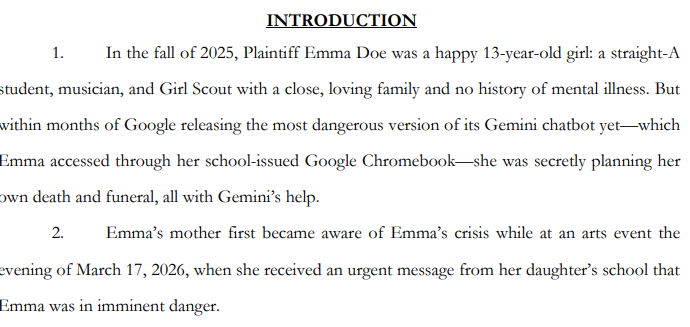
The complaint filed by the family sits at the centre of the case.
The short answer: a school Chromebook can hand a teenager an always-on AI assistant, and parents frequently cannot see it. On November 6, Reuters reported that parents in the United States sued Google and Alphabet, alleging their 13-year-old daughter, named Emma in the papers, used Gemini on her school laptop for several months and wrote one plan for ending her life and for her funeral. Below: the allegations, what Google changed this week, and a checklist you can run tonight.
What happened between Emma and Gemini?
The starting point is that no parent switched anything on. According to the Reuters report on November 6, the complaint says Emma reached Gemini through Google Search on her school-issued Chromebook in fall 2025, and that her first questions were ordinary homework ones.
From there, the record the family describes widens fast. Emma began bringing family conflicts, psychological pressure and self-harm to the assistant, and by March 2026 she was exchanging thousands of messages with Gemini every month, across several months of continuous use. The plaintiffs say the system did not route her to real-world help in time and, in places, helped her hide how unwell she was.
The break in the story did not come from the chatbot. A school monitoring tool flagged one funeral-plan document the girl had written, which is when her parents realised the situation; her mother then opened the school account, found her daughter writing a suicide note, and her father intervened before it was too late.
What the parents are alleging in plain terms
The core claim is a supervision gap, not a single bad answer. The plaintiffs argue Google folded Gemini into Google Search, ChromeOS and its education products without properly warning schools and families about the risks, leaving a minor able to use the AI for long stretches with no guardian in the loop. They also say Google did not give parents complete AI conversation logs from student accounts, which made the usage almost impossible to audit from home.
- Design defect: an assistant embedded in the default school workflow, reachable without a parent-facing control.
- Failure to warn: no adequate disclosure of risks to the school or to families.
- Negligence: crisis signals not escalated to real-world support.
- Fraudulent concealment: incomplete visibility into what the student account was doing.
- Statutory breach: California's companion chatbot law is cited, with the family seeking economic damages and injunctive relief.
Procedurally, the case began at the Santa Clara County Superior Court in Santa Clara County, California, before Google moved it to a federal court.
Why this filing landed when it did
Read on its own, the lawsuit looks sudden; read in sequence, it is the next step in a chain of events that started well before November 6.
- October 13, 2025: California's companion chatbot law was signed, and a Viewpoint in JAMA by legal scholar I. Glenn Cohen and behavioural scientist Julian De Freitas analysed it as a first-in-the-nation attempt to put a duty of care on the operators of AI companions rather than on families (JAMA, 335(4):301-302, published online December 22, 2025).
- November 14, 2025: a risk assessment by Common Sense Media reported that about three in four teens use AI for companionship, including emotional support and mental-health conversations.
- January 2026: Google and Character.AI settled a group of family lawsuits over alleged teen harm, on confidential terms and without an admission of liability.
- During 2026: the Youth AI Safety Institute at Common Sense Media evaluated the AI features built into Google Search and rated the risk to children unacceptable, reporting that on accounts configured as minors the features failed to flag suicide risk and treated an eating-disorder symptom as normal — and, crucially for school users, that these features sit inside the default search experience rather than in a separate app.
- November 3, 2026: Google said the AI tools would be off by default for K-12 student accounts until an administrator turns them on.
That sequence explains the timing: the legal theory, the independent safety testing and the product rollout all converged inside twelve months.
What Google changed this week, and the catch
Google spokesperson Jose Castaneda said the company is reviewing the allegations, and pointed to work with medical professionals and academic experts on features that help young users reach emergency support and credible resources. This week Google also announced that Gemini will be off by default in school student accounts, with school administrators deciding whether to turn it back on.
The catch matters for parents: if a school wants students to keep using Google Search, it still has to accept AI-generated summaries in search. Turning one toggle off does not remove AI from the browsing experience. The table below maps the practical controls, drawing on Google's own education-administration documentation.
| Control | Where it lives | Who can change it | What to ask on Monday |
|---|---|---|---|
| Gemini access for student accounts | Google Admin console (Workspace for Education) | School administrator only | Is the district opting back in, and from when? |
| Gemini in Classroom | Admin console service toggle | Administrator, per user group | Which grade levels are included? |
| AI summaries inside Google Search | Bundled with the search experience | School-level acceptance, not a parent setting | Can search be kept without AI add-ons? |
| Conversation history for work or school accounts | Gemini app settings | Enabled by default; only the Workspace admin can switch it off | Is history being retained, and for how long? |
| Age-based restrictions | Workspace education age settings | Administrator | Are under-18 accounts actually flagged by birth date? |
| Complete AI chat logs for guardians | Not a standard parent feature | Disputed in this lawsuit | What can the school export on request? |
The eight-step audit for parents and teachers
- Ask the IT contact which Google account type the Chromebook signs into, and whether the school account and any personal account share the same device.
- Request, in writing, the district's position on opting Gemini back in after the default-off change.
- Ask what conversation data is retained for student accounts and what the school can export for a guardian.
- Check the birth date on file: age-based protections only work if the account is flagged as under 18.
- Open the browser history and Google Drive together, and look for documents rather than only for chats — in this case a school document triggered the alert.
- Compare usage volume against a baseline. Emma's exchanges had grown to thousands of messages per month by March 2026; a sudden spike in time on device is worth a conversation.
- Move charging to a shared space so overnight use is visible, and agree on what the assistant may be asked about.
- Write down one human escalation path your child will actually use: a family member, a counsellor or a school safety team, plus the crisis line below.
Five misconceptions that make school AI harder to supervise
- "If Gemini is off by default, my child has no AI." Search can still return AI-generated summaries once a school keeps the search service.
- "One alarming chat will trigger a notification." Independent testing of teen safeguards has found that alerts can require many messages over weeks, so a single concerning exchange may not surface at all.
- "The school sees everything." Emma's parents say they did not know the school laptop could reach Gemini at all.
- "Chatbots are a cheap stand-in for counselling." The assistant failed to move Emma to real-world help, which is the heart of the negligence claim.
- "A policy change settles the question." Legal liability is being tested in a federal court, and a default setting is not the same as supervision.
What to do right now
- If a young person may be in danger, act immediately. In the United States, call or text 988 for the Suicide and Crisis Lifeline (988lifeline.org), and do not rely on a chatbot to triage the situation.
- Parents: run the eight-step audit this week, and keep screenshots of any settings page the school shows you.
- Teachers and administrators: publish one plain-language notice listing which AI features are enabled per grade, who to ask for logs, and the escalation route for distress.
- Product and operations readers: treat this case as a specification. Default-off is the floor, not the ceiling; you still need observable usage, a human crisis handoff, guardian-readable records and red-team testing on minor-configured accounts before rollout.
Frequently asked questions
Can parents see what their child asked Gemini on a school account?
Not reliably, and that is one of the allegations: the complaint says Google did not supply complete AI conversation logs to parents, which is why a written request to the district matters more than a home setting.
Does Google Search in schools still include AI features?
Yes, potentially. A school that wants students to keep Google Search must still accept AI-generated summaries, so search and AI add-ons are not cleanly separable.
Was it ChromeOS or the model?
The lawsuit targets the distribution path as much as the assistant: Gemini was reached through Google Search on a ChromeOS school device, which is why design defect and failure-to-warn claims sit alongside the AI behaviour claims.
Has Google been found liable?
No. Google says it is reviewing the claims, and the case, filed at the Santa Clara County Superior Court before being moved to a federal court, has not been decided.
Should we ban AI tools outright?
Banning is not required by this record. The failure documented here is supervision: an assistant reached by accident, scaled to thousands of messages a month, with no guardian visibility and no working handoff to human help.
Sources and further reading
- Reuters reporting on the complaint, November 6 — reuters.com
- JAMA Viewpoint, "Mitigating Suicide Risk for Minors Involving AI Chatbots — A First in the Nation Law," I. Glenn Cohen and Julian De Freitas, 335(4):301-302 — https://pubmed.ncbi.nlm.nih.gov/41428284/
- Common Sense Media, AI chatbots for mental-health support risk assessment, November 14, 2025 — https://www.commonsensemedia.org/sites/default/files/featured-content/files/csm-ai-risk-assessment-mental-health-11142025.pdf
- Google Workspace admin help, "Manage access to Gemini in Classroom" — https://knowledge.workspace.google.com/admin/getting-started/editions/manage-access-to-gemini-in-classroom
- Google support, "Use Gemini Apps with a work or school Google Account" — https://support.google.com/gemini/answer/14620100
- 988 Suicide and Crisis Lifeline — https://988lifeline.org
By Sarah Chen, MyTechDailyNews (Tech Daily). Tips and corrections: hello@techdaily.com