
MyTechDailyNews Explains: Overgrowth, the Chrome Extension That Lets Neglected Tabs Turn Into a Jungle
If you have ever lost track of the pages you opened "to read later", this project describes that pile in a completely different way. Nothing nags you: no badge, no reminder, no unread counter. Instead, the browser window slowly fills with leaves. Built for Chrome, the experiment treats every page you stop looking at as an empty room that nature reclaims, one vine at a time, and turns the act of returning to an old tab into a small clearing operation. The rest of this guide unpacks where the idea started, the exact rules that decide how overgrown a tab becomes, what readers can customize, and what the tool is deliberately not trying to be.
Where the concept came from
The starting point was a small creative exercise run on 20/10/2026 — the other day, in the author's own telling — built around the single word Overgrowth.
The first image that surfaced had nothing to do with software. It was an apocalyptic setting close to The Walking Dead or The Last of Us, where vegetation swallows abandoned buildings and every human trace disappears underneath the green.
The step from that image into the browser came from the word abandoned itself. Unread tabs are the closest digital equivalent of an empty building: opened, useful once, then left. The question that followed was simple — could a neglected tab slowly be captured by plants, and would you need to clear invasive growth before reaching it again, the way you would force open a door buried under vines?
That question became a Chrome extension described by its maker as fun and deliberately light. It is not presented as a productivity system. The honest note attached to it is that the tool will not necessarily make anyone read their tabs more, and that is treated as fine.
Watch the experiment move
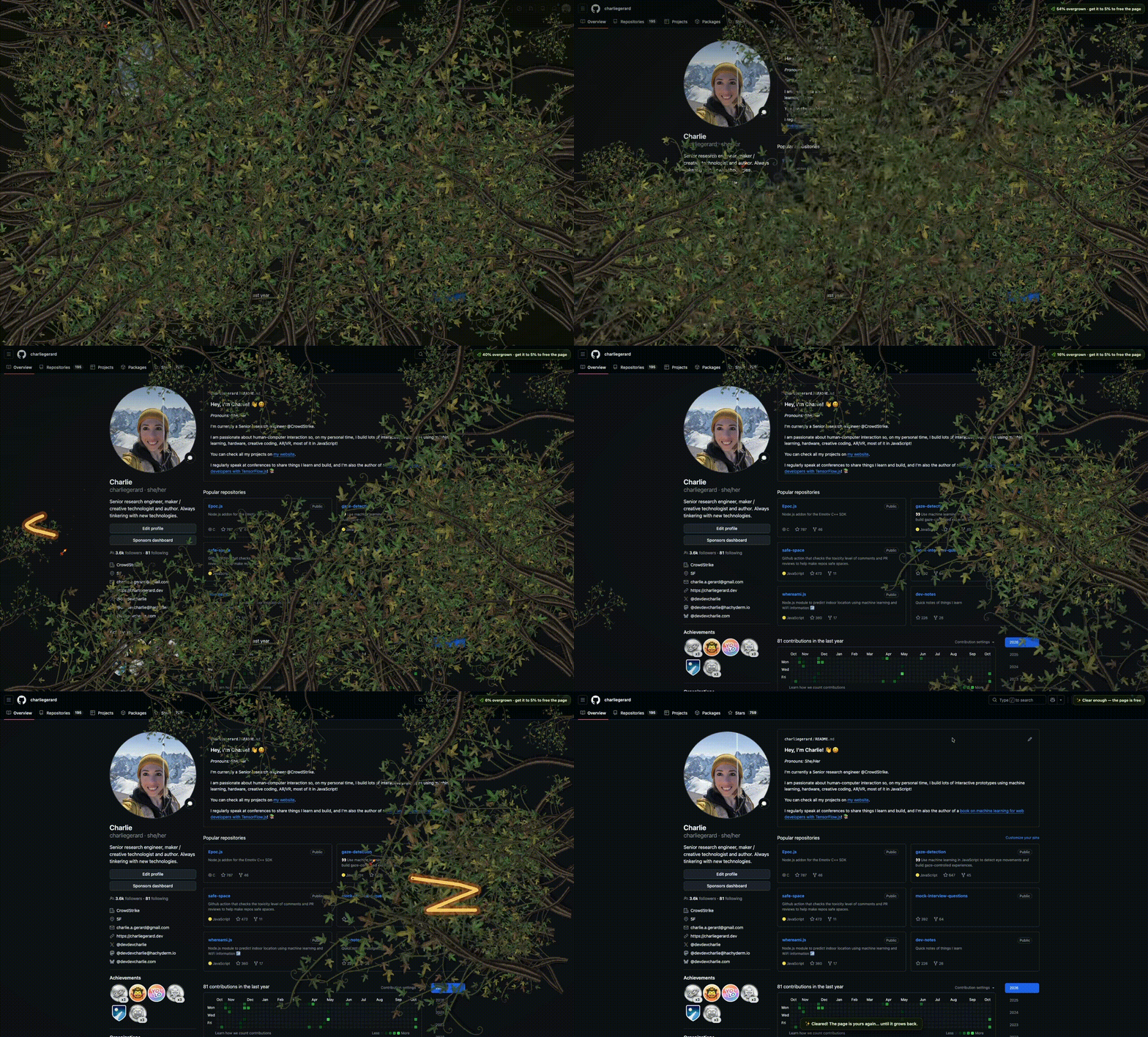
The write-up also links to the repository, so anyone curious about the code can look at the whole project rather than only the clip.
How the neglect clock works
The rule set is short and unusually clear. Four behaviours define the whole experience:
- Every tab keeps its own clock. Each tab carries a neglect clock that measures disuse individually rather than as part of a browser-wide score.
- The clock runs when you are not looking. Time accumulates while the tab is out of sight and pauses while the tab is being viewed.
- Neglect equals foliage. The longer a tab remains neglected, the more plants cover it.
- Growth moves inward. Vegetation spreads from the edges toward the middle, so the centre of the page is the last area to be lost.
The direction of that growth is the readable part of the design: the first leaves appear at the margins of the screen, and the usable space shrinks toward the middle of the page as time passes.
The 5% threshold and how you cut your way back in
Interaction is blocked at a precise level of coverage. Once a tab is more than 5% overgrown, the page behind the vines is sealed off: scrolling remains possible, but clicking, selecting, or dragging anything is not.
Recovery is physical. The user must slash through the vines by dragging the mouse across them, and when the coverage drops to 5% the remaining pieces fall away and the tab behaves normally again.
Nothing here is permanent, and that is what gives the concept its edge. If the tab is abandoned again, the jungle begins to grow once more.
What you can adjust
| Setting | Options | What it changes |
|---|---|---|
| Weapon | Rusty machete, chainsaw, flamethrower | Offered for fun; it changes how you slash through the foliage |
| Time to full overgrowth | Adjustable | How long a tab must stay hidden before it is completely covered |
| Closing overgrown tabs | Always allowed | Preventing closure until every plant was slashed was considered at first and dropped as too annoying |
| Status panel | Inside the popup | Shows the time setting, the weapon choice, the list of tabs and their current stat |
Under the surface: 3 moving parts
For readers who want the shape of the project without the technical depth, the code is organised in 3 main parts: the background logic, the content script that displays plants and animation on the tabs, and the popup folder that handles the UI of the extension itself.
Background worker
The background.js file starts the jungle on each open tab and forgets it when the tab closes.
Popup
This folder handles the interface for the extension through small components for the time setting, the weapon choice, the list of tabs, and their current stat.
Overlay
The content folder contains the SVGs for the plants and the weapons, the logic that positions and grows the clusters, the neglect clock, and the sounds.
Common misconceptions
- "It is a reading app." The project never claims that. Its maker says it will not necessarily make tabs get read more, and accepts that.
- "A blocked tab is a frozen tab." Scrolling stays available; the restriction covers clicking, selecting, and dragging.
- "Clearing a tab once fixes it." Regrowth begins as soon as the tab is abandoned again.
- "It punishes you." The strictest version — locking overgrown tabs closed until every plant was cut — was rejected before the concept settled.
- "The plants appear at random." Coverage follows the neglect clock and spreads from the edges inward.
FAQ
How much foliage blocks a page?
Once a tab is more than 5% overgrown, the page behind the vines is sealed off for interaction.
Can I still scroll a sealed page?
Yes. Scrolling remains possible, while clicking, selecting, or dragging anything is not.
How do I unlock an overgrown tab?
Drag the mouse across the vines to slash through them; when the coverage drops to 5%, the remaining pieces fall away.
Will the plants come back?
If the tab is abandoned again, the jungle begins to grow once more.
Can I close a tab that is completely overgrown?
Yes — closing was never blocked. Preventing users from closing overgrown tabs until every plant was slashed was an early idea that felt too annoying.
Can I choose how I clear the vines?
Yes, for fun: the weapon can be chosen from the rusty machete, the chainsaw, and the flamethrower.
Action tips for everyday readers
- Treat the clip as a diagnostic. If a visual jungle feels excessive, the underlying situation is a tab shelf nobody audits.
- If you try the extension, set the time to full overgrowth to match how you actually work, not an ideal habit you want to have.
- Pick the weapon you enjoy — machete, chainsaw or flamethrower — because the value of the project sits in that small clearing moment.
- Read the 5% rule as a design lesson: partial access is enough to signal neglect without destroying the page underneath.
A scale check from the maker's own window
The project is also a return to building things: after a while of wanting to make again, this felt like a small, fun way to begin. The author's own screen sets realistic expectations. Writing on a new computer, the current count is described as "only" 22 tabs open — and 14 of them are already completely overgrown. That ratio is the tone of the whole exercise. Slashing through the vines may not make the tabs get read more, but it does make returning to them more fun.
The interesting part for everyday readers is not the plants but the substitution: a silent accumulation of unread pages becomes something you can see, cut, and watch grow back. No counter, no reminder, no productivity lecture — just a neglect clock, some foliage and a rusty machete. If your own browser bar is full of doors you keep walking past, this Chrome experiment at least makes the waiting visible.