
General Tech Review: Can an NPU Run the Windows 11 Desktop? npu-driver's 2-to-3-Frame Test Against What GPUs Do
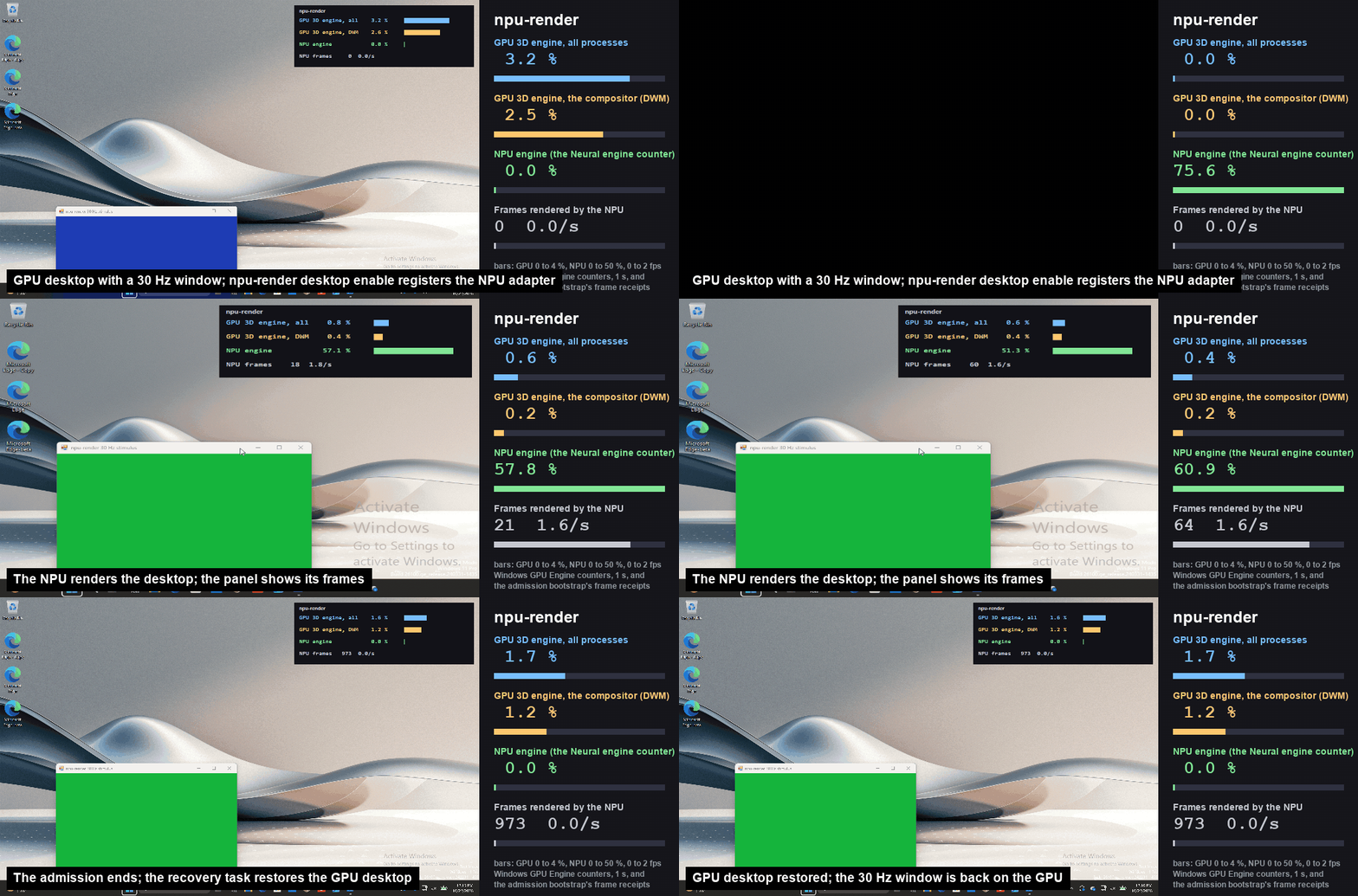
Short answer: an NPU can technically take over the job, but it cannot yet do the job well. The open-source project npu-driver, published by the developer group labscommunity, succeeded in rendering the entire Windows 11 desktop on a neural processing unit instead of a graphics chip. It ran at 2 to 3 frames per second, with some runs falling to 0.6 frames, while an ordinary Windows desktop moves at 60 frames per second or higher. So this is a proof of architecture, not a product you should switch to.
For anyone who bought an "AI laptop" in the last two years, the more interesting question is hiding underneath the frame-rate joke: the same silicon that sits mostly idle in your machine just proved it can do a graphics job it was never designed for. Here on MyTechDailyNews, our General desk compares the three rendering paths now available on a modern PC, explains why the NPU loses so badly, and says plainly who should — and should not — try this code.
What did npu-driver actually prove?
It proved one narrow thing: desktop composition is not a GPU-only capability. The project is released under the Apache 2.0 open-source licence and its source is public on GitHub, where the repository is listed under the labscommunity account as npu-render while coverage generally uses the driver name npu-driver.
The mechanism is straightforward to describe. The team built a custom Direct3D 10 user-mode display driver that intercepts the drawing commands the Windows Desktop Window Manager (DWM) would normally hand to a graphics card, records them as batches of frame data, and replays them as compute work on the Intel NPU through OpenVINO and dedicated SHAVE compute kernels. A hand-written rasterisation module covers vertex processing, texture sampling and layer blending — tasks a GPU normally performs in fixed-function silicon.
Nothing above that layer had to change. Notepad, File Explorer, the Start menu and Microsoft Edge keep running exactly as before, unaware that a different unit is now painting their pixels.
How do the three desktop rendering paths compare?
Conclusion first: today the integrated GPU is the only path a normal user should rely on, the discrete GPU wins when graphics and AI compete for resources, and the NPU path is currently a laboratory instrument.
| Rendering path | What it is built for | Desktop speed today | Best fit | Deal-breaker |
|---|---|---|---|---|
| Integrated GPU | Parallel graphics, display output, video | 60 frames per second or higher | Everyday laptops, office work, light creative tasks | Shares power and memory budget with AI inference |
| Discrete GPU | Heavy 3D, rendering, large local AI models | 60 frames per second or higher, with headroom to spare | Games, video editing, model running | Cost, heat, battery drain on laptops |
| NPU via npu-driver | Matrix maths for neural-network inference | 2 to 3 frames per second; worst observed 0.6 frames | Driver research, workload-splitting experiments | Research prototype, hardware-specific, unusable speed |
The gap is not a rounding error. Reaching the developers' own goal of 30 frames per second would require the prototype to become roughly 10 to 15 times faster than its current best case — by our arithmetic from the published figures, not a claim from the project. The reference desktop baseline of 60 frames per second is another two to three times beyond that. Windows Forum's write-up of the release put it bluntly: "The 30 Hz target is the headline miss."
Why does an NPU struggle to draw a window?
Because the shapes do not match. An NPU is optimised for one dominant operation — multiply large matrices of numbers fast and in bulk, which is exactly what neural-network inference consists of. A desktop frame, by contrast, is a patchwork of thousands of small, irregular jobs: clipping a rectangle, sampling a texture, alpha-blending a translucent title bar, handing a finished surface to the display engine.
A plain-language analogy: a GPU is a freight yard with a dedicated crane for every container movement, so loading is a routine. An NPU is a very fast packaging line for one specific box shape. npu-driver's trick is to dismantle the crane work into steps the packaging line can imitate — which is precisely why the team had to write its own rasterisation module rather than call hardware that already existed on a GPU. The engineering is impressive; the throughput penalty is the whole point of the comparison.
What is the trade-off, then? The one number worth watching
Conclusion: the payoff is not speed, it is freed GPU capacity. A developer believed to be part of the labscommunity team shared early figures on Reddit, as reported by the Chinese technology outlet IT Home, showing 3D GPU utilisation dropping from 3.4% to 0.6% while the NPU carried the desktop. That single data point reframes the experiment: if a background desktop layer can be pushed onto an otherwise idle NPU, graphics silicon becomes available for games, video work or local model inference.
Two caveats belong in any fair assessment. The 3.4% to 0.6% figure is a developer's own pre-release observation, not an independently benchmarked result; and it describes a nearly idle desktop, not a working one with 30 open tabs and a video call running.
Is 45 to 50 TOPS unusual hardware?
No — and that matters for how you read the story. The test machine is a laptop built on Intel Panther Lake, whose fifth generation NPU architecture delivers 45 to 50 TOPS of rated compute. Panther Lake, sold as the Core Ultra Series 3 line, was unveiled at CES in Las Vegas in early January 2026, with Intel's own NPU 5 block rated at up to 50 TOPS.
Context from the wider market: Qualcomm's Snapdragon X Hexagon NPU is rated at 45 TOPS, Intel's Lunar Lake family around 48 TOPS, and AMD's Ryzen AI 300 (XDNA 2) up to 50 TOPS. The industry sits in a tight 45 to 50 TOPS band, so the test platform is typical, not an outlier. Microsoft's platform bar is also in the same neighbourhood — its NPU developer documentation states that "many of the new Windows AI features require an NPU with the ability to run at 40+ TOPS".
The practical reading: if the current hardware generation is normal for the industry and still cannot paint a desktop faster than a slideshow, the bottleneck is architectural fit rather than raw TOPS. Buying a higher-TOPS chip will not, on today's evidence, make this work.
Which reader is this for, and which should stay away?
| If you are… | Verdict | What to do |
|---|---|---|
| A driver or graphics developer | Worth your time | Read the Apache 2.0 code on GitHub; study the Direct3D 10 interception and SHAVE kernel path |
| An enthusiast with an Intel Panther Lake laptop | Only on a spare machine | Test the fallback behaviour deliberately; expect a sluggish 2 to 3 frames per second |
| An AI tinkerer hunting free GPU headroom | Watch, do not install | Treat the 3.4% to 0.6% GPU figure as unverified until independent tests land |
| An everyday laptop owner or gamer | Not for you | Nothing changes about your purchase or your settings |
Hardware and toolchain requirements alone rule out most readers: the prototype depends on specific Intel Panther Lake hardware, a compatible NPU driver and extra development tools. Ordinary users cannot simply install it and end up with a GPU-free Windows 11 system.
Five common misconceptions about this project
- "I can now unplug my graphics card." No. The GPU path remains the supported way to run Windows 11, and the driver's own safety design assumes a graphics card is available to fall back to.
- "More TOPS means a faster desktop." TOPS measures neural-inference throughput, not rasterisation throughput; a 50 TOPS NPU is still slower at drawing windows than a decade-old integrated GPU.
- "Games will run on the NPU next." This covers desktop composition only; application-level 3D rendering is a different problem and is untouched.
- "It will extend battery life." No public power figures were released with the prototype; efficiency claims are speculation at this stage.
- "Open source means it is safe to try on a work machine." Experimental display drivers sit low in the system stack; the fallback mechanism already has known limits.
Before you experiment: an action checklist
- Confirm your machine actually carries an Intel Panther Lake processor and that its NPU driver version matches what the repository documents.
- Use a secondary device, never a work or school machine, and take a full system backup plus a restore point first.
- Read the fallback notes in advance so you know how to force rendering back to the integrated or discrete GPU — and accept that the recovery path is imperfect, since some tests failed to restore the positions of all application windows.
- Disable automatic operating-system updates during testing, so a driver swap does not fight your experiment mid-session.
- Measure the same three interactions for a fair comparison: dragging a window, opening File Explorer, and using the Start menu — the exact cases where the 2 to 3 frames per second pace becomes obvious.
- Log your findings and post them; with a research prototype, community data on where the fallback fails is currently more valuable than any benchmark.
Frequently asked questions
Can Windows 11 really run with no GPU involved?
For short, supervised test sessions, yes — labscommunity's npu-driver demonstrated full desktop composition on an Intel NPU. As a daily driver, no: performance at 2 to 3 frames per second, hardware specificity and prototype status make it unusable.
What happens when the NPU driver fails?
The team built an automatic fallback so that, on a driver error or on a user's explicit request, rendering returns to the integrated or discrete graphics processor. Current limitations remain, including incomplete restoration of some application window positions after recovery.
Why bother if it is this slow?
Because it reopens how compute is allocated inside a processor. CPU, GPU and NPU are designed around different targets — the GPU excels at massively parallel graphics work, the NPU at matrix operations and neural-network inference. Porting a traditional graphics pipeline onto the NPU shows the boundary is softer than the industry assumed.
Where is the code?
Publicly on GitHub under the labscommunity account, licensed Apache 2.0. Test results circulated in early November 2026.
What would make this practical?
The near-term marker is concrete: closing the gap from 2 to 3 frames per second to the 30 frames per second target. If that ever happens, the plausible first use is not replacing GPUs but offloading a light slice of desktop work so graphics silicon can serve AI inference, gaming or video processing.
Our take
Treat npu-driver as an instrument, not an upgrade. Its real contribution is a clean, testable answer to a question that many laptop owners now live with: an NPU in almost every new machine, largely unused, while the GPU juggles desktop compositing, browsers and a growing pile of local AI work. The experiment shows that redistribution is possible in principle and painful in practice, and that the next several years of "AI PC" progress will likely come from smarter scheduling between these units rather than any one of them replacing another. For general readers, the takeaway is simple: no action needed today, watch the frame-rate number, and only test the code on hardware you can afford to break.
Reference sources
- labscommunity project repository on GitHub (npu-render, Apache 2.0): https://github.com/labscommunity/npu-render
- Tom's Hardware, coverage of the 2-to-3 Hz prototype and 30 Hz target: https://www.tomshardware.com/pc-components/gpu-drivers/open-source-project-renders-your-windows-11-desktop-using-the-npu-rather-than-the-gpu-npu-driver-can-only-run-at-2-to-3-hz-targets-30-hz-performance
- Microsoft Learn, NPU requirements for Copilot+ PCs (40+ TOPS): https://learn.microsoft.com/en-us/windows/ai/npu-devices/
- PCMag, Intel Panther Lake / Core Ultra Series 3 at CES: https://www.pcmag.com/news/intel-panther-lake-core-ultra-laptop-chips-details-ces-2026
- Windows Forum, npu-render analysis and the "headline miss" quote: https://windowsforum.com/news/npu-render-runs-the-windows-11-desktop-on-an-intel-npu-but-only-at-2-3-fps.450887/
- IT Home (ithome.com), report of the developer's Reddit figures on GPU utilisation (3.4% to 0.6%): https://www.ithome.com/html/android/1022430.htm
- The Shortcut, NPU ratings across Snapdragon X, Lunar Lake and Ryzen AI 300: https://www.theshortcut.com/p/amd-ryzen-ai-9-hx-390-ryzen-ai-300-benchmarks