
MyTechDailyNews General Explainer: NIO’s Whole-Vehicle Door-Opening Warning Image and Everyday Exit Habits
A car door opening at the wrong moment can turn an ordinary exit into a sudden hazard. MyTechDailyNews has been following that everyday safety topic because vehicle assistance systems are starting to address actions that people usually perform without thinking. On October 28, NIO founder and chairman Li Bin published an explanation of the company’s Whole-Vehicle Door-Opening Warning Image, a cabin feature designed to help occupants look before they swing a door outward and reduce the risk of dooring.

The core idea: show the outside world before the door moves
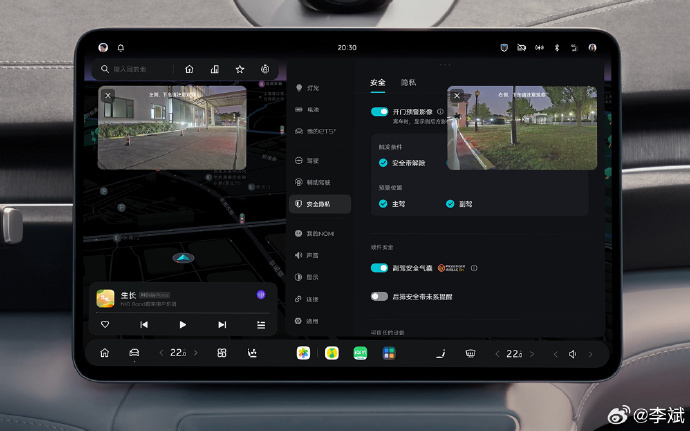
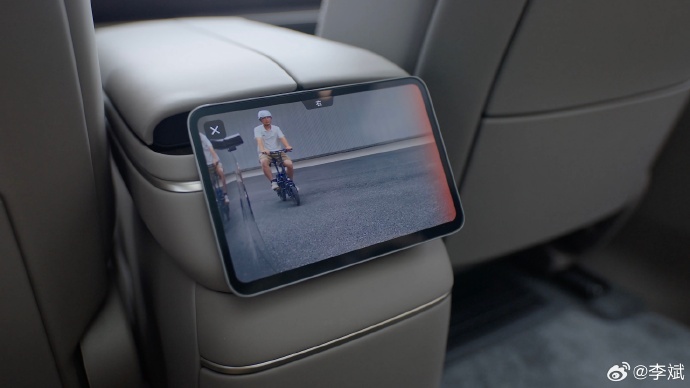
According to Li Bin’s description, the feature becomes relevant at the moment an occupant prepares to leave the car. As someone unbuckles a seat belt or reaches to push a door open, the system can bring up an outside view for the corresponding side of the vehicle. When the cabin logic judges that opening the door could create a collision risk, it can add a light-based and sound-based reminder, helping the passenger notice nearby traffic conditions before committing to the door swing.
Not just a single view: screens can split when both sides are active
The design detail that makes it more useful for shared trips is how the display handles multiple exits. The outside rear-side image can be sent to either the central console screen or a rear control screen. If people seated on both left and right sides are preparing to get out, the screen can present both sides in separate areas. That means a rear passenger, front passenger, and driver are not forced to rely on one static view if several doors are about to be used.
What the feature is not
- It is not a replacement for a person’s own check. Li Bin emphasized that the Whole-Vehicle Door-Opening Warning Image provides more reference material for occupants as they observe the environment when getting out.
- It is not a full autonomous door-control promise. The description centers on display and alerts, not on a guarantee that the door will be blocked or kept shut.
- It is not only a rear-seat convenience. The logic is tied to an occupant preparing to open a door, and it can cover situations where left and right exits are happening at the same time.
Which vehicles are linked to the rollout
The capability is built on the Shenji NX9031 chip. Li Bin said it currently covers the all-new ES8, ET9, and ES9; NIO ES6 and EC6 in 2025 and 2026 model forms; and Onvo L60, L80, and L90 in 2026 model forms.
How users can turn it on or off
Owners who want to manage the alert can find the option inside the vehicle’s Settings—Safety—Door Opening Warning Image menu. The menu lets users manually enable or disable the feature, so the warning image can match personal preference or the needs of a particular trip.
Checklist before opening a door
- Pause and look at the side view shown on the central or rear control screen.
- Watch for light and sound warnings that suggest a collision risk.
- Still turn your own head and check surrounding traffic conditions before moving the door.
- If several occupants are exiting, remember that both left and right sides may need attention.
Why this matters beyond the spec sheet
For ordinary riders, the value of the Whole-Vehicle Door-Opening Warning Image is not that it adds a dramatic new button to the cabin. It is that it inserts one more observation step into a routine action. The door opening process is short: a person releases a belt, turns, pushes, and steps out. If the system can make that sequence slightly more informed, it may help people avoid the kind of sudden side-door danger known as dooring.
FAQ
What does the Whole-Vehicle Door-Opening Warning Image actually do?
It shows the relevant outside view when an occupant is preparing to exit, and it can add light and sound warnings if opening a door appears to carry collision risk.
Who announced the details?
NIO founder and chairman Li Bin published the explanation on October 28.
Which chip enables the feature?
It relies on Shenji NX9031, also written as NX9031 in model discussions.
Can users disable it?
Yes. The vehicle menu path is Settings—Safety—Door Opening Warning Image, where users can turn the feature on or off.
Does it mean I can stop looking before I open the door?
No. Li Bin emphasized that assistance should not replace the occupant’s own observation, and riders still need to check nearby traffic conditions.
The practical takeaway is simple: this is an information aid, not a substitute for human attention. As NIO extends the capability across more ES, ET, Onvo L, and other supported models, the best use for passengers is to treat the screen and alerts as a second pair of eyes, not as permission to open a door blindly.