
MyTechDailyNews Guide: How to Pick Your AI PC Across Microsoft's Tier 0, Tier 1 and 128GB Ladder
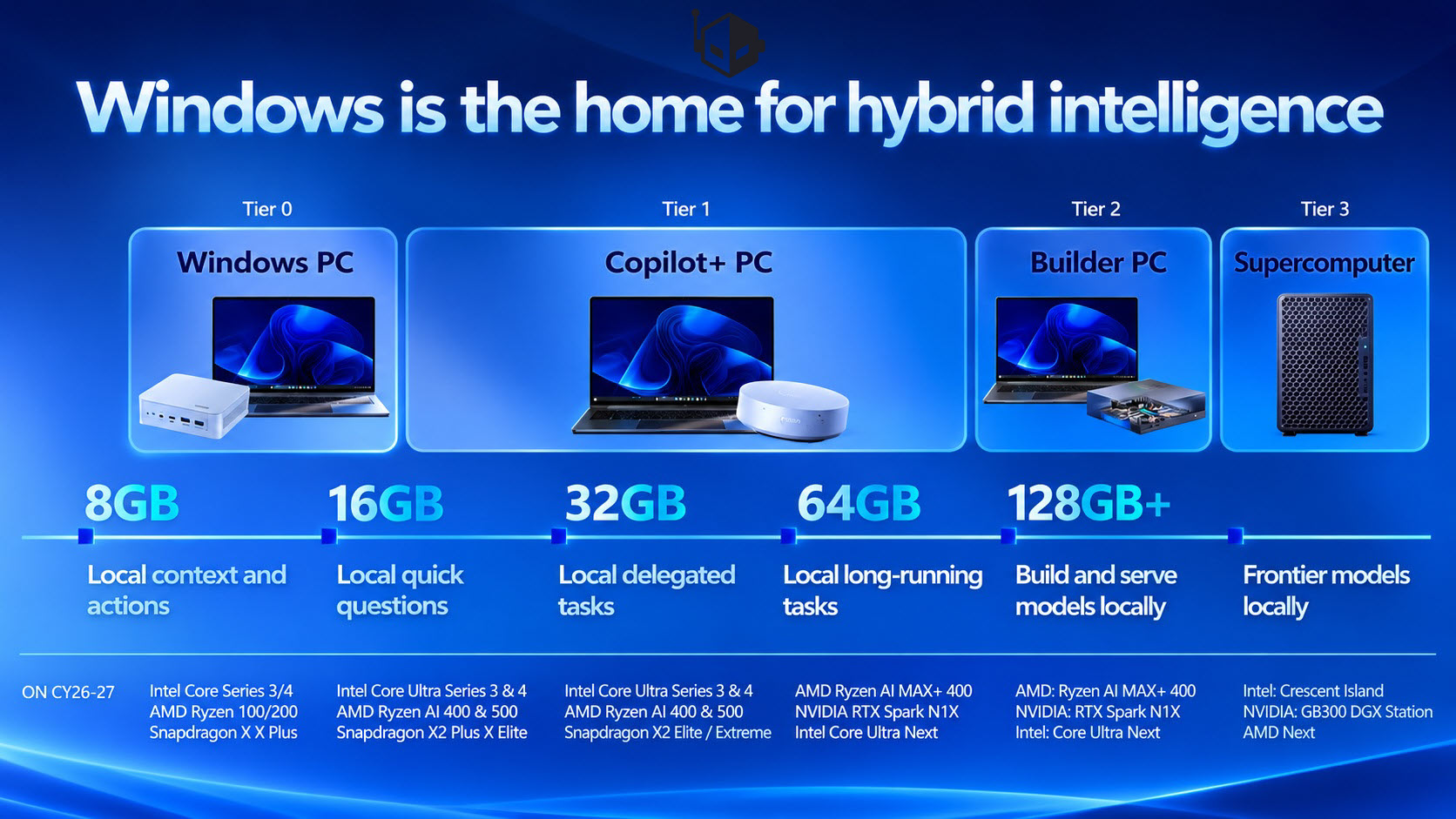
Scan almost any laptop listing this season and the word "AI" appears inside the first three lines of the spec sheet, usually welded to a chip acronym few shoppers can define. Microsoft's answer to that noise is a published ladder of hardware classes: an entry machine with 8GB of memory at the bottom, professional boxes at 128GB and beyond at the top, all held together by the slogan the company repeats like a motto — "Windows is the home of hybrid intelligence."
You do not need to care about the corporate philosophy to use the map. It answers one shopping question, and this guide turns that answer into checks you can run in the time it takes to compare two product pages: how much intelligent work will this computer do on its own, without a round trip to a data centre?
Three rungs, one routing rule underneath them
Microsoft is assembling the ladder with AMD, Intel and Qualcomm so that every price band, from budget to professional, maps to a defined level of AI capability. The logic was spelled out in the Windows company blog post "Building Windows for hybrid intelligence", published on 7 October 2026, which describes a platform where agents run locally when that makes sense and reach for the cloud when they need to. Tasks get sorted by size, privacy sensitivity, latency and cost.
Translated for a buyer, that single rule decides which rung you should shop on. If your AI use is short, repetitive and personal — summarising an inbox, tidying a document, keeping a meeting transcript — the device can carry it. If your AI use is long-context, model-heavy or continuous, you are really buying memory, and memory capacity is exactly what the tier names describe.
Tier 0: the 8GB floor and the jobs it genuinely handles
At the bottom of the roadmap sits "Tier 0". These machines carry 8GB of memory, target the entry market, and are expected to perform local context understanding plus simple action execution. Microsoft's assessment is that this class is comfortable with email processing, office document editing, video conferencing and light web browsing — four activities that account for most people's computing day.
Two honest caveats before you treat it as a bargain ticket. First, 8GB already sits at the practical floor of a modern Windows installation, and the common industry view is that this capacity bottlenecks quickly under complex apps and multitasking; Tier 0 is an on-ramp to AI, not a high-intensity productivity platform. Second, memory has stopped behaving like a commodity component. Counterpoint Research tracked DRAM prices rising roughly 80% to 90% in the first six weeks of 2026 alone, and Gartner said on 26 February 2026 that surging memory costs would cut global PC shipments by about 10.4% in 2026 while delaying the point at which AI PCs reach half the market. A cheap 8GB machine today is not guaranteed to stay cheap to buy — or to repair.
What to look for on the box: Intel Wildcat Lake series processors, AMD Ryzen 100 and Ryzen 200 series products, and Qualcomm Snapdragon C, Snapdragon X and Snapdragon X Plus platforms. Some of these are already in stores, with prices generally holding around $500.
Tier 1: 16GB to 64GB, where the Copilot+ PC badge has real content
Tier 1 is the mainstream band and, in Microsoft's framing, the core of the future AI PC ecosystem. Memory in this class runs from 16GB all the way up to 64GB, and every device in the range meets the Copilot+ PC standard, which unlocks the more demanding local features.
That standard is not decorative. Microsoft's published requirements for a Copilot+ PC include a neural processor able to sustain at least 40 TOPS of AI throughput, a minimum of 16GB RAM and 256GB of solid-state storage, and Windows 11 version 24H2 or newer. In a market full of vague claims, this badge is the rare place where a promise is attached to numbers you can verify on a spec page.
Functionally, the step from Tier 0 to Tier 1 is the step from answering questions to finishing jobs. Beyond local understanding and context analysis, these machines run local agent tasks and AI workloads that stay open for a long time. A growing share of what used to require an upload can instead be processed on the device itself, which means faster responses, better privacy protection and less dependence on network quality.
The silicon to watch in this band: Intel Core Ultra 3 Panther Lake, AMD Ryzen AI 400 "Gorgon Point", and Qualcomm Snapdragon X2 Plus and Snapdragon X2 Elite. Microsoft's longer planning horizon also lists Intel Nova Lake and AMD Ryzen AI 500 "Medusa Point".
Above 64GB: builder computers and supercomputer-class AI PC hardware
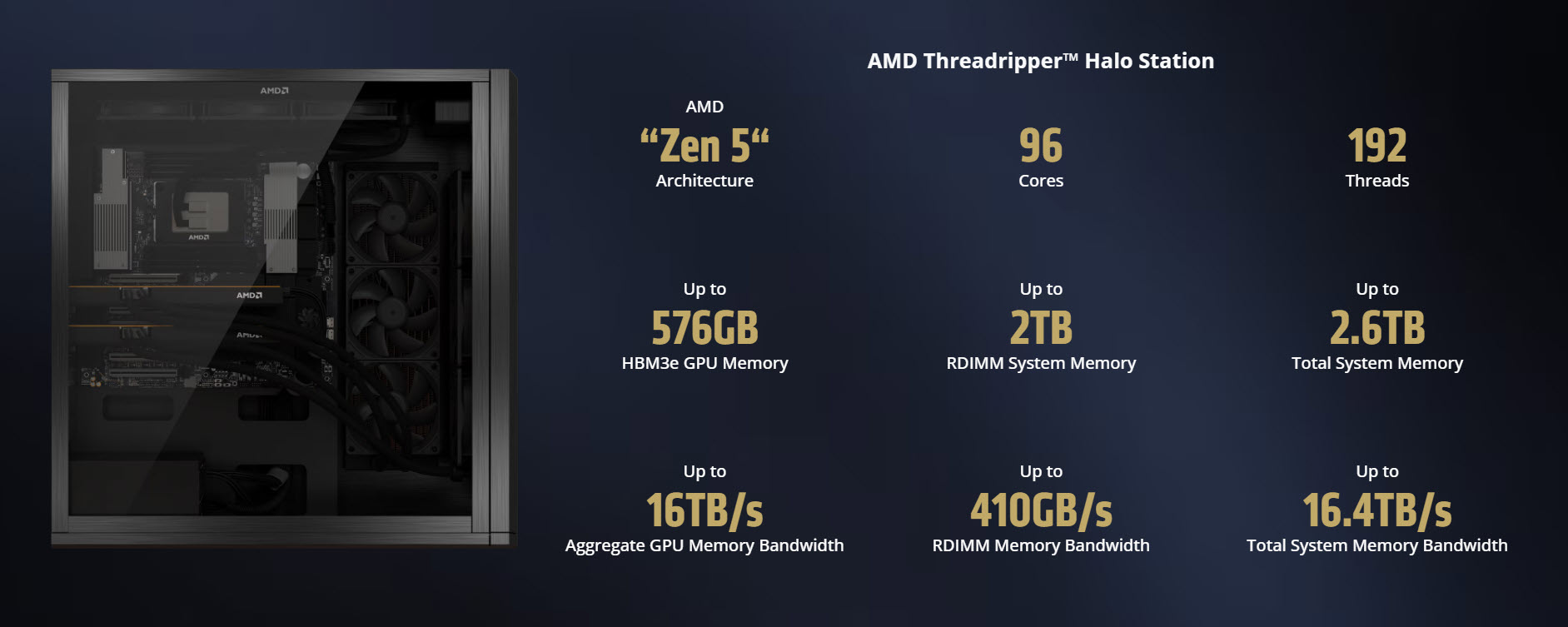
The roadmap reaches further. As local model sizes keep expanding, Microsoft expects higher classes of device in which memory is pushed to 64GB and above, with some professional platforms reaching 128GB or higher. The company labels this group "builder computers" and "supercomputer-class AI PC" hardware: machines for developers, research groups, content creators and enterprise users that run much larger AI models locally and take on complex reasoning, code generation, content production and specialist calculation.
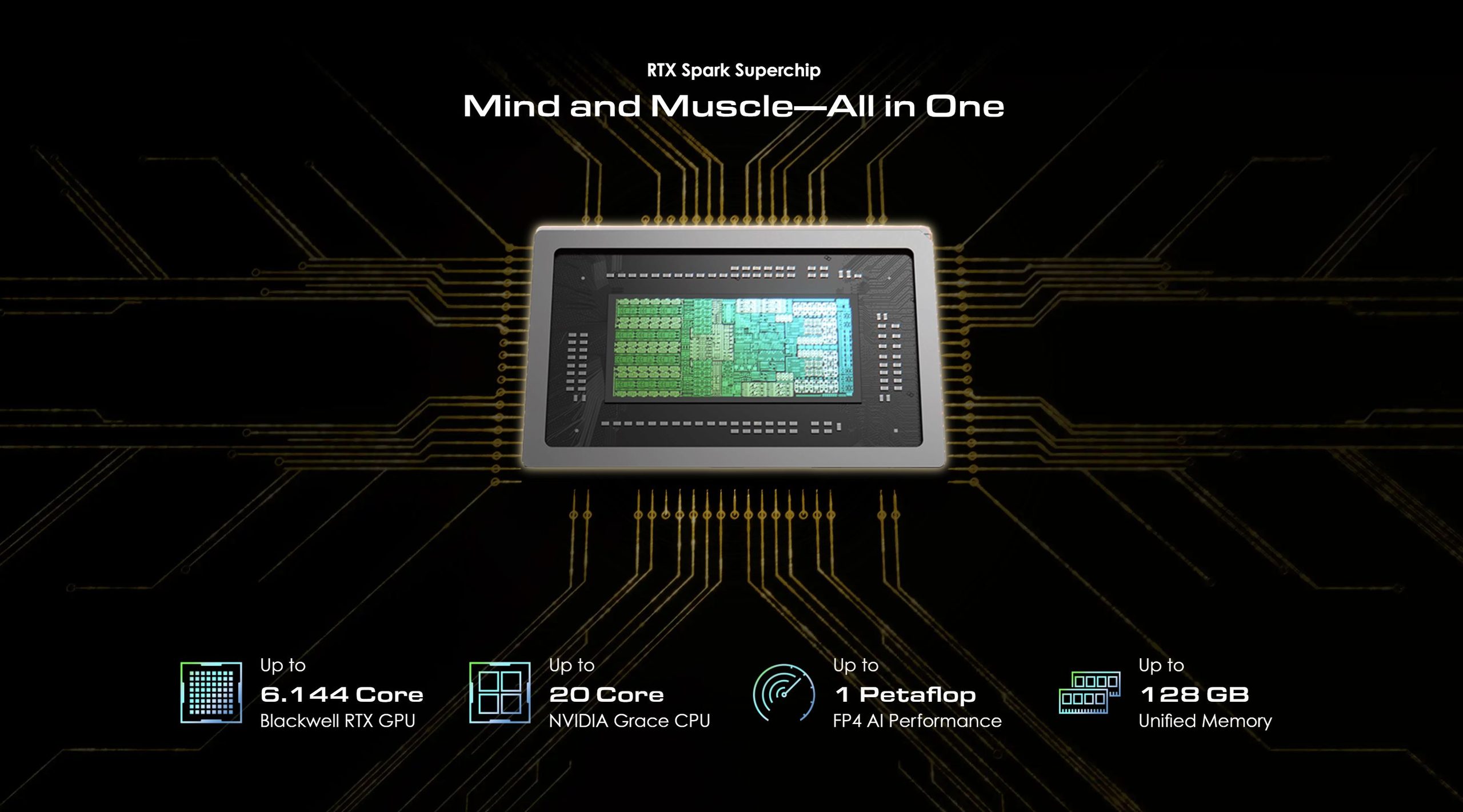
This top rung is no longer theoretical. Among the high-performance hardware pointed at the premium market are Nvidia solutions, and Nvidia's DGX Spark desk machine already ships with up to 128GB of unified memory, officially positioned for local inference and fine-tuning of models up to around 70 billion parameters. It is the clearest preview of what the roadmap's upper classes mean in practice: genuinely useful, unmistakably real, and priced for people who bill for their compute.
The ladder at a glance
| Class | Memory | Representative platforms | Price signal | Best fit | What to watch |
|---|---|---|---|---|---|
| Tier 0 | 8GB | Intel Wildcat Lake series, AMD Ryzen 100 / Ryzen 200 series, Qualcomm Snapdragon C, Snapdragon X, Snapdragon X Plus | around $500 | Email, documents, video calls, light browsing | Memory ceiling under multitasking |
| Tier 1 | 16GB to 64GB | Intel Core Ultra 3 Panther Lake, AMD Ryzen AI 400 "Gorgon Point", Qualcomm Snapdragon X2 Plus / X2 Elite | Mainstream to premium | Local agents, long AI workloads, offline responsiveness | Copilot+ PC badge requires 40+ TOPS NPU, 16GB, 256GB SSD, 24H2+ |
| Builder / supercomputer class | 64GB and above, up to 128GB or higher | Next-generation AMD and Intel AI processors plus stronger graphics platforms, including Nvidia solutions | High end; 128GB desk boxes already cost thousands | Developers, research, creators, enterprises | Overkill unless you really run models locally |
| Planning horizon | 8GB to 128GB and beyond | Intel Nova Lake, AMD Ryzen AI 500 "Medusa Point" | Roadmap, not shelves yet | Future AI PC tiers | Treat as direction, not a purchase trigger |
Six checks to run before you pay
- Name your three recurring AI tasks. If they are all "summarise, transcribe, search", Tier 0 covers them. If any one of them is "run this model", or "keep this agent busy for an hour", start reading Tier 1 spec sheets.
- Read memory and NPU as a pair, never separately. A Copilot+ PC claim means both the 40+ TOPS accelerator and the 16GB floor are present; one without the other is a different product.
- Match the exact generation name. "Snapdragon X" and "Snapdragon X2 Elite" sit on different rungs, and "Ryzen 100" is not "Ryzen AI 400". Copy the chip name from the retailer page and check it against Microsoft's tier list.
- Decide how many years you will keep the machine. Gartner expects AI PCs to reach 143 million shipments and 55% of the market in 2026, and to become the default by 2029 — a longer ownership window argues for the higher rung.
- Ask whether the memory is soldered. Thin laptops increasingly use soldered LPDDR5 or LPDDR5X, which is fast but not expandable; if so, the tier you choose at checkout is the tier you live with.
- Watch the memory market as well as the launch calendar. With DRAM costs surging through 2026, capacity upgrades cost more than they did a year ago — price the 32GB option rather than assuming it is a rounding error.
Four misconceptions that quietly inflate bills
- "An AI PC is simply a faster PC." The difference is where the work happens, not how fast the fan spins. A machine that can complete agent tasks locally beats a quicker machine that must send everything to a server.
- "High TOPS equals future-proof." TOPS measures a ceiling on throughput; whether a model fits in the first place depends on memory capacity and bandwidth. Buy both numbers together or neither is meaningful.
- "I can add RAM later." Often false on the thinnest designs, and the cheapest tiers are exactly where soldered memory is most common.
- "Local AI means no cloud." Hybrid intelligence is a routing system, not an exile of the cloud. Small and sensitive jobs stay home; heavy jobs still go out. Nobody gets the full experience on one side alone.
FAQ
Do I have to throw away a 16GB laptop because of this roadmap?
No. 16GB is the floor of Tier 1 and the documented minimum for the Copilot+ PC class, so a machine already there sits inside the mainstream band rather than behind it. What changes is which tasks you can push off the network and onto the device.
Can a Tier 0 machine still use Copilot and ordinary Windows AI features?
Yes. The Copilot+ PC label gates a set of on-device experiences tied to the 40+ TOPS accelerator requirement; it is not a paywall on general AI assistance in Windows. Microsoft's own learning centre materials exist precisely to explain the gap between a standard Windows PC and a Copilot+ PC.
Is "it runs locally" the same as "it is private"?
Not automatically, but it is closer. Recall, the snapshot feature tied to this hardware class, processes content locally on the Copilot+ PC and stores the material on the device, and Microsoft documents it as opt-in rather than on by default — a posture shaped by the privacy criticism the feature drew when it was first announced.
Should I wait for 128GB machines to get cheap?
Not if you need a computer now. The 128GB-and-above tier is defined by memory capacity, and memory is the component under the most price pressure in 2026. The cheaper path to a bigger AI experience is usually buying one rung higher at the same size class, not waiting for the top rung to fall.
What is the single most useful spec line to look at?
Memory size, next to the exact chip generation. Everything else in the tier system — Copilot+ PC eligibility, agent capability, which local models fit — follows from those two numbers.
What to do with this over the next few years
Microsoft has noticeably toned down the marketing volume around the Copilot+ ecosystem in recent years, yet this roadmap shows no loss of conviction. If anything, the opposite: the company is trying to stand up a complete AI computer system spanning 8GB to 128GB and beyond, so that any budget and any workload finds a matching level of artificial intelligence.
For readers, that means the tier labels are worth keeping on your shopping list. As AMD, Intel and Qualcomm ship their next-generation AI processors, the contest inside the Windows ecosystem in the coming years will shift away from traditional CPU benchmarks toward local AI compute, NPU performance and the ability to run large models on the machine in front of you.
Practical summary from the MyTechDailyNews desk: buy Tier 0 if your AI life is reading, writing and video calls; buy Tier 1 if you want the machine to do work while you think; buy above 64GB only if you are the person who has to keep the models running. Microsoft's bet is that whoever sets the hardware standard for that ladder keeps Windows at the centre of personal computing — and, for once, the standard is written out in numbers you can check.
By Sarah Chen, MyTechDailyNews General desk. Tips and corrections: hello@techdaily.com.