
MyTechDailyNews General Tech Guide: Meta Muse Real-Time Voice and Avatars
Starting with the United States, Meta is letting people speak with Muse AI assistant in real time. Its avatar answers with facial expressions and gestures while the conversation unfolds, across phone, web and Mac use of the Muse app. You can choose audio only, view the avatar beside the chat, or use a full-screen face-to-face setup. The change turns rough ideas into spoken requests for travel, interviews, speeches and proposals.
What changed with Meta Muse?
Meta has moved Muse from typed chat toward spoken assistance. The key change is that users can talk to Muse AI assistant in real time while Muse Realtime Avatar reacts with expressions and gestures and Muse Realtime Voice shapes the spoken reply. The rollout starts in the United States across the Muse app on phone, web and Mac, with audio only, avatar and chat side by side, or full-screen face-to-face modes.
For general readers, this matters because the interface behaves less like a search box and more like a messaging call. If an idea is not fully formed, a user can say it out loud and ask Muse to turn it into a travel plan, a mock interview, a speech outline or a proposal structure. The voice experience supports natural interruptions, so you can correct the assistant mid-sentence without restarting.
How to use the voice mode as a practical workflow
The best approach is to start with low-stakes spoken tasks, then escalate to structured requests. When the option appears in the Muse app, choose the mode based on whether you need speed, a written record, or a more immersive prompt.
- Update the Muse app and confirm the voice or avatar option is available.
- Use audio only when you need to think out loud without exposing the screen.
- Choose avatar and chat side by side when you want a transcript to review later.
- Switch to full-screen face-to-face when you want the avatar to act as a rehearsal partner.
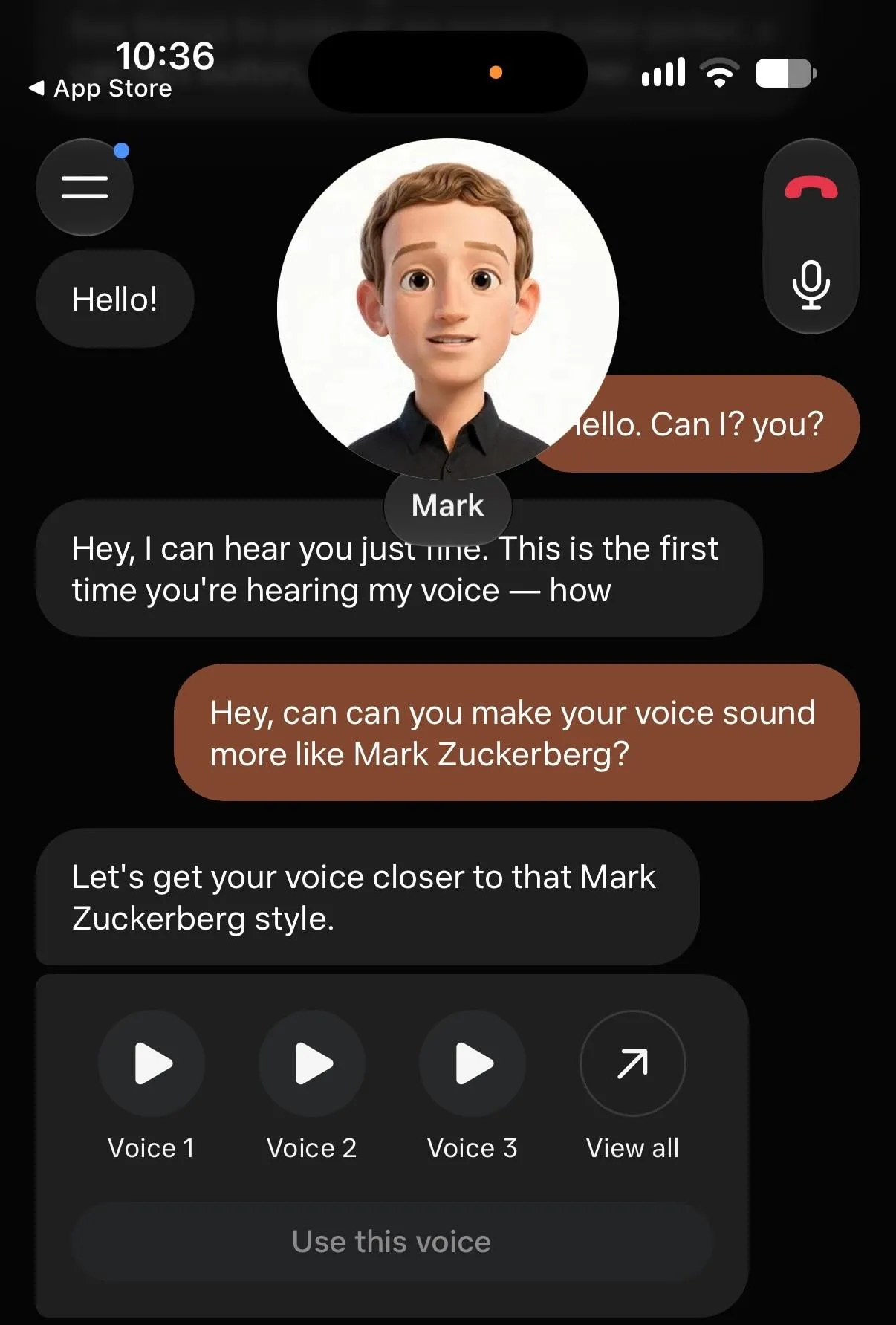
- Pick from hundreds of voices, or describe the pace, tone and accent you want.
- State the goal first, such as 'help me plan a weekend trip', 'run a mock interview', or 'outline a proposal'.
- Interrupt naturally, then ask Muse to revise the result instead of starting from zero.
Which Muse voice mode fits the moment?
The right mode is the one that matches privacy, follow-up needs, and the kind of task you are trying to finish.
| Scenario | Recommended setup | Practical reason |
|---|---|---|
| Planning while moving | Audio only | Faster to use and keeps sensitive text off the screen. |
| Need notes after the call | Avatar and chat side by side | Preserves the spoken exchange as a readable output. |
| Rehearsing a presentation | Full-screen face-to-face | Makes the avatar a visible prompt and feedback partner. |
What the hands-on reports reveal
Meta says the experience is powered by Muse Realtime Voice and Muse Realtime Avatar. The Verge reported that Muse usually responds quickly but can pause when it searches for information. The same report says avatar animation can look strong yet occasionally uncanny, and that the voice did not fully mimic a Mark Zuckerberg-style profile chosen by the reporter.
A second layer of evidence shows this is part of a broader agent rollout. Meta's official launch page introduced Muse as a personal AI agent on September 8, 2026, while CNBC reported a free tier plus $20 or $100 monthly subscription options depending on usage. TechCrunch reported that U.S. users could video chat with their Muse AI avatar. The practical takeaway is that Meta is turning Muse from a task assistant into a visible, spoken interface.
What it is not yet
The biggest mistake is treating Muse's voice and avatar as a perfect human teammate. Real-time responsiveness is not the same as full judgment, and expressive movement does not prove that the assistant understood the request. The safer mental model is a high-speed drafting and planning partner that still needs user review.
- A realistic avatar is not a human agent with personal memory or accountability.
- Real-time voice does not mean every answer is correct or final.
- Full-screen conversation does not replace verification for calendar, payments or travel bookings.
- Planned device access does not mean the feature is already available everywhere.
Action checklist before you rely on Muse for tasks
Use Muse voice first as a drafting aid, not as an authority. Before you let a spoken request change real-world plans, check the output for factual accuracy, privacy risk and permission boundaries.
- Confirm that the feature appears in your Muse app on the supported platform.
- Avoid sensitive work tasks until you know how the output will be stored or displayed.
- Use split-screen for anything that may need correction, because a transcript is easier to edit.
- For voice tone, test the preset voices first, then use a text description if the style is still wrong.
- When a task touches money, dates, contacts or travel details, verify before accepting.
- Watch for follow-up access on AI glasses and Muse Charm, but do not assume hands-free use is ready for every scenario.
Frequently asked questions
Is Muse real-time voice available everywhere?
No. The rollout is described as starting in the United States, with availability varying by account and device.
Can I use Muse voice on Mac?
Yes. The feature is described for phone, web and Mac use of the Muse app.
Can I interrupt Muse while it is speaking?
Yes. The voice experience supports natural interruptions, so you can redirect the assistant without restarting the request.
Can I change the voice style?
Yes. Users can choose from hundreds of voices or describe the speed, tone and accent they want.
Reference sources
- Meta Newsroom: official launch page describing Muse as a personal AI agent.
- The Verge: hands-on coverage of Muse voice mode and expressive avatars.
- TechCrunch: reporting on U.S. users video chatting with a Muse AI avatar.
- CNBC: reporting on Muse launch and subscription tiers.
By Sarah Chen, MyTechDailyNews General desk, published by Tech Daily. Contact: hello@techdaily.com.