
MyTechDailyNews General: Dynamic Island on MacBook Pro — What the New Spotlight and Siri Zone Means for Mac Users
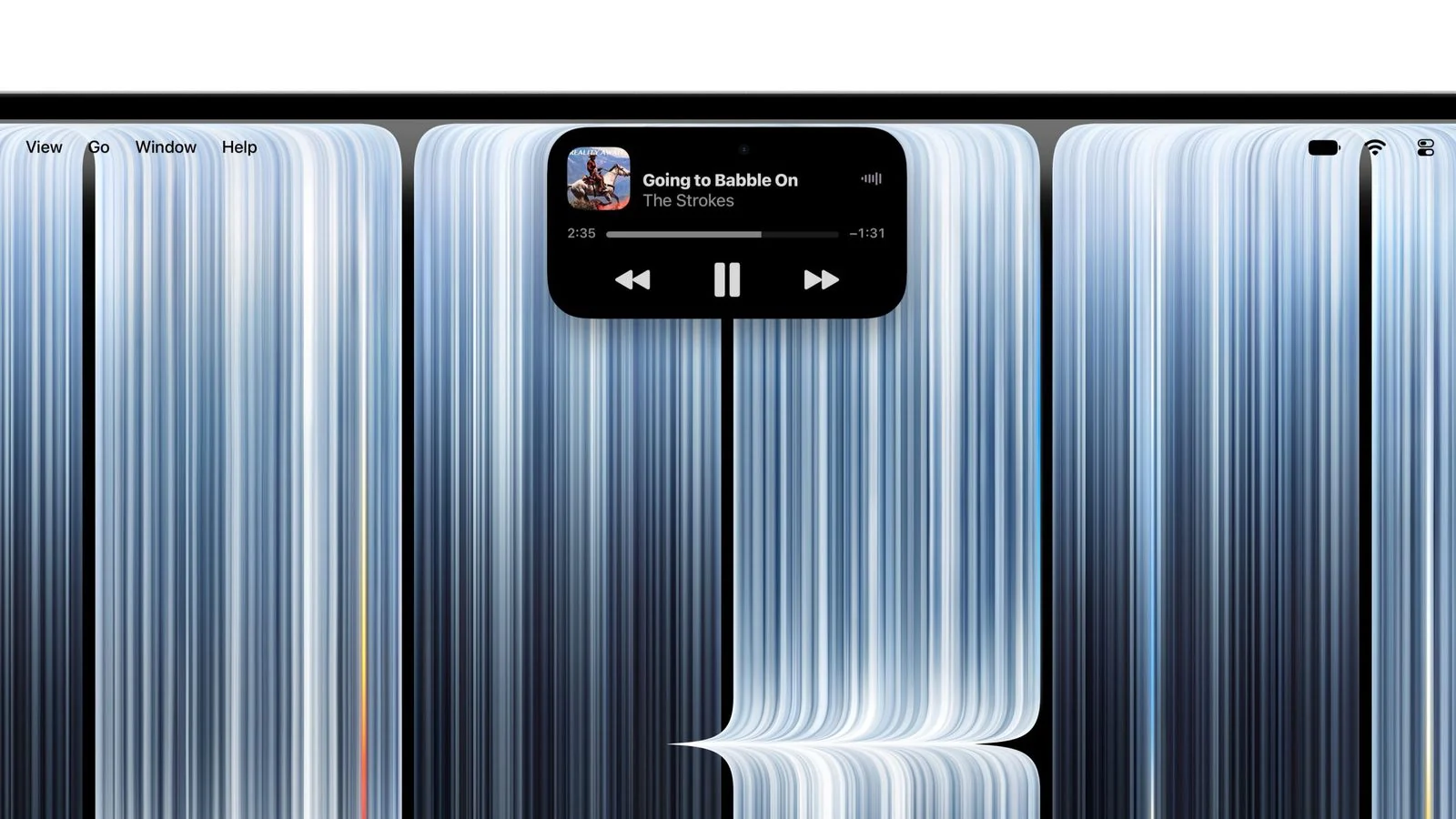
When a Mac finally borrows an interface idea that started on a phone, the practical question is not just whether it looks familiar; it is what changes for the people who use Mac every day. On the new 14-inch and 16-inch MacBook Pro models, Apple brings Dynamic Island to the Mac lineup, putting real-time activities, Spotlight search, and Siri into one interactive zone.
From iPhone feature to Mac interaction
The concept first appeared in September 2022 with iPhone 14 Pro and iPhone 14 Pro Max. Instead of the earlier notch, Apple used a smaller cutout for the front-facing camera and built a flexible software layer around it. That layer can expand or reshape itself to show notifications, ongoing activities, and quick controls.
The Mac version keeps the same core idea: let ongoing tasks stay visible and actionable while users work in other apps. Apple says this can cover actions such as answering calls, controlling music playback, and accepting AirDrop transfer requests. The same area also becomes the entry point for Spotlight and Siri, so searching or asking for help is no longer confined to a separate menu. On the new MacBook Pro touchscreen, simple actions such as pausing a song can be completed with a tap.
What it is not
For all the visual similarity, this is not Face ID on Mac. The original iPhone implementation depended on the TrueDepth camera system used for Face ID. The new MacBook Pro still uses Touch ID for authentication and comes with a 12-megapixel, or 12 million-pixel, center-stage camera. In other words, Dynamic Island on Mac means a new interactive surface, not a new biometric login method.
Selling window and U.S. pricing
| Item | Detail from the source |
|---|---|
| Models | 14-inch MacBook Pro, 16-inch MacBook Pro |
| Pre-order date | October 28 |
| Release date | November 6 |
| Starting price in the United States | $2,899 for the 14-inch model; $3,399 for the 16-inch model |
For MyTechDailyNews readers, the pricing detail is easy to miss but important: these are starting prices, so configuration choices may move the final cost above the listed numbers. The date sequence also matters. If you saw pre-order availability on October 28, that is different from general availability on November 6.
Checklist: Who may care most about this change
- Users who multitask across calls, music, transfers, and quick searches may benefit from keeping real-time activities visible in one zone.
- Users who choose between Mac and iPhone based on biometrics should note that Mac authentication remains Touch ID.
- Users who upgrade mainly for camera security should not assume Face ID has arrived.
- Users who buy on date-based deals should track both October 28 pre-orders and November 6 retail release.
Common misunderstandings
- “Dynamic Island means Face ID on MacBook Pro.” It does not: the Mac still uses Touch ID and a 12-megapixel camera.
- “Spotlight is just the same search button moved once.” It is now positioned as an entry point inside the interactive area, along with Siri and real-time activities.
- “iPhone 14 Pro design and Mac design are identical in hardware.” No: iPhone’s version was tied to the TrueDepth system; the Mac version is not the same hardware basis.
- “Pre-order means all models are in stores already.” The release date is November 6, separate from the October 28 pre-order window.
FAQ: What readers should understand before they react
Why move Dynamic Island to Mac?
Because it lets ongoing tasks remain visible and actionable while users work in other apps, reducing the need to hunt for controls or alerts outside the current window.
Does this make Mac and iPhone more alike?
Only in interaction style. The software behavior can feel familiar, but the hardware path is not the same: iPhone’s original feature was built around Face ID hardware, while the Mac uses Touch ID.
What is the main practical change?
The main change is entry-point consolidation. Instead of thinking only of notifications or search separately, users can treat the interactive area as one place for real-time activities, Spotlight, and Siri.
What should shoppers watch?
Watch the starting prices in the United States: $2,899 for the 14-inch model and $3,399 for the 16-inch model. Also watch the release timeline, since October 28 covers pre-orders and November 6 covers sale.
Action advice
Before deciding whether this is a must-have, ask whether you actually touch the Mac screen during routine work, whether you rely on real-time activities and AirDrop-style transfers often, and whether Touch ID already fits your security habits. If your answer is yes, Dynamic Island may make the Mac feel more continuous with the iPhone experience. If your main reason was Face ID, stop before paying for a model you think includes it. If your reason is search and quick controls, compare how much time you currently spend jumping between Spotlight, Siri, notifications, and media controls; that is where the new interactive zone is aimed.
The bigger story is not that Apple copied a good phone idea. It is that Apple is trying to make Mac users experience ongoing tasks as something that follows them, instead of something that disappears behind another app. On the new 14-inch and 16-inch MacBook Pro, that experiment now sits right where the eye already looks: the Dynamic Island zone, with Spotlight and Siri close by, and without the hidden promise of Face ID.