
MyTechDailyNews Checkup Guide: Is Your Android TV Box Safe After Google's Videostrong XCPE Takedown?
Few shopping signals are as reassuring as an official certification badge printed on the back of a streaming box. Google's disclosure in recent days weakens that shortcut: a Shenzhen-based manufacturer called Videostrong is accused of baking a hidden remote-control channel into hardware that had passed the certification process for Android TV and Google TV devices. Rather than a bug or a rogue employee, Google describes a deliberately built capability that was rented out to criminal groups. If you own a TV box, the practical question is not whether the story is scary — it is what to check, in what order, and when it makes sense to buy something else. This guide walks through exactly that.
What the disclosure actually says
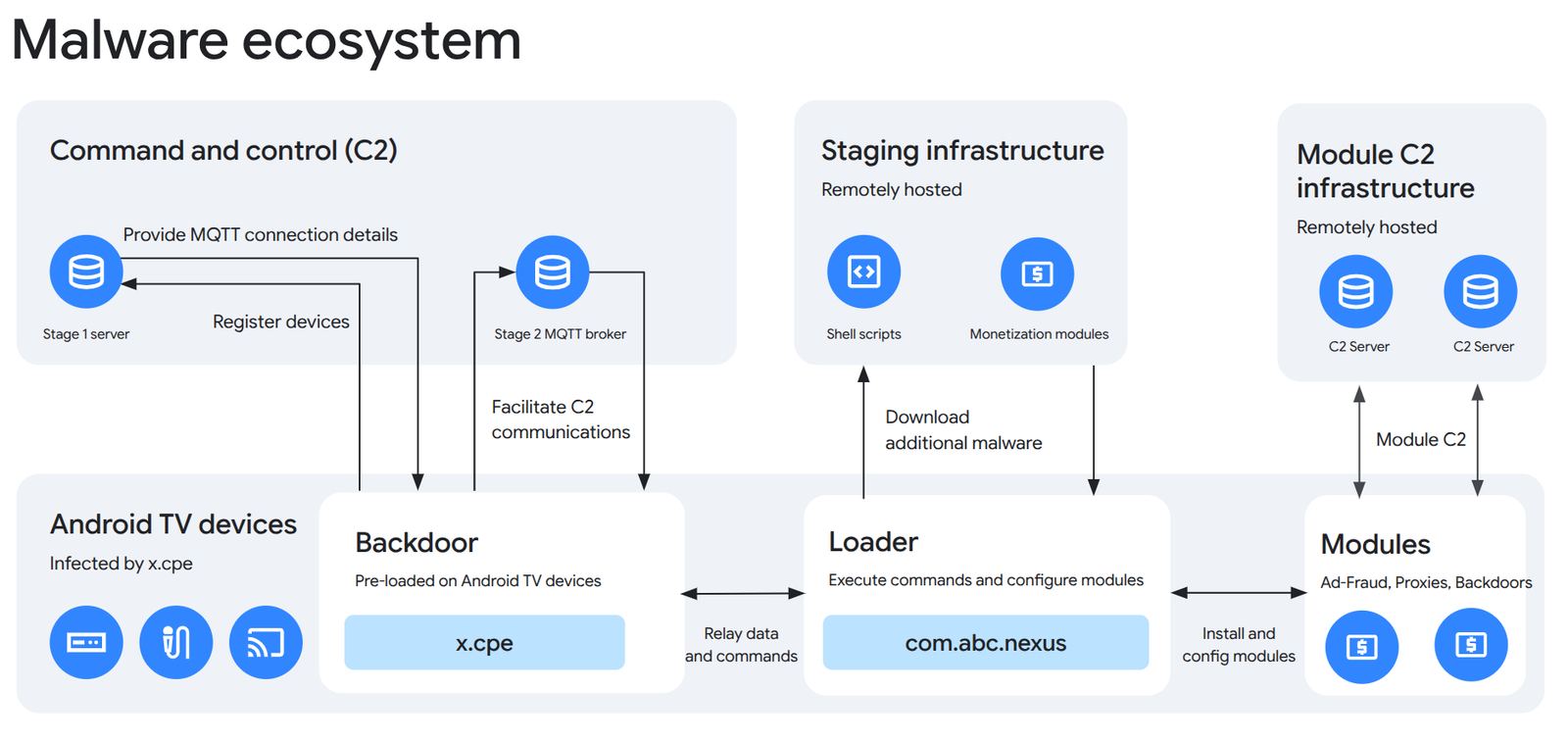
Google's Threat Intelligence Group said the affected firmware came from multiple models and multiple brands built by the same China-based manufacturer, supported by its own server infrastructure for managing enrolled devices and pushing malicious code. That work is reported to have run for years, with an evolving toolkit designed to slip past detection. The company has ended all cooperation with Videostrong, banned it and any future affiliates from producing certified Android hardware, and blocked the firm from supplying software services to other certified device makers.
The enforcement side matters just as much as the ban. Google took legal action against the domains and servers that controlled the XCPE botnet, cutting the command channel used by more than a dozen related malware families, and worked alongside Japan's National Police Agency plus the security firms Lumen, HUMAN Security, Plume, Synthient and TrendAI, according to Google's own write-up on the disruption. The botnet was assembled from more than 1.3 million Android devices spread across roughly 200 countries, per that post and Plume's release on the takedown, and Google estimates the seizure also severed the attacker's link to at least 10 million additional affected devices.
Why a certified badge was not enough protection
Investigators describe a two-stage trick. Hidden code is written into the firmware at the factory but kept obfuscated, so compatibility and security tests see a clean-looking build. Malicious modules are only pulled in or activated after the owner switches the box on for the first time. Google acknowledged that this exploited a blank area in its review flow, and says it is upgrading certification and review procedures with stronger verification of firmware and of post-launch software behaviour.
Two things follow for readers. First, "certified" describes a test result at a moment in time, not a permanent guarantee about what a device will do a year later. Second, the risk profile of a box depends on who built it, not only on the brand sticker on the front — Videostrong is reported to have sold its own branded units while also manufacturing for other names.
Certified versus uncertified boxes: a comparison
Earlier waves of TV-box malware, including the BadBox and BadBox 2.0 operations and the Vo1d campaign reported in 2024 and 2025, largely swept up cheap off-brand players running the open-source build of Android that never went through certification. The XCPE case is different, and that difference is what makes it a platform-level problem for Google.
| Dimension | Uncertified "Android-based" boxes (previous waves) | Certified Android TV / Google TV hardware (XCPE case) |
|---|---|---|
| Where the implant originates | Seller or modder images, third-party app stores | Factory firmware from the device manufacturer itself |
| Buyer's expectation | Low; bargain hardware, DIY appeal | High; shopper assumed an official security review had happened |
| Detection point | Visible as unusual apps or unknown sources | Deferred activation after first boot, obfuscated to pass testing |
| Vendor consequences | Model-by-model blocking, app removals | Full ban of the manufacturer and its future affiliates, plus changes to the review process |
| Owner's realistic remedy | Reflash, replace, or isolate | Isolate now, replace if the origin cannot be confirmed — factory code cannot be uninstalled by the user |
Step-by-step: a five-minute checkup for your own box
- Write down the exact brand and model. Check the label under the unit and then Settings, Device preferences (or About), Device model. A model name alone is not proof of infection, but you cannot assess a device you cannot name.
- Confirm certification status. Google's Android TV site publishes the current list of partners shipping Play Protect certified devices, and Google's Play support pages explain how to confirm whether a specific build appears on that certified list. If your model is missing, treat the device as uncertified.
- Check inside the Play Store. Open Google Play on the box, select your profile icon, and look for the Play Protect or device-certification entry. A device that never shows a certification state is the one to question.
- Look at the interface and the remote. Certified products ship with the Android TV or Google TV home experience and Google Assistant, usually paired with a deliberately simple remote — a wall of exotic buttons and "Android-based" wording is a common tell of uncertified hardware.
- Update what you control. Install the newest firmware the vendor offers, restart the box, and review app permissions and any apps you do not recognise, especially launchers and "service" components.
- Watch the network, not the screen. The abuse described by Google happens in the background: devices being enrolled into botnets for ad fraud and for selling residential network access, as covered by CyberScoop. Unexplained slow streaming, constant LED activity when nothing is playing, or bandwidth spikes at night are reasons to investigate, not proof of anything.
Lock down the network side, even if the box looks clean
- Put streaming sticks, boxes and cameras on a guest network or a separate VLAN, away from laptops, NAS drives and any work machine.
- Turn off casting, discovery and remote-access features you never use, and disable installation of apps from unknown sources.
- Review your router's connected-device list monthly for hardware you did not add, and change default administrator credentials.
- If you work from home, do not let a TV box touch company accounts or internal tools; treat unmanaged consumer hardware in the house as part of your employer's attack surface.
- Keep a purchase record for every device. When a manufacturer is banned or vanishes, firmware updates stop, and the paper trail is what justifies a return or replacement.
Common misconceptions about this story
- "The takedown cleaned my box." Legal action severs the control channel; it does not rewrite factory firmware. Google says losing the servers removes the attacker's ability to steer devices and describes the current risk as much lower, but the underlying code is a manufacturer-level problem.
- "A factory reset will fix it." Treat a reset as hygiene, not a cure — it cannot be counted on to remove a component that ships with the system image.
- "Only shady, no-name hardware is at risk." That was the old assumption, and this case is precisely the exception that forced Google to change its review process.
- "Mecool is named, so my Mecool box is infected." Mecool is described as one of the key affected product lines, not as a uniformly compromised brand. Model, build and origin matter more than the logo.
- "I only watch videos, so a botnet does not cost me anything." The asset being sold is your home internet connection and its reputation, which is why the incident is worth ten minutes even for light users.
Buying checklist for a replacement or a first box
- Prefer hardware whose certification you can confirm on Google's official Android TV partner list before you pay.
- Choose sellers you can hold accountable: manufacturer warranty pages, a visible update policy, and a real support channel.
- Be sceptical of boxes that advertise "full Android", unlocked installers, or bundled streaming apps at a price far below mainstream models.
- Check the update history, not the spec sheet: recent firmware releases are a better trust signal than processor cores and gigabytes.
- If the box is for a rental property, clinic waiting room, shop signage or classroom, assume it is shared infrastructure and isolate it on its own network segment from day one.
FAQ
Which devices are implicated beyond TV boxes?
Google's findings cover Android TV and Google TV set-top boxes as the core of the botnet, plus devices that use the same firmware lineage: digital signage players, karaoke machines and telehealth terminals were found carrying the same malicious components. Anything from the same manufacturing chain deserves the same checkup.
Do I have to replace my box today?
No. Google states that with the control servers shut down, the risk facing infected devices has dropped sharply. The company's advice, echoed in its disclosure, is that owners weigh where the device came from and consider switching to a brand with a better standing — and if you cannot confirm certification at all, replacement is the cleaner answer.
Why does a ban on a manufacturer matter to a consumer?
Because the same supplier can otherwise reappear under a new name. Google's ban covers Videostrong and any future subsidiaries and extends to providing software services to other certified Android makers, which narrows the usual rebranding route.
Is a cheap uncertified box safer, or less safe?
Less predictable either way. An uncertified device is outside Google's testing record, so nobody can vouch for it; a certified device from a compromised supplier looks trustworthy but was not. Buy from the certified list, from a seller you can trace.
The takeaway
Google's handling of the Videostrong case is being described as one of the worst supply-chain security incidents in Android TV's history, and the fix it has promised is procedural: tighter certification, deeper firmware scrutiny, and monitoring of what a device does after launch. For readers, the durable lesson is smaller but useful — certification is a starting point, not a verdict. Spend five minutes naming your box and confirming its status tonight, keep it away from your laptop and work accounts, and treat a stubbornly cheap device as a spending decision that is already costing you something.
This practical guide was prepared by Sarah Chen for MyTechDailyNews. Corrections and reader tips can be sent to hello@techdaily.com (Tech Daily).