
MyTechDailyNews General Review: Fingerprint USB Drives vs Real Encryption — What Buyers Should Compare
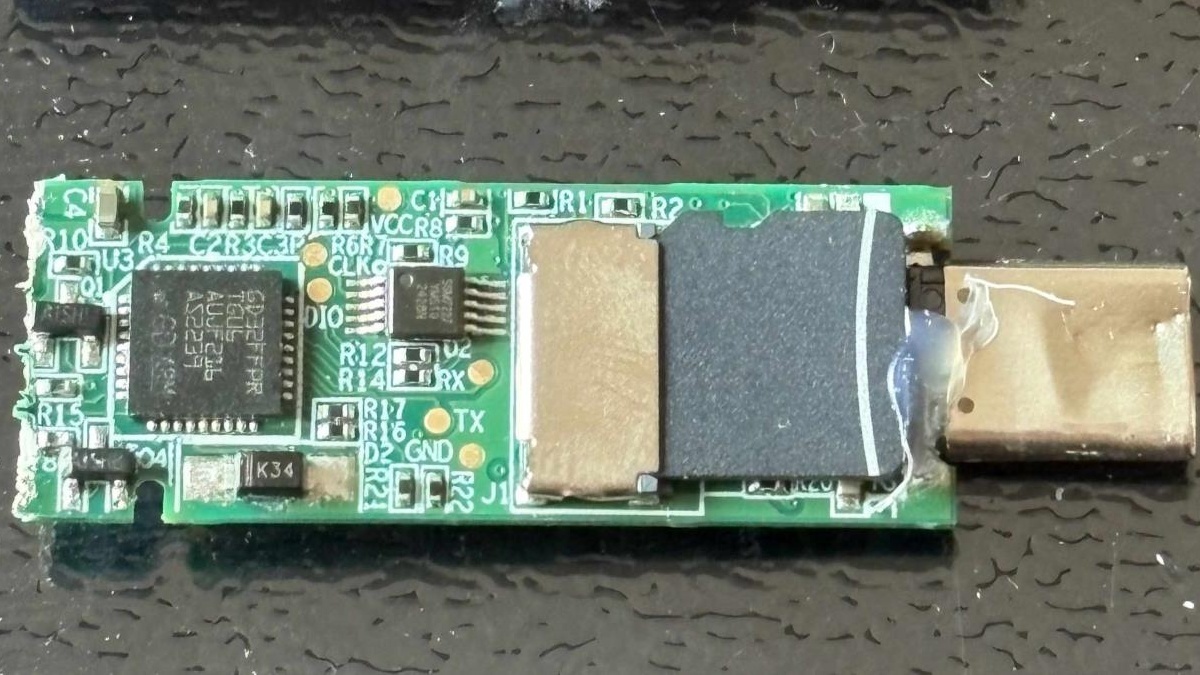
Portable storage is no longer a simple price-and-capacity decision. Buyers now read labels such as fingerprint lock, AES-256 and hardware security, then decide whether a stick is safe for contracts, photos, client folders or workplace credentials. The most useful takeaway from the ThinkPlus FU100 case is that these labels do not always describe the same thing: one researcher opened the drive last year, discussed the results at a conference this March, and showed that a fingerprint gate can protect only the USB port while the stored files remain readable elsewhere.
That gap is why this MyTechDailyNews General comparison treats the story less as a one-off product complaint and more as a buyer checklist. If a product uses a physical control, a software dialog or an encryption key in a separate chip, each design has different failure modes when a laptop, badge or whole bag disappears.
What happened to FU100, FU200, TU800 and TSD303
Xusheng Li called the FU100 design an SD card inside a flashy shell. In his reading, the fingerprint module only decides whether the drive connects to a computer; it does not make the files on the SD card unreadable. He also argued that the episode shows that some claims around hardware security may function mainly as marketing.
Lenovo subsequently published fix plans for FU100, FU200, TU800 and TSD303. Users need to call the China service hotline, choose between sending the device back for replacement or waiting for an on-site firmware upgrade, and back up data first. Lenovo strongly recommends erasing the data before the device is sent back. The relevant public advisory, listed as Lenovo advisory LEN-210545 at iknow.lenovo.com.cn, gives the severity as high and names three CVE numbers: CVE-2025-13453, CVE-2025-13454 and CVE-2025-13455.
Among the three vulnerabilities, one is related to the configuration software and may allow a logged-in local user to bypass device authentication and enroll an untrusted fingerprint. In other words, the weakness is not limited to someone physically prying the stick open; the companion application path can also weaken the lock.
The other failure: TSD303 leaked the password
Li found another vulnerability in the TSD303 portable SSD. Unlike the FU100, data on the TSD303 was encrypted. The problem was the unlock flow: the drive previously sent the correct password in plaintext over USB to the software for comparison, so the password could be captured if someone could monitor the link or inspect the program.
About three months after the vulnerability report, the first fix appeared. Researchers later found that the fix used an encryption key that could be derived from a timestamp-like value, meaning a stolen device was still not well protected. A follow-up fix released later last year made the drive verify the user-supplied password itself, so the correct password no longer left the device.
How the issue spread to other devices
The investigation did not stop at one brand. Reportedly, nine other devices from several makers used the same software development kit, and most of those products could also leak passwords to an attacker with enough technical skill. In addition, two other devices kept unencrypted data on microSD cards. Li hid the vendor names in the slide shown at the talk, so buyers should not assume the problem belonged to only one product line.
AI-assisted testing made the map larger
Recently, Li carried out one follow-up study with artificial intelligence. He used OpenAI Codex together with a reverse-engineering tool built by his employer to test storage products and protection software from other companies.
Codex reportedly broke one tool made by Netac in about 7 minutes. The test found a fixed key inside the program and showed that user passwords were written into diagnostic logs. When he gave his talk this March, Netac had not published a patch, and the report did not say whether the product had been repaired since then.
The same study covered two file-copy protection products. These tools try to let a recipient open a file while blocking copying. Codex reconstructed a password used by KakaSoft USB Copy Protection in about 26 minutes and decrypted one test file without having the user password. Nexcopy Copy Secure was reportedly broken in about 10 minutes.
Li also identified two hidden accounts in SecZure YutianDun with relatively simple passwords. He called them backdoors, although the report cautions that this does not prove malicious intent from the maker. Li said he did not notify KakaSoft, Nexcopy or SecZure in advance, arguing that a USB drive already taken by an attacker is hard to recall or update.
What a better design can look like
The research also includes a positive reference: one open-source USB drive uses a microSD card, yet it implements encryption correctly by deriving the key from the user password. For an attacker, pulling the card out separately does not directly expose the files.
Comparison: four ways vendors promise protection
| Design pattern | What it protects | What it does not guarantee | Best fit | MyTechDailyNews verdict |
|---|---|---|---|---|
| Fingerprint gate, as described in the FU100 findings | Casual use when the drive is plugged into a normal computer | Data confidentiality after the shell is opened or the storage card is removed | Shared home photo transfer, low-risk convenience | Good for access control, weak as a security claim when files are plaintext |
| Password verified by host software | Convenient pairing between app and device | Protection against log capture, memory inspection or protocol sniffing | Temporary protection for non-sensitive files | Acceptable only if secrets never leave the device after unlock |
| Device-side verification, as in the later TSD303 fix | Keeps the correct password from travelling over USB | Key quality, firmware correctness and update reach | Everyday confidential work if model is patched | Stronger direction, but verify the exact version and serial status |
| Proper key derivation from user password, as in the open-source drive | Offline card extraction because stored data is encrypted | Protection from a weak password or stolen already unlocked device | Buyers who carry personal documents, client data or credentials | The most useful mental model for a secure USB purchase |
Checklist: how to judge a secure USB drive before buying
- Separate authentication from encryption. Ask whether the fingerprint or PIN unlocks the data or merely enables a connection.
- Look for the official advisory, not only the product page. Lenovo advisory LEN-210545 shows why a CVE list and severity rating matter.
- Check whether the key is derived from the user password and whether the password can leave the device during verification.
- Compare physical threat models: card removal, USB sniffing, malicious host, configuration software and local logged-in users.
- Test the backup workflow. If repair requires shipping the drive, decide whether you can wipe it first or accept the data-residency risk.
- For enterprise use, require a model-specific firmware list, a sample teardown or destructive verification, and a replacement process with serial-number checks.
- Do not treat AES-256 as proof. A manufacturer can describe an algorithm while the actual storage layout is unencrypted.
- Prefer devices whose protection works even when the storage medium is separated from the controller.
Common misconceptions
- If it needs a fingerprint, it must encrypt. No. A biometric can be only a switch.
- Hardware encryption means the hardware cannot be bypassed. No. It means the intended crypto work sits in device logic, not that the implementation is flawless.
- Vendor names on a slide are the whole risk list. No. The report noted additional devices using the same software development kit while keeping names hidden.
- Once patched, the product is safe forever. No. The TSD303 case shows a first fix can be incomplete, and update access can be inconvenient.
Action advice for owners and buyers
If you already own a fingerprint USB drive
- Identify the exact model: FU100, FU200, TU800, TSD303 or another device mentioned in vendor advisories.
- Back up sensitive files to a location you control before any repair step.
- Use the official China service line described in the Lenovo advisory for the affected models, and erase the drive before sending it if the process requires return.
- Until the fix is confirmed, assume anyone with physical access may read the stored files unless you independently know the device implements device-side verification and encryption.
If you are buying now
- For personal convenience, a low-cost drive with no encryption may be safer for your expectations than a premium drive whose lock is only cosmetic.
- For confidential documents, demand device-side verification, password-derived keys and a public security-update path.
- For regulated workplaces, replace USB-only habits with controlled sync services or managed endpoints where possible; removable media should be approved by model and firmware version.
FAQ
Is a fingerprint USB drive useless?
No. It can stop casual use and reduce accidental exposure. The problem is buying it for the wrong promise. If the data is plaintext on a removable SD card, physical disassembly is the main risk.
Why did the TSD303 matter if its data was encrypted?
Because encryption can still fail during unlock. Sending the correct password to software for comparison can expose that secret. The later approach of verifying the password inside the drive is cleaner.
Does this mean all secure USB products are fake?
No. The open-source example shows that microSD hardware and strong password-derived encryption can coexist. The lesson is to verify architecture, not reject the category.
Should I throw away my Lenovo drives?
Not necessarily. The affected products have published fix guidance. But if the device may be stolen, or if you cannot confirm that it has the current firmware, move high-sensitivity files off it and follow the official replacement or upgrade route.
The decision that matters
For MyTechDailyNews readers, the practical split is simple. Choose a fingerprint drive when you want a lock in everyday situations and your files are low-risk. Choose a properly encrypted drive when you want protection after loss or theft. Choose a managed service or endpoint policy when the file matters to a client, employer or your own identity. The FU100 case earns its headline because it forces buyers to ask a basic question: does the lock guard the door, the room or the paper inside?