
MyTechDailyNews General: Firefox Smart Window Turns an AI Sidebar Into a Potential Form-Filling Helper
Job applications, service bookings, and online sign-ups often ask the same information over and over. Mozilla is testing one new AI feature in the Firefox browser: a Smart Window (intelligent window) side experience meant to understand web content and fill online forms, reducing repetitive input.
Written by Sarah Chen for MyTechDailyNews General, a general-technology column by Tech Daily.
What the test is trying to change
The main idea is practical: a browser feature that reduces repetitive typing. Instead of requiring a person to copy information from a resume, profile, or order form into each field, Smart Window is intended to understand the current page and use details supplied by the user to complete the form. The feature is presented as a test, not a finished release, so its behavior should be understood as a demonstration of direction.
A sidebar that listens for a task, not only a question
In the demonstrations described by Mozilla, the experience appears as a sidebar inside the browser. A user can state a goal in natural language, such as filling a job application, booking a service, or completing an online registration. The AI then examines the visible form fields on the active page and matches them with information the user has provided.
This distinction matters for general readers. A question-answering sidebar helps you find or interpret information. An action-oriented sidebar aims to operate the page itself. Smart Window is placed in the second category because the task is not only to explain a form, but to help populate it.
A practical example: reading a job application page
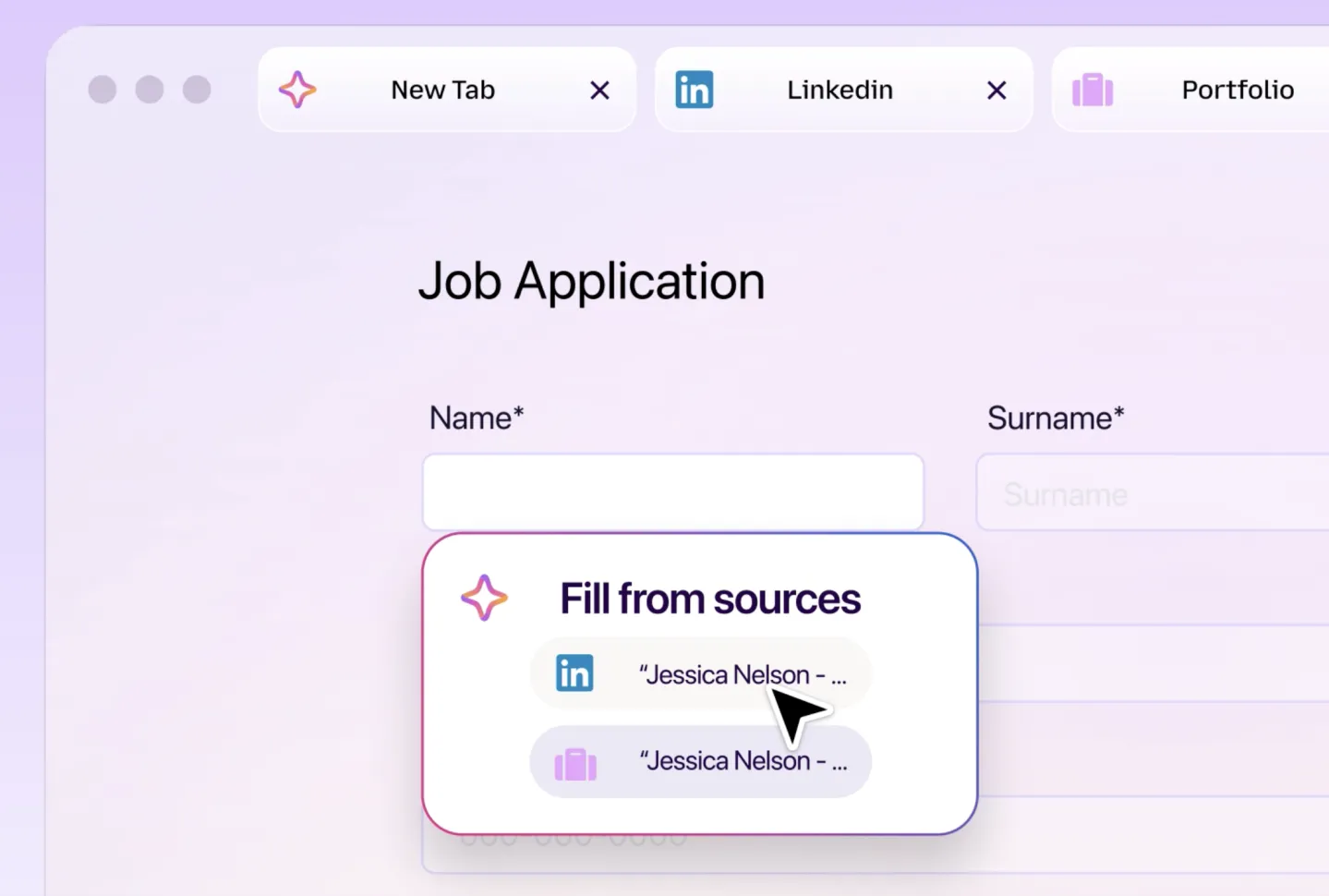
The demo shows a common scenario: an application page on a job site. Smart Window can read the form, pull details from a resume or other source information, and place items such as name, contact details, and work history into the corresponding fields.
Before data is entered, the tool shows the information it plans to submit. That gives the user a chance to check and edit each detail before the form is filled. This review step is one of the visible design choices that separate a convenience feature from a fully automatic action.
For a typical user, the practical value is obvious: fewer copy-and-paste steps. The practical risk is also obvious: a job application, registration, or booking can contain details that should not be sent without a second look. The demonstration emphasizes that the user remains the reviewer before submission.
Why Mozilla frames it as more than a chatbot
Mozilla describes Smart Window as more than a chatbot. The stated goal is not merely to answer questions or generate text, but to understand and operate page content. Many browser sidebars focus on search, summaries, and question-and-answer tasks. This feature is positioned for direct interaction with web elements, such as form fields, so the user can ask for a task rather than only receive a response.
Privacy and user control are part of the pitch
Privacy is one of the themes Mozilla emphasizes. The company says the test follows the long-standing privacy principles associated with Firefox, and it presents the data handling in terms of user control. The idea is that a person can decide which information the AI may access and which data may be used to complete the requested task.
The company also speaks about transparency in how data is used and processed. For a general reader, that language points to a basic question every browser-AI feature must answer: does the tool know only what it needs to know, and can the user limit its access when the task changes?
How this fits the broader browser-AI trend
Smart Window appears as part of a wider movement across browser makers and AI companies. Multiple participants are trying to move artificial intelligence beyond information delivery and into task execution, including shopping, filling forms, booking services, and managing online affairs. Mozilla's test places the Firefox browser in that competitive area.
The broader context is why the story extends beyond a single convenience feature. If the direction holds, the browser becomes a place where a task can be completed, not only where information is viewed. The final product, however, still depends on testing, release plans, privacy controls, and user trust.
Status: available now or still a test?
The feature remains in a testing stage. Mozilla has not announced a time when Smart Window would be open to all Firefox users. The public message is therefore about direction rather than a finished product: a browser sidebar may become a tool for completing web tasks, not just reading or answering web content.
Checklist: what matters when a form-filling AI enters a browser
- Check the review screen. If a form-filling assistant shows information before submission, use that screen carefully. It is the place to catch old addresses, incorrect employment dates, or a name spelled differently on a resume.
- Control the access scope. Mozilla describes user control over the information the AI may access. Choose only the details needed for the current task when a permission choice is available.
- Keep reusable data clean. An AI helper can only work as well as the source data it receives. Keep current contact details, work history summaries, and common application answers in a simple, trusted format.
- Remember the release status. The feature is still a test, and Mozilla has not given a general availability time for all Firefox users. Treat demonstrations as information about direction, not as a tool already in your browser.
- Balance privacy and convenience. The promise is fewer repetitive fields. The responsibility is deciding how much personal information is worth exposing, even with controls and transparency commitments.
FAQ: quick answers for general readers
What is Firefox Smart Window?
It is a Mozilla AI test feature for the Firefox browser. It aims to understand a web page, follow natural-language instructions, and help fill online forms.
How does the user ask it to work?
The demo uses a sidebar. The user can describe a task, such as a job application, booking a service, or completing an online registration.
What information can Smart Window fill?
In the shown example, it can use information from a resume or provided source information to fill fields such as name, contact details, and work history.
Will it send the form without asking?
Based on the demonstration, the planned workflow includes a review step: the user sees the information before the form is filled and can check or edit it.
Is this available to everyone?
No. The feature is still in testing, and Mozilla has not given a general availability time for all Firefox users.
Why does Mozilla say it is not only a chatbot?
Because the goal is to interact with web page elements, not only provide conversational answers. The feature is designed to operate on forms as part of completing a task.
What privacy controls are described?
Mozilla says the test aligns with Firefox's long-standing privacy principles and aims for transparency. Users can decide which information the AI can access and which data may be used.
How does this relate to other AI browsers?
Multiple browser and AI companies are exploring task-executing AI. Smart Window is one part of that broader trend.
Common misconceptions
- "It will do everything automatically." The test description emphasizes a review step before submission, not silent form completion.
- "It only works like search." Unlike a sidebar focused on answering questions, Smart Window is intended to interact with page fields.
- "It can see every detail about you." Mozilla's privacy description focuses on user control over what information the AI can access.
- "It is already a finished browser update." The current status is testing, with no announced date for open availability.
- "The feature removes the need to check forms." For applications, bookings, and registrations, errors and sensitive details still deserve a human review.
Action advice: what readers can do now
- Treat Smart Window as a testing signal, not a released tool. Do not assume it is available in your browser.
- Practice safe form habits now. Review every autofill and automation suggestion before sending personal, application, or booking data.
- Organize the information you might reuse. Keep clean copies of contact details, resume summaries, and common application answers so any future tool can use them accurately.
- Pay attention to permission language. If a browser feature asks what data the AI may access, choose the narrowest set needed for the task.
- Follow the test status. Mozilla has not announced when the Firefox browser feature would be open to all Firefox users, so updates and privacy details matter more than hype.
The larger story is not just a form helper. It shows where browser AI may be headed: from a place that retrieves information to a workspace that can help complete tasks on the user's behalf. Until that future arrives, the practical takeaway is simple: watch the testing status, keep control of what data is exposed, and let review remain the final step before anything is sent.
This general-technology coverage is published by Tech Daily. Questions about the story can be sent to hello@techdaily.com.