
Quiz Pop-Up vs Kids Mode vs Router Timer: Which TV Guardrail Actually Holds After a Dad Swapped Boot Ads for Homework
By Sarah Chen · MyTechDailyNews, published by Tech Daily
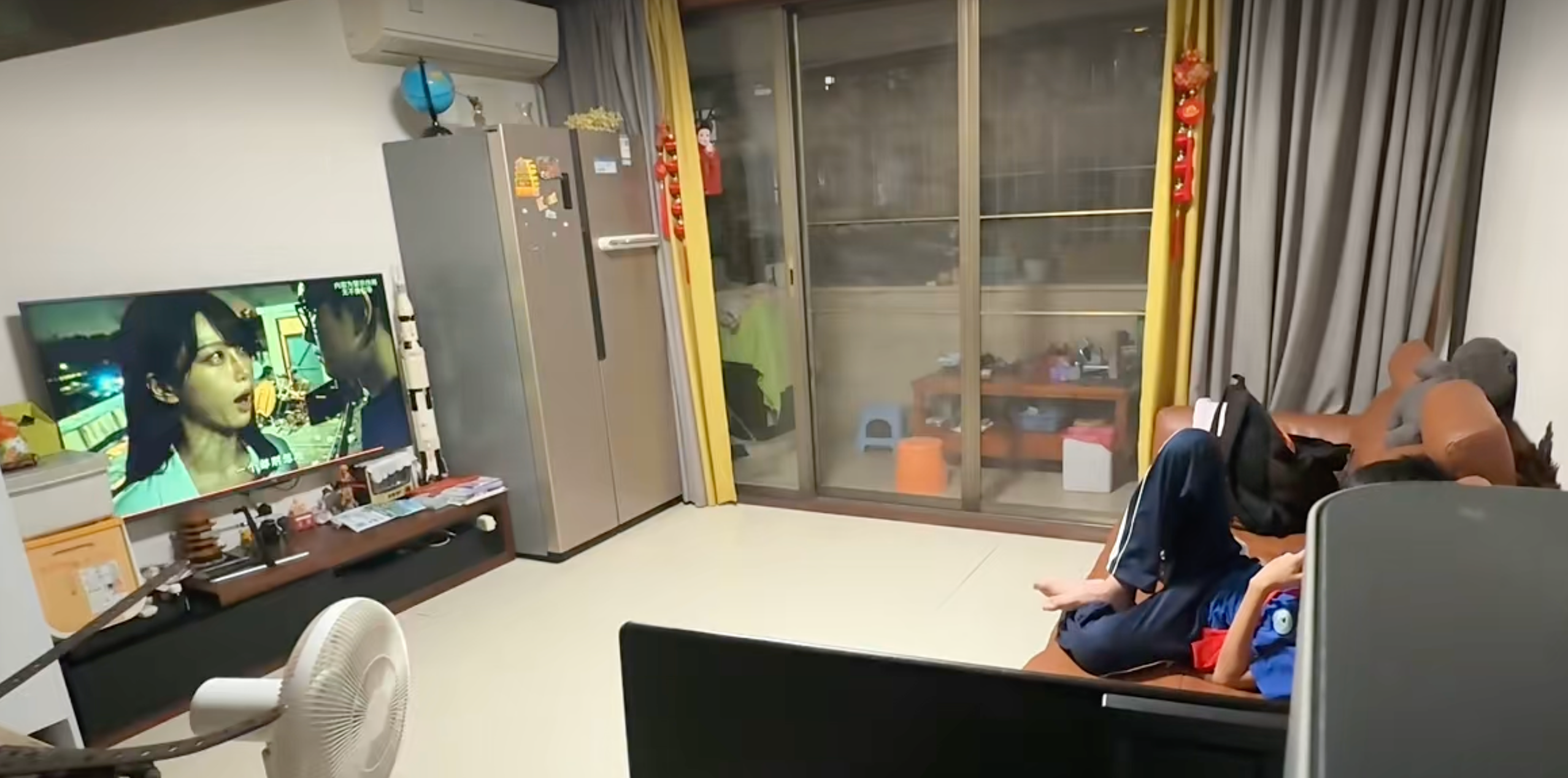
Watch the first screen of a modern television and you are watching a business model. One father in China solved that problem in a way product teams should study rather than smile at: he deleted the advertising slot and rebuilt it as a homework gate. The anecdote arrived through a widely shared video and has been circulating across social platforms this week, and it deserves to be read as a design case — a self-made paywall where the price of entry is a correct answer instead of a subscription. Below we compare his rolling question wall with the four guardrails that shipping smart-television software and home networking gear actually provide, and note where each one leaks.
Anatomy of the gate: what he built, minute by minute
His own description of the setup is blunt. When he is out driving for a ride-hailing platform late into the night, his son — a student in the first year of junior high school, a seventh grader — watches television with no self-imposed ceiling. So the father reworked the television's software and replaced the boot advertisement with a question bank he wrote himself, matched to his son's textbook edition and the school's current pace, covering three subjects: Chinese, mathematics and English. Playback now runs in slices: every 10 minutes of viewing, exactly one question pops up over the picture. A correct answer buys the next stretch; a wrong answer adds one more question on top before the screen lets the viewer continue.
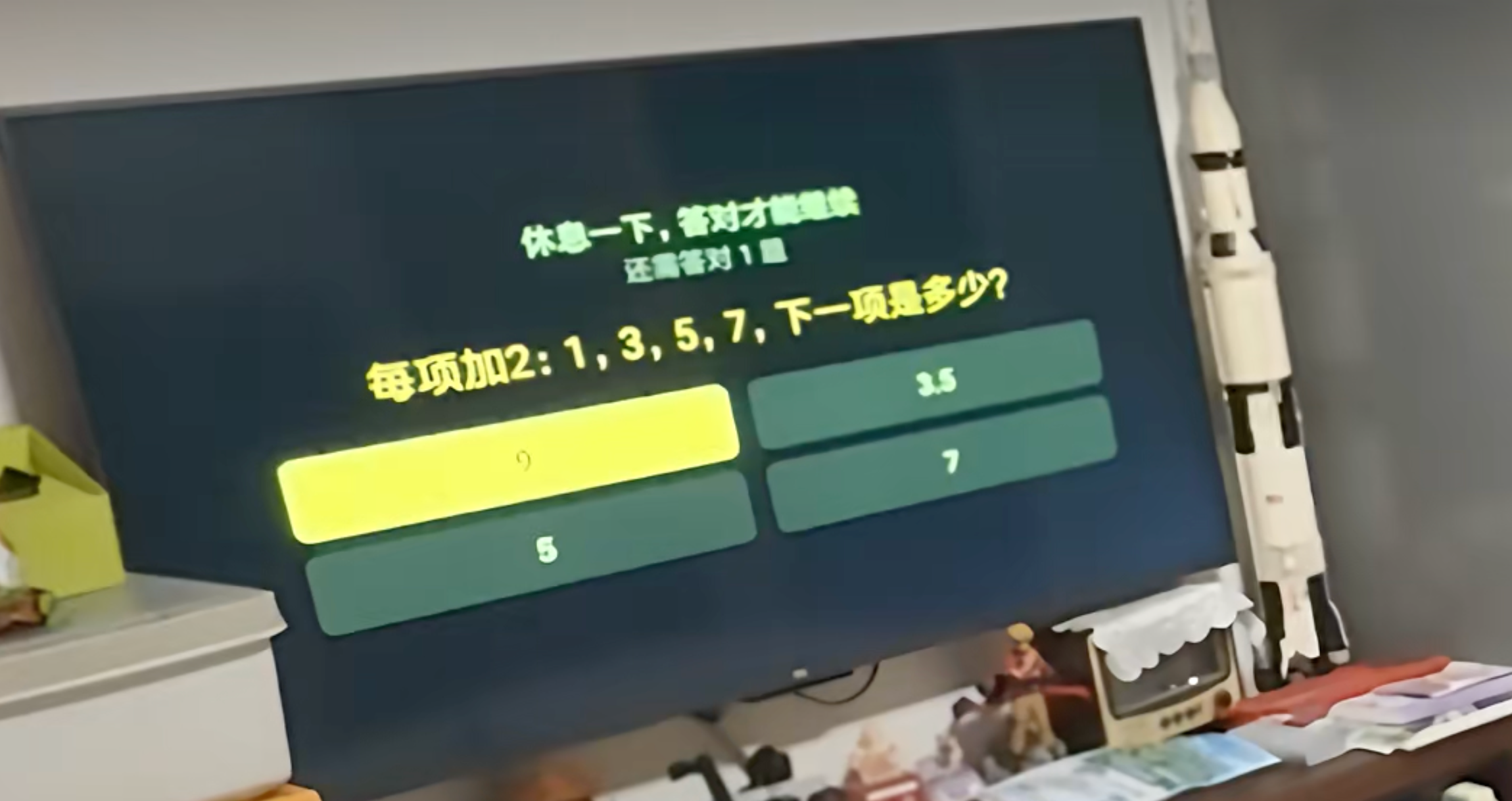
The opening round is the instructive part. The first time a question flashed up, the boy instantly recognised his father's hand in it and hit back with the oldest trick in consumer electronics — a power cut and restart: pull the plug from the socket, wait, then switch the set on again. That loophole has since been sealed, and the question now appears at start-up, before there is any programme to interrupt. In the follow-up footage the teenager sits quietly in front of the screen, pencil in hand, having accepted reality.
The father frames the whole arrangement as an attack-and-defence game between father and son, in which the son is free to try any exploit he likes while the parent's job is to patch and close every loophole by any means necessary. He had expected that a few questions would be enough to make the boy give up on the television; by his own account the effect has been limited, so the next move is to raise the difficulty of the papers.
One comment that kept being reposted sums up the public reaction: "This is what teen mode and pop-up ads are supposed to look like."
Why a question stops a session where a countdown does not
Both an advertisement and a quiz are interruptions, but they interrupt different things. A 30-second unskippable ad taxes attention while preserving the reward: the child waits, the child gets the cartoon, and the only party harmed is the parent's patience. A mandatory question taxes the reward itself. It raises the cost of every viewing session, forces a switch from passive to active, and — crucially — leaves a record the parent can read afterwards. That is why the pop-up format bites harder than the advertising format it replaced, and why simply turning the ads off rarely settles the underlying argument in a household.
The trade-off is just as plain. An ad wall costs nothing to maintain and never corrodes a child's willingness to try again. A quiz wall is authored content: it must be written, updated, matched to school progress, and re-patched every time the child finds a bypass. The father in this case is a willing maintainer. Most parents are not, and that single fact decides which option below they should pick.
Five guardrails side by side
| Control | Where it lives | What it genuinely stops | Standard bypass | Best-fit household |
|---|---|---|---|---|
| DIY question wall (this case) | Customised TV software | Session length and passive flow; produces a visible result per interruption | Any unpatched reboot or safe-mode path — until the maintainer closes it | Parents who will keep authoring content and testing exploits |
| Built-in teen / kids mode | TV operating system | Content catalogue, plus per-session caps on many models | Guessed or negotiated passcode; switching to an adult profile | Younger children in a shared living room |
| App lock on one streaming client | TV launcher or account settings | One or two problem apps | Another app, a browser, or casting from a phone | A single guilty service, otherwise normal viewing |
| Router time window for the TV's MAC address | Home router | Internet access for that device during homework or bedtime hours | Antenna, cable box, HDMI stick, USB files, mobile hotspot, randomised MAC | Families already arguing about hours, not content |
| Separate simple source (set-top box or older set) | Signal path, not software | Nothing, by design | None needed | Grandparent-run households where complexity fails first |
Vendor documentation supports the differences. ASUS's official support guide for router parental controls describes exactly this mechanism — per-device internet scheduling keyed to a client name or MAC address, applied to the selected device only. Apple's Screen Time documentation takes the opposite route, gating a child's profile behind a separate passcode the child cannot remove. LG has published setup guidance for time limits inside the television's own Family Settings. Three vendors, three layers of the stack — network, account, device — which is precisely why one layer alone is so easy to route around.
The ad slot he hacked may be disappearing anyway
Here is context the anecdote usually arrives without. Chinese broadcast regulators published new rules in late October 2026 requiring cable operators to put full-screen live channels on the first screen and explicitly forbidding boot advertising; the provisions take effect from 27 November 2026 and, as reported by 21st Century Business Herald (21jingji.com) and China Daily (chinadaily.com.cn), reach an installed base of about 205 million cable households. Regulators had already said in September 2025 that 93% of smart-television models had implemented a one-key close function for start-up ads, according to figures carried by China Consumer News (ccn.com.cn).
Two consequences follow for parents tempted to copy this hack. First, the first screen is becoming regulated ground, so the fight shifts to the middle of the session — nested menus, tiered memberships and upsell panels inside apps, none of which the boot-ad rule touches. Second, a rule that returns the opening second to the viewer removes the advertisement but installs nothing in its place. The father's build is interesting exactly because it occupies a slot that operators are on the point of vacating: somebody is going to use that first screen, and the realistic options are advertising, an empty logo, or a parent's own content.
Is 10 minutes the right interval? What the guidance actually says
The American Academy of Pediatrics is explicit on a point that circulates as myth: its evidence-based guidance does not hand families a single fixed screen-time number that applies to every child and teenager, because purpose and context change the answer (aap.org). The American Academy of Child and Adolescent Psychiatry's Facts for Families sheet is more practical for this age group: from age six onward the recommendation is consistent limits and healthy habits, screens off during family meals, parental controls switched on and understood, screens never used as a babysitter or to defuse a tantrum, and devices off and out of bedrooms 30 to 60 minutes before bedtime (aacap.org). Guidance circulated by Singapore's health authorities, echoed in ministry material on mddi.gov.sg, caps recreational use for children aged 7 to 12 at under two hours a day unless the screen is doing schoolwork.
Against those benchmarks the father's cadence looks defensible as a break generator and indefensible as a budget: interrupting every 10 minutes guarantees pauses, but nothing in the design limits the daily total. If the boy keeps answering correctly, the evening can still run long. A router time window or a daily cap in the television's own settings closes that gap in about five minutes and never needs an answer key.
Common misconceptions
- Killing the ad kills the incentive. Boot advertising is the most visible revenue line, not the largest. Subscription layers and recommendation slots keep working after the first screen is cleaned up.
- A passcode is parental control. A code a ten-year-old has watched you type, or that unlocks the set for the whole family, is a speed bump rather than a control.
- Kids mode means educational content. The mode filters a catalogue; it does not upgrade it. Two hours of the same animated loop is still two hours.
- A router block turns the television off. It removes internet for one MAC address. An antenna, a set-top box, an HDMI stick, a downloaded file or a phone hotspot still deliver a picture.
- Friction equals punishment. This is the real risk in the quiz-wall design. If every maths question is the toll paid for cartoon time, mathematics is being trained as an obstacle, and the lesson learned is the wrong one.
Decision checklist: run this before you copy the hack
- Photograph the boot screen as it is today. It is your baseline evidence of what the set did before you touched it.
- Check warranty terms first. Modifying firmware or installing a replacement launcher can void coverage, and the repair bill will dwarf the value of the ads you removed.
- Write the rule down with the child, not for the child: minutes allowed, when the gate fires, what a wrong answer costs, what changes at the weekend.
- Attack your own build before your kid does. Try the power cut and restart, safe mode, a spare remote, a USB installer and a mobile hotspot, and log which ones get through.
- Cap the escalation. The father here says he will make the questions harder; decide now where the difficulty stops rising, or the arms race consumes you.
- Layer cheap controls on top: a daily total in the television's settings plus one router window covers the gaps a question wall leaves open.
- Measure one outcome that is not screen time: homework started unprompted, bedtime on schedule, or the child voluntarily choosing the harder subject.
FAQ
Are boot ads actually banned now?
For cable service, the rules effective 27 November 2026 bar operators from playing start-up advertisements and require live channels first. Smart-television sets are separately under pressure to ship a working one-key close, with 93% of models reported to support it. Neither provision covers upsell panels inside apps.
Would this style of gate work for my child?
It depends on maintenance, not on the idea. It suits a pre-teen who treats it as a fair fight and a parent who will keep writing papers. It collapses with a teenager who owns a phone, because the answers are one search away.
Does schoolwork on the television count toward the daily allowance?
Under guidance that separates schoolwork from recreational use, no — but the practical version of that rule needs a second control, because the same set that shows a worksheet also shows everything else.
What is the cheapest credible version of this?
Kids mode plus one app lock plus a router window. Cost: nothing, and roughly fifteen minutes of setup. Add a short question ritual at the end of the session yourself and you capture most of the learning benefit without running a forked television operating system.
The boy seems fine with it. Is that success?
It is one datapoint and a mild warning sign. He has accepted reality, which reads as compliance; the father says the effect has been limited and plans to raise the difficulty. An arms race with no declared finish line is a maintenance cost, not a strategy.
Bottom line
Judged as engineering, the question wall is the most effective guardrail in the table above and the most expensive to sustain. Judged as parenting, it borrows the one mechanic advertisers have always had and software makers still will not ship: an interruption with a purpose attached. For most households reading this on MyTechDailyNews, the practical takeaway is to steal the mechanic rather than the build — put friction where your child's attention actually flows, choose the layer that matches the failure you can see, and never let a control that needs a maintenance engineer be your only line of defence.
Have a television setup that finally tamed a viewing argument? Tech Daily wants to compare notes: write to hello@techdaily.com.