
Spooky Season, Small Computer: A General Guide to Raspberry Pi Pico Halloween Builds | MyTechDailyNews
By Sarah Chen · Tech Daily · General desk
Come October, the decoration aisle is mostly the same molded plastic it has been for years. What has changed for ordinary tech readers is the intelligence being stuffed inside it. The seasonal roundup assembled by Raspberry Pi Official Magazine this time leans on a single microcontroller, the Raspberry Pi Pico, and asks it to make props glow, twitch, and appear to stare back. The ambition is social rather than technical: use a handful of inexpensive parts to liven up a gathering instead of buying a pre-animated prop at retail price. The board's size is its most misleading feature — it is smaller than most snack bars, yet it drives every build below.
At a glance: five builds, four levels of effort
| Idea | What it does | Parts the coverage highlights | Effort |
|---|---|---|---|
| Pico Unicorn Pack | Puts programmable color light inside a bought decoration | LED strip with buttons; a Pico supplied separately | Low |
| Wireless Plasma Kit | Runs a custom lighting scheme without a tether to the wall | Programmable LED strip plus a Plasma 2350 W; optional skull bottle edition | Low to medium |
| Pico pumpkins | Replaces the candle with programmed eyes | LED matrices; a pumpkin you carve yourself | Medium |
| Skeleton robot | Moves its face when someone stands in front of it | 3D printed parts, ultrasonic sensors | Medium to high |
| Bag o' Bones | Animates a store-bought skeleton bag and adds music | PIR motion sensor, motors, speaker | Medium |
| Possessed Portrait | A face that follows guests around the room | Ultrasonic sensors, servos, a sheet of card behind the picture | Medium |
Two lighting add-ons do most of the heavy lifting
Supermarkets and hardware stores fill up with seasonal merchandise at this time of year; some of it is genuinely cool and reasonably priced, but it still looks flat. Many projects rely on servos, sensors, and so-called Halloween-as-a-Service setups, whereas the coverage argues that a Pimoroni lighting upgrade is the fastest way to take a plain prop and give it atmosphere.
Pico Unicorn Pack: programmable light you hide inside a prop
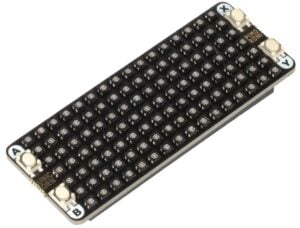
This strip is barely bigger than a Raspberry Pi Pico and combines addressable LEDs with onboard buttons, so the decoration itself can switch patterns. Slip it inside something you already own, choose greens, oranges, and purples for a seasonal mood, and a static bulb becomes something that behaves. Two shopping notes: a Pico is not included, and the programming is described as very easy — closer to configuring a light strip than writing software.
Wireless Plasma Kit: a control board built around LEDs

At minimum, the kit supplies a strip of programmable LEDs and a Plasma 2350 W, which is basically a custom Raspberry Pi Pico 2 W designed to control LEDs. Because the control is wireless, the light can move with the prop rather than staying near an outlet, so any decoration that needs its own lighting scheme is a candidate. Pimoroni also sells a version that includes a skull bottle to hold the lights — Dan Aykroyd not included — which works as a finished ornament by itself.
Props that respond to whoever walks in
Pico pumpkins: matrices instead of a candle
The concept sits close to the lighting upgrades above, but the jack-o'-lantern version is more advanced, using LED matrices to create eyes. You still have to carve the pumpkin yourself, and that is the point: with programmed eyes, a traditional spooky face — or ordinary carved eyes at all — is not required.
A skeleton robot that watches the room
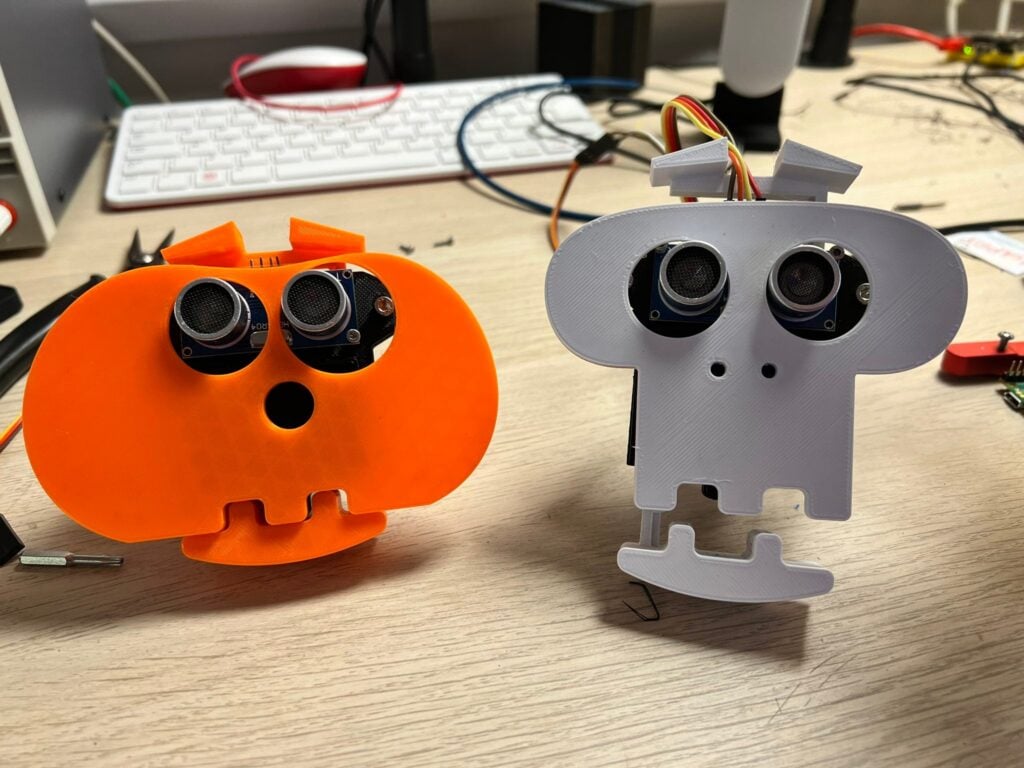
For one Halloween, Kevin McAleer, known for the many robots collected at kevsrobots.com, built a 'bare bones' robot. Its frame comes from 3D printed parts, and it senses people with ultrasonic sensors — the eye-shaped components usually used to detect distance. When movement appears in front of it, the mouth and eyebrows start moving. A guest is noticed without a camera, which keeps both the wiring and the privacy question simple.
Bag o' Bones: a supermarket find with a soundtrack
Maker 314Reactor started with a bag o' bones decoration picked up in a Sainsbury’s supermarket, then upgraded it with a PIR motion sensor, various motors, and a speaker. Passers-by can be startled out of their socks by bones that suddenly writhe, accompanied by Toccata and Fugue in D minor — the cliché spooky organ cue most people instantly recognize.
The portrait that follows you

This portrait of George Washington tracks visitors around the room with his eyes, and it is genuinely creepy. Face detection by computer vision is the usual method for projects like this, but here ultrasonic sensors do the work, much as they do in the skeleton robot. The servos simply shift a piece of card behind the picture, and that low-tech approach proves very effective.
Where the builds were documented

The article ran in issue 170 of Raspberry Pi Official Magazine. The same source also mentioned print subscription terms of six- or twelve-month length, a Raspberry Pi Pico 2 W, and the names Facebook, X, Threads, LinkedIn, and Mastodon.
Before you start: a parts checklist
- One Pico per animated build, bought separately if your chosen add-on does not bundle it.
- A programmable LED strip — a Pico Unicorn Pack or a Wireless Plasma Kit covers this.
- A Plasma 2350 W, or the equivalent Raspberry Pi Pico 2 W, when lighting is the main effect.
- A sensing part for interaction: ultrasonic sensors for proximity, a PIR motion sensor for presence.
- Actuators: servos or small motors, depending on how much movement you want.
- A speaker if the prop should announce itself with music.
- 3D printed structural parts, or a card-and-frame substitute for simpler motion.
- A real pumpkin and carving tools, if the project is a Pico pumpkin rather than a prop conversion.
Four misconceptions worth clearing up
- “A board this small cannot do much.” The whole set of builds exists to contradict that: the Raspberry Pi Pico's small stature is precisely what lets it disappear inside a decoration.
- “Anything that looks at you needs a camera and face recognition.” Both the skeleton robot and the portrait rely on ultrasonic sensors instead.
- “Every haunted prop needs servos, sensors, and a subscription service.” Those components are common, but the coverage points to a lighting upgrade as the quickest fix for store-bought items.
- “A pumpkin must have the classic carved face.” With LED matrix eyes, neither a traditional spooky face nor ordinary eyes is required.
Frequently asked questions
Do I need programming experience to start?
The entry-level lighting option is described as very easy to program, which makes the Pico Unicorn Pack the natural first project. The sensor-driven builds add complexity because they combine motion detection with moving parts.
What is the cheapest way to make a bought decoration feel new?
Change the light. A programmable strip in seasonal colors takes a shelf-bought item from static to atmospheric faster than any motorized conversion.
Which board suits a lighting-heavy project?
The Plasma 2350 W, a custom Raspberry Pi Pico 2 W made for controlling LEDs, is the purpose-built option in the Wireless Plasma Kit; elsewhere, the standard Raspberry Pi Pico handles the work.
How does a prop know someone is there?
Two ways appear in these builds: ultrasonic sensors measure whether something is in front of them, and a PIR motion sensor flags a moving body, as in the upgraded bag o' bones.
Is a bundled prop supplied ready to go?
Not always. The Unicorn Pack does not include a Pico, while the skull-bottle edition of the plasma kit is sold as a quick decoration in itself.
An action plan for the next two weeks
- Choose one existing decoration rather than a whole haunted display, and decide whether it should change light, move, or react to people.
- Start with light if the deadline is tight: a strip plus a controller is the shortest path to a visible result.
- Add a sensor only when the effect depends on a guest arriving; proximity detection is what makes the skeleton and the portrait feel alive.
- Keep the motion low-tech. Servos nudging a card behind a picture is a working pattern you can copy without engineering parts printed specifically for the project.
- Test in the actual room, at the viewing distance guests will use, before the party night — lighting and detection both behave differently in a furnished space.
- If you want the original step-by-step detail, go back to the source issue rather than improvising new parts.
None of these projects asks the reader to become an embedded engineer; they ask you to put a light where a light was dull, and to add one sensor where a decoration was passive. That is the useful takeaway for anyone following consumer hardware this season: the scare value now comes from cheap, tiny computing hidden in plain sight. If you try one of these builds and want to share the result, or spot something we should correct, the Tech Daily desk at hello@techdaily.com is glad to hear from you.