
DeepSeek Hit "Server Busy" on November 3: The MyTechDailyNews Playbook for Users, Developers and Teams
Type a question, hit send, and the chat window hands you the same stubborn line: "server busy, please try again later". That was the experience on the afternoon of November 3, when DeepSeek's official status page logged a partial interruption of its web and API services starting at 16:58. Three services were named as affected — Chat Service, the DeepSeek V4 Pro API service and the DeepSeek V4.1 Flash API service. The DeepSeek official site later reported that the partial web/API interruption had been fixed and that the team was still watching how well the fix held; meanwhile the DeepSeek V4 Pro and DeepSeek V4.1 Flash API services and the chat service continued to show degraded performance.
Headline coverage usually stops right there. This MyTechDailyNews guide is about what comes next: how to tell in ninety seconds whether the trouble is upstream or on your side, what to do while you are mid-task and mid-deadline, what engineers should wire in tonight so that someone else's bad afternoon never becomes your incident, and which reflexes quietly make a fifteen-minute outage much worse than it needs to be.
One incident, three very different problems
| Who you are | What actually hurts | First move |
|---|---|---|
| Everyday user | Lost prompt, lost thread, lost afternoon | Confirm it is upstream, then switch surface |
| Developer / product owner | Failed calls inside your own user experience | Back off, fail visibly, route around the degraded model |
| Team lead / ops | Nobody knows who owns the clock | Assign one status-page watcher, log timestamps |
Step one: prove the fault is not yours
Before you clear caches or reinstall anything, spend two minutes separating a provider problem from a local one.
- Read the per-service status page, not the headline. A page that says everything is healthy does not mean your specific endpoint is healthy — the November 3 entry was explicitly partial, and it named three services rather than "the site".
- Cross-check with an outside pinger. Tools such as Down For Everyone Or Just Me and free website-down checkers send requests from their own servers, so they answer the real question: is it down for everyone, or just for you (downforeveryoneorjustme.com).
- Look for a crowd, not a ping. Crowdsourced trackers such as downdetector.com are useful when an AI product has no public error-rate dashboard: a spike in user reports is the signal.
- Repeat the failing action on a second network — your phone on cellular rather than the office Wi-Fi — and, if you can, on a second device. That rules out ISP routing, VPN exit nodes and browser extensions in one shot.
- Test each surface separately: web chat, mobile app, and a bare API call. If the app works and your own integration fails, your problem is configuration, not capacity.
- Timestamp and screenshot the status entry. This becomes your evidence later, for a vendor ticket or for your own post-mortem.
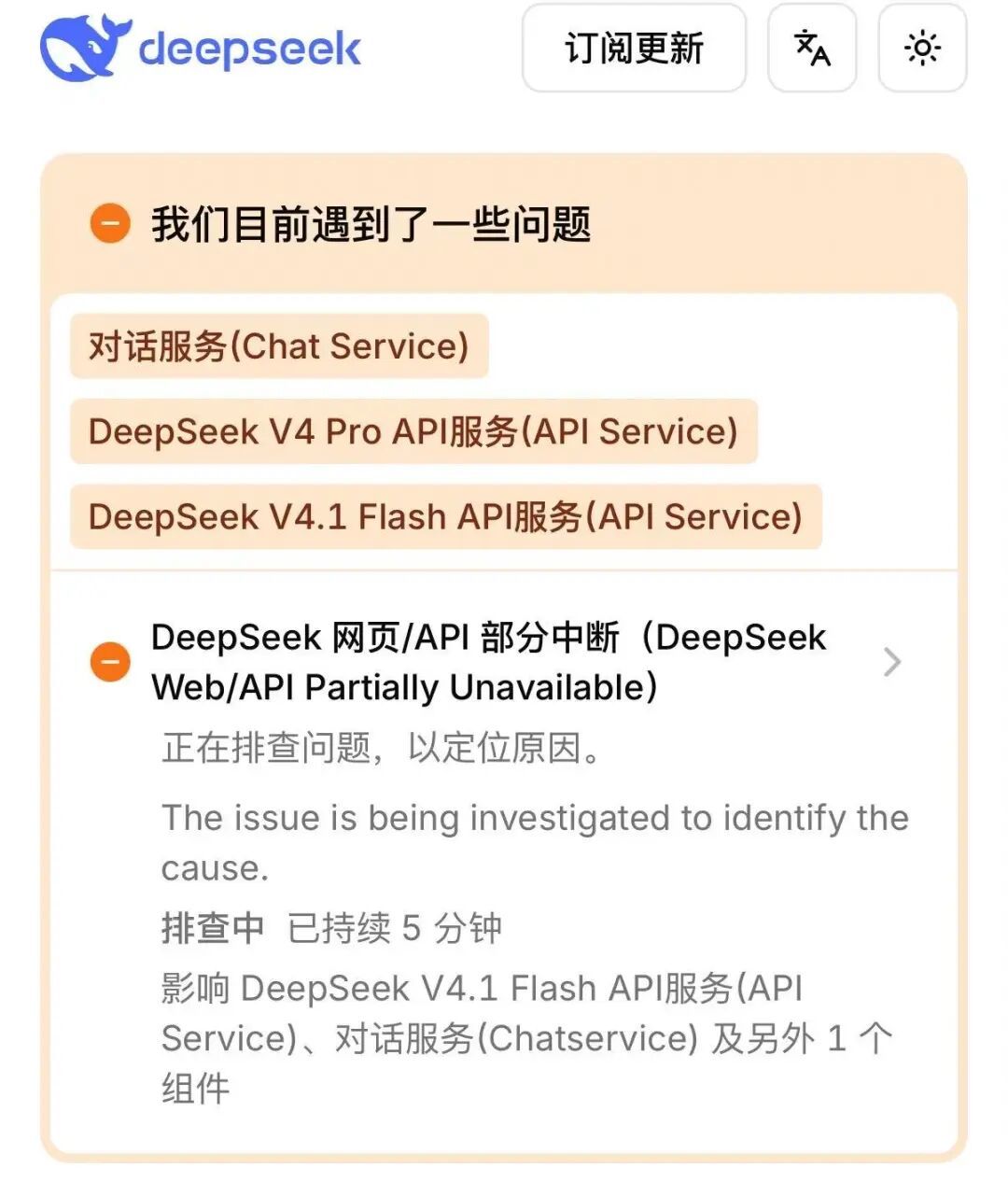
The November 3 timeline, in the words on the status page
| Moment | What was recorded |
|---|---|
| 16:58 | DeepSeek web/API partial interruption begins; official investigation under way to locate the cause |
| Affected services named | Chat Service; DeepSeek V4 Pro API service; DeepSeek V4.1 Flash API service |
| User-visible symptom | Chat unavailable, interface returning "server busy, please try again later" |
| Later update on the DeepSeek official site | Partial web/API interruption fixed; monitoring the effectiveness of the repair |
| Residual state | Degraded performance still present on DeepSeek V4 Pro and DeepSeek V4.1 Flash API services and the chat service |
If you only need an answer today: five low-risk moves
- Back off instead of hammering refresh. Manually re-sending the same long prompt every few seconds adds load to a system already rejecting it, and it risks duplicate submissions once service returns. Space your attempts out and let them grow longer.
- Change surface, not settings. Web, app and API can recover on different clocks. In the November 3 case, the interruption itself was repaired while two named API services remained degraded — so the path that works first is often neither the one you started on.
- Trim the ask. Shorter prompts, fewer pasted documents and smaller context windows are the variables most likely to slip through a system that is running hot.
- Save anything you cannot lose outside the chat box. Long prompts, system instructions and half-written drafts belong in a local file or your own document store, because an unsent prompt is an unpersisted one.
- Keep one offline fallback ready. A small local model on a laptop will not replace a frontier assistant, but it will carry you through summarising a meeting or rewriting an email. Microsoft's app-development guidance for hybrid AI makes the same architectural point: check readiness, define a cloud fallback, and keep local and cloud inference behind one application-level abstraction so the rest of the tool never cares where the answer came from (learn.microsoft.com).
For builders: give your app a fifteen-minute buffer
The uncomfortable truth of the November 3 event is that it was not a clean blackout. Availability came back while performance did not, which is the hardest shape of outage to handle because requests neither fail fast nor succeed.
- Classify the error before you retry it. A 5xx or a timeout is the provider's problem and is safe to retry. A 429 is quota. A 401 or 403 is your configuration. Retrying the last two with a backoff loop just hides a bug for an hour.
- Use exponential backoff with jitter, and retry only idempotent calls. This is the standard published retry guidance from Google Cloud for transient failures: doubling the wait while adding randomness, so that thousands of clients do not all come back in the same second and create a retry storm (docs.cloud.google.com).
- Honour the headers. If a response carries a Retry-After or remaining-quota header, that is your schedule; do not invent your own.
- Set a timeout budget per request and a total budget per user action. Thirty seconds of silence is worse UX than a five-second, honest failure message.
- Make the model name a variable, never a constant. On November 3 the residual degradation was confined to DeepSeek V4 Pro and DeepSeek V4.1 Flash, so a config-driven model list lets you shift traffic instead of stopping service.
- Queue the non-urgent work. Summaries, embeddings, batch classifications and nightly reports should sit in a queue that drains after recovery rather than blocking the user in front of you.
- Fail loudly. A banner reading "upstream provider degraded at 16:58" buys trust; an endless spinner buys support tickets.
- Reconcile afterwards. Count failed calls, check whether any were billed, and confirm nothing was double-submitted when retries finally landed.
A runbook you can paste into your wiki today
- Assign one named owner to watch the DeepSeek official status page and post updates on a fixed cadence.
- Archive a timestamped snapshot of the incident entry the moment you see it.
- Freeze auto-retry amplification above your configured ceiling so the retry loop does not fight the recovery.
- Switch non-critical traffic to your pre-agreed secondary model or to cached responses.
- Notify affected customers once, with a window rather than a promise, and again only when something changes.
- Log downtime minutes, affected endpoints and error codes per service.
- Within 48 hours, run a five-line review: what failed, what the detection delay was, what you would change.
Four misconceptions that cost people time
- "If the status page is quiet, nothing is wrong." Status pages describe services, not experiences. A page can legitimately show a repaired interruption while two of its models still deliver degraded performance — which is precisely the November 3 situation.
- "Refresh hard enough and it will come back." Retry storms are the reason recoveries feel slow; polite, spaced retries converge sooner.
- "An API key entitles me to uptime." Availability guarantees live in contracts, not in dashboards. On hyperscaler agreements, credits are not automatic either: AWS, for example, requires you to open a case in its Support Center to receive Service Credits under its compute SLA (aws.amazon.com).
- "This was a one-off." The record says otherwise — see the frequency section below.
Look at the pattern, then plan for it
DeepSeek's official service-status record shows at least 10 large-scale failures so far this year, including reports of "service unavailable" and "service anomaly", while "degraded performance" entries appear far more frequently. That is the shape of the risk: soft failures outnumber hard ones, and soft failures are the ones that break user trust because nothing ever officially "went down".
The individual events are worth reading as planning inputs rather than trivia. On the morning of October 15, the web client and the app both stopped working normally; sending a message returned "server temporarily unavailable", and the fault lasted close to 5 hours. On October 12, the web service had a partial interruption, and both web and API services had episodes of performance degradation. In September, the official log recorded several service anomalies, one September 14 partial web/API interruption lasting about 3 hours, and earlier incidents that ran even longer.
One practical addition: the public incident history on DeepSeek's own status site is granular enough that short degraded-performance windows sit alongside the headline outages — a separate web/API degraded-performance entry on October 8 appears in the same history between the September cluster and the October 12 partial interruption (status.deepseek.com/history). If you plan capacity or reliability targets from the "big outage" headlines only, you will undercount the days when the service is merely slow.
Will the downtime cost you money — and can you claim it back?
For a free consumer chat product, the honest answer is that the remedy is usually an apology and a status-page entry, not compensation. Where paid contracts exist, uptime credits are almost always claim-based rather than automatic, and they typically expire if you do not file within a set window after the incident month. So the risk note is simple: read your own tier's terms before the next incident, archive timestamped evidence of the failure and the affected service, and record which endpoints returned errors. If your business depends on a single AI provider with no SLA, your true contract is with whatever workaround discipline you have already built.
FAQ
The interface says "server busy, please try again later" but the status page looks fine. Am I imagining it?
No. Partial interruptions are reported per service, and a repaired interruption can still leave residual degraded performance on specific models such as DeepSeek V4 Pro and DeepSeek V4.1 Flash. Verify with an outside checker and a second network before assuming your setup is at fault.
Should I still ship features that depend on these models?
Yes — but not as a single point of failure. With at least 10 large-scale failures already recorded so far this year plus frequent performance-degradation notices, the sensible design keeps the model name configurable, adds a secondary provider or cached response, and degrades gracefully rather than blocking the user.
Did the outage destroy conversations?
The November 3 notices were about availability and performance, and nothing in the official record describes lost conversations or data. The safe assumption is narrower: anything you typed but never got a reply for should be treated as unsent, which is why drafts and long prompts belong outside the chat box.
How long should I plan to be without it?
From minutes to close to 5 hours. The October 15 fault ran close to 5 hours; the September 14 partial interruption lasted about 3 hours. If a workflow cannot survive half a day without the model, it needs a fallback, not a wish.
What is the cheapest single reliability win?
Wrap every call in exponential backoff with jitter, set a timeout budget, and put non-urgent jobs in a queue. Three lines of discipline absorb most of the pain of an upstream outage.
Bottom line
An AI chat window is now a piece of shared public infrastructure: when it slips, thousands of half-finished tasks slip with it. Availability is no longer a feature the vendor quietly owns — it is a property you design at the edges of your own workflow. Three tasks for tonight: bookmark the official status page and one independent outage tracker; put a second model or an offline fallback in your configuration; and make sure every call your app makes to DeepSeek V4 Pro or DeepSeek V4.1 Flash backs off politely, times out honestly and fails visibly.
Bug or correction? Email hello@techdaily.com. Story By Sarah Chen, MyTechDailyNews General.