
MyTechDailyNews Guide: Colorfigures Turns One Plain Sentence into a Spinnable, Clickable Machine
If you have ever wanted to poke at a machine and watch what happens inside, a tool released for ordinary chat users now lets you ask for exactly that in a single sentence. Describe something as everyday as a kettle, a toaster or a record player, and the reply comes back as a hand-inked, isometric object you can drag through a full turn, strip down to see-through, and operate by pressing its buttons and labels. The tool is called Colorfigures, its demo gallery holds 26 objects, and every one of them came out of a prompt typed into a fresh install — no hand-written code anywhere. This guide covers what a finished figure actually does, how it lands in the chat apps people already use, what it costs in minutes and tokens, and which assumptions are worth clearing up first.
What the finished object actually does
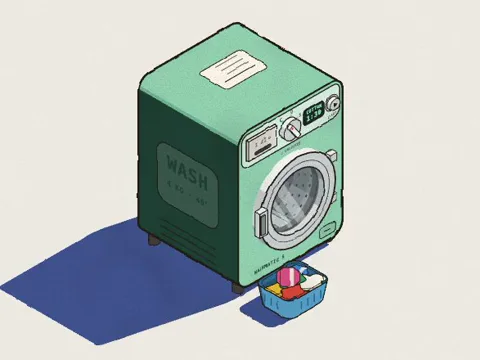
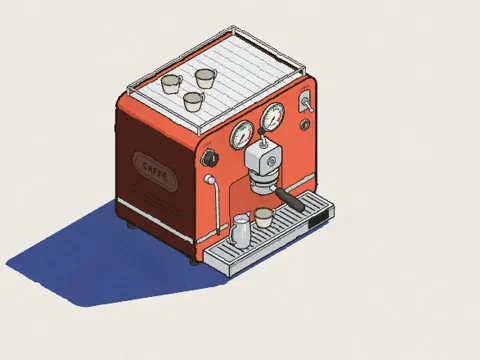
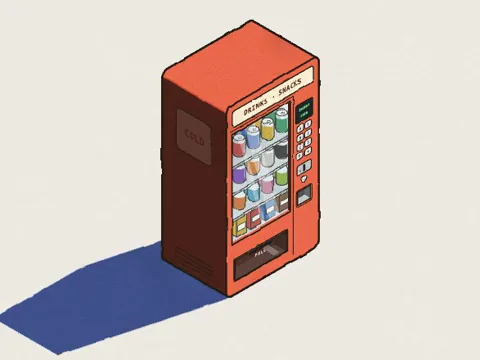
The output behaves less like a picture and more like a small toy you can handle. Dragging rotates the figure all the way round, so you can inspect the back and the underside before judging the drawing. A see-through switch lifts the outer shell and exposes the mechanism running inside, and each internal part carries a label that lights up while the machine works. Inputs respond the way you would expect: the coin drops, the crank turns, the needle falls onto the record. Before installing anything, the demo lets you play with all 26 objects.
One sentence in, one working object out
The gallery is not a showcase of hand-built projects. Each example was generated from the line of text shown above it, on a clean install of the skill, with nothing written by hand underneath.
- "You a gumball machine where I can put in a coin and turn the crank" — the gumball machine.
- "You an electric kettle that boils, then clicks itself off when done" — the kettle.
- "You a record player: put on a record, drop the needle and it plays" — the record player.
Eight figures worth clicking
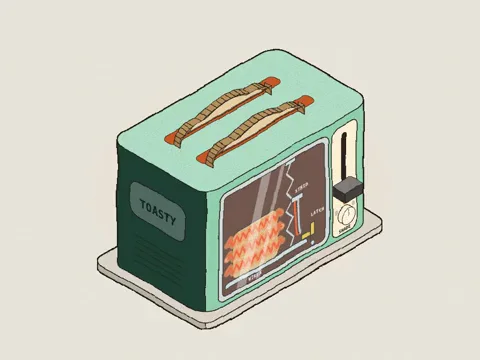
In the demo, hovering makes an object move on its own; opening a figure lets you press its parts and switch to see-through.
- Washing machine:
- Espresso machine:
- Vending machine:
- Toaster:
- Traffic light:

- Smoke alarm:
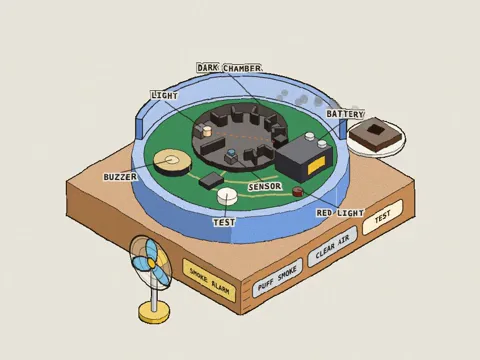
- Capsule toy machine:
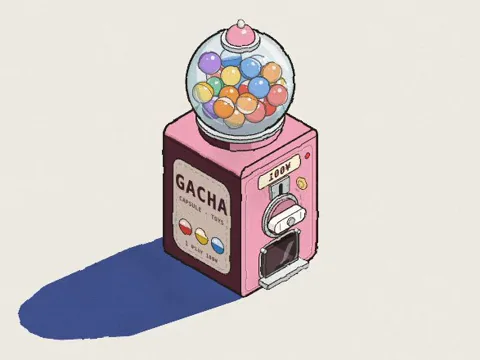
- Music box:
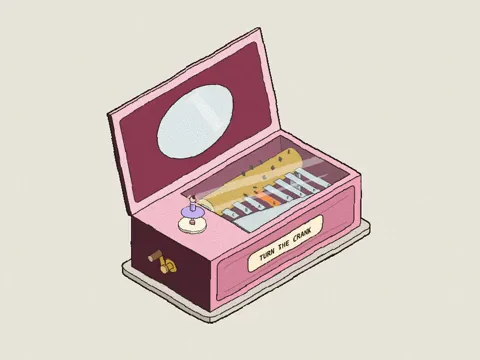
Setup: Three steps and about a minute
The project page is april-zhu.com, and the source is also open for review on GitHub. Whichever assistant you use, the guide is organised as Three steps and is described as taking about a minute.
| Where you run it | Route the guide suggests | Details worth knowing |
|---|---|---|
| Claude | Claude Code, Claude.ai, or a manual package | The manual package is listed for Windows, macOS and Linux; on a Mac the guide points you to Terminal. |
| ChatGPT | An upload path | The guide lists this as an upload rather than a folder route. |
| Codex and Codex CLI | A comparable folder path | Shown separately from the ChatGPT upload path. |
| Gemini app and Gemini CLI | A Gemini version of the package, or a folder path | Two options depending on whether you work in the app or the command line. |
Three prompts to try once it is installed
- "how does a toaster know when to pop? make it a Colorfigure"
- "a bike pump filling a tyre, with a see-through valve"
- "a parcel locker wall: type a code and the right door pops open"
Common misconceptions
- "It is an app." A skill is not an app and does not run by itself. It is a small folder of instructions and templates that the AI reads only when your request falls inside its scope.
- "Anything can be drawn." Devices with parts you can press give the best results; soft, organic subjects such as people, animals and plants do not suit the style.
- "You need to be a developer." Plain words are enough, both for the first request and for the revisions that follow.
- "It will appear instantly." A single figure takes about 15 to 30 minutes, because the object is modelled from every side and its interior is built out before the AI checks its own work.
- "Installing means running unknown software." The package is eight small plain-text files, about 220 KB in total; installing only copies them, nothing runs, and there are no packages or dependencies.
- "The results belong to whoever made the tool." The skill is MIT licensed, and the figures you make are yours to use, including in paid and client work.
FAQ
What is a skill, in plain terms?
A folder of instructions and templates that teaches an assistant to do one job well. Nothing in it executes on its own; the AI consults it when you ask for something it covers.
I made a request and the AI ignored the skill. What should I do?
Restart the app, then name it inside the request: "use the colorfigures skill to draw a gumball machine". To confirm the files actually landed, open the folder and look for SKILL.md, README.md, LICENSE, assets and scripts.
Which objects are the easiest wins?
Everyday machines and devices you can push, turn or feed: appliances, vending and arcade machines, toys, signs and kiosks. Each figure turns all the way round, and a machine gets a See-through switch showing the real working parts inside, labelled and moving along with the buttons.
How much time and how many tokens does one figure need?
In Claude Code, plan on 15 to 30 minutes and roughly 200,000 to 400,000 tokens. Most of that goes into modelling the object from every side and constructing its see-through from how the real machine works; afterwards the AI reviews the result from several angles, in see-through and on a phone, and fixes what it finds. In a fresh test run, a parking meter with a see-through of about 20 labelled parts took around 15 minutes and 230,000 tokens. Denser machines or scenes with several objects run longer, while changes asked for afterwards in the same chat are much quicker. On a Claude plan the work counts toward usage; on the API it is billed per token.
Can I control the colours?
Yes. Every figure has body-colour swatches — tomato, mustard, mint, cobalt and blush — plus a hand-drawn wobble slider, and you can simply ask for a particular colour in your message.
Is the installation something I can inspect?
The whole thing is eight small plain-text files, roughly 220 KB: the instructions, the drawing engine, three example figures, a build script, a readme and a licence. Copying them is all that installation does. Each figure the AI produces is a single HTML file that runs in your browser like any web page, with no tracking, accounts or outside requests, and SKILL.md can be read in any text editor first.
Can I use the figures commercially?
Yes. The skill carries an MIT licence, and what you make with it is yours, paid work and client deliverables included.
Do I have to write code to revise a figure?
No. Describe the object in words, then keep asking in the same conversation — "make the door open further" or "add a coin return" are the kind of follow-ups the guide expects.
A practical checklist before your first run
- Pick one hard-edged object with something to press — a vending machine, a toaster, a traffic light — rather than a person or a plant.
- Play with the 26 objects in the demo first, so you know what "working" means here.
- Read SKILL.md in a text editor before installing; the package is eight small plain-text files totalling about 220 KB.
- Follow the Three steps for your assistant: Claude Code or Claude.ai, the ChatGPT upload path, Codex or Codex CLI by folder, or the Gemini app and Gemini CLI routes.
- Check where the work is metered: 200,000 to 400,000 tokens per figure counts toward a Claude plan and is billed per token on the API.
- Ask for one object in one sentence, then refine in the same chat with "make the door open further" or "add a coin return".
The takeaway for everyday users
For readers who never write code, the interesting shift is in the unit of work: a description of a machine comes back as a machine you can handle, in the same window that would otherwise return a paragraph of text. The limits are just as plain — one generation can occupy 15 to 30 minutes and 200,000 to 400,000 tokens, organic subjects fall flat, and the quality of the result depends on choosing objects whose parts genuinely move. Set your expectations on that footing and the MIT licence plus a copy-only, eight-file install make it easy to try: pick one gadget from your own kitchen or street, describe it in a line, and see whether it comes back turning.