
Google Chrome Turns Gmail Into an Autofill Assistant: What MyTechDailyNews Readers Need to Know
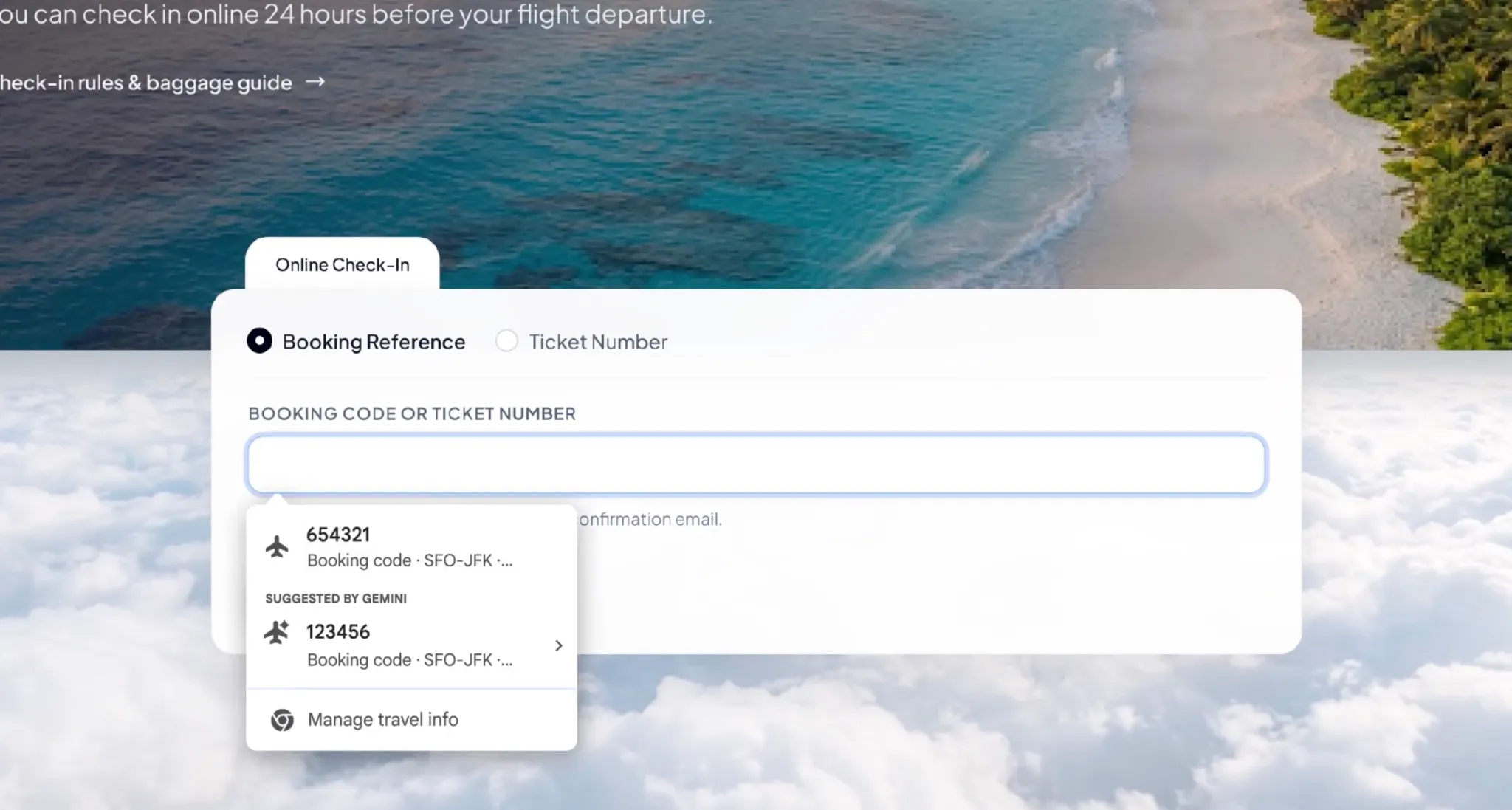
MyTechDailyNews readers who have ever hunted for an order number while a checkout page waits can soon expect a different kind of help from Chrome. Instead of only pulling saved profile details, the Chrome browser may search a Gmail mailbox and propose a value for the current form field. Google is extending its AI-based enhanced autofill experience with Gemini and Personal Intelligence, turning everyday web forms into a place where linked information can be surfaced on demand.
This is not simply another toggle buried in a settings page. The practical change is that Chrome can move from passive recall to active retrieval. It can look through the user's Gmail mailbox, identify information such as order numbers, package tracking numbers, flight booking details and similar confirmation data, then present that information as a suggestion inside the website's form. The browser does not necessarily complete the entry without consent; the user sees a recommendation, decides whether to accept it and can see where the information came from.
What changes for everyday users
Chrome's traditional autofill behavior focused on common saved fields: names, addresses, phone numbers and payment information. The newer capability expands that role. It can connect a form on an external website with relevant material already present in the user's Gmail mailbox. That is why the update feels closer to a personal assistant than a password manager: it tries to match what the user is doing right now with information that is scattered across messages.
In a logistics lookup, Chrome may surface a tracking number that appears in a shipping notice or order confirmation email. In a flight check-in flow, it may surface a booking reference or related travel detail from an airline confirmation. For the user, the routine of opening Gmail, searching for the message and copying a code into another tab may disappear, at least in supported scenarios.
How Gemini and Personal Intelligence connect
Gemini and Personal Intelligence provide the background capability for this experience. Personal Intelligence is described as a feature that can use information from connected Google services to help with a specific task after the user grants access. In this Chrome update, that ability is pulled directly into the act of filling a web form. The goal is not just to answer a question, but to recognize that a field is asking for a particular kind of data and then retrieve a matching item.
When Chrome detects that the current form may need a certain value, an autofill menu can display a suggestion supported by Gemini. The user remains the decision point: the suggestion can be reviewed and accepted rather than forced. The suggestion may also show its information source, helping the user verify whether the email data belongs to the task at hand.
Availability: not everyone sees it first
Google says the feature has started to roll out to users in the United States. It applies to desktop Chrome, as well as iOS and Android platforms for users who use the Gemini feature within Chrome. To access the Gmail-powered part of the experience, a person needs to enable Personal Intelligence-related functionality. It is not an immediate upgrade for every Chrome user, because availability depends on account eligibility, settings and the pace of the staged rollout.
For product and market observers, that phased pattern is important. It means the feature can be discussed as a public capability while still being limited in practice. A reader may have heard the news long before the same menu suggestion appears in their own browser.
Privacy: convenience with a permission question
Google emphasizes that sensitive information involved in autofill is encrypted, and the user can control whether the feature is enabled and which information it can access. Users can also delete unwanted suggestions or turn off enhanced autofill. The company also points to Chrome settings as the place to manage the feature and its data access permissions.
Even so, the update naturally raises questions about personal data scope. Gmail often contains shopping records, travel plans, bills, order confirmations and other sensitive communications. When a browser can automatically retrieve from those messages, the benefit is less friction, but the tradeoff is that people need to understand which data may be read, when it may be used and how to limit access. Google has said users can manage these permissions, but the details of how each email is selected, how relevance is judged and what appears in a suggestion may become clearer through real use and setting guidance.
Why this matters beyond a single form
In recent years, autofill in Chrome has been growing outward. In 2025, Google added more intelligent form understanding, allowing the browser to handle more complex fields such as passport numbers, driver license information and vehicle identification numbers. In 2026, the company moved some advanced autofill capabilities to mobile devices and strengthened integration between Chrome and Google Wallet.
The Gmail integration continues that path. The update is less about memorizing a few more values and more about changing the operating logic. Instead of only helping Chrome remember information the user has already saved, it can help find the information needed for the current task from linked services. This also reflects Google's broader effort to place Gemini inside daily software scenarios. Artificial intelligence becomes part of the browser, mail and cloud services: understanding context, extracting information and assisting operations, rather than living only in a separate chat window.
What comes after email
Google has also indicated that the source of enhanced autofill information may expand in a later stage. The company plans to let the feature safely draw relevant information from images stored in Google Photos. That would mean Chrome could look beyond messages and use picture content when it helps fill a form. The company also notes that this expansion is not fully available with the current update.
FAQ: quick answers for MyTechDailyNews readers
Does Chrome fill the form automatically?
Not necessarily. The article describes suggestions that appear in the autofill menu. The user can see the suggestion, check the source information and decide whether to use it. The experience is meant to assist, not silently replace every manual entry.
Do all Chrome users get Gmail-powered suggestions?
No. The rollout has started for users in the United States, including desktop Chrome and iOS or Android users who use Chrome's Gemini feature. Access to the Gmail mailbox part requires enabling Personal Intelligence-related functionality, and actual availability depends on account eligibility, settings and staged rollout.
Can a user reject or remove a suggestion?
Yes. According to the description, users can delete unwanted suggestions or turn off enhanced autofill. Google also states that users can control whether the feature is enabled and the information it can access.
What is the planned next expansion?
Google says a subsequent phase could extend the feature to relevant information from images in Google Photos. The company describes that future step as a safe extraction use case, but it is not part of the current full release.
Autofill checklist for readers who use forms often
- Confirm whether the rollout has reached your account before changing your workflow.
- Check that Personal Intelligence-related functionality is enabled if you want Gmail-based suggestions.
- Look at the information source shown with each suggestion before accepting a value.
- Review Chrome settings for enhanced autofill and the data access permissions attached to it.
- Delete suggestions you do not want to keep, especially in shared-device or temporary-use scenarios.
- Keep an eye on expired orders, similar bookings and look-alike references when checking form entries.
- Decide whether the convenience is worth the access for your most sensitive email folders.
Common misconceptions
- It is not the same as old autofill. The new element is the ability to search Gmail mailbox content, not just fields already saved in Chrome.
- It is not guaranteed to appear for every user immediately. Staged rollout, account eligibility and Personal Intelligence settings all affect access.
- It is not described as uncontrolled automation. The user is meant to receive a suggestion and choose whether to use it.
- It is not only a browser story. The change connects Chrome, Gmail, Gemini and Personal Intelligence, showing how AI features may move across a service ecosystem.
Action advice
If you shop online, track packages, book travel or handle customer forms regularly, the update may reduce repetitive searching. Start by checking your own availability and settings rather than assuming it works everywhere. Then review the permission model carefully. For frequent travel or order-heavy workflows, test the feature on low-risk forms first, verify the suggested values and only expand trust as the results become predictable.
For readers who treat browser privacy as a boundary rather than a preference, the safer first step is to keep enhanced autofill off until you understand how the Gmail mailbox is searched, how relevance is judged and which suggestions can be removed. For people who value speed above all, the feature can be useful now, but they should still treat each suggestion as a proposed value, not an answer that needs no review.
The larger point for tech news readers
MyTechDailyNews covers this development because it shows where consumer AI is heading. The most practical AI may not be a flashy assistant answering open-ended questions; it may be a quiet helper that notices a form field, consults an email thread and offers one number. The challenge is not just technical accuracy. It is whether users can keep clear control over personal data while the browser becomes more useful.
Google's update therefore sits at a familiar junction for everyday tech. It promises fewer switches between Gmail and websites, less manual copying and a smoother path through forms. At the same time, it asks readers to think about permission, accuracy and context. If Chrome can identify the right tracking number without confusing an old order with a new booking, the convenience is real. If it cannot, the browser may be efficient, but the user still has to pay attention.