
ChatGPT Makes GIFs in One Prompt: A MyTechDailyNews Field Guide to Images 2.6
Short answer: an animated GIF is now a chat reply. OpenAI has upgraded ChatGPT so that a looping clip can be produced in a single conversation — describe the motion, or upload a photo, and you get a GIF whose playback speed you can change, whose individual frames you can repair, and which you can share straight away. The capability ships with the Images 2.6 model, which also shortens generation time for still pictures. Below, the MyTechDailyNews guide to the workflow, the prompts, the traps and the developer options.
What actually changed with Images 2.6
The headline change is procedural, not cosmetic: GIF authoring moves from a multi-step workaround into one conversation. Previously ChatGPT could produce still images, and turning them into animation meant extra steps or outside tools. Now the request and the edit both live in the same thread.
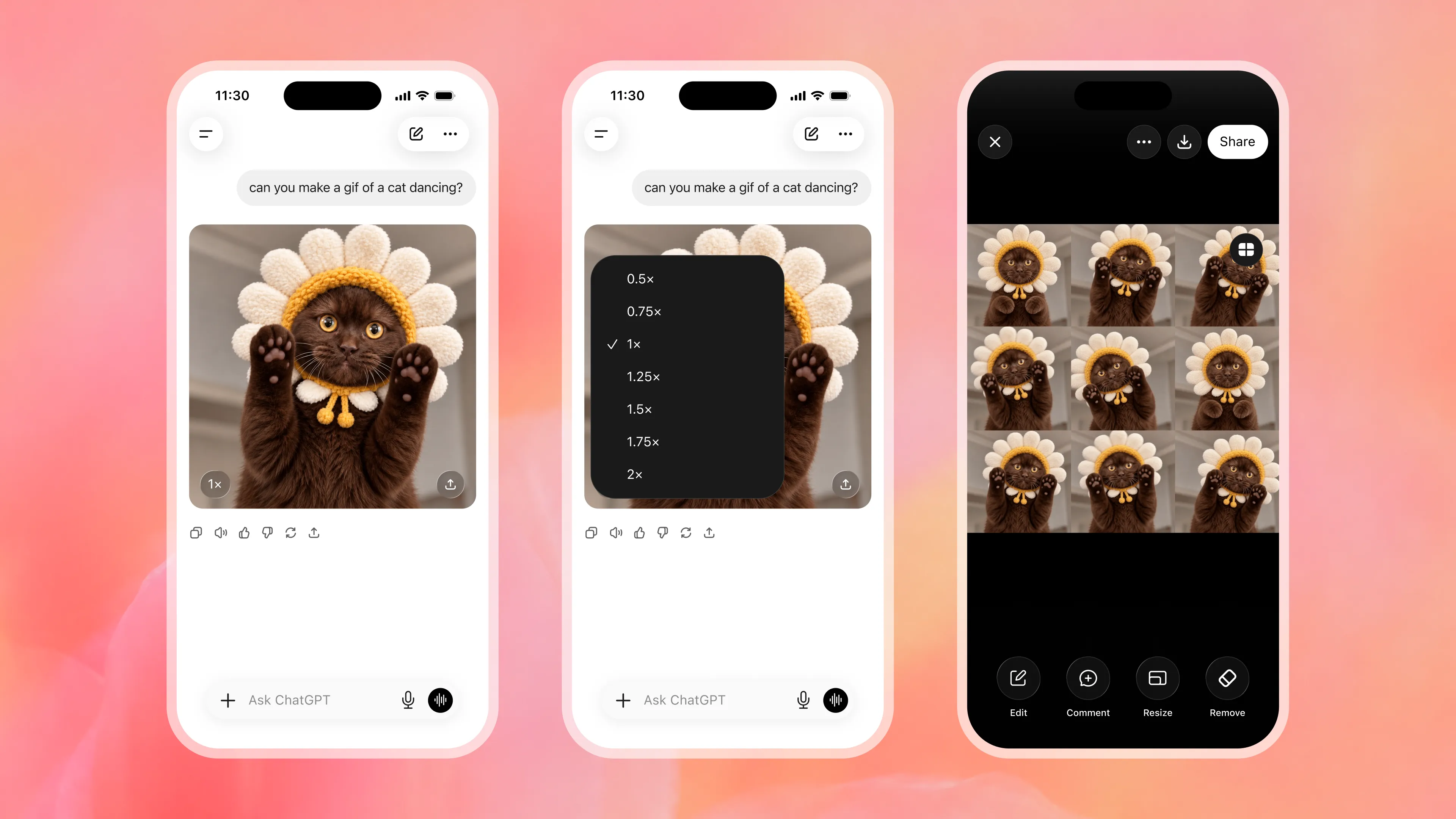
OpenAI's own demo is deliberately mundane: a user types “Can you make me a GIF of a dancing cat?” and ChatGPT returns the animation. Under the result sit two practical controls — a playback-speed switch and a frame-by-frame viewer — so a bad moment can be corrected without re-rolling the whole clip.
The model itself is also quicker. OpenAI says Images 2.6 further cuts the time it takes to return an image while the company keeps tuning output quality. Two numbers frame how much this workload has grown: users now produce more than 4 billion images each week through ChatGPT and the company's API, up from the 3 billion per week figure OpenAI published this September.
Rollout is broad rather than gated to one surface: Images 2.6 and the GIF feature reach all ChatGPT and Codex users on the web, the desktop client and the mobile apps.
How to make your first GIF, step by step
- Open a normal ChatGPT conversation (web, desktop or mobile) — no separate tool, no code step.
- State the motion, not just the subject. “A cat dancing, side view, loopable” beats “a cute cat picture”.
- Add the loop constraint. Say the first and last frames should match, otherwise the GIF will jump when it restarts.
- Keep the frame count modest. Five to eight beats usually read cleanly and stay small enough to send.
- Upload a photo instead of describing one if you want a real subject animated; the same text controls apply.
- Review with the frame-by-frame view, change only the broken frame, then set the playback speed to taste.
- Share from inside the conversation once the loop reads correctly at the size your target app expects.
Which GIF prompt patterns hold up best
- One actor, one action. A single subject doing one repeatable motion is far more stable than a busy scene with several moving parts.
- Flat colour and bold shapes. Cartoon, sticker and logo-style looks suit the format's technical limits (more on that below) and stay crisper.
- Name the camera. “Fixed tripod shot” or “slow push-in” stops the model from reframing between frames, which is what makes loops wobble.
- Specify duration and tempo in words. “About two seconds, four beats” gives the speed control something to match.
- Avoid dense text in the animation. Lettering is the first thing to smear or distort when frames are re-drawn.
Fixing a single frame instead of re-generating the clip
This is the part of the update most likely to change working habits. Because ChatGPT exposes a per-frame view and lets you edit an individual frame, a repair no longer costs a fresh generation of the whole sequence. In practice: scrub to the offending frame, describe only what should change there, and leave the rest untouched. Playback speed is adjusted separately, so a clip that feels sluggish can be retimed without touching any artwork.
Why the GIF still matters in 2026
The format predates the modern web by years: CompuServe introduced GIF on 15 June 1987, and animation only became standard after Netscape Navigator 2.0 added looping playback in September 1995, according to the format's documented history. In other words, a loop is a late-1990s browser behaviour sitting on top of a 1987 container — which explains both its universal support and its awkward edges.
Demand also never went away. Back in 2018, TechCrunch reported Tenor handling roughly 12 billion GIF searches a month and Giphy claiming around 300 million daily active users, evidence that moving pictures had become ordinary conversational vocabulary rather than a novelty.
Stephen Wilhite, the CompuServe engineer who built the format, framed the original design problem in almost the opposite terms of today's AI pipelines: “I saw the format I wanted in my head and then I started programming,” he said; Wilhite died in March 2022, as PBS NewsHour reported. The constraint he designed for — 256 colours and lossless LZW compression for slow modem links — is still the reason a long, detailed clip gets heavy so fast.
Common misconceptions
- “This is just another image-model bump.” The workflow change matters more than the model number: animation creation and repair now happen in one conversation.
- “More frames, better animation.” Each added frame adds weight inside a 256-colour, LZW container. Short loops almost always ship better.
- “The character will stay identical on its own.” Temporal consistency is the weak point of any frame-by-frame generation; lock the camera, the palette and the pose, and fix outliers frame by frame.
- “GIF is legacy, nobody uses it.” Search, messaging and reaction culture still run on it, which is why a native generator is a product-level feature rather than a party trick.
- “The loop is stored in the file the way I see it.” Loop count is a 1995-era extension; some apps re-encode clips and change how they replay.
Developer options: GPT-Image-2.6 Flare vs GPT-Image-2.6 Sunburst
Alongside the consumer feature, OpenAI released two images API models with opposite biases. GPT-Image-2.6 Flare prioritises generation speed for high-volume or latency-sensitive jobs; GPT-Image-2.6 Sunburst prioritises output quality for work where detail matters more than turnaround.
| Decision axis | GPT-Image-2.6 Flare | GPT-Image-2.6 Sunburst |
|---|---|---|
| Stated priority | Faster generation | Higher image quality |
| Best fit | Preview passes, bulk assets, chat-native replies | Hero visuals, print, client-facing detail |
| Cost logic (analysis) | Cheap first pass, escalate only what is needed | Spend on the small set that is actually published |
| Multi-frame clips (analysis) | Iterate motion ideas quickly | Finish the chosen loop at maximum fidelity |
Two caveats worth building into any rollout. First, on the pricing model: OpenAI's earlier images API release, gpt-image-1 in April 2025, was metered by tokens, with the company estimating roughly $0.02, $0.07 and $0.19 per square image at low, medium and high quality. Nothing in the Images 2.6 announcement sets pricing for Flare or Sunburst, so treat the older figures only as an indication of how the meter works and confirm current rates before budgeting a campaign. Second, on provenance: the same OpenAI announcement states that generated images carry C2PA metadata identifying them as AI-made, so expect that signal in outputs and test how your pipeline behaves if a downstream app strips metadata during re-encoding.
Limits, risks and the traps that burn generations
- Weight beats beauty. Google's WebP documentation puts it bluntly: animated GIFs converted to lossy WebP come out about 64% smaller, and lossless WebP about 19% smaller. If a clip must live inside a chat app, export at the smallest loop that reads correctly, or keep a WebP or MP4 fallback.
- Colour quantisation artefacts. Skies, skin gradients and film-grain textures band badly at 256 colours; stylise rather than photorealise.
- Real people and rights. Animating an uploaded photo of someone identifiable needs that person's permission, and platform rules on likeness still apply — being generated by an AI tool is not an exemption.
- Commercial claims. A product demo GIF must not animate a feature your product does not have; treat the output as an asset needing the same fact check as a screenshot.
- Rollout timing. If the option is not visible, update the client and check OpenAI's help page for Images in ChatGPT before assuming an account problem.
Action checklist for this week
- Run one loop end to end in ChatGPT: prompt, speed change, single-frame repair, share.
- Save a house prompt template — subject, one action, fixed camera, duration, loopable, flat palette.
- Set a file-size ceiling per destination (chat app, email signature, site embed) and test before you brief a team.
- If you build on the API, benchmark one Flare pass against one Sunburst pass on the same brief and log cost and latency.
- Add an “AI-generated” review step so provenance metadata survives or is disclosed deliberately.
FAQ
Do I still need third-party software to build a GIF?
No. OpenAI says ChatGPT can create the animation in a single conversation, including speed control, frame editing and sharing. External tools remain useful for heavy compositing or precise export sizes, not for the creation itself.
Who gets it, and on which devices?
All ChatGPT and Codex users, across the web version, the desktop client and the mobile apps, according to OpenAI.
Can I change one bad frame without losing the rest?
Yes — that is the point of the frame-by-frame mode. Edit the specific frame and leave the sequence alone; retiming happens separately through the playback-speed control.
Why does my clip look blocky or weigh so much?
Two inherited constraints of a 1987 format: an 8-bit palette capped at 256 colours and LZW compression. Simplify the palette, shorten the loop, or convert to a modern format where the receiving app supports it.
Are API-generated images marked as AI-made?
OpenAI has said since the April 2025 images API release that generated output includes C2PA metadata labelling it as AI-generated; re-encoding by another app can remove that signal.
References
- OpenAI Help Center — Images in ChatGPT: https://help.openai.com/en/articles/11084440-images-in-chatgpt
- OpenAI — Introducing our latest image generation model in the API (gpt-image-1 pricing, C2PA metadata, 23 April 2025): https://openai.com/index/image-generation-api/
- Wikipedia — Graphics Interchange Format (CompuServe, 15 June 1987; Netscape Navigator 2.0 looping, September 1995): https://en.wikipedia.org/wiki/GIF
- PBS NewsHour — Stephen Wilhite, inventor of the GIF format, has died (March 2022): https://www.pbs.org/newshour/arts/stephen-wilhite-inventor-of-the-gif-format-has-died
- Google for Developers — WebP FAQ (animated GIF to WebP size reductions): https://developers.google.com/speed/webp/faq
- TechCrunch — GIF and sticker platform Emogi raises $12.6M (Tenor and Giphy usage figures, 30 May 2018): https://techcrunch.com/2018-05-30/gif-and-sticker-platform-emogi-gets-12-6m-as-the-battle-of-gif-startups-continues-to-heat-up/
Takeaway: the interesting thing about Images 2.6 is not the model name but the collapse of a workflow. Animation idea, first cut and repair now sit inside one thread, and the scarce skill becomes knowing what to ask for and what the 1987 container can still carry. Build one loop, measure it against your own file-size ceiling, and only then decide whether a team needs a paid toolchain at all.