
MyTechDailyNews General: Should You Delete Prefetch Files? Microsoft Incident Response Team Explains Speed and Privacy
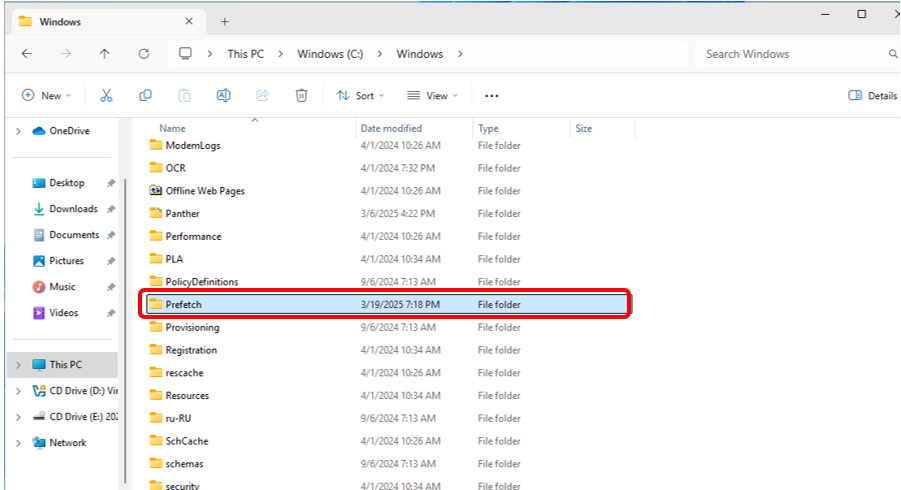
If you have ever wondered why familiar programs sometimes open quickly, you may have heard of files that record what happened during startup. The practical question is whether those records are useful, wasteful, or a privacy trace that should be cleared. The Microsoft Incident Response team has explained what the Prefetch folder does, how much space it usually takes, and why someone who cares about local activity records may choose to remove it.
Background: What Prefetch Files Do
Prefetch files live in C:\\Windows\\Prefetch. Their names carry a PF suffix. They record the files and directories that an application accessed when it started. In plain terms, this can be understood as a small list of “what did this program need last time?”
The goal is speed. When the same application is opened again, the system can read information from the matching Prefetch record and help the application start faster. The Microsoft Incident Response team notes that, according to documentation, the collection of access information usually happens within 10 seconds after an application starts.
It helps to separate the record from the program itself. A Prefetch file is not a copy of an application. It is not the whole application loaded into memory. It is metadata about startup: what parts the application touched, so future startup can be smoother.
Do Prefetch Files Take a Lot of Space or Memory?
The source says system-generated Prefetch files usually do not occupy much system space. That is why users do not need to delete them for capacity reasons.
The memory story is similar. A Prefetch record is read when its corresponding application starts. If an application has not been started for a long time, its record does not keep occupying running memory. The main effect of deletion is therefore not “freeing a huge amount of RAM”; it is removing the startup history that helped future launches.
What Happens If You Delete Prefetch Files
Deleting Prefetch files removes the startup records that the system has already formed. The next time an application runs, the system must collect the files and directories accessed by that application again, then rebuild a Prefetch file so that later launches can have a cache.
This has two practical implications:
- For a general user, the convenience of faster future starts can be reduced until the records are rebuilt.
- For a privacy-sensitive user, deletion is a deliberate way to clear stored traces such as run count, recent run time, and accessed paths.
Why Microsoft’s Security Side Cares About Prefetch
The Microsoft Incident Response team belongs to security, so the question naturally arises: why would a security team discuss a startup-speed feature? The answer is the privacy and evidence value inside system records. During incident investigation and forensics, Prefetch files may also need to be extracted because they can show traces of application activity.
That does not mean every user should treat Prefetch as a threat. It means the files are not only performance helpers; they are also local records. A Microsoft security team may discuss them because those records can matter when someone is trying to understand what an application did on a machine.
Keep or Delete: Decision Table
| If your priority is | What the original guidance supports | Suggested reading of the action |
|---|---|---|
| Keeping familiar applications easier to start | Most users do not need to actively clean Prefetch because deletion affects startup records. | Leave the files alone. |
| Saving space | Prefetch files usually do not take much space. | Deleting them is not necessary. |
| Reducing local activity traces | Prefetch can store run count, recent run time, and accessed paths. | Deleting may be a privacy choice. |
| Understanding future behavior | Records are rebuilt after deletion as applications start again. | Expect new Prefetch entries over time. |
Common Misconceptions
- Misconception: Prefetch files are app backups. Clarification: They are startup records, not copies of applications.
- Misconception: Deleting Prefetch permanently stops apps from starting. Clarification: The stated effect is that startup records are removed and rebuilt later.
- Misconception: Prefetch always uses valuable running memory. Clarification: Records for applications not started for a long time do not keep occupying running memory.
- Misconception: Only experts can judge Prefetch cleanup. Clarification: The basic decision can be simple: keep for convenience, or delete to reduce local traces.
- Misconception: Microsoft security discussion means Prefetch is malicious. Clarification: It reflects privacy and forensic relevance of ordinary system records.
Checklist: Things to Confirm Before Cleanup
- Am I deleting Prefetch to reduce local activity records, not because I believe it will free a large amount of space?
- Do I understand that familiar applications may lose existing startup records?
- Do I understand that the system will collect access information again when those applications start?
- Do I accept that new Prefetch files can be rebuilt through normal use?
- Is my decision about privacy trade-off rather than performance gain?
FAQ: General Readers’ Questions About Prefetch Files
Can I delete Prefetch files safely?
The source describes a straightforward cleanup method, but it also says most users do not need to actively delete them. If you do delete them, the system can rebuild Prefetch files as applications run again.
Do Prefetch files store more than file paths?
The article mentions that Prefetch files can include application run count, recent run time, and accessed paths. That is the privacy angle.
Why did a Microsoft team explain Prefetch files?
Because they can matter in security and forensic scenarios. The Microsoft Incident Response team is a security team, and the discussion shows why performance files can also have privacy relevance.
Does deleting Prefetch improve startup speed?
No, not according to the described role of the files. Prefetch helps faster startup, so deletion can remove that convenience until a new record is built.
Should ordinary users avoid touching the folder?
Ordinary users are not required to clean it. The main reason for cleanup is a personal privacy preference, not general maintenance.
How to Delete Prefetch Files, as Described in the Source
The cleanup method given in the original article is simple:
- Open C:\\Windows\\Prefetch.
- Select all files in the folder.
- Delete the selected files.
Action Suggestions
For everyday browsing on a tech-news site, the practical takeaway is not to turn Prefetch cleanup into routine maintenance. It is a record that supports startup, not a large storage burden. Most readers can leave it alone.
For readers who are especially attentive to local privacy traces, the action is different: delete the Prefetch files when reducing stored app activity matters more than the startup convenience the files provide.
For teams or users comparing both sides, use the same decision rule: choose speed and convenience when the device is used primarily for smooth application launches; choose cleanup when the goal is to remove local records such as run counts, recent run times, and accessed paths.
In short, Prefetch files can be deleted, but the reason for deletion should be privacy-focused trace reduction rather than space saving. That is how the general guidance from the Microsoft Incident Response team can be understood by ordinary users.