
Apple Weather's −30°C Scare: A Step-by-Step Checklist to Verify, Fix and Outrun the Forecast Glitch
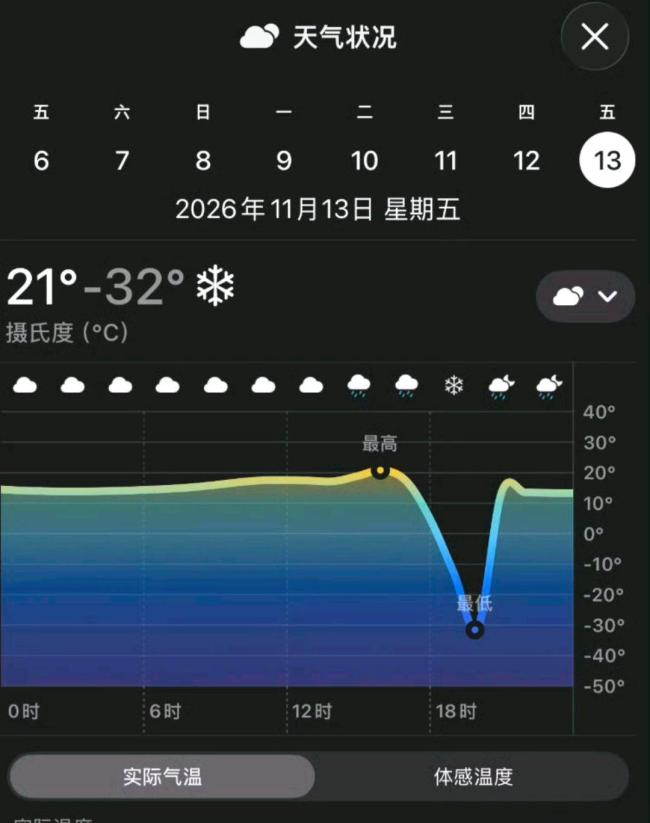
A single screenshot was enough: the iPhone's built-in Weather app promised Beijing, Shanghai and Xiamen a low of around −30°C on November 13, with some cities pushed even further down to −32°C. Thousands of people woke up in the early hours of November 4 to a feed full of "flash-freeze" jokes, packing lists and genuine confusion. Before you reorder your winter wardrobe, here is a practical way to tell a data fault from a real cold wave — and to make sure your own device is not the broken link.
The 60-second version: what broke and who said what
- The fault: in the early hours of November 4, the Apple Weather app served extreme low-temperature values for the November 13 forecast in multiple Chinese cities, with readings of around −30°C and, in some places, as low as −32°C.
- The vendor's answer: Apple's official customer service told China News Jingwei that early investigation pointed to a system port anomaly — not a hardware defect on the handset — and said the engineering team had completed an urgent fix.
- The location theory, ruled out: Apple customer service denied that a positioning error had jumped the data to another region. Their logic: if GPS drift were the cause, the days around the affected date would have looked wrong too, instead of a single date carrying an extreme value.
- Apology and promise: acknowledging a heavy volume of user reports, Apple's official customer service apologised for the disruption and said it would keep improving the data service experience.
- The meteorological reality check: per The Beijing News, staff at the China Meteorological Administration said that if such extreme weather were genuinely coming, meteorological departments would certainly have issued advance notice; as of now, the China Meteorological Administration had never published a forecast of this kind of extreme cold.
- The blunt line: "China Weather", the official account of the Public Meteorological Service Center of the China Meteorological Administration, responded that there is simply no such temperature difference, and told the public not to worry.
- Current state: currently, the temperature data for the affected dates inside the Apple Weather app has returned to normal.
Step 1 — Sanity-check a scary number before you act on it
Extreme readings are exactly the case where you should slow down, because the cost of ignoring a real cold wave is far higher than the cost of waiting five minutes for confirmation. Run these checks in order.
- Cross-read the same city and date from an official channel. Open weather.com.cn or the National Meteorological Center site at nmc.cn, or use the China Weather app; if you prefer voice, the nationwide weather-information hotline is 12121. If the official forecast for November 13 still shows lows in the teens and nobody has issued a cold-wave warning, the app value is suspect.
- Check Apple's own service board. Visit apple.com/support/systemstatus and look at the Apple Weather entry. A green status does not prove the data is right, but a flagged incident tells you instantly that this is server-side and not your phone.
- Inspect the neighbouring dates, not the scary one. Scroll the 10-day view. One absurd value flanked by perfectly ordinary numbers is the signature of a data-feed fault — the same reasoning Apple customer service used to dismiss the GPS-drift theory.
- Force a refresh on the device. Pull down inside the Apple Weather app, then swipe it away from the app switcher and reopen it. This is also the fix Apple and users reported after the April 2026 service interruption.
- Verify the plumbing on your side. Make sure Settings → Privacy & Security → Location Services is on and set to "While Using" for the Weather app with Precise Location enabled; check that Background App Refresh is enabled; confirm the device date, time and time zone are automatic; then test on both Wi-Fi and cellular.
- Escalate only if data will not load at all. Restart the iPhone; if stale or missing data persists, reset network settings (it wipes saved Wi-Fi passwords and Bluetooth pairings, so keep them handy) and install the latest iOS update. Reinstalling the app is a last resort — and it cannot repair numbers the server is sending you wrong.
Step 2 — Understand where the number came from
Apple does not compute your forecast alone. Its support document "Feature availability and data sources in the Weather app" (support.apple.com/en-us/105038) states that the 10-day forecast is provided by Apple Weather, while severe-weather information for mainland China comes from QWeather, and Apple's Weather platform draws on several third-party meteorological feeds. Think of it as a parcel moving through four warehouses: the label can be swapped in any of them, and by the time it reaches your screen it looks like a delivery from the wrong city.
That chain matters for one specific reason: the bad value landed nine days into the future. Forecast skill falls off a cliff with lead time — NOAA's science education site SciJinks (scijinks.gov) puts a five-day forecast at roughly 90 percent accurate, a seven-day forecast at about 80 percent, and a ten-day-or-longer outlook at only about half. A far-out date is the weakest card in the deck, which is why a mismatched data packet is most likely to surface there, and why "the app says −30°C on November 13" was never a planning-grade statement even on a normal day.
Step 3 — Common misconceptions, corrected
| What people assumed | What the evidence says |
|---|---|
| My iPhone's sensor or hardware is failing. | Apple's official customer service described the fault as a system port anomaly and explicitly said the phone hardware was not at fault. |
| My location drifted and the app pulled another city's weather. | Apple customer service denied this: a positioning offset would corrupt the dates around November 13 as well, not just one isolated day. |
| A −32°C reading is an early warning I should trust anyway. | Meteorological departments issue warnings for such events in advance. As of now, the China Meteorological Administration had issued no extreme low-temperature forecast of this type. |
| Reinstalling the app will give me clean data. | Device-side fixes cannot change what the server returns. Currently the affected dates had already been corrected upstream. |
| A 15-day or 45-day outlook is a booking-grade forecast. | Consumer weather apps republish official model output; long-range numbers are a trend hint, not a fact. For typhoons, heavy rain and cold waves, follow the official warning from the China Meteorological Administration and China Weather. |
Step 4 — This is a pattern, so build a fallback
Worth knowing: the November 4 incident is not the first time this service wobbled. On April 28, 2026, Apple's System Status page recorded an Apple Weather interruption that began at 22:45 Beijing time and was resolved at 02:30 on April 29 — roughly 3 hours and 45 minutes of slow or failed data loading, with users seeing empty panels or endless spinners. Apple did not publish a technical cause at the time (readhub.cn, ithome.com). Earlier in June 2026, the same app reportedly displayed a temperature near 50°C for Lin'an, a district of Hangzhou; local meteorological authorities said the erroneous reading came from the handset app's own system data, since no extreme-heat warning had been issued (via ithome.com). In April 2023, Apple support responses to comparable complaints centred on restarting the device and updating iOS (sina.com.cn).
Three lessons follow. First, a wrong value on a far-future date is not evidence your phone is broken. Second, the fastest signal of a platform-wide fault is that friends on other devices and other cities see the same absurd number at the same time. Third, every household should have one official channel pinned as the tiebreaker before storm season, not during it.
Your weather-trust checklist
- Pin one official source per risk type: China Weather or nmc.cn for cold waves and typhoons; 12121 when you want a human-readable number without data.
- Keep severe-weather alerts enabled on the iPhone, and remember that alerts are warning-grade while routine forecast numbers are planning-grade.
- Re-check any extreme value for a date more than seven days out before you change travel, delivery or heating plans.
- Snapshot suspicious screens with the date visible — useful when you ask support why the app disagreed with the meteorological bureau.
- If a glitch persists after a refresh, restart and iOS update, report it; the Tech Daily desk at MyTechDailyNews can also be reached at hello@techdaily.com for corrections and follow-ups on this story.
FAQ
Was my iPhone damaged by whatever happened on November 4?
No. Apple's official customer service told China News Jingwei that the early diagnosis was a system port anomaly rather than a hardware fault, and that the fix had already been deployed.
Why did the bad numbers show up for November 13 specifically?
Apple has not published the detailed root cause beyond the system port explanation. What is clear from Apple customer service's own reasoning is that this was a single-date data fault rather than a location problem — and long-lead dates are where forecast pipelines are least stable.
Was −30°C ever a real forecast for Beijing, Shanghai or Xiamen?
No. China Weather, the account of the Public Meteorological Service Center of the China Meteorological Administration, said there is simply no such temperature difference, and the China Meteorological Administration had issued no such extreme cold warning, as confirmed by its staff to The Beijing News.
My widget still shows old values after the fix. What now?
Open the app once so it refreshes, then confirm Background App Refresh and Precise Location are on for the Weather app. Widgets inherit stale data from the app cache far more often than from the network.
Which source should I trust during extreme weather?
Official warning products. In mainland China that means the China Meteorological Administration and its meteorological departments, published through China Weather, weather.com.cn and nmc.cn. Consumer apps — Apple Weather included — redistribute these signals but can misrender them.
Bottom line
The November 4 glitch cost nobody anything except a few minutes of alarm — precisely because meteorological authorities and Apple both moved fast, and because the tell was so obvious once you looked: one impossible date inside an otherwise ordinary 10-day strip. Treat your built-in app as a convenience layer, keep one official channel as the referee, and give long-range forecasts the scepticism their accuracy deserves. That routine would have caught −32°C on a Shanghai winter afternoon in seconds.